What’s new in Playcode

101 updates in the last 90 days.

New features, improvements and fixes, newest first.

RSSJSON FeedMarkdown for agents

Our rocket on its pad beside a tall board of update cards: the builder pins a fresh card at the top, Play fits a new part to the rocket, and two passing suits stop to stare.

July 2026

NewAccount and billing

See what a chat has spent, right in the chat picker

Every chat now carries its own receipt. Open the chat picker in the editor (click the chat name above the conversation) and the bottom of the menu shows two quiet numbers for the current chat:

  • Spent in this chat - the total AI credits this conversation has used so far.
  • Context - how much of the model's working memory the chat is filling.

When a chat runs long, the context number turns amber with a tip: long chats reply slower and cost more, so starting a new chat for the next task keeps you fast and cheap.

Nothing ticks while the AI works - the receipt only appears when you ask for it.

NewBuild

Choose your build quality - now with an Ultra tier

You can now pick exactly how Playcode builds - and swap the model behind each tier - right from the Choose build quality menu next to the composer.

Three tiers, your call.

  • Economy - fast and low-cost, great for simple edits, fixes, and basic pages.
  • Pro - the default: detailed design, the cleanest results, and the fewest errors.
  • Ultra - new. Our most capable model, for the hardest, highest-stakes builds.

Pick the model per tier. Each tier has a small model chip - tap it to choose from a curated shortlist, with a cost signal so the trade-off is clear. Set your preferred Pro model once and it sticks.

Tune the context, too. A new Context dial controls how much of the conversation the agent keeps before it summarizes - turn it up for long files and deep sessions, or down to keep runs lean.

NewBuild

Teams: share with a whole group at once

Workspaces now have teams - named groups of people you can share with in one step.

Create a team from Settings -> People -> Teams and add workspace members to it. Then, in the Share popup, grant access to the team the same way you would to a person: everyone in the team gets that access at once.

Teams stay live as your group changes. Add someone to a team and they immediately get everything the team has been given; remove them and that access goes away just as fast. No more re-sharing a dozen projects when a new person joins.

The Share popup shows exactly where access comes from: grants received through a team are labeled "via team", and the team's access level is edited in one place - on the team grant itself. A direct personal share and a team share can coexist; the more permissive one wins.

NewAccount and billing

Team billing: workspaces get their own plans and credits

Workspaces now have their own billing. A team workspace can subscribe to Pro or Business, buy credits, and manage its payment method - independently of anyone's personal plan.

Every workspace has its own credit balance. Work done in a team project uses the team's credits, not yours - and a teammate on a free personal plan gets the full power of the workspace's plan while building there, including the best AI models. Your personal workspace keeps its own plan and credits, exactly as before.

Everyone sees the team's credit meter. Members can always check how many credits the workspace has left and when they refresh. Payment details stay private: only the workspace owner and admins can see the card, change the plan, buy credits, or configure auto-recharge - members who run low see who to ask instead of a dead end.

Upgrading is contextual. Open pricing from inside a team workspace and the subscription goes to the team; open it from your personal workspace and it's yours. Each workspace gets its own invoices and billing portal.

Existing subscriptions carried over automatically - if you were subscribed, your personal workspace has the same plan, credits, card, and invoice history as before, with no action needed.

NewBuild

Workspaces: build together with your team

Playcode now has workspaces - shared spaces where your whole team builds together.

Create or switch workspaces from the main dashboard menu and invite teammates by email - they don't need a Playcode account yet; the invitation walks them through signing up. On phones, projects, folders, and the workspace menu share one sidebar, so navigation never stacks drawers. Everyone in the workspace sees its projects live: when a teammate creates or edits a project, it appears for you in real time.

Sharing got personal, too. The Share popup in the editor now works the way you'd expect from tools like Notion: type an email, pick a role (Viewer or Editor), and that one person gets access to that one project - whether or not they're in your workspace. Projects shared with you show up in a new "Shared with me" section in the sidebar.

Viewer access is consistently read-only across code, chat, publishing, and Cloud controls. Editors can change project content without receiving owner-only sharing or lifecycle controls, and any direct collaborator can leave a shared project from the Share popup.

Each workspace has its own settings area: manage People (roles, pending invitations), rename or leave the workspace, inspect Usage per member, and open Billing as its own section. Owners and admins can filter usage by period, inspect individual AI requests, and understand input, output, and cache credit use. Billing controls stay role-aware: owners and admins manage the workspace plan while members get a clear read-only explanation. Paid features and Upgrade prompts follow the active workspace, so teammates receive the plan their team is actually paying for.

Your personal projects are untouched - everything you've built lives in your personal workspace, exactly as before. And when a project should belong to the team, Move to workspace in the project menu brings it - chats, history, and all.

NewBuild

New AI models: GPT-5.6 (Sol, Terra, Luna) and Grok 4.5

Playcode's AI model picker just got the newest models from OpenAI and xAI, plus a cleanup so the list stays easy to choose from.

OpenAI GPT-5.6 arrives as three tiers you can pick per task:

  • GPT-5.6 Sol - the flagship. Highest quality of the family, for the hardest builds.
  • GPT-5.6 Terra - the balanced everyday pick. GPT-5.5-level quality at lower credit use, so it's the new default GPT for most work.
  • GPT-5.6 Luna - fast and light. Great for simple pages and quick edits where you'd rather iterate than wait.

Grok 4.5 from xAI joins too - an "Opus-class" model that's fast and unusually token-efficient, so long AI builds tend to cost less.

Each model's picker badge reflects its expected credit use, so you can trade quality for cost with your eyes open. Start on Terra, reach for Sol when a build is genuinely hard, and drop to Luna or Grok 4.5 for quick, cheap passes.

We also retired older models from the picker (earlier GPT-5.x, Grok 4.1, and a few others) so the choices you see are the ones worth using. Nothing you've already built is affected.

NewBuild

Select and manage many projects at once

The projects dashboard now lets you work on many projects at once - a real help once you have more than a handful.

On desktop, drag a box across empty space to rubber-band a group of projects (it auto-scrolls when you reach the edge), or hold Shift to extend a range. On a phone, tap the checkbox on each card. Once you've selected some, a bar appears with the actions that fit: Move to folder, Archive, or - for already-archived projects - Restore and Delete permanently.

We tidied the dashboard around it, too. Each card now shows whether it's a Static or Cloud project, the filter row carries live counts for your Cloud usage and your Archive, and the views - All, Live, Drafts, Cloud, Archive - moved into one clear switcher at the top while the sidebar stays focused on your folders.

NewBuild

The AI can measure your site’s performance

Ask Playcode's AI to check your site's speed and it now runs a real Google PageSpeed Insights (Lighthouse) audit on your live page - the same signals Google uses to rank sites.

You get your Performance, Accessibility, Best Practices, and SEO scores, your Core Web Vitals (Largest Contentful Paint, Cumulative Layout Shift, and more), and a ranked list of concrete fixes with estimated time savings. The AI can measure, apply improvements, and measure again to prove your site actually got faster.

Publish your site first, then just ask - for example, "How fast is my site, and how do I speed it up?"

It's a step toward Playcode helping your site succeed, not just get built: fast pages that are ready for Google, all in the same chat.

NewBuild

Claude Fable 5 is now available

Claude Fable 5 is now selectable in Playcode's AI model picker.

Fable 5 is Anthropic's highest-capability generally available Claude model for demanding reasoning, coding, and long-horizon agent work. It has much higher credit use than Sonnet and Opus models, so the picker shows it as a premium option for the hardest tasks.

June 2026

NewBuild

Claude Sonnet 5 is in the model picker

Claude Sonnet 5 is now selectable in Playcode's AI model picker.

It is a new Sonnet option for builders who want a stronger balanced model without jumping all the way to Opus. Sonnet 5 uses Anthropic's newer tokenizer, and the model picker badge accounts for expected credit use.

Opus 4.6 remains the default Quality model for now while we watch Sonnet 5 on real website-building work.

NewBuild

Choose how hard the AI thinks in Pro

Pro mode now lets you choose how much the AI thinks before it answers. Open the mode picker in the chat and set an Intelligence level for the task in front of you:

  • Low / Medium - quick answers for simple edits, with less waiting
  • High (the default) - the balanced setting that fits most work
  • Extra High / Max - let the model reason longer on hard, multi-step problems

Set it per chat from the mode picker, or choose a default for every new chat in Preferences > AI Model > Default Intelligence. Economy mode stays the fast, simple lane, so there's no dial to think about there.

Also in this release

  • No more blank Pro replies - on rare occasions a Pro answer could come back empty; those now retry automatically instead of showing nothing.

</content> </invoke>

NewPublish

Connect your own domain with a guided setup wizard

Pointing your own domain at an app is the step where most people get stuck. So we rebuilt it into a guided setup wizard for Playcode Cloud apps that walks you through it, step by step.

Open Custom domains in the publish menu, type the domain you own, and the wizard does the hard part:

  • One record, not a pile of them. It detects your DNS provider, shows the single record to copy, and the exact name your provider expects. No TXT ownership record, no IP addresses, no certificate to install.
  • Ownership and SSL are automatic. Once your record resolves, Playcode confirms the domain is yours and issues the HTTPS certificate for you.
  • Close the window and walk away. Setup can take a few minutes for DNS to update, so we email you the moment your domain is live instead of making you wait and refresh.
  • Root or www, handled. Want yourdomain.com without the www? The wizard shows the right record when your provider supports it, and points you to www when it doesn't.

Each step has a plain-language Need help? panel answering the questions first-timers actually ask, so you never need to know what a CNAME is to finish.

See the full walkthrough in the custom domain help guide.

NewBuild

GLM 5.2 is now in the model picker

GLM 5.2 is now selectable in Playcode's AI model picker. It replaces GLM 5.1 in the visible picker and gives you a newer long-context reasoning option for code-heavy tasks.

Choose it from Menu → Preferences → AI Model when you want to compare GLM against your usual model on the same project.

GLM 5.1 is no longer shown in the picker. Existing history remains intact, and the newer GLM 5.2 option is the one to use going forward.

NewBuild

Faster startup, sturdier Preview, cleaner sign-in

Playcode now gets to the usable editor faster. We split more of the heavy editor code into lazy-loaded pieces, load only the current language by default, and delay expensive startup work until the interface is already responsive.

Preview starts more gently. The browser no longer has to spin up the preview worker, bundler, and Service Worker immediately on page load. If you press Run, Preview still starts right away. If you just open a project and begin typing, the heavy work waits briefly so the page stays smooth.

Preview is also more reliable in embedded browsers. Playcode now checks for blocked browser features like Service Workers, cache storage, IndexedDB, cookies, and local storage. When a browser blocks something Preview truly needs, you get a clear message instead of a blank panel or a forever-loading iframe.

Sign-in and onboarding got a cleanup pass. The auth screens are cleaner, Google sign-in fallback behaves better when a browser blocks it, and new users get a smoother first-run flow before landing in the editor.

We also tuned the marketing homepage video so it waits for real user intent instead of competing with the first paint, which makes the first screen feel less stuck on slower devices.

May 2026

NewBuild

GPT-5.5 is now selectable in the model picker

OpenAI's newest general-purpose model, GPT-5.5, is now available alongside 5.4 in Playcode's model picker. Pick it as your Quality model in Menu → Preferences → AI Model → Quality Model if you want to try it.

Heads up on cost. Per OpenAI's May 2026 rate card, GPT-5.5 is roughly 2× the per-token price of GPT-5.4 across input, cached input, and output. 5.5 shares the same tokenizer family as 5.4, so net effective per-request cost lands at about 2× what 5.4 charges for the same work. Real, not theoretical.

Not the default - Claude Sonnet 4.6 keeps that slot for now. We add new models as they ship so you can A/B them against your usual pick on real work; no model is unilaterally better than the others on every job, and the right answer depends on what you're building.

Honest take: no AI today gets everything right. Even Claude Opus, which still does UI design better than any model we've tested, takes its time and sometimes over-engineers a request. GPT-5.5 has its own trade-offs. Run the same prompt across two or three models when it matters; trust your own eyes on the output.

NewBuild

Switching back: Claude Sonnet 4.6 is the new default Pro model

Earlier today we moved the default Quality model to Claude Opus 4.8. A few hours of real-world Pro usage made it clear that 4.8 burns credits roughly 2.6× faster than Claude Sonnet 4.6 for comparable output on typical website-building work.

Concretely: on the entry-level Pro plan, leaving 4.8 as the default would have torn through the monthly credit allowance in a handful of busy days. That's not the experience we want anyone to land on by default.

So we're walking it back: the default Quality model is now Claude Sonnet 4.6. Strong reasoning, sharp design, well-balanced per-request cost. Your Pro credit budget goes meaningfully further.

Opus 4.8 stays available for the work where the extra capability is worth the cost. Switch any time in Menu → Preferences → AI Model → Quality Model. Same place for Opus 4.6 if you want the previous default.

Honest about the back-and-forth: we set 4.8 as default thinking the quality jump would be worth the spend. The first hours of paid-user data said otherwise. Better to adjust quickly than to leave you on a setting that doesn't fit your plan.

NewBuild

Claude Opus 4.8 is now the default Pro model

We've moved the Quality model from Claude Opus 4.6 to Claude Opus 4.8 - Anthropic's newest Opus. Sharper reasoning, cleaner code, better designs. The difference in output quality is immediate and visible.

Honest about cost. 4.8 charges the same per token as 4.6, but its tokenizer packs roughly 25-48% more tokens into a typical request (the upper end on image-heavy work), so expect spend on Pro work to scale up by about that much. We made the call anyway: we want Playcode's default AI to be the best one available, not the cheapest.

Prefer lower cost? Switch the Quality Model yourself - it takes about 10 seconds:

  • Menu → Preferences → AI Model → Quality Model
  • Pick Claude Opus 4.6 (the previous default) - same family, lower per-request cost
  • Or Claude Sonnet 4.6 - cheaper still, excellent for most tasks

NewBuild

DeepSeek V4 Pro + V4 Flash in the model picker

Two new thinking models are now selectable in the chat model picker, talking to DeepSeek's official API directly:

  • DeepSeek V4 Pro - frontier-level reasoning with a 1M-token context window. Strong at code, math, and long multi-step tasks. A serious daily driver. Text-only.
  • DeepSeek V4 Flash - the same reasoning shape, tuned for speed and high-throughput work. 1M context, text-only.

Heads-up: these models do not see images. Pick a vision-capable model (Sonnet, Gemini, GPT-4o) if your task needs to read a screenshot or a PDF.

NewPublish

Introducing Playcode Cloud - the cloud built for the apps you build with AI

Shipping a real online product today takes too many things. An editor over here. Hosting over there. A separate database, a separate domain registrar, a CI pipeline, an SSL renewal, a monitoring dashboard. Five vendors, five bills, five places to keep in sync.

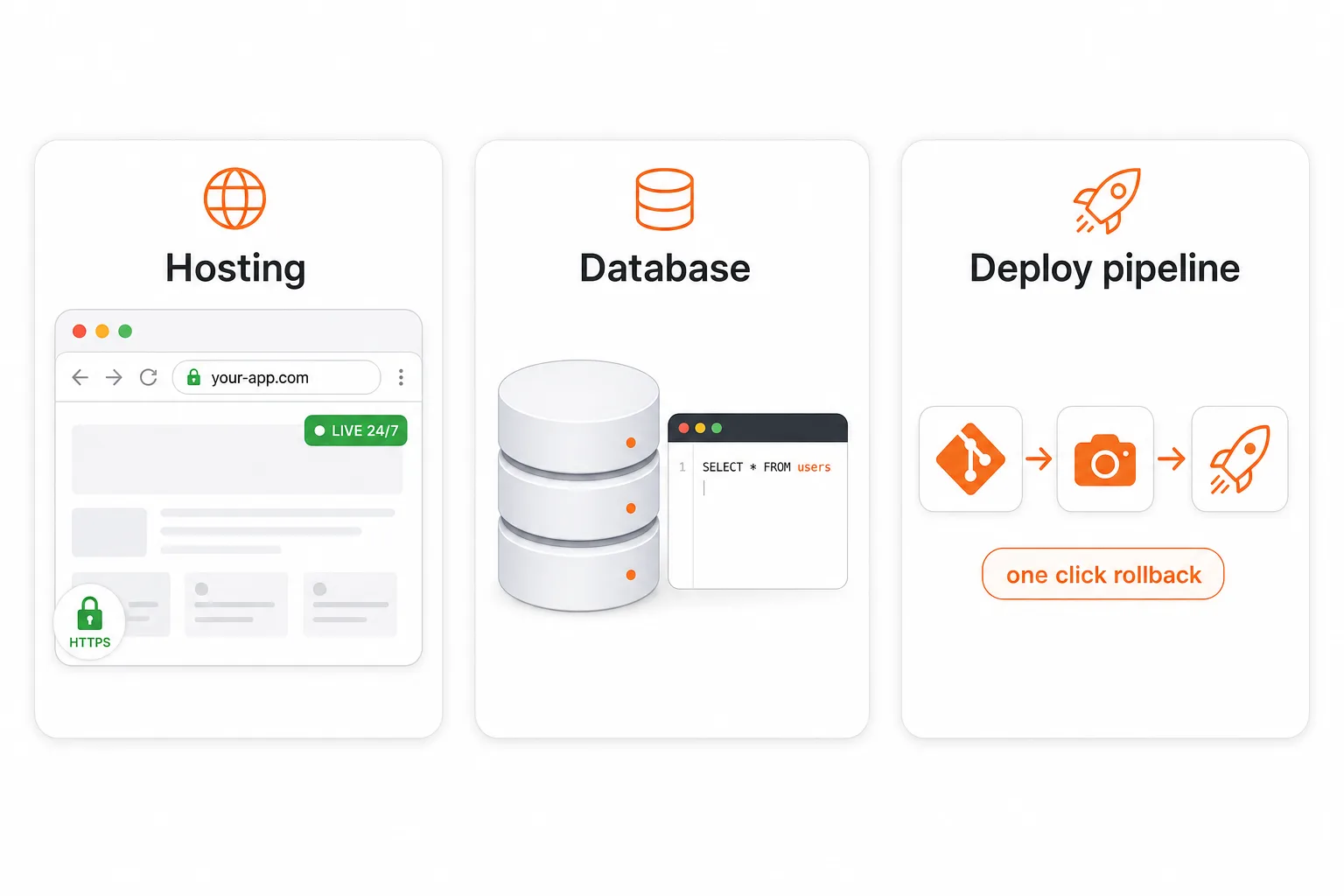
Today we're launching Playcode Cloud as its own product. Hosting, a real database, and a deploy pipeline - in one workspace. The cloud, designed for the apps you build with AI.

Three pillars of Playcode Cloud: a real production environment, your data durable forever, and build-ship-run in one product

Three products in one

  • Hosting. Always-on production, custom domain, automatic HTTPS, real TCP/UDP ports. Replaces what you would otherwise pay Vercel, Netlify, or Heroku for.
  • Database. A real database with tables, queries, transactions. Persists forever, survives every restart. Replaces what you would otherwise pay Supabase, Neon, or RDS for.
  • Deploy pipeline. Per-project git server, automatic snapshots, one-click rollback for code and data together. Replaces what you would otherwise wire up with GitHub Actions, CircleCI, and backup scripts.

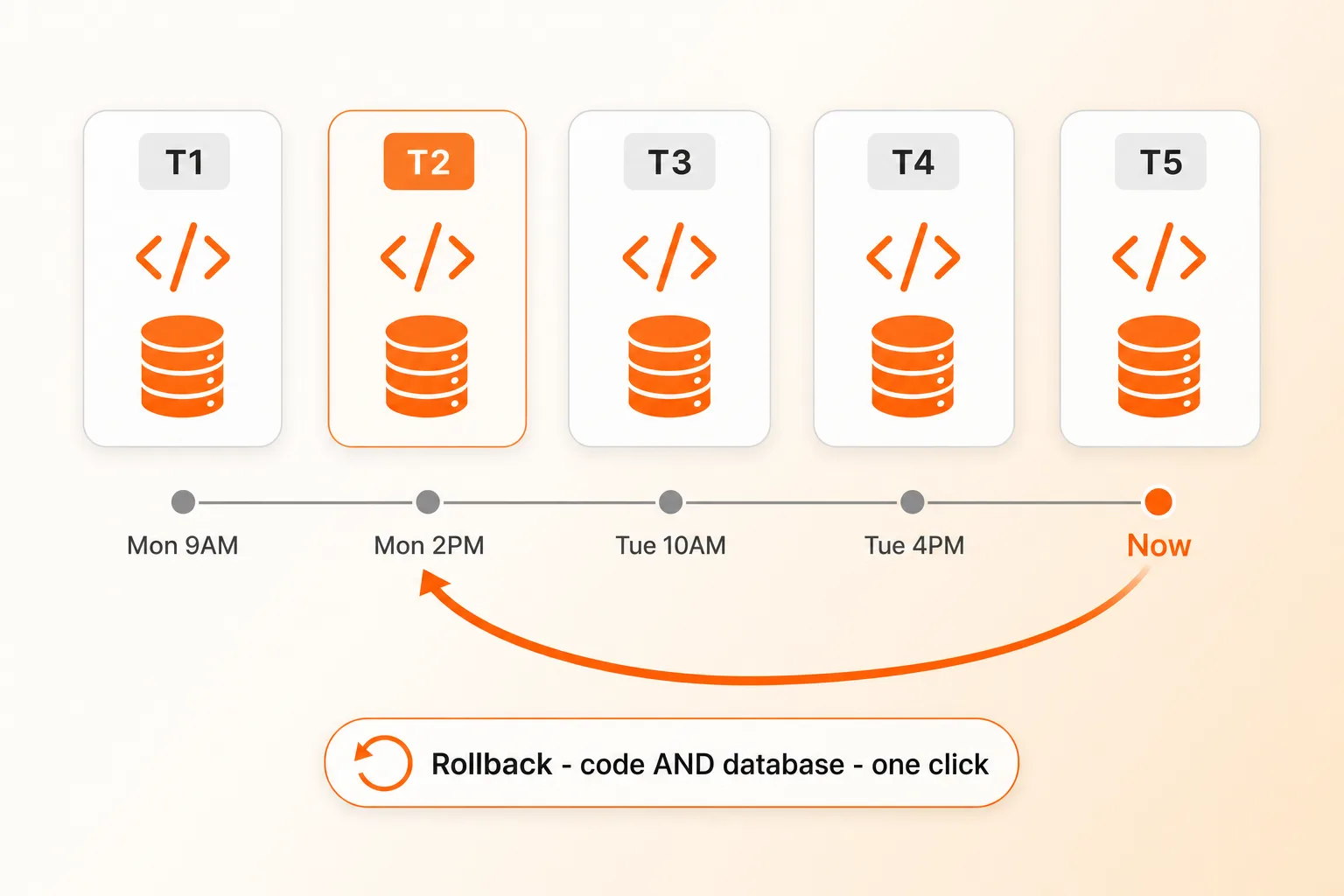
Rollback your whole project - code AND database - one click

Timeline of project snapshots with a rollback arrow restoring both code and database together

Most platforms snapshot your code. We snapshot the whole machine - your app AND your database AND your files. Bad migration corrupted production? Schema change you regret? Customer says something broke three days ago? One click, both code and data restored. Replit is the only other platform we know of that does this end-to-end. Almost nobody else.

Plus an automatic safety net: before every Publish, we snapshot live production. If the deploy fails its health check, we roll back automatically.

What's NOT yet built (so you know)

  • Auto-scaling a single app across multiple machines - manual horizontal scaling supported today.
  • Multi-region failover - single EU region (Germany) today.
  • Bidirectional GitHub.com mirror - our own git server handles full git semantics internally; ZIP export available any time.

Playcode Cloud is in beta and included with every paid plan. Pro gets 3 cloud projects, Business gets 5. Read the full story on /cloud.

April 2026

NewBuild

Your Hero Just Started Moving - AI Video Generation

Say "make the hero a video" and the AI generates an 8-second cinematic loop with Google Veo 3 - no separate tool, no stock footage, no upload step. Works from a prompt or from an image you already have on the page. The agent verifies the output, extracts a poster frame for instant-load, compresses for web, and swaps in a self-playing muted looping background in one pass.

New

  • Video generation built in - Google Veo 3.1 Fast is the default for production output, Veo 3.1 Lite for rapid drafts, Veo 3.1 Standard for polished hero content. Ask for a video and you get one.
  • Image-to-video animation - Turn any hero image into a moving version. Cherry blossoms drift, water ripples, clouds pass - the photo you already made comes alive.
  • Poster frames + web compression, automatic - Every generated video is auto-optimized down from 20+ MB to ~3 MB for fast loading, and gets a poster frame extracted so your site shows something instantly while the video buffers.
  • Understand any video - The agent can read a video and tell you what's on screen (duration, resolution, subjects, mood). Useful for verifying the output matches your prompt before shipping.
  • Trim, resize, strip audio, convert format - New video editing capabilities: cut a clip shorter, resize for web, mute audio for hero loops, or convert between MP4 and WebM.

Improvements

  • Smarter hero prompts by default - The AI now defaults to static-framed ambient motion (wind, water, drifting light) instead of camera moves. Produces cleaner loops with no glitchy mid-clip cuts.
  • Silent by default - Hero videos no longer come with unsolicited audio. Autoplay-muted is the norm anyway, and audio is available when you actually need it (tutorials, reels).
  • Image generation picks the right shape - When you ask for a hero image, the AI now uses 16:9 by default (not square), and knows to match the aspect if you're about to animate it.

Billed per second of output - the AI tells you the approximate cost before each video call and pauses to confirm before anything expensive. No surprise charges.

NewBuild

Cheaper Pro & Smart With Claude - Prompt Cache Rework

Short version: Pro with Claude now costs a lot less to run in real conversations. We noticed that follow-up messages weren't reusing the cached context from earlier messages the way they should have been, so each new turn was paying to re-process a bunch of the same tokens. We rebuilt how we hand context to the model and the cache now holds across turns, across chats, and during sub-agent runs.

Improvements

  • Follow-up messages in Pro chats are ~10x cheaper - The second (and every later) message in a Claude Pro chat now hits the prompt cache instead of paying full price. In our tests a typical 17K-token follow-up dropped from ~1.2 credits to ~0.1 credits
  • Starting a new chat is cheaper too - The system prompt is now cached across chats, so the first message of a fresh Claude chat reuses the cache from your previous conversation (within a 5-minute window) instead of paying full price for the system prompt every time
  • Smart mode sub-agents benefit as well - When Smart mode delegates code work to an Opus sub-agent, that sub-agent now uses the same caching wins: system prompt shared across delegations, history cached within a run. No change for Gemini Flash (Google handles caching server-side, nothing for us to tune)

No action needed - it just works. If you're curious about the raw numbers, the credit counter in Usage History now shows the difference directly: first Claude message in a chat is typical, every follow-up is usually 10x smaller.

NewBuild

Claude Opus 4.7 Available + New Experimental Models

Anthropic just released Claude Opus 4.7 - sharper reasoning, better code, longer 1M-token context. It's available today in Settings -> AI Model. We're keeping Claude Opus 4.6 as the default Quality model: the sticker price per token is the same, but 4.7 uses a new tokenizer that consumes roughly 45% more tokens per request on average (and about 3x on image-heavy work), so real-world cost per run is noticeably higher. Pick 4.7 when reasoning matters more than cost - your call.

New

  • Claude Opus 4.7 in the model picker - Anthropic's latest Opus with stronger reasoning, better code output, and 1M-token context. Opt-in from Settings -> AI Model
  • Two experimental models, opt-in from Settings -> AI Model - Try Qwen 3.6 Plus (1M context, multimodal, deep thinking mode) for very large projects, or GLM 5.1 (open-weight reasoning) when you want a strong but budget-friendly option

NewBuild

Talk to AI While It Works + Voice Overhaul

You no longer have to wait for the AI to finish before sending your next message. Type or speak while it's working, and the AI will see your message and adapt on the fly - no restart, no lost progress. Change your mind mid-build? Just say so.

New

  • Send messages during AI processing - The AI picks up your follow-up instructions at the next step and adjusts its plan naturally. Send as many messages as you want, even while it's writing files
  • Hold-to-record voice - Press and hold the microphone to record, release to send. Drag up to lock the recording for longer messages. Drag left to cancel. Just like Telegram
  • Voice shortcut (Alt+V) - Press once to start recording, press again to stop and send. Works anywhere in the editor
  • Auto-send voice messages - Voice recordings are now transcribed and sent automatically by default. Toggle in Preferences > Transcription

Improvements

  • Cleaner chat input - Input stays focused after sending, so you can keep typing immediately. Escape cancels voice recording
  • Smoother scrolling - Chat automatically scrolls to the latest message as the AI works
  • Polished toolbar - Mic, stop, and send buttons now coexist naturally. The stop button only appears when the AI is running and you're not recording

March 2026

NewBuild

Playcode Now Speaks 10 Languages

Playcode is now available in 10 languages - both the marketing site and the editor itself. Every menu, tooltip, button, and AI chat interface has been translated.

Your language is auto-detected from your browser. You can also change it anytime in Menu > Preferences > Language.

The same announcement in all 10 languages:

  • EN: Playcode now speaks your language! Editor, menus, and AI chat - all translated.
  • ES: Playcode ahora habla tu idioma! Editor, menus y chat AI - todo traducido.
  • PT: Playcode agora fala seu idioma! Editor, menus e chat AI - tudo traduzido.
  • DE: Playcode spricht jetzt deine Sprache! Editor, Menus und AI-Chat - alles ubersetzt.
  • FR: Playcode parle maintenant ta langue ! Editeur, menus et chat AI - tout traduit.
  • TR: Playcode artik senin dilini konusuyor! Editor, menuler ve AI sohbet - hepsi cevrildi.
  • RU: Playcode теперь говорит на твоем языке! Редактор, меню и AI-чат - все переведено.
  • JA: Playcodeがあなたの言語に対応! エディター、メニュー、AIチャット - 全て翻訳済み。
  • KO: Playcode가 이제 한국어를 지원합니다! 에디터, 메뉴, AI 채팅 - 모두 번역 완료.
  • IT: Playcode ora parla la tua lingua! Editor, menu e chat AI - tutto tradotto.

NewBuild

GPT-5.4, AI Modes, and Help Center Rewrite

New

  • GPT-5.4 - OpenAI's latest model is now available as a quality model option.
  • 3 AI Modes - Economy (Gemini only, lowest cost), Smart (Gemini for reading + Claude for building), and Pro (Claude for everything).

Improved

  • Help Center rewritten - All help articles updated to reflect current AI features, modes, and model names.

NewAccount and billing

Affiliate Program

New

  • Affiliate Program - Earn commission by sharing Playcode. Share your unique referral link, and when someone subscribes, you earn a commission on their first payment. Track clicks, registrations, and purchases in real time from your affiliate dashboard.
  • Multiple Referral Codes - Create different codes for different campaigns (YouTube, Twitter, blog, etc.) and track which ones perform best.
  • Affiliate Dashboard - Full funnel analytics: clicks, registrations, purchases, earnings, and payout history. Available in Settings > Affiliate.

NewBuild

Version 2026.5.15

New

  • AI Image Generation - Generate images, icons, logos, and illustrations right from the chat. Just describe what you need and the AI creates it using Google Gemini's native image generation. Supports any aspect ratio, up to 4K resolution, and multiple style directions.
  • Image Editing with References - Attach existing images and ask the AI to edit them: change colors, add elements, remove backgrounds, adjust style. The AI sees your image and makes targeted modifications.
  • Background Removal - Automatically remove white backgrounds from generated icons and logos, producing transparent PNGs ready for your website.
  • Image Processing - Resize, compress, and convert images between formats (WebP, AVIF, PNG, JPEG, GIF, ICO) through the chat. The AI optimizes your images for the web automatically - just say "compress this image" or "make me a favicon".

NewBuild

Version 2026.5.6

New

  • Website Screenshot Tool - The AI agent can now capture visual screenshots of any website. Say "make me a site like competitor.com" and the AI actually sees the design, layout, colors, and typography - not just the HTML text.
  • Full-page & element capture - Screenshots support desktop/mobile viewports, full-page scrolling capture, specific element targeting via CSS selector, dark mode, and retina resolution.
  • Vision-powered tool results - Tool results can now include images and files as attachments. The AI sees screenshots as actual images (via vision), not just text descriptions. This works across all AI models with vision support.

Under the Hood

  • SSRF protection - Screenshot URLs are validated against private networks, cloud metadata endpoints, and DNS rebinding attacks.
  • Clean captures - Cookie banners, ads, and animations are automatically removed for clean screenshots.

NewBuild

Version 2026.5.5

New

  • Native Tailwind CSS v4 - Tailwind CSS is now compiled at build time instead of loading the 266KB browser compiler on every preview refresh. This means dramatically faster previews, especially on mobile devices.
  • Zero-config setup - Just add @import "tailwindcss"; to any CSS file and start using Tailwind classes. No PostCSS config, no build tools setup needed.
  • Smart class scanning - Only the CSS you actually use gets generated. The compiler scans your HTML, JSX, Vue, and Svelte files for class names and produces minimal, optimized CSS.
  • Incremental builds - Compiled CSS is cached between builds. If your classes haven't changed, the preview updates instantly.

Improvements

  • Updated all templates - All 32 Tailwind-powered templates now use native compilation instead of the CDN script.
  • Backward compatible - Existing projects using the Tailwind CDN script tag will automatically use the native compiler instead.

NewBuild

Version 2026.5.4

New

  • GPT-5.3 Codex - The latest agentic coding model from OpenAI. Combines frontier coding with research and tool use capabilities.
  • Claude Sonnet 4.6 - The newest Sonnet with adaptive thinking and 64K output tokens.
  • Claude Opus 4.6 - Upgraded to 128K output tokens with 1M context window support.
  • Gemini 3.1 Pro - Replaces the deprecated Gemini 3 Pro Preview.
  • Configurable Model Preferences - Choose which AI models to use for Economy (Fast) and Quality (Pro) modes from Preferences > AI Model. Your choices are saved to your account.

Show all updates