Novedades

Registro de cambios

Nuevas funciones, mejoras y correcciones.Lanzamos mejoras cada semana.

Page 8 of 17 · 165 updates

Latest updates
May 31, 2026

Claude Opus 4.8 is now the default Pro model

We've moved the Quality model from Claude Opus 4.6 to Claude Opus 4.8 - Anthropic's newest Opus. Sharper reasoning, cleaner code, better designs. The difference in output quality is immediate and visible.

Honest about cost. 4.8 charges the same per token as 4.6, but its tokenizer packs roughly 25-48% more tokens into a typical request (the upper end on image-heavy work), so expect spend on Pro work to scale up by about that much. We made the call anyway: we want Playcode's default AI to be the best one available, not the cheapest.

Prefer lower cost? Switch the Quality Model yourself - it takes about 10 seconds:

  • Menu → Preferences → AI Model → Quality Model
  • Pick Claude Opus 4.6 (the previous default) - same family, lower per-request cost
  • Or Claude Sonnet 4.6 - cheaper still, excellent for most tasks
May 31, 2026

Read any website's raw HTML to inspect or redesign

Until today, the AI agent could fetch a webpage's text (article-style, cleaned via Markdown) but not its raw HTML. That was a real gap when you'd say "redesign this site" - the agent needed the actual DOM, classes, and layout, not a flattened text version.

Now there's a dedicated WebFetchHtml tool. Give the agent a URL, it downloads the page's raw HTML (up to 5 MB), saves it as a file inside your project under temp/, and reads it back chunk by chunk - the same way it reads any other file in your project.

Practical example: "Fetch https://stripe.com/pricing and redesign our pricing page in that style." The agent now actually sees Stripe's grid, their semantic landmarks, their spacing patterns - not just the text on the page.

Safety: same SSRF protections as the existing fetcher - localhost, private IPs, cloud metadata endpoints are all blocked. The HTML is never inlined into the conversation (that would blow the context budget); it's only ever read on demand from the project file.

May 31, 2026

Drag a zip or tar.gz straight into chat

The chat attach menu (the paperclip) now accepts zip and tar.gz archives, on top of images, videos, and PDFs. Drop one in chat, the agent gets the URL, and you can ask it to do something with the contents.

Where this really shines: Cloud projects. The agent has a real shell, so it can curl the archive into your workspace and unzip it directly. Practical uses:

  • Import an existing site - drag its source zip in, ask the agent to extract it and use it as a starting point.
  • Hand the agent an asset bundle - a folder of images, fonts, or design exports, packaged once, dropped in chat.
  • Move work between projects - export from one, drop into another.

On Browser projects the agent sees the archive's URL but can't extract it in-browser (no shell). For full unzip-and-use behavior, drop archives into a Cloud project.

Up to 150 MB per file. The archive contents are never sent to the AI model directly - only the URL is referenced in the conversation, which keeps your costs predictable and avoids hitting model file-size limits.

May 27, 2026

DeepSeek V4 Pro + V4 Flash in the model picker

Two new thinking models are now selectable in the chat model picker, talking to DeepSeek's official API directly:

  • DeepSeek V4 Pro - frontier-level reasoning with a 1M-token context window. Strong at code, math, and long multi-step tasks. A serious daily driver. Text-only.
  • DeepSeek V4 Flash - the same reasoning shape, tuned for speed and high-throughput work. 1M context, text-only.

Heads-up: these models do not see images. Pick a vision-capable model (Sonnet, Gemini, GPT-4o) if your task needs to read a screenshot or a PDF.

May 24, 2026

Introducing Playcode Cloud - the cloud built for the apps you build with AI

Shipping a real online product today takes too many things. An editor over here. Hosting over there. A separate database, a separate domain registrar, a CI pipeline, an SSL renewal, a monitoring dashboard. Five vendors, five bills, five places to keep in sync.

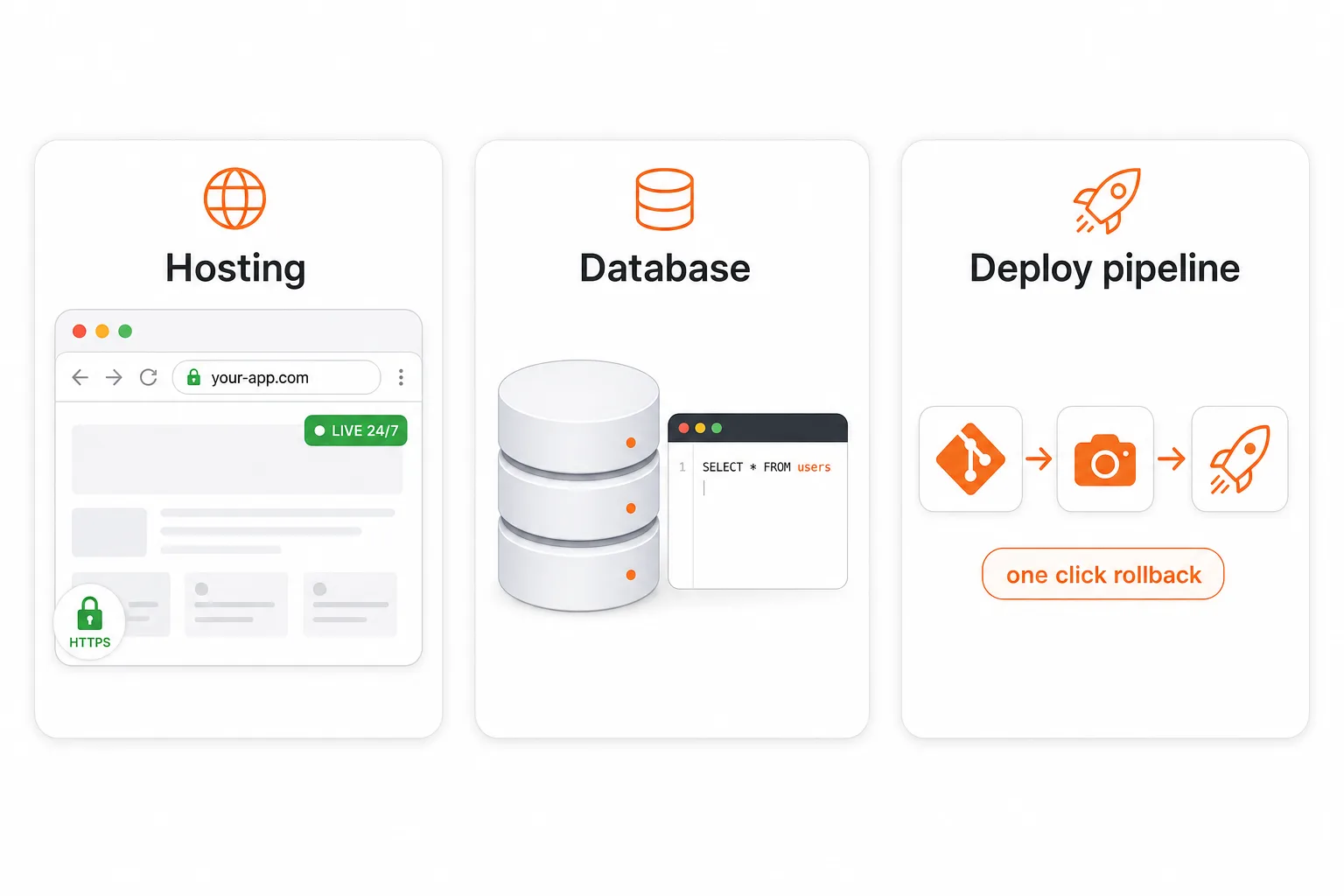
Today we're launching Playcode Cloud as its own product. Hosting, a real database, and a deploy pipeline - in one workspace. The cloud, designed for the apps you build with AI.

Three pillars of Playcode Cloud: a real production environment, your data durable forever, and build-ship-run in one product

Three products in one

  • Hosting. Always-on production, custom domain, automatic HTTPS, real TCP/UDP ports. Replaces what you would otherwise pay Vercel, Netlify, or Heroku for.
  • Database. A real database with tables, queries, transactions. Persists forever, survives every restart. Replaces what you would otherwise pay Supabase, Neon, or RDS for.
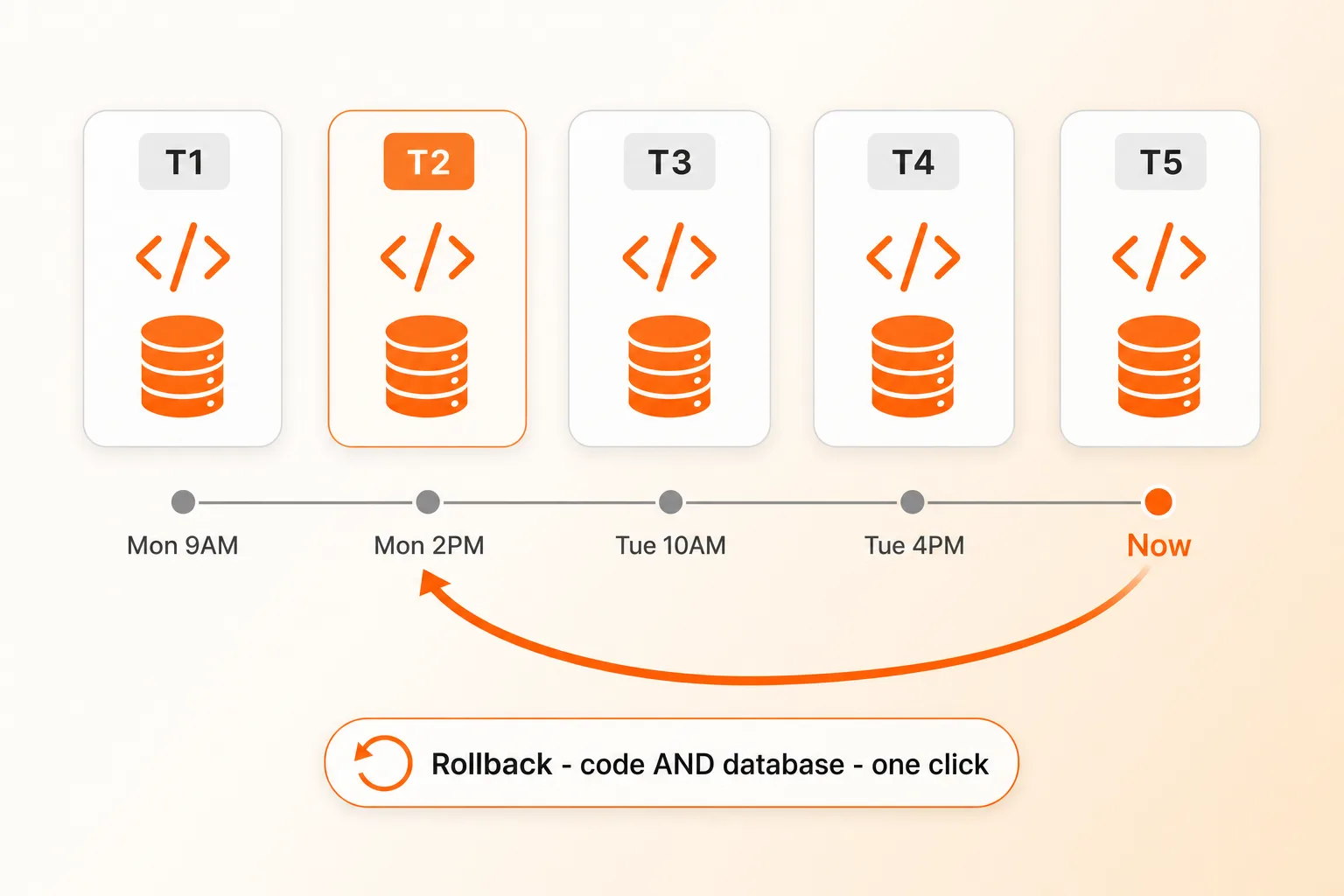
  • Deploy pipeline. Per-project git server, automatic snapshots, one-click rollback for code and data together. Replaces what you would otherwise wire up with GitHub Actions, CircleCI, and backup scripts.

Rollback your whole project - code AND database - one click

Timeline of project snapshots with a rollback arrow restoring both code and database together

Most platforms snapshot your code. We snapshot the whole machine - your app AND your database AND your files. Bad migration corrupted production? Schema change you regret? Customer says something broke three days ago? One click, both code and data restored. Replit is the only other platform we know of that does this end-to-end. Almost nobody else.

Plus an automatic safety net: before every Publish, we snapshot live production. If the deploy fails its health check, we roll back automatically.

What's NOT yet built (so you know)

  • Auto-scaling a single app across multiple machines - manual horizontal scaling supported today.
  • Multi-region failover - single EU region (Germany) today.
  • Bidirectional GitHub.com mirror - our own git server handles full git semantics internally; ZIP export available any time.

Playcode Cloud is in beta and included with every paid plan. Pro gets 3 cloud projects, Business gets 5. Read the full story on /cloud.

Apr 20, 2026

Your Hero Just Started Moving - AI Video Generation

Say "make the hero a video" and the AI generates an 8-second cinematic loop with Google Veo 3 - no separate tool, no stock footage, no upload step. Works from a prompt or from an image you already have on the page. The agent verifies the output, extracts a poster frame for instant-load, compresses for web, and swaps in a self-playing muted looping background in one pass.

New

  • Video generation built in - Google Veo 3.1 Fast is the default for production output, Veo 3.1 Lite for rapid drafts, Veo 3.1 Standard for polished hero content. Ask for a video and you get one.
  • Image-to-video animation - Turn any hero image into a moving version. Cherry blossoms drift, water ripples, clouds pass - the photo you already made comes alive.
  • Poster frames + web compression, automatic - Every generated video is auto-optimized down from 20+ MB to ~3 MB for fast loading, and gets a poster frame extracted so your site shows something instantly while the video buffers.
  • Understand any video - The agent can read a video and tell you what's on screen (duration, resolution, subjects, mood). Useful for verifying the output matches your prompt before shipping.
  • Trim, resize, strip audio, convert format - New video editing capabilities: cut a clip shorter, resize for web, mute audio for hero loops, or convert between MP4 and WebM.

Improvements

  • Smarter hero prompts by default - The AI now defaults to static-framed ambient motion (wind, water, drifting light) instead of camera moves. Produces cleaner loops with no glitchy mid-clip cuts.
  • Silent by default - Hero videos no longer come with unsolicited audio. Autoplay-muted is the norm anyway, and audio is available when you actually need it (tutorials, reels).
  • Image generation picks the right shape - When you ask for a hero image, the AI now uses 16:9 by default (not square), and knows to match the aspect if you're about to animate it.

Billed per second of output - the AI tells you the approximate cost before each video call and pauses to confirm before anything expensive. No surprise charges.

Apr 20, 2026

Cheaper Pro & Smart With Claude - Prompt Cache Rework

Short version: Pro with Claude now costs a lot less to run in real conversations. We noticed that follow-up messages weren't reusing the cached context from earlier messages the way they should have been, so each new turn was paying to re-process a bunch of the same tokens. We rebuilt how we hand context to the model and the cache now holds across turns, across chats, and during sub-agent runs.

Improvements

  • Follow-up messages in Pro chats are ~10x cheaper - The second (and every later) message in a Claude Pro chat now hits the prompt cache instead of paying full price. In our tests a typical 17K-token follow-up dropped from ~1.2 credits to ~0.1 credits
  • Starting a new chat is cheaper too - The system prompt is now cached across chats, so the first message of a fresh Claude chat reuses the cache from your previous conversation (within a 5-minute window) instead of paying full price for the system prompt every time
  • Smart mode sub-agents benefit as well - When Smart mode delegates code work to an Opus sub-agent, that sub-agent now uses the same caching wins: system prompt shared across delegations, history cached within a run. No change for Gemini Flash (Google handles caching server-side, nothing for us to tune)

No action needed - it just works. If you're curious about the raw numbers, the credit counter in Usage History now shows the difference directly: first Claude message in a chat is typical, every follow-up is usually 10x smaller.

Apr 17, 2026

Claude Opus 4.7 Available + New Experimental Models

Anthropic just released Claude Opus 4.7 - sharper reasoning, better code, longer 1M-token context. It's available today in Settings -> AI Model. We're keeping Claude Opus 4.6 as the default Quality model: the sticker price per token is the same, but 4.7 uses a new tokenizer that consumes roughly 45% more tokens per request on average (and about 3x on image-heavy work), so real-world cost per run is noticeably higher. Pick 4.7 when reasoning matters more than cost - your call.

New

  • Claude Opus 4.7 in the model picker - Anthropic's latest Opus with stronger reasoning, better code output, and 1M-token context. Opt-in from Settings -> AI Model
  • Two experimental models, opt-in from Settings -> AI Model - Try Qwen 3.6 Plus (1M context, multimodal, deep thinking mode) for very large projects, or GLM 5.1 (open-weight reasoning) when you want a strong but budget-friendly option
Apr 10, 2026

Talk to AI While It Works + Voice Overhaul

You no longer have to wait for the AI to finish before sending your next message. Type or speak while it's working, and the AI will see your message and adapt on the fly - no restart, no lost progress. Change your mind mid-build? Just say so.

New

  • Send messages during AI processing - The AI picks up your follow-up instructions at the next step and adjusts its plan naturally. Send as many messages as you want, even while it's writing files
  • Hold-to-record voice - Press and hold the microphone to record, release to send. Drag up to lock the recording for longer messages. Drag left to cancel. Just like Telegram
  • Voice shortcut (Alt+V) - Press once to start recording, press again to stop and send. Works anywhere in the editor
  • Auto-send voice messages - Voice recordings are now transcribed and sent automatically by default. Toggle in Preferences > Transcription

Improvements

  • Cleaner chat input - Input stays focused after sending, so you can keep typing immediately. Escape cancels voice recording
  • Smoother scrolling - Chat automatically scrolls to the latest message as the AI works
  • Polished toolbar - Mic, stop, and send buttons now coexist naturally. The stop button only appears when the AI is running and you're not recording
Apr 9, 2026

Smarter Error Handling + AI Timeout Protection

When something goes wrong during a build, you used to see a generic "Processing failed" message with no clear way to recover. Now you get a clear explanation of what happened and a button to fix it - one click to continue, retry, or add credits.

Improvements

  • Clear error messages - Every error now explains what happened in plain language, translated into all 10 supported languages
  • One-click recovery - "Continue", "Try again", or "Add credits" buttons appear right where you need them. No more guessing what to do next
  • AI timeout protection - If the AI gets stuck overthinking a step, it now automatically stops and lets you continue. Your progress is always saved
  • Smoother long conversations - When your conversation gets summarized, you see a clear notice with a Continue button instead of a confusing pause