What’s new in Playcode

139 updates in the last 90 days.

New features, improvements and fixes, newest first.

RSSJSON FeedMarkdown for agents

Our rocket on its pad beside a tall board of update cards: the builder pins a fresh card at the top, Play fits a new part to the rocket, and two passing suits stop to stare.

May 2026

NewBuild

Claude Opus 4.8 is now the default Pro model

We've moved the Quality model from Claude Opus 4.6 to Claude Opus 4.8 - Anthropic's newest Opus. Sharper reasoning, cleaner code, better designs. The difference in output quality is immediate and visible.

Honest about cost. 4.8 charges the same per token as 4.6, but its tokenizer packs roughly 25-48% more tokens into a typical request (the upper end on image-heavy work), so expect spend on Pro work to scale up by about that much. We made the call anyway: we want Playcode's default AI to be the best one available, not the cheapest.

Prefer lower cost? Switch the Quality Model yourself - it takes about 10 seconds:

  • Menu → Preferences → AI Model → Quality Model
  • Pick Claude Opus 4.6 (the previous default) - same family, lower per-request cost
  • Or Claude Sonnet 4.6 - cheaper still, excellent for most tasks
ImprovedBuild

Read any website's raw HTML to inspect or redesign

Until today, the AI agent could fetch a webpage's text (article-style, cleaned via Markdown) but not its raw HTML. That was a real gap when you'd say "redesign this site" - the agent needed the actual DOM, classes, and layout, not a flattened text version.

Now there's a dedicated WebFetchHtml tool. Give the agent a URL, it downloads the page's raw HTML (up to 5 MB), saves it as a file inside your project under temp/, and reads it back chunk by chunk - the same way it reads any other file in your project.

Practical example: "Fetch https://stripe.com/pricing and redesign our pricing page in that style." The agent now actually sees Stripe's grid, their semantic landmarks, their spacing patterns - not just the text on the page.

Safety: same SSRF protections as the existing fetcher - localhost, private IPs, cloud metadata endpoints are all blocked. The HTML is never inlined into the conversation (that would blow the context budget); it's only ever read on demand from the project file.

ImprovedBuild

Drag a zip or tar.gz straight into chat

The chat attach menu (the paperclip) now accepts zip and tar.gz archives, on top of images, videos, and PDFs. Drop one in chat, the agent gets the URL, and you can ask it to do something with the contents.

Where this really shines: Cloud projects. The agent has a real shell, so it can curl the archive into your workspace and unzip it directly. Practical uses:

  • Import an existing site - drag its source zip in, ask the agent to extract it and use it as a starting point.
  • Hand the agent an asset bundle - a folder of images, fonts, or design exports, packaged once, dropped in chat.
  • Move work between projects - export from one, drop into another.

On Browser projects the agent sees the archive's URL but can't extract it in-browser (no shell). For full unzip-and-use behavior, drop archives into a Cloud project.

Up to 150 MB per file. The archive contents are never sent to the AI model directly - only the URL is referenced in the conversation, which keeps your costs predictable and avoids hitting model file-size limits.

NewBuild

DeepSeek V4 Pro + V4 Flash in the model picker

Two new thinking models are now selectable in the chat model picker, talking to DeepSeek's official API directly:

  • DeepSeek V4 Pro - frontier-level reasoning with a 1M-token context window. Strong at code, math, and long multi-step tasks. A serious daily driver. Text-only.
  • DeepSeek V4 Flash - the same reasoning shape, tuned for speed and high-throughput work. 1M context, text-only.

Heads-up: these models do not see images. Pick a vision-capable model (Sonnet, Gemini, GPT-4o) if your task needs to read a screenshot or a PDF.

NewPublish

Introducing Playcode Cloud - the cloud built for the apps you build with AI

Shipping a real online product today takes too many things. An editor over here. Hosting over there. A separate database, a separate domain registrar, a CI pipeline, an SSL renewal, a monitoring dashboard. Five vendors, five bills, five places to keep in sync.

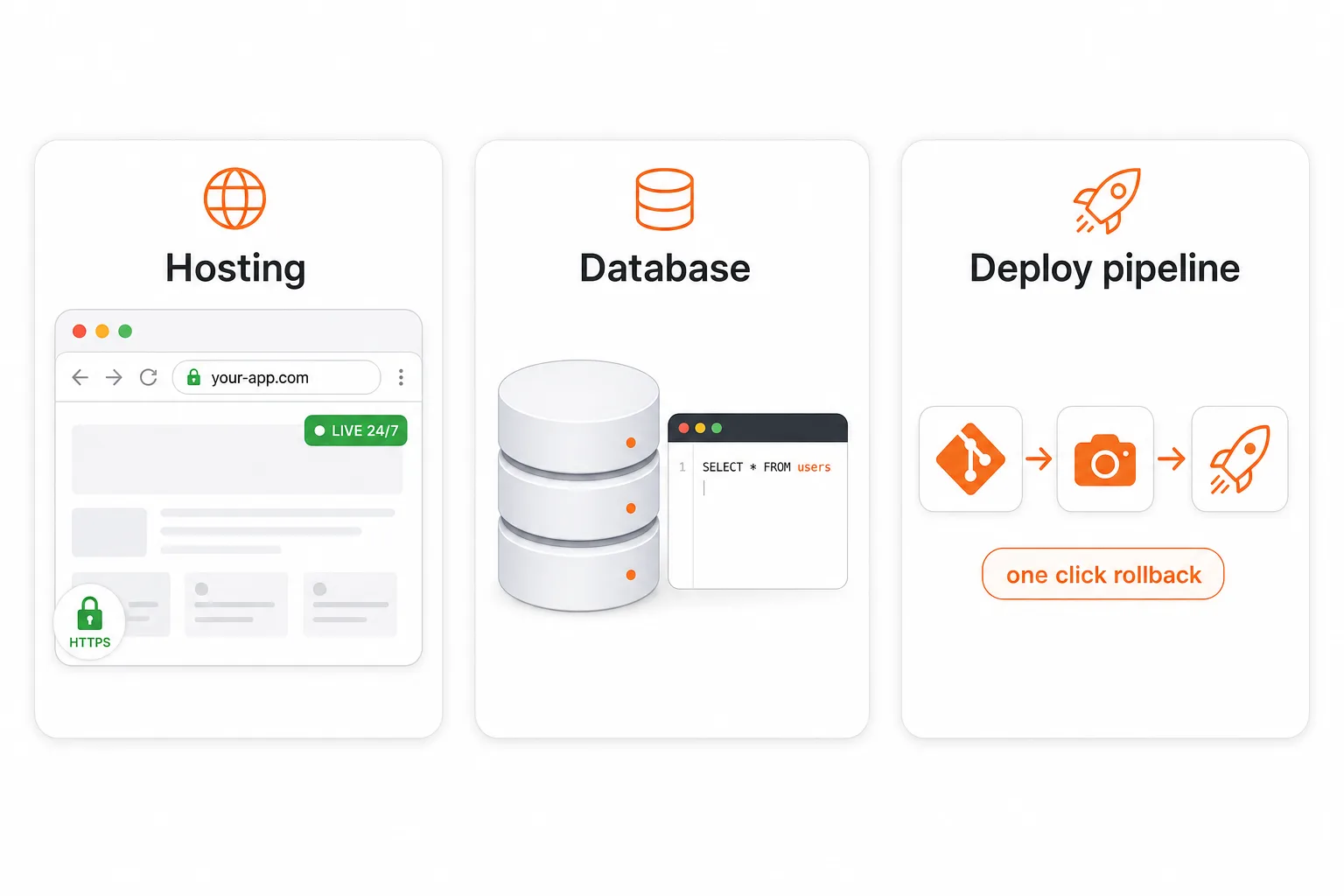
Today we're launching Playcode Cloud as its own product. Hosting, a real database, and a deploy pipeline - in one workspace. The cloud, designed for the apps you build with AI.

Three pillars of Playcode Cloud: a real production environment, your data durable forever, and build-ship-run in one product

Three products in one

  • Hosting. Always-on production, custom domain, automatic HTTPS, real TCP/UDP ports. Replaces what you would otherwise pay Vercel, Netlify, or Heroku for.
  • Database. A real database with tables, queries, transactions. Persists forever, survives every restart. Replaces what you would otherwise pay Supabase, Neon, or RDS for.
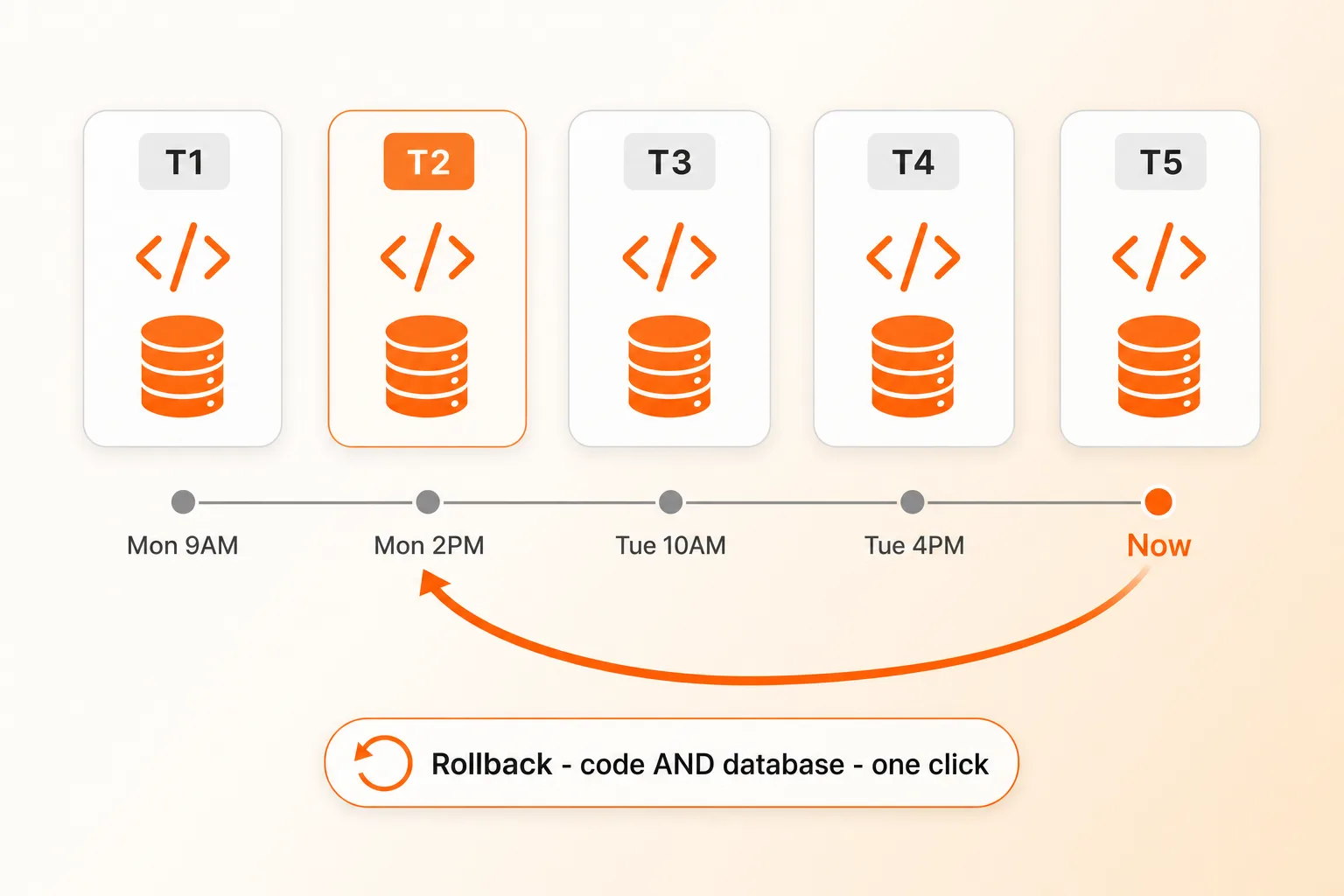
  • Deploy pipeline. Per-project git server, automatic snapshots, one-click rollback for code and data together. Replaces what you would otherwise wire up with GitHub Actions, CircleCI, and backup scripts.

Rollback your whole project - code AND database - one click

Timeline of project snapshots with a rollback arrow restoring both code and database together

Most platforms snapshot your code. We snapshot the whole machine - your app AND your database AND your files. Bad migration corrupted production? Schema change you regret? Customer says something broke three days ago? One click, both code and data restored. Replit is the only other platform we know of that does this end-to-end. Almost nobody else.

Plus an automatic safety net: before every Publish, we snapshot live production. If the deploy fails its health check, we roll back automatically.

What's NOT yet built (so you know)

  • Auto-scaling a single app across multiple machines - manual horizontal scaling supported today.
  • Multi-region failover - single EU region (Germany) today.
  • Bidirectional GitHub.com mirror - our own git server handles full git semantics internally; ZIP export available any time.

Playcode Cloud is in beta and included with every paid plan. Pro gets 3 cloud projects, Business gets 5. Read the full story on /cloud.

April 2026

NewBuild

Your Hero Just Started Moving - AI Video Generation

Say "make the hero a video" and the AI generates an 8-second cinematic loop with Google Veo 3 - no separate tool, no stock footage, no upload step. Works from a prompt or from an image you already have on the page. The agent verifies the output, extracts a poster frame for instant-load, compresses for web, and swaps in a self-playing muted looping background in one pass.

New

  • Video generation built in - Google Veo 3.1 Fast is the default for production output, Veo 3.1 Lite for rapid drafts, Veo 3.1 Standard for polished hero content. Ask for a video and you get one.
  • Image-to-video animation - Turn any hero image into a moving version. Cherry blossoms drift, water ripples, clouds pass - the photo you already made comes alive.
  • Poster frames + web compression, automatic - Every generated video is auto-optimized down from 20+ MB to ~3 MB for fast loading, and gets a poster frame extracted so your site shows something instantly while the video buffers.
  • Understand any video - The agent can read a video and tell you what's on screen (duration, resolution, subjects, mood). Useful for verifying the output matches your prompt before shipping.
  • Trim, resize, strip audio, convert format - New video editing capabilities: cut a clip shorter, resize for web, mute audio for hero loops, or convert between MP4 and WebM.

Improvements

  • Smarter hero prompts by default - The AI now defaults to static-framed ambient motion (wind, water, drifting light) instead of camera moves. Produces cleaner loops with no glitchy mid-clip cuts.
  • Silent by default - Hero videos no longer come with unsolicited audio. Autoplay-muted is the norm anyway, and audio is available when you actually need it (tutorials, reels).
  • Image generation picks the right shape - When you ask for a hero image, the AI now uses 16:9 by default (not square), and knows to match the aspect if you're about to animate it.

Billed per second of output - the AI tells you the approximate cost before each video call and pauses to confirm before anything expensive. No surprise charges.

NewBuild

Cheaper Pro & Smart With Claude - Prompt Cache Rework

Short version: Pro with Claude now costs a lot less to run in real conversations. We noticed that follow-up messages weren't reusing the cached context from earlier messages the way they should have been, so each new turn was paying to re-process a bunch of the same tokens. We rebuilt how we hand context to the model and the cache now holds across turns, across chats, and during sub-agent runs.

Improvements

  • Follow-up messages in Pro chats are ~10x cheaper - The second (and every later) message in a Claude Pro chat now hits the prompt cache instead of paying full price. In our tests a typical 17K-token follow-up dropped from ~1.2 credits to ~0.1 credits
  • Starting a new chat is cheaper too - The system prompt is now cached across chats, so the first message of a fresh Claude chat reuses the cache from your previous conversation (within a 5-minute window) instead of paying full price for the system prompt every time
  • Smart mode sub-agents benefit as well - When Smart mode delegates code work to an Opus sub-agent, that sub-agent now uses the same caching wins: system prompt shared across delegations, history cached within a run. No change for Gemini Flash (Google handles caching server-side, nothing for us to tune)

No action needed - it just works. If you're curious about the raw numbers, the credit counter in Usage History now shows the difference directly: first Claude message in a chat is typical, every follow-up is usually 10x smaller.

NewBuild

Claude Opus 4.7 Available + New Experimental Models

Anthropic just released Claude Opus 4.7 - sharper reasoning, better code, longer 1M-token context. It's available today in Settings -> AI Model. We're keeping Claude Opus 4.6 as the default Quality model: the sticker price per token is the same, but 4.7 uses a new tokenizer that consumes roughly 45% more tokens per request on average (and about 3x on image-heavy work), so real-world cost per run is noticeably higher. Pick 4.7 when reasoning matters more than cost - your call.

New

  • Claude Opus 4.7 in the model picker - Anthropic's latest Opus with stronger reasoning, better code output, and 1M-token context. Opt-in from Settings -> AI Model
  • Two experimental models, opt-in from Settings -> AI Model - Try Qwen 3.6 Plus (1M context, multimodal, deep thinking mode) for very large projects, or GLM 5.1 (open-weight reasoning) when you want a strong but budget-friendly option

NewBuild

Talk to AI While It Works + Voice Overhaul

You no longer have to wait for the AI to finish before sending your next message. Type or speak while it's working, and the AI will see your message and adapt on the fly - no restart, no lost progress. Change your mind mid-build? Just say so.

New

  • Send messages during AI processing - The AI picks up your follow-up instructions at the next step and adjusts its plan naturally. Send as many messages as you want, even while it's writing files
  • Hold-to-record voice - Press and hold the microphone to record, release to send. Drag up to lock the recording for longer messages. Drag left to cancel. Just like Telegram
  • Voice shortcut (Alt+V) - Press once to start recording, press again to stop and send. Works anywhere in the editor
  • Auto-send voice messages - Voice recordings are now transcribed and sent automatically by default. Toggle in Preferences > Transcription

Improvements

  • Cleaner chat input - Input stays focused after sending, so you can keep typing immediately. Escape cancels voice recording
  • Smoother scrolling - Chat automatically scrolls to the latest message as the AI works
  • Polished toolbar - Mic, stop, and send buttons now coexist naturally. The stop button only appears when the AI is running and you're not recording

FixedBuild

Smarter Error Handling + AI Timeout Protection

When something goes wrong during a build, you used to see a generic "Processing failed" message with no clear way to recover. Now you get a clear explanation of what happened and a button to fix it - one click to continue, retry, or add credits.

Improvements

  • Clear error messages - Every error now explains what happened in plain language, translated into all 10 supported languages
  • One-click recovery - "Continue", "Try again", or "Add credits" buttons appear right where you need them. No more guessing what to do next
  • AI timeout protection - If the AI gets stuck overthinking a step, it now automatically stops and lets you continue. Your progress is always saved
  • Smoother long conversations - When your conversation gets summarized, you see a clear notice with a Continue button instead of a confusing pause

FixedBuild

Fixed: Garbled AI Replies In Long Chats

Some of you ran into a really nasty one: after a long building session, the AI would suddenly reply with jumbled text - bits and pieces of earlier messages, file names, error banners, all stitched together into something that made no sense. Once it started, it usually kept happening on every message in that chat, and the only thing that worked was starting a new chat.

This one was hiding deep in the plumbing and it took a while to track down. It's now fixed, and new replies in every chat will be clean from here on.

We also went back and cleared out the corrupted content from older messages across the database so it can't influence new replies. If you scroll back through an old chat you might see a message or two that looks empty where the garbled text used to be - that's the old corruption being cleaned up, not something new breaking. Your projects, files, and chat history are otherwise untouched.

We're really sorry to anyone who hit this. It was confusing, it wasted your time, and it stayed broken for longer than we'd have liked. Thank you to the people who took the time to report it in chat with screenshots - that's what made it possible to find. If anything still feels off after this update, please ping us and we'll jump on it.

FixedBuild

Smart Mode Builds Better Sites

We tuned Smart mode to make the AI feel more like a real designer working on your project. You should notice it right away.

  • Cleaner, more polished results. Pages come out looking less like a template and more like something a designer actually thought about - better spacing, hover states, mobile layouts, the small details that make a site feel real.
  • Stays focused on what you asked for. The AI is better at making the change you wanted without wandering off and rewriting things you didn't ask it to touch.
  • Long building sessions go further. You can keep iterating in the same chat for longer before anything starts to slow down or get confused.
  • Stops repeating itself. The AI was sometimes reading the same file two or three times in a single change. We fixed that, so changes are faster and use noticeably fewer credits.

Nothing in your workflow changes. Same chat, same buttons. Just open a project and try a redesign - you should feel the difference on the first turn.

FixedBuild

Voice Input Now Works In Every Language

Fixed: Voice Transcription Was Stuck on Russian

When you used the microphone in chat, your voice was being transcribed as Russian no matter what language you actually spoke - so English speakers got back garbled, transliterated text. The default was wrong and was getting saved permanently in your browser, which is why even people who never touched the setting kept seeing it.

Voice transcription now auto-detects your language from the audio. Speak English, Spanish, German, Japanese, anything - it just works. The fix runs across the whole stack, so it applies to every existing user automatically the next time you open the app.

New: Transcription Language Menu

Want to lock voice input to a specific language instead of auto-detecting? There's now a dedicated Preferences → Transcription → Language menu with all 10 supported languages plus Auto-detect. Picking a specific language can improve accuracy if you have a strong accent or if you switch between languages a lot and want voice input to stay consistent.

Heads up: as part of this fix, your chat preferences (selected AI model, custom instructions, open chat tabs) will reset to defaults the first time you open the app after this update. Your projects, files, and chat history are not affected. If you notice anything off, just refresh the page - and if something still feels wrong, ping us in chat and we'll sort it out fast.

March 2026

FixedBuild

AI Quality & Reliability Improvements

Fixed: Multi-File Projects Now Build Correctly

When AI built websites with multiple files (HTML, CSS, JavaScript), it could sometimes produce files that didn't match each other - for example, CSS class names that didn't correspond to the HTML. This happened because the AI lost visibility of files it had just written. Now the AI always sees the full content of its recent work, so multi-file projects stay consistent.

Fixed: Conversations No Longer Get Stuck

In rare cases, if the AI took a full-page screenshot of a very tall website, the conversation could become permanently stuck - every message would fail with "Something unexpected happened." This has been fixed. Screenshots are now automatically resized to safe dimensions, and if an issue does occur, you'll get a clear message explaining what happened.

Improved: Web Research for Large Pages

The AI can now fetch content from larger websites (up to 5 MB). Pages that previously failed due to size limits - like sites with inline JavaScript - are now handled automatically. If a page is too large for direct fetching, the AI falls back to an intelligent content extraction service that pulls just the useful text.

Improved: AI Research Tasks

When the AI researches websites to gather content for your project, it now has more room to work - up to 20 steps instead of 8. This means it can thoroughly explore multi-page websites without running out of steps halfway through.

ImprovedBuild

Faster Loading for Long Chats & Big Projects

Projects with long chat histories and lots of files now load significantly faster. Instead of downloading every message on login, chats now load on demand - only when you open them.

  • Instant project loading - Login and project switching no longer wait for chat history to download. You get to your code immediately.
  • Smart message loading - Chat messages load when you open a conversation, with older messages fetched as you scroll up.
  • Lower memory usage - Only active chats consume memory, so even projects with hundreds of AI conversations stay snappy.

FixedBuild

AI Stability Improvements

Fixed: AI Repetition Loops

In rare cases, AI models (especially Gemini Flash) could get stuck in a loop, endlessly repeating the same text. This wasted credits and could freeze your browser with a gigantic message. We've shipped a multi-layer fix:

  • Automatic loop detection - The AI now detects when it starts repeating itself and stops immediately, saving your credits.
  • Tuned model settings - Adjusted temperature and repetition penalty parameters to prevent loops from starting in the first place.
  • Large message protection - If a response is unusually long, it's now truncated in the UI with a "Show full message" button, preventing browser freezes.

FixedBuild

Image Uploads Fixed, Smarter AI Questions

Fixed: Image Uploads in AI Chat

Over the past few days, some of you experienced issues when uploading images to AI chat - conversations would freeze or show an error message. We've been investigating this intensively and shipped multiple fixes:

  • CDN compatibility fix - Google's AI servers couldn't fetch images through our CDN. We now route image URLs through a direct path that bypasses the issue entirely.
  • Long conversation support - Conversations with many images (10+) would fail because of a provider limit on image URLs per request. We now intelligently manage the image budget across your conversation history, keeping the most recent images while preserving text references to older ones.

If you were affected, your existing chats with images should work again. Thank you for your patience while we tracked this down.

Improved: AI Clarifying Questions

The AI's question wizard now supports two types of questions: multiple choice (A/B/C/D) for decisions, and text input for open-ended questions like "What's your business name?" Previously, the AI was forced to turn everything into multiple choice, which sometimes caused errors or awkward options. Now it picks the right format automatically.

NewBuild

Playcode Now Speaks 10 Languages

Playcode is now available in 10 languages - both the marketing site and the editor itself. Every menu, tooltip, button, and AI chat interface has been translated.

Your language is auto-detected from your browser. You can also change it anytime in Menu > Preferences > Language.

The same announcement in all 10 languages:

  • EN: Playcode now speaks your language! Editor, menus, and AI chat - all translated.
  • ES: Playcode ahora habla tu idioma! Editor, menus y chat AI - todo traducido.
  • PT: Playcode agora fala seu idioma! Editor, menus e chat AI - tudo traduzido.
  • DE: Playcode spricht jetzt deine Sprache! Editor, Menus und AI-Chat - alles ubersetzt.
  • FR: Playcode parle maintenant ta langue ! Editeur, menus et chat AI - tout traduit.
  • TR: Playcode artik senin dilini konusuyor! Editor, menuler ve AI sohbet - hepsi cevrildi.
  • RU: Playcode теперь говорит на твоем языке! Редактор, меню и AI-чат - все переведено.
  • JA: Playcodeがあなたの言語に対応! エディター、メニュー、AIチャット - 全て翻訳済み。
  • KO: Playcode가 이제 한국어를 지원합니다! 에디터, 메뉴, AI 채팅 - 모두 번역 완료.
  • IT: Playcode ora parla la tua lingua! Editor, menu e chat AI - tutto tradotto.

NewBuild

GPT-5.4, AI Modes, and Help Center Rewrite

New

  • GPT-5.4 - OpenAI's latest model is now available as a quality model option.
  • 3 AI Modes - Economy (Gemini only, lowest cost), Smart (Gemini for reading + Claude for building), and Pro (Claude for everything).

Improved

  • Help Center rewritten - All help articles updated to reflect current AI features, modes, and model names.

FixedBuild

Undo from Here, Checkpoints, and My Projects

New

  • "Undo from here" button - Every message you send to AI now shows an "Undo from here" button below it. Click it to undo all the AI's changes after that point and try again with different instructions. No more endlessly asking AI to fix its own mistakes.
  • "Undo & resend" confirmation - When you undo, a clear confirmation dialog explains exactly what will happen before any changes are made. Edit your message if you want, then send it again.
  • Checkpoints help page - New help article explaining how checkpoints work, when to use them, and how they relate to publishing.

Improved

  • Versions renamed to Checkpoints - "Versions" was confusing for non-technical users. They're now called "Checkpoints" everywhere - menu, labels, help pages. Save a checkpoint before big changes, come back to it anytime.
  • Checkpoints moved to top-level menu - Checkpoints were buried three levels deep (Menu > Project > Versions). Now they're right in the main menu, one click away. Includes a "How it works" link to the help page.
  • My Projects redesigned - The "My Projects" menu item now has a distinct visual style with a project count badge, so you always know where to find your other projects.
  • AI suggests undo and checkpoints - When things go wrong, the AI now suggests using "Undo from here" instead of trying to fix its own mistakes. It also recommends saving checkpoints before major changes.

Fixed

  • CSS url() on published sites - Images and fonts referenced with url() in CSS (like background images) now work correctly on published sites. Previously, these paths broke after publishing.

NewAccount and billing

Affiliate Program

New

  • Affiliate Program - Earn commission by sharing Playcode. Share your unique referral link, and when someone subscribes, you earn a commission on their first payment. Track clicks, registrations, and purchases in real time from your affiliate dashboard.
  • Multiple Referral Codes - Create different codes for different campaigns (YouTube, Twitter, blog, etc.) and track which ones perform best.
  • Affiliate Dashboard - Full funnel analytics: clicks, registrations, purchases, earnings, and payout history. Available in Settings > Affiliate.

NewBuild

Version 2026.5.15

New

  • AI Image Generation - Generate images, icons, logos, and illustrations right from the chat. Just describe what you need and the AI creates it using Google Gemini's native image generation. Supports any aspect ratio, up to 4K resolution, and multiple style directions.
  • Image Editing with References - Attach existing images and ask the AI to edit them: change colors, add elements, remove backgrounds, adjust style. The AI sees your image and makes targeted modifications.
  • Background Removal - Automatically remove white backgrounds from generated icons and logos, producing transparent PNGs ready for your website.
  • Image Processing - Resize, compress, and convert images between formats (WebP, AVIF, PNG, JPEG, GIF, ICO) through the chat. The AI optimizes your images for the web automatically - just say "compress this image" or "make me a favicon".

FixedBuild

Version 2026.5.7

Improvements

  • Smarter file handling - The AI agent now sees file sizes before reading them and reads files in smaller chunks. No more wasting credits on loading giant files that don't fit in context.
  • Faster AI responses - Improved prompt caching for Claude models reduces latency and cost on follow-up messages in long conversations.

Fixes

  • Fixed AI agent loops - Resolved an issue where the AI could enter a repetitive loop after long conversations, re-reading the same files and burning credits. A new loop detection system automatically breaks the cycle.

NewBuild

Version 2026.5.6

New

  • Website Screenshot Tool - The AI agent can now capture visual screenshots of any website. Say "make me a site like competitor.com" and the AI actually sees the design, layout, colors, and typography - not just the HTML text.
  • Full-page & element capture - Screenshots support desktop/mobile viewports, full-page scrolling capture, specific element targeting via CSS selector, dark mode, and retina resolution.
  • Vision-powered tool results - Tool results can now include images and files as attachments. The AI sees screenshots as actual images (via vision), not just text descriptions. This works across all AI models with vision support.

Under the Hood

  • SSRF protection - Screenshot URLs are validated against private networks, cloud metadata endpoints, and DNS rebinding attacks.
  • Clean captures - Cookie banners, ads, and animations are automatically removed for clean screenshots.

NewBuild

Version 2026.5.5

New

  • Native Tailwind CSS v4 - Tailwind CSS is now compiled at build time instead of loading the 266KB browser compiler on every preview refresh. This means dramatically faster previews, especially on mobile devices.
  • Zero-config setup - Just add @import "tailwindcss"; to any CSS file and start using Tailwind classes. No PostCSS config, no build tools setup needed.
  • Smart class scanning - Only the CSS you actually use gets generated. The compiler scans your HTML, JSX, Vue, and Svelte files for class names and produces minimal, optimized CSS.
  • Incremental builds - Compiled CSS is cached between builds. If your classes haven't changed, the preview updates instantly.

Improvements

  • Updated all templates - All 32 Tailwind-powered templates now use native compilation instead of the CDN script.
  • Backward compatible - Existing projects using the Tailwind CDN script tag will automatically use the native compiler instead.

NewBuild

Version 2026.5.4

New

  • GPT-5.3 Codex - The latest agentic coding model from OpenAI. Combines frontier coding with research and tool use capabilities.
  • Claude Sonnet 4.6 - The newest Sonnet with adaptive thinking and 64K output tokens.
  • Claude Opus 4.6 - Upgraded to 128K output tokens with 1M context window support.
  • Gemini 3.1 Pro - Replaces the deprecated Gemini 3 Pro Preview.
  • Configurable Model Preferences - Choose which AI models to use for Economy (Fast) and Quality (Pro) modes from Preferences > AI Model. Your choices are saved to your account.

FixedBuild

Version 2026.5.3

New

  • Image Attachments - Attach images directly to your chat messages. Paste screenshots with Cmd+V, pick files, or drag and drop. The AI can see and analyze your images - describe designs, debug UI issues, or use attached images in your project.
  • PDF Attachments - Attach PDF documents to your chat for the AI to read and reference while building your project.
  • Web Browsing - The AI can now fetch web pages and search the internet. Share a URL and it will read the content, or ask it to research topics, find documentation, or look up examples.

Improvements

  • Economy Mode by Default - New chats now start in Economy mode (Gemini) for the lowest cost. Switch to Smart or Pro anytime from the mode selector.
  • Smarter Chat Names - The AI automatically renames your chat to match the topic once it understands what you're building.

FixedBuild

Version 2026.5.2

New

  • Responsive Preview Mode - Switch between phone, tablet, and desktop views right in the preview toolbar. See exactly how your project looks at different screen sizes without leaving the editor.

Fixes

  • Folder Drag & Drop Preserves Structure - Dragging a folder into your project now correctly places asset files (images, fonts, etc.) inside their original subfolders. Previously, all assets were flattened into the root directory.

NewBuild

Version 2026.5.1

New

  • Colorful Redesign - The entire interface has been refreshed with a vibrant, colorful design. Every screen, button, and panel now feels more polished and visually engaging.
  • Smarter AI Agent - The AI no longer tries to build everything at once. It now starts by suggesting a wireframe, explains its approach, and builds your project step by step. The result is working websites and interfaces with functional buttons, real navigation, and detailed layouts - not just a pretty picture.
  • AI Modes: Economy, Smart & Pro - Choose how AI works for you. Economy uses Gemini for the lowest cost. Smart (recommended) automatically picks the best model for each task - fast and cheap for reading code, premium for writing it. Pro uses Claude for everything - fastest responses and best quality.
  • Empty React Template - Start a React project from scratch with just the bare minimum: React, ReactDOM, and a blank component. No Tailwind, no example app - just a clean slate for your own code.

Improvements

  • Mobile Experience - Completely reworked for phones. Every screen is clean, readable, and easy to use on small displays. No wasted space, no clipped elements - everything is crisp and well-organized.
  • Unified Menu - The project menu and user menu are now combined into one. Everything you need - project actions, sharing, preferences, profile, billing - is in a single, clear menu. Simpler names, better organization.

February 2026

NewBuild

Version 2026.4.118

New

  • Visual Editing Mode - Click the "Visual edits" button in the preview toolbar to enter visual editing mode. Hover over any element to see it highlighted, then click to select it. Make changes directly in the properties panel or edit text inline by clicking on it.
  • Inline Text Editing - Double-click any text element in the preview to edit it directly. Your changes are tracked and can be applied to your code with a single click.
  • Properties Panel - Adjust colors, typography, spacing, borders, and effects for any selected element. Changes preview instantly in real-time.
  • Batch Changes - Make multiple visual edits across different elements, then apply them all at once. The AI knows exactly which file and line each change belongs to.
  • Ask AI from Preview - Select any element and type a request in the popup to ask AI to modify it. Perfect for quick tweaks like "make this button bigger" or "change the color scheme".