What’s new in Playcode

139 updates in the last 90 days.

New features, improvements and fixes, newest first.

RSSJSON FeedMarkdown for agents

Our rocket on its pad beside a tall board of update cards: the builder pins a fresh card at the top, Play fits a new part to the rocket, and two passing suits stop to stare.

December 2025

NewBuild

Version 2026.4.25 - SQL Playground with PostgreSQL

New

  • SQL Playground: Full PostgreSQL and SQLite running 100% in your browser. Write, run, and test SQL queries instantly with no server required.
  • PostgreSQL with Persistence: Your data is saved to IndexedDB. Close the tab, come back later, your tables are still there.
  • 18+ PostgreSQL Extensions: pgvector for AI embeddings, pg_trgm for fuzzy search, hstore, uuid-ossp, ltree, cube, and more. All pre-loaded and ready to use.
  • Database Explorer: Browse your tables, preview data with pagination, view row counts, and manage tables with a context menu.
  • Export & Import: Export your database with pg_dump, import SQL dumps. Backup and restore your data easily.
  • Sample Databases: Chinook (music store) and Northwind (e-commerce) databases preloaded for learning and testing.

Improvements

  • Template System: Quickly switch between different configurations. Open PostgreSQL, then switch to SQLite, Python, or C++ with one click. Each template comes with its own files and features.
  • Reset Files: New Reset button in Python and C++ playgrounds. Restore files to template defaults when you want a fresh start.
  • Better Panel Management: Closeable panels with proper close buttons. Smart positioning when reopening panels.
  • Updated Landing Pages: SQL Playground pages now highlight all the new PostgreSQL features, persistence, and extensions.

ImprovedBuild

Version 2026.4.20 - HTML Page Selector

Improvements

  • HTML Page Selector: Click the URL bar in the preview toolbar to see all HTML pages in your project. Quickly switch between pages without typing URLs manually.

NewBuild

Version 2026.4.16 - Developer Tools Suite

New Developer Tools

A complete suite of free, ad-free developer tools, all running in your browser with no data sent to servers.

  • JSON Formatter : Beautify, validate, and explore JSON with Monaco editor. Tree view, JSON path display, sort keys, share via URL, and auto-save.
  • JSON to TypeScript : Generate TypeScript interfaces from JSON. Customize naming, optional fields, and export format.
  • JSON Diff : Compare and merge JSON files. Three-way merge, array comparison strategies, apply individual changes, and JSON Patch export.
  • Regex Tester : Test regular expressions with real-time highlighting. Match groups, replacement preview, flag toggles, and common patterns library.
  • Python Compiler : Run Python code in your browser via WebAssembly. Multi-file support, console output, and instant execution. No server required.
  • C++ Compiler : Compile and run C++ code in your browser. WebAssembly-powered with standard library support and instant feedback.

Improvements

  • Products Mega Menu: New dropdown menu in the header showcasing all Playcode products: AI Website Builder, language playgrounds, and developer tools.

NewBuild

Version 2026.4.14 - Agent Modes

New

  • Three Agent Modes - Choose how the AI works: Ask (answers questions without changing code), Plan (creates a plan before coding), and Agent (full autonomous coding). Switch modes anytime from the chat toolbar.
  • Plan Mode - AI asks clarifying questions with a step-by-step wizard, then creates a detailed implementation plan in plan.md. Review and edit the plan before executing.
  • Execute Plan Button - After reviewing the plan, click Execute to start implementation. The AI reads your (potentially edited) plan and follows the steps exactly.
  • Multi-Select Questions - When AI asks questions, some allow multiple selections (like choosing features). Single-select questions auto-advance to the next question.

Improvements

  • Smarter Task Tracking - AI now merges task updates by default instead of replacing the entire list. No more accidentally losing your task progress.

FixedBuild

Version 2026.4.13 - Delete & Move Files

New

  • Delete Files - Ask the AI to remove files from your project. Full undo support to restore deleted files instantly.
  • Move & Rename Files - Ask the AI to move files to different folders or rename them. Undo restores the original location.

Fixes

  • Undo Button Fix - Clicking undo on a specific change now correctly reverts that change. Previously, the last change wasn't being undone.

NewBuild

Version 2026.4.11 - Live Preview Streaming

New

  • Real-time Preview Updates - Watch your website update live as the AI writes code. No more waiting for the entire file. See changes appear progressively in the preview as they're being written.

Improvements

  • Tasks Shown Inline - AI task lists now appear inline with other tool messages. Click to expand and see progress like "Tasks: 2/3 done, 1 in progress".
  • Visual Task Status - Tasks now show clear status icons: checkmark for completed, spinner for in-progress, and circle for pending.

ImprovedBuild

Version 2026.4.10 - Clickable AI Tool Results

Improvements

  • Click to Open Files - When AI reads a file, click the tool message to open that file in the editor with the exact lines highlighted.
  • Accurate Line Range - Read tool now shows the precise line range (e.g., "Read index.html:1-78") so you know exactly what the AI saw.
  • Clickable File Lists - In "List files" results, click any file path to open it directly in the editor.
  • Cleaner Visual Hierarchy - Read and list operations now use muted text styling to keep focus on the code changes.

NewBuild

Version 2026.4.9 - AI Model Selector Improvements

Improvements

  • New Default Model - Grok Code Fast 1 is now the default AI model. It's fast, affordable, and produces quality code, best value for most users.
  • Cost Tier Indicators - Each model now shows a cost badge ($, $$, $$$, $$$$) so you can easily see relative pricing without complex math.
  • Better Model Descriptions - Every model now has a clear, user-friendly description explaining what it's good at and why you'd choose it.
  • Reorganized Model List - Models are now sorted by cost tier (cheapest first), making it easier to find budget-friendly options.

FixedBuild

Version 2026.4.8 - Angular Hot Reload Fix

Fixes

  • Angular Hot Reload - Fixed critical issue where Angular projects would crash after 2-3 code edits with "Maximum call stack size exceeded" or "JIT compiler not available" errors. The fix: upgraded to Angular 21 with zoneless mode. No more zone.js, cleaner hot reload, smaller bundles, and better performance.

Improvements

  • Angular 21.0.2 - Updated from Angular 17 to the latest Angular 21 with modern features and improved performance.
  • Zoneless Change Detection - Angular template now uses provideZonelessChangeDetection() for cleaner architecture without zone.js overhead.

FixedBuild

Version 2026.4.7 - Angular & Template Improvements

New

  • Angular Template - The long-awaited Angular support is here! Many users requested this, and now you can build Angular apps directly in Playcode with full TypeScript support, standalone components, and live preview. New landing page at /angular.
  • Developer Portfolio Template - Beautiful personal website template with hero section, about, skills grid, project showcase, experience timeline, and contact section. Perfect for developers looking to showcase their work.
  • Blog Template - Multi-page blog with featured posts, category filters, clean article typography, code blocks, and newsletter signup. Built with React and Tailwind CSS.
  • SaaS Landing Page Template - Professional landing page with animated hero, pricing toggle (monthly/yearly), feature grid, testimonials carousel, and company logos. Ready for your next product launch.

Improvements

  • All Templates Redesigned - Every template has been rewritten from scratch with modern, beautiful designs. Dark themes, glassmorphism effects, gradient backgrounds, smooth animations, and interactive elements. Templates now look like real production websites, not simple demos.
  • Template Selection UI - Modernized the template picker with better organization, showcase section for full-featured templates, and "NEW" badges for recently added templates.

Fixes

  • Email Notifications - Fixed an issue with Cloudflare that was incorrectly pushing out email notifications. This was causing unnecessary emails that many users found annoying. The issue is now resolved.

November 2025

FixedBuild

Version 2026.4.0 - AI Coding Agent (Beta)

Major Update: AI Coding Agent is Here!

Write, edit, and understand code with an AI assistant that works like Cursor. Real-time streaming, multiple tabs, and 12+ models to choose from.

New

  • AI Coding Agent - A powerful AI assistant that can write code, edit files, understand your project, and help you build faster. Works just like Cursor, right in your browser.
  • Multi-Tab Support - Work on multiple files simultaneously. The AI can read and edit different files in your project at the same time.
  • Real-Time Streaming - Watch the AI write code in real-time. See exactly what's happening as it generates and edits your files.
  • 12+ AI Models - Choose from the latest models: Claude Haiku 4.5, Claude Sonnet 4.5, Claude Opus 4.5, GPT-5.1 series, Grok 4.1 series, Gemini 3 Pro, OpenAI o3, and more.
  • Chat History - All your conversations are saved. Rename or delete chats, and pick up where you left off.
  • Undo Changes - Made a mistake? Undo any changes the AI made with a single click.
  • Instant Publish - Build with AI and publish your site immediately to Playcode Pages.

Model Recommendations

  • Best Value - Claude Haiku 4.5: Fast, cheap, and effective for most tasks.
  • Best Quality - Claude Opus 4.5: The best price-to-quality ratio for complex coding tasks.
  • Budget Option - Grok Code Fast 1: Great for saving money while still getting solid results.

Pricing

Pay-as-you-go on top of your Pro subscription ($9.99/month). You only pay for what you use. Balance never expires, and you can top up anytime.

Beta Notice

This is a beta release. Some features may not work perfectly yet, but we're actively improving and fixing issues quickly. Your feedback helps us make it better!

Learn more in our AI Agent help article or check your AI credits balance.

NewBuild

Version 2026.3.16

New

  • Memory Records - AI assistant can now remember your preferences, coding patterns, and instructions across all projects. Tell it once, it remembers forever. Supports preferences (TypeScript, frameworks), instructions (never/always do X), patterns (your code style), context (project background), and decisions (architecture choices).
  • Rich Text Support - Memory content supports markdown formatting with code blocks, making technical instructions clear and easy to reference.
  • Memory Management UI - Browse, search, edit, and organize your memory records. Filter by type, confirm AI suggestions, or manually add memories. Access from Account menu or user profile.

Note: Memory Records are shared across all your projects and will be used by upcoming AI features to provide personalized assistance based on your preferences and past decisions.

NewBuild

Version 2026.3.12

New

  • AI Credits Balance System - Pro subscribers can now manage their AI credits balance. Top up manually, enable auto-recharge, and get bonus credits with your subscription. Infrastructure ready for upcoming AI features (chat assistant, code generation, and more coming soon).
  • Auto-Recharge - Set a threshold and never run out of credits. Your balance automatically tops up when it falls below your chosen amount. Monthly limits protect you from unexpected charges.

Note: AI features are currently in development. The balance system is live and ready to use. You can add credits now, and they'll be available when we launch AI features in the coming weeks.

Learn more about AI credits →

FixedBuild

Version 2026.3.1

Improvements

  • UI Redesign - Completely redesigned Sign In page, authentication popup, welcome onboarding, and account settings with modern blue gradients, orange action buttons, and cleaner layouts. Improved responsiveness across all screen sizes. All flows now have consistent, professional design.
  • Collaboration UI - Fixed visual bug where the collaborators list would cut off with many users. New overlapping avatar design handles 30+ collaborators with a "+N more" indicator.

ImprovedBuild

Version 2026.2.62 - Fresh Borderless Design

Improvements

  • Refined Visual Design - The interface now features a cleaner, more borderless appearance with improved color themes and subtle shadows that create depth without clutter
  • Better Contrast - Enhanced visibility across all themes (Dark, Blue, Gray) with optimized borders and backgrounds for a more polished look

FixedPublish

Version 2026.2.52 - Custom Domain SSL Fixed

Fixes

  • Custom domain SSL certificates now generate automatically for paid users
  • Fixed DNS validation to prevent misconfigured domains from causing errors

NewBuild

Version 2026.2.46 - Edit Unsaved Projects

Improvements

  • Edit Project Details Anytime - You can now edit the project name and move projects to folders even before saving them. When you open a template or create a new project, click the project title to rename it or organize it into a folder immediately
  • Automatic Saving - When editing unsaved projects, changes are automatically saved to your account, so you don't need to manually save before organizing your work

FixedBuild

Version 2026.2.44 - Save Button & Project Management

Improvements

  • Visible Save Button - Added a prominent Save button in the editor header that appears when your project has unsaved changes
  • Notion-Style Drag Handles - Added 6-dot drag handles to project rows that appear on hover, making drag-and-drop more intuitive
  • Permanent Delete - Delete archived projects permanently from the Archive view with a confirmation dialog
  • Drag-to-Archive - Quickly archive projects by dragging them to the Archive folder
  • Drag-to-Restore - Restore archived projects by dragging them from Archive into any folder - they'll automatically be unarchived and moved in one step
  • User Avatar Menu - Added a user avatar in the header (both editor and dashboard) that opens a context menu with quick access to Account, Billing, and Logout
  • Unpublish Websites - Added ability to unpublish your websites via a subtle link in the Publish popover, making your site inaccessible at the public URL
  • Dashboard Plus Menu - Added a plus icon next to "PROJECTS" in the sidebar that opens a menu for creating new projects or folders
  • Cleaner Dashboard Design - Removed row borders, simplified sidebar by removing redundant navigation buttons, and reduced visual clutter with subtle styling

Fixes

  • Navigation After Save - Fixed issue where saving a project before navigating away would prevent the navigation from completing

NewBuild

Version 2026.2.41 - Public Folder Support

New

  • Public Folder - Create a /public folder in your project to store static files (images, PDFs, text files) that need to be accessible in both preview and published sites
  • Production Build Support - Files in the public folder are automatically included when publishing your project, ensuring they work the same way in production as they do in preview

Learn more in our help article →

NewBuild

Version 2026.2.40 - Missing Projects Alert & Help

New

  • Missing Projects Alert - Dashboard now shows a helpful alert if you can't see your projects after an update, with quick logout button
  • Help Article - Comprehensive troubleshooting guide for missing projects with browser cache clearing instructions

FixedBuild

Version 2026.2.39 - Unified Design System

Improvements

  • Premium Pro Identity - Beautiful purple-to-red gradient for all Pro branding (badges, upgrade buttons, pricing cards)
  • Unified Design System - All dialogs, notifications, menus, tooltips, and context menus now share consistent styling with theme-aware gradients
  • Redesigned Dashboard - Modern card-based layout with improved visual hierarchy and navigation
  • Enhanced Pricing Pages - Clearer feature comparison and improved upgrade flow
  • Better Onboarding - Improved template selection and project creation experience
  • Refined Theme Support - Optimized gradients, borders, and hover states for Dark, Blue, Gray, and Light themes
  • Pro Badge - Premium badge displays next to username in sidebar for Pro users

Fixes

  • Desktop App Downloads - Fixed download links for Windows, macOS, and Linux applications
  • Windows Application - Resolved critical issues preventing Windows app from launching
  • Security Improvements - Enhanced data protection and authentication security
  • Cache Issues - Fixed caching problems that affected application performance

NewAccount and billing

Version 2026.2.31 - Account Management & UI Redesign

New

  • Delete Account - Permanently delete your account and all projects from settings
  • Change Email - Update your email with two-step verification
  • Playcode Pages Section - Dedicated explanation in pricing with help links

Improvements

  • Redesigned Settings & Dashboard - Modern card-based UI with better visual hierarchy
  • User Profile Header - Avatar, name, and email in sidebar
  • Better Navigation - Icons, green hover states, improved folder tree

FixedAccount and billing

Version 2026.2.29 - Critical Authentication Fix

Fixes

  • Resolved "Missing Projects" Issue - We discovered and fixed a critical authentication bug that caused some users to see their projects disappear after our recent backend migration. Your projects were never lost, they were always safely stored in our database. The issue was caused by outdated authentication tokens from our previous system that became incompatible with our new backend. Our attempt to maintain backward compatibility inadvertently created this problem.
  • Authentication System Migration - We've completed the migration to a more reliable authentication system. All users now use the same secure token format, eliminating future compatibility issues.
  • Database Initialization - Fixed an issue where signing in via email or Google popup wouldn't properly initialize the user database, preventing new project saves.
  • Template Preservation - Fixed a bug where creating a template while signed out and then signing in would cause the template to disappear. Templates now properly survive the login process.

Why the forced logout? To ensure all users get the new, correctly formatted authentication tokens, we had to reset everyone's session. This is a one-time inconvenience that permanently resolves the authentication issues. We apologize for any confusion this may have caused and appreciate your patience as we worked to identify and fix the root cause.

NewBuild

Version 2026.2.2 - Folder Organization

New

  • Project Folders - Organize your projects with nested folders. Create hierarchical folder structures to keep your workspace tidy
  • Folder Tree in Dashboard - Navigate your projects using a collapsible folder tree in the sidebar. Click folders to filter projects
  • Drag & Drop - Drag projects from the table directly into folders. Visual feedback shows where your project will land
  • Multiple Ways to Move Projects - Click folder column in table, use right-click context menu, or drag-and-drop to organize projects
  • Edit from Project Page - Click project title in editor header to change both name and folder in one action
  • Special Views - "All" shows all projects, "Archive" shows archived projects

NewBuild

Version 2026.1.22 - Documentation & Editor Improvements

New

  • Changelog page - Track all Playcode updates, share links to specific versions, discuss on Discord
  • Help Center - Self-hosted documentation with 18 articles covering everything from publishing to editor settings
  • Preview size indicator - See exact dimensions when resizing preview panel
  • Auto-copy asset path on upload - Upload an image and its path is instantly copied to clipboard
  • Copy Path options - Right-click any file to copy path, relative path, or asset URL

NewBuild

Playcode 2026.1 - Major Release 🚀

After a year of building, Playcode 2026.1 is live.

I completely rewrote it from scratch. Here's what changed:

Architecture & Performance

  • Offline-first architecture - Inspired by Linear's approach, we built our own offline-first ORM implementation
  • Brand new design - New dashboard, project pages, and marketing site. We drew this design 2 years ago and finally had the chance to ship it
  • Significantly faster - Even large projects render instantly now
  • More NPM modules work - Better stability, better flexibility
  • Moved to Bare Metal (Hetzner) - Why pay for Vercel when you can have one big, fast server?

New Features

  • Address bar in WebView - Build multi-page websites with multiple HTML files and switch between them right in the preview
  • SPA mode - React Router and client-side routing now work correctly. Navigate your single-page app and see the URL update in the address bar
  • Quick run from file tree - Click any file icon to run it instantly. Works with HTML and JavaScript files. No need to change code - just click the triangle that appears on hover
  • Command Palette - Quick access to all commands. Open/close preview, switch network schemes, and toggle features without touching menus
  • Playcode Pages - Deploy static sites to our CDN (like Cloudflare Pages or GitHub Pages). Custom domains supported. Real-time sync keeps all your devices up to date

This was hard. Really hard. I even built a separate product getpartner.ai along the way to help me cope emotionally and physically.

Worth it: Absolutely.

But this is only the beginning. Thanks to rewriting everything in NestJS and our new offline-first ORM framework, we can now quickly add new features.

Please send suggestions and feedback through the chat button on the changelog page.

June 2023

FixedBuild

Version 2023.6.16 - Multiplayer collaboration 🎉

New

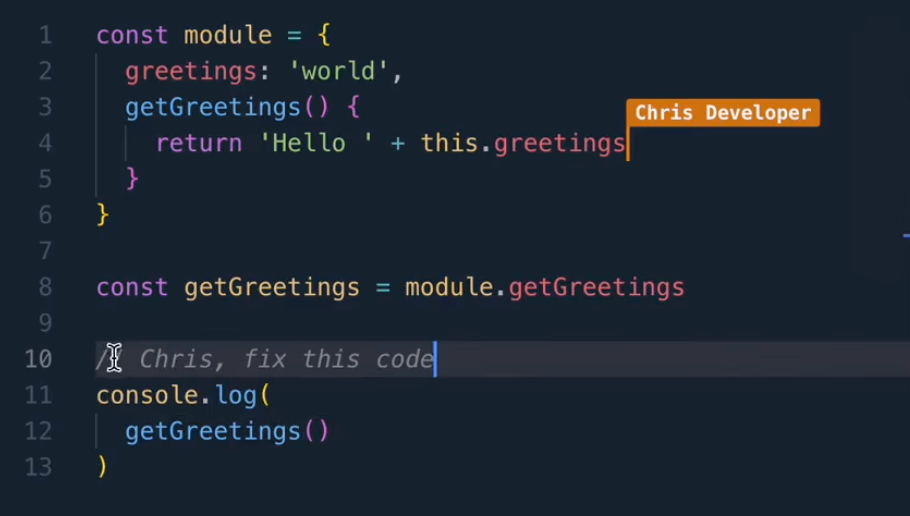
  • Multiplayer collaboration - Ability of multiple individuals to work together in real-time on a shared project
  • React Course
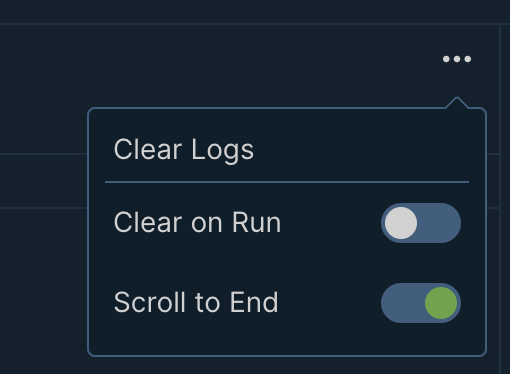
  • Clear console logs option
Multiplayer collaboration
Clear console logs

Improvements

  • .JS files now work as .JSX - many React users expect this behavior
  • Projects created by paid accounts no longer have the 8 lines limitation
  • Console better displays structures of nested objects and their prototypes
  • Preserved collapsed file directories on file creating/renaming
  • Improved installing speed for large packages (React MUI, Framer, MUI Icons, etc.)

Fixes

  • Fixed rate limiting issues when redeeming AppSumo deals
  • Projects in My Projects can now be opened in new tab with Ctrl+click or middle button

December 2022

FixedBuild

Version 2022.12.19

New

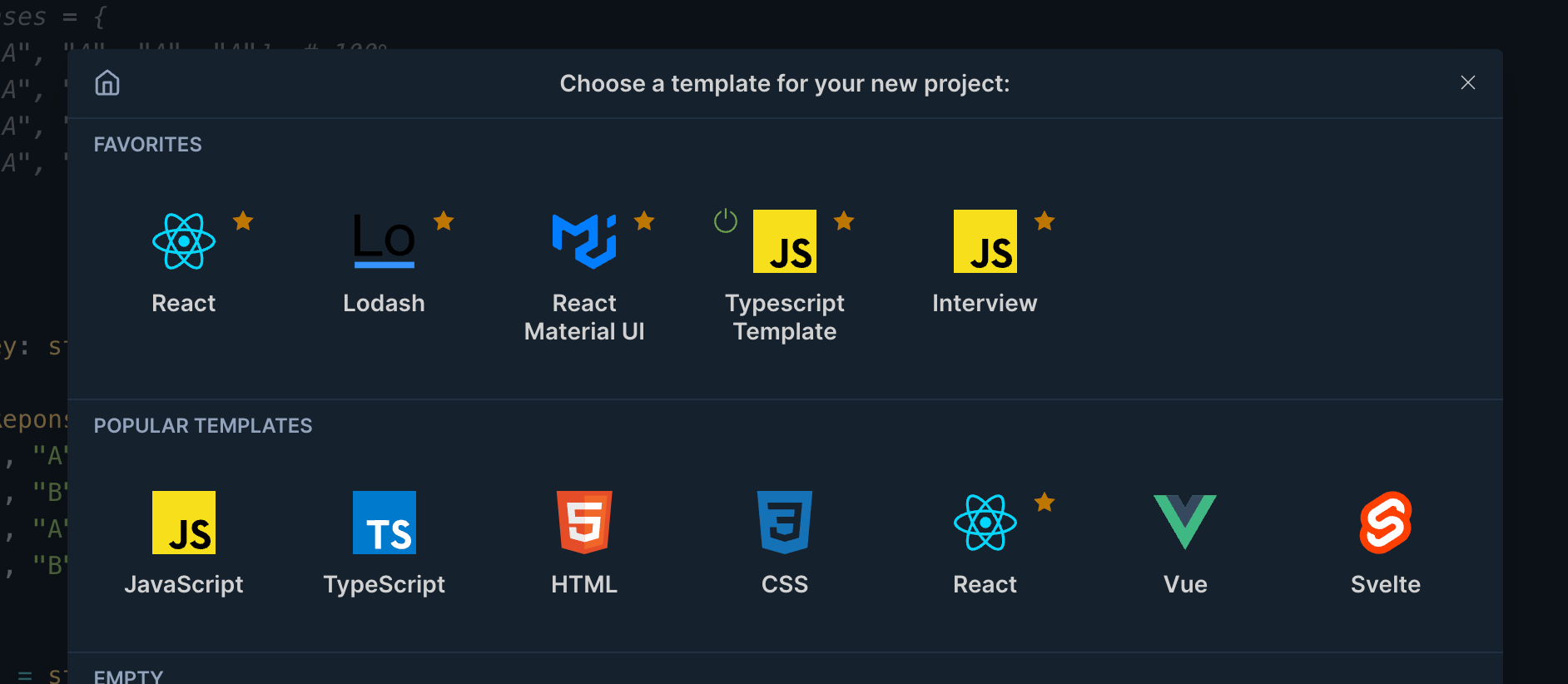
  • Favorites
  • Save project as a favorite template
Template favorites

Improvements

  • Set a default project in template selection popup. "Default project" is used instead of initial page, helping to open preferred template faster

Fixes

  • Fixed setting up a default project or template

September 2022

FixedBuild

Version 2022.9.14

New

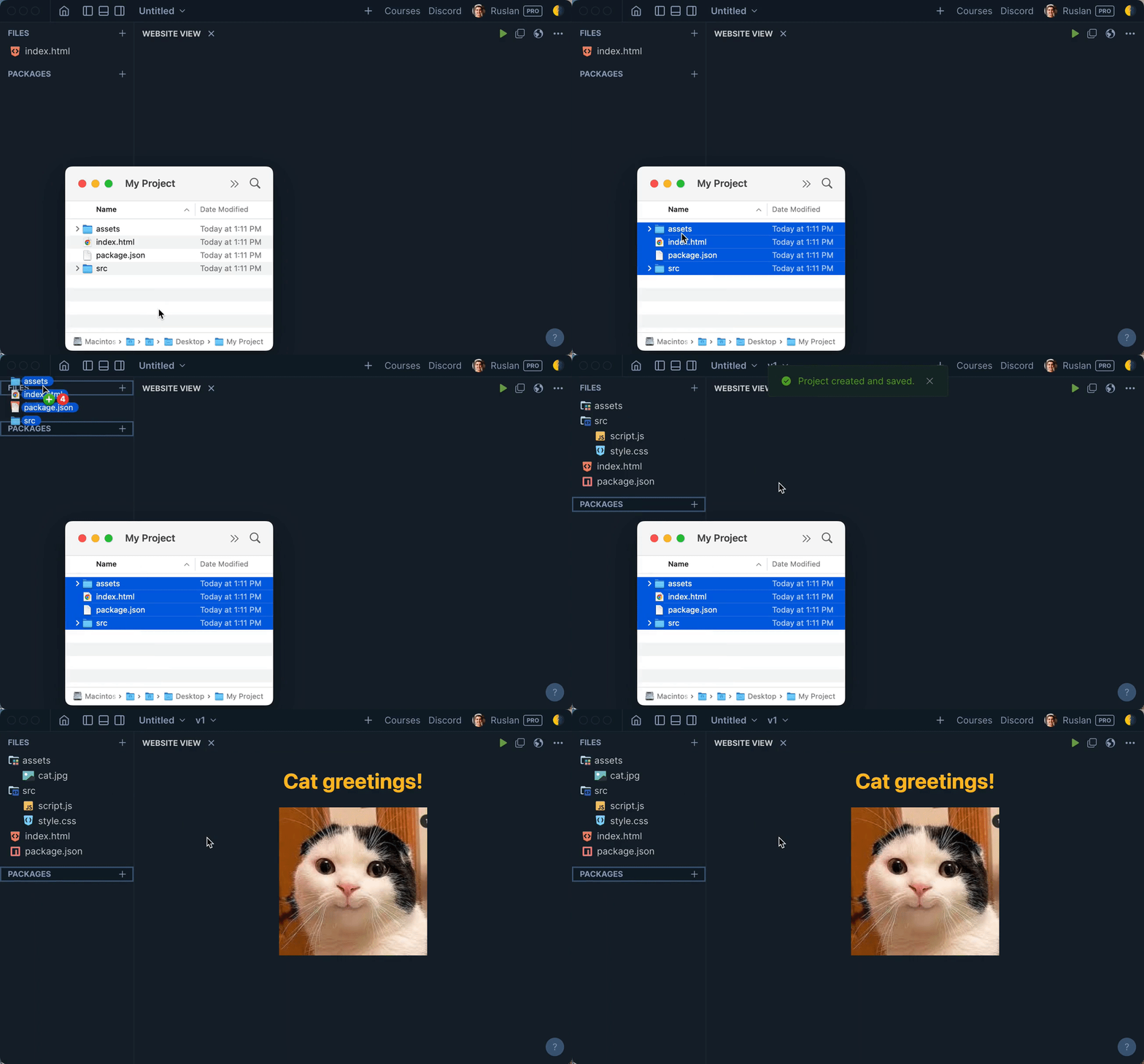
  • Upload folders with files
  • Drop folders and files right on files list
  • Autoselect filename without extension on renaming
Drag and drop files

Improvements

  • Double click to rename a file
  • Double click on "Untitled" to rename a project
  • Show package.json (it was hidden before)

Fixes

  • Fixed .svg using with <img src="file.svg">

FixedBuild

Version 2022.9.3

New

  • Add Discord chat
  • Add Rimbu template
  • Add option to make Website View white by default

Improvements

  • Return back Lifetime subscription for $199
  • Reduce home page size

Fixes

  • Fixed @rimbu/core package (it was producing infinite recursion)
  • Fixed a lot of testing errors in Frontend Developer Path course