AI app builder. Build the app, not just the demo.
Playcode is an AI app builder for web and mobile apps. Describe your app in plain words, and Playcode AI builds the screens and what’s behind them: sign-in, a database, payments, email and AI. Playcode can test the app in a real browser, runs it on Playcode Cloud, and a person on our team helps when the AI gets stuck.

2.6M+ projects started on Playcode. Your app is next.
“I’m glad you built it. I’ve been waiting 20 years.”
“Building Websites and Apps is Easy”
“Easily Built My Dream Website by Sharing My Site and Using Prompts”
Projects created across Playcode’s history, browser coding and AI projects together. Counted October 22, 2026.
A demo works when you click it. An app works when a stranger forgets their password.
The first version is the easy part with any AI app builder, Playcode included. The work starts with the first person who isn’t you: they sign up, forget their password, pay, upload a file and come back next week. That’s where many AI-built apps get stuck, and where the credits go.

Playcode builds what your customers touch after the demo.
| When a customer… | Playcode builds |
|---|---|
| signs up and comes back next week | sign-in and registration, password reset, and a database that keeps their records |
| pays you | checkout with your own Stripe account, each payment saved in your app |
| sends you a document | uploads kept with their record, and a screen where you review them |
| waits to hear back | the emails your app sends, such as confirmations and updates |
| writes at 11 at night to move a booking | an AI assistant that answers from your own rules and moves the booking |
| …and for you | an admin page with your customers, leads and settings, and logins for your team |
Each new app on Pro, up to 3, starts with sign-in, a database, an admin page, email and AI already connected, so your first prompts go into your idea, not the setup.
Payments need your own Stripe account, its fees and its approval. Your app emails your customers, password resets included, once you verify a domain of your own; buy one in Playcode and we add its email records. AI requests inside your app use credits, and so does email past 500 recipients a month on Pro.
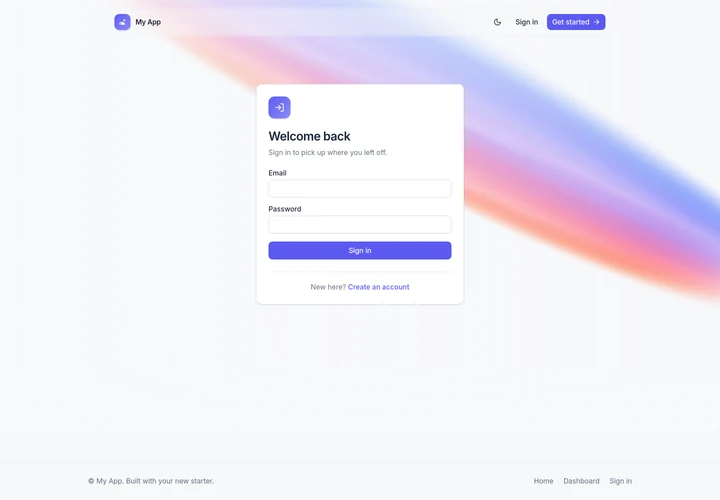
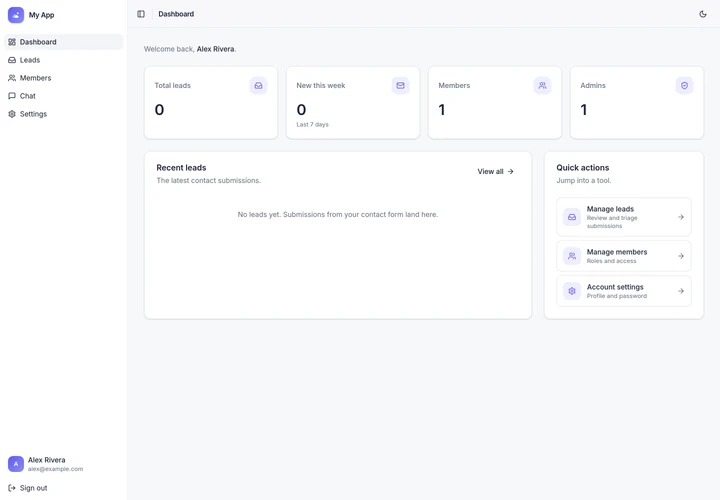
An AI app builder with code you can take with you.
Download your app as one ZIP: the screens, the server, the database layout and the tests, with a guide to running it on a server you rent. Your secret keys stay out of the ZIP, and the guide inside shows how to set them on your server. The live data of a published app moves separately. Before a big change, save a version; if the change goes wrong, go back: code, files and database together.
Download comes with paid plans. A restore replaces later changes and data.
When the AI gets stuck, a person looks at your project with you.
Write to us from the chat in the app or from playcode.io/help. A person on our team looks into the problem with you, fixes what broke on our side, helps finish a change the AI couldn’t make, and can return credits when the fault was ours.
“You can always write to us, and we’ll help however we can.”
“I was honestly pleasantly surprised at the communication I got with the support chat, above and beyond.”
Returning credits is our call, case by case. Otherwise credits stay spent, even on a try that didn’t work.
Build the web app first. Add iPhone and Android when you need them.

On the web
Playcode is an AI web app builder first. Your customers open your app in any browser, at a Playcode address or your own domain, and your team signs in to the same app from any computer.
On phones
The same project can also hold an iPhone and Android app that uses the same accounts and data: your web app inside an app for the stores, or a phone app with screens of its own. Open it on your phone while it’s being built: in the phone’s browser, or in the Expo Go app signed in to your own Expo account.
Phone apps need Pro. The App Store and Google Play need your own Apple and Google developer accounts and an Expo account for the builds, with their fees and their review.
Six questions to ask any AI app builder before you pay.
| Ask | Playcode’s answer |
|---|---|
| Where do sign-in, the database and payments run, and can they leave with you? | In the same project, on Playcode Cloud. The code downloads and runs on a server you rent; the live data moves separately. |
| Does it check its own work? | It can test the app in a real browser and with automated tests. Then you check. |
| What happens when the credits run out? | We email you. The app’s AI stops at once; the app keeps running for 72 hours, then stops until you add credits. |
| Who helps when the AI gets stuck? | A person on our team. |
| Can it build a phone app? | Yes, on Pro: iPhone and Android in the same project, published with your own store and Expo accounts. |
| Can I build the whole app on the free plan? | No. With trial credits, Free builds the screens; sign-in, a database and payments need Pro. |
How do you build an app with AI?
With an AI app builder, you describe the app and the AI builds it: the screens, the logic and the data. In Playcode it takes four steps. Here they are for the booking app above.

Describe it.
“Customers book a detailing slot and pay a deposit. My crew sees the day’s jobs.” Add notes, a sketch or a screenshot of an app you like. Playcode may ask a few questions first, such as how long a slot is.

Watch it build.
Playcode AI plans the app, then builds the booking page, the crew’s day view and the database behind them. You watch each screen appear in a live preview.

Try it like a customer.
Playcode AI can sign up in a real browser, book a slot and check the screenshots, then fix what it finds. It writes down what you decided, such as a 90-minute slot and a $50 deposit, so the next change starts from it. Then book a slot yourself and ask for changes.

Publish it.
Your booking app goes live on Playcode Cloud, at a Playcode address or your own domain; buy one in Playcode and we connect it. When customers ask for something new, ask Playcode for it in the same project.
Five apps, drawn from their first prompts.
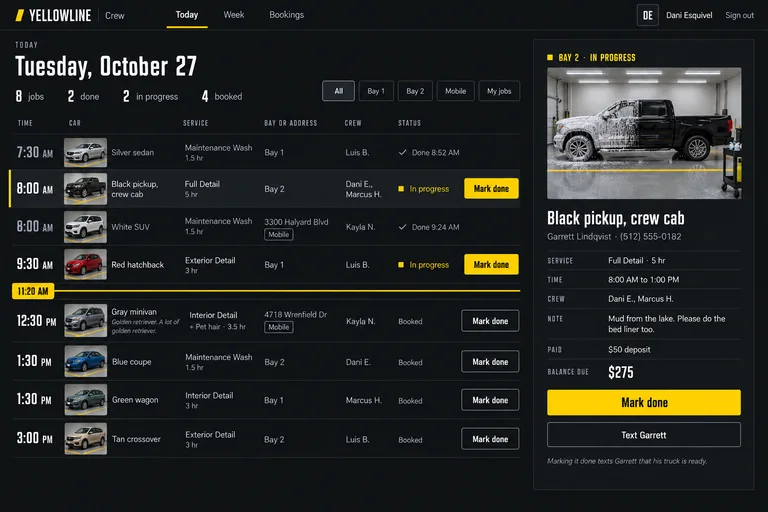
Each prompt says who uses the app and what they need to get done. Under it, an AI concept of the app it describes, in several screens, on a desktop and on a phone.
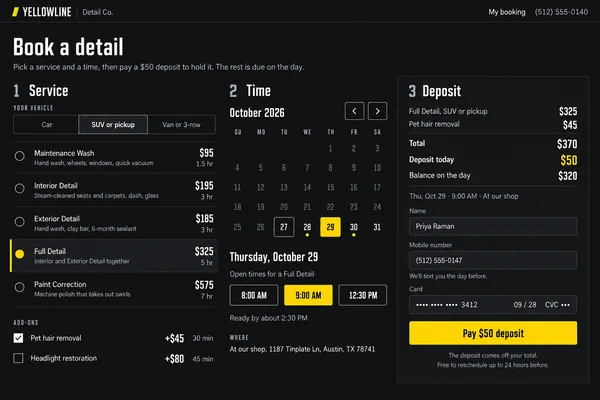
Booking and jobs
A booking app for my car detailing business. Customers pick a service and a time, pay a deposit and get a reminder the day before. My crew signs in to see the day’s jobs and mark each one done.
Drawn as Yellowline Detail Co., Austin (invented). Look: “Garage night”.
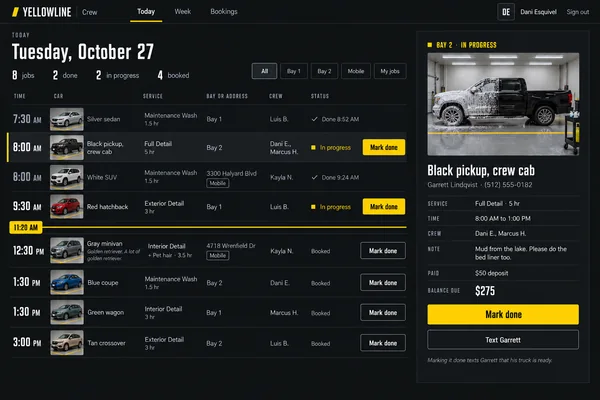

Second screen: the customer picks a service and a time and pays the $50 deposit.
Client portal
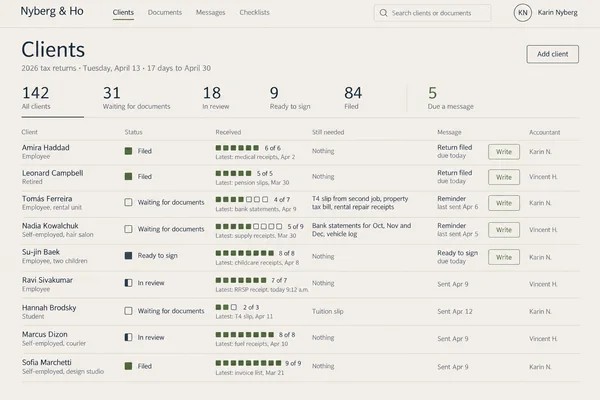
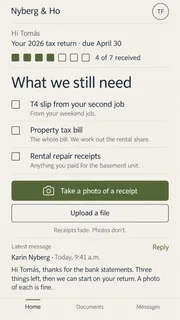
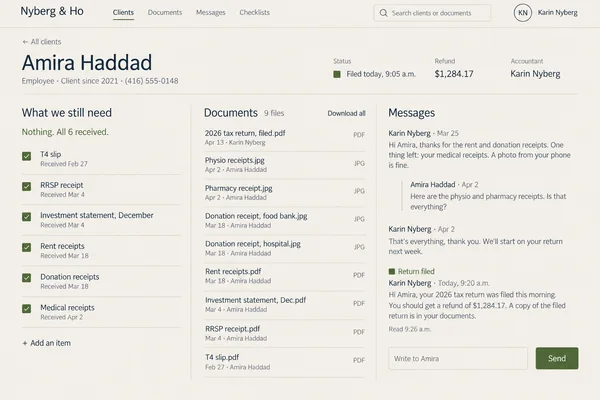
A client portal for my accounting practice. Clients sign in, upload receipts and statements, and see what we still need from them. We see every client’s documents in one place and message them when a return is filed.
Drawn as Nyberg & Ho, Toronto (invented). Look: “Nordic paper”.
Second screen: one client’s page, with their documents, the checklist and messages.
CRM
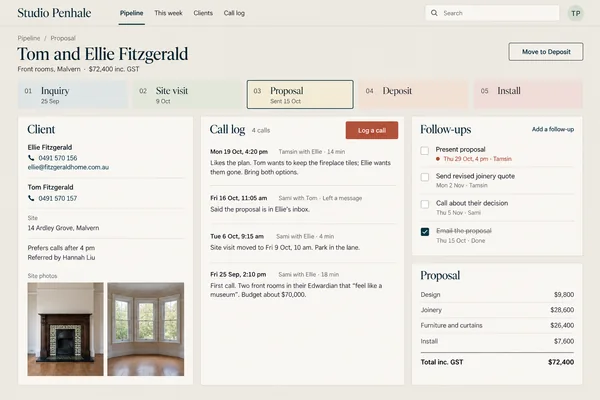
A CRM for my interior design studio with our own stages: inquiry, site visit, proposal, deposit, install. Log every call, set follow-ups and show which projects need us this week.
Drawn as Studio Penhale, Melbourne (invented). Look: “Gallery wall”.
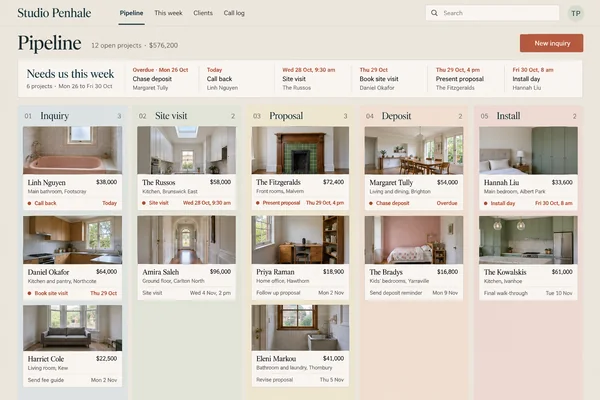

Second screen: one project, with its call log, follow-ups and proposal.
Marketplace
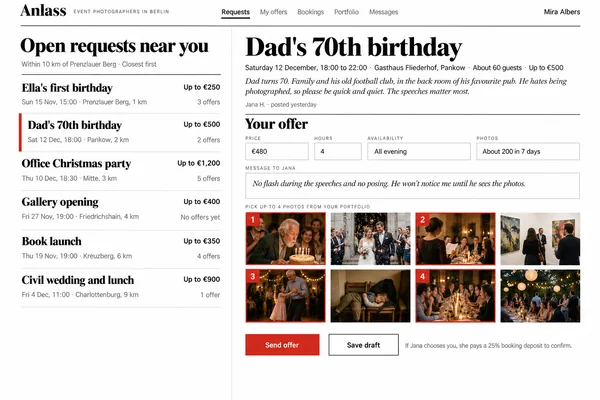
A marketplace for event photographers in my city. Clients describe their event and budget, photographers send an offer with their portfolio, and clients pay a booking deposit to confirm.
Drawn as Anlass, Berlin (invented). Look: “Editorial magazine”.


Second screen: the photographer’s side, with open requests nearby and an offer.
AI intake
An intake desk for my immigration law firm. Clients answer a few questions and upload their documents; AI reads them, builds a timeline and prepares a one-page brief for the lawyer.
Drawn as Hale & Mensah, London (invented). Look: “Ink and ledger”.
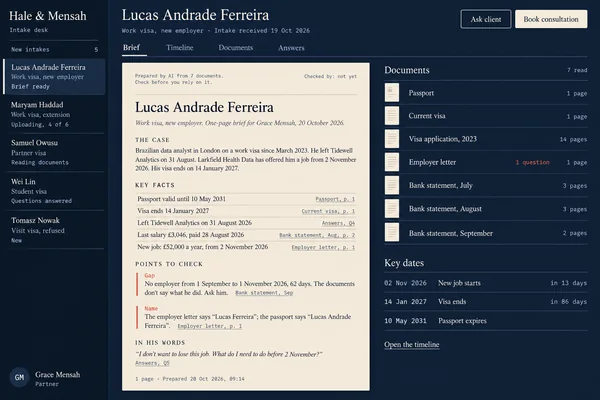
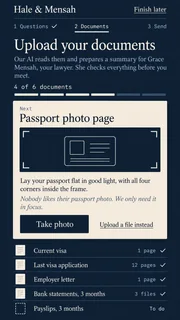
Second screen: the case timeline, with a gap flagged for the lawyer.
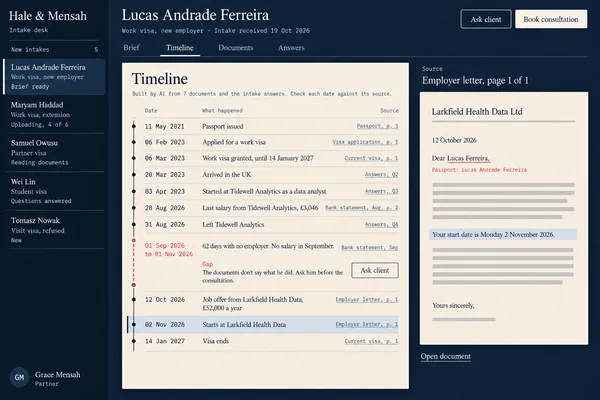
These designs are AI concepts drawn from the prompts, not screenshots of apps built in Playcode.
Bookings this week. Deposits next month. A CRM when your crew needs one.
Each step goes into the same project, with the rest of Playcode around it.

An AI agent for your customers.
Give your app its own AI agent. It reads the PDF a customer uploads, finds the order, books the slot and sends the email, and it runs on the engine behind Playcode AI.
On Pro and Max; it uses credits.
Explore Playcode AI GatewayYour domain and your app’s email.
Buy a domain in Playcode and we connect it. Send confirmations and updates from your app through Playcode Email.
Domain purchases and renewals are charged separately.
See how domains workImages, video and sound.
Generate logo concepts, icons, images, short videos, music and narration for your app, and ask Playcode to add them in the same conversation.
On paid plans, generation uses credits.
A product video and an investor deck.
Compose a product video from your app’s screens and captions, and make a presentation you can share as a link or download as an editable PowerPoint file.
Video rendering and PowerPoint exports run on Playcode Cloud.
People who find your app.
Research what people search for, check your pages’ speed and connect Google Search Console, then turn what you learn into changes in the same project.
Search research needs a paid plan and uses credits.
Explore SEO with AIYour team, and your phone.
Invite your cofounder or your crew and choose who can edit. Open Playcode in your phone’s browser and continue the same project.
See how Playcode Cloud runs your app
An AI app builder for your kind of app.
A mobile app needs different screens from an internal tool or a bot. Pick yours to see what it can include.
- Internal tools builder
- AI mobile app builder
- iPhone app builder
- Android app builder
- ChatGPT app builder
- Discord bot builder
- Telegram bot builder
- Chrome extension builder
- No-code app builder
Comparing AI app builders?
See how Playcode compares with Lovable, Bolt, Base44, v0, Bubble and Replit.
How much does it cost to build an app with AI?
On Playcode you can start free: if your account gets trial AI credits, which depend on your country and the signup offer, Playcode AI builds your app’s first screens so you can try the idea. The app behind them, with sign-in, a database and payments, needs Pro: $17 a month, billed $199 a year, or $19 if you pay monthly, with 76 credits a month for building and running it. Max starts at $100 a month. What your app costs depends on how much you build and change.
| What your app needs | Free | Pro | Max |
|---|---|---|---|
| Price | $0 | $17 a month, billed $199 a year, or $19 if you pay monthly | from $100 a month |
| Sign-in, a database and payments | Not included | Included | Included |
| AI to build it | Trial credits for eligible accounts | 76 credits a month; top-ups | 400 credits a month and up |
| Run it on Playcode Cloud | Not included | Up to 3 apps | Up to 10 apps |
| Your own domain | Not included | Connect or buy one | Connect or buy one |
| Download the code | Not included | Included | Included |
Credits are spent when the AI works, even on a try that doesn’t work out. A published app spends credits from the same balance: on Pro’s computer, 0.083 credits for each hour it’s awake, about $15 of credits for a month it never sleeps, and only its disk while it rests. Work on a timer, such as a reminder, needs the app awake: Playcode AI sets a wake schedule with your OK. Emails to your customers, password resets included, need a domain of your own: connect one you have, or buy a .com here for $17.99 a year, charged to your saved card, not credits.
Cancel any time in Billing: Pro stays active until the end of the period you paid for. Cancelling does not refund that period.
Questions about AI app builders
Updated

What is an AI app builder?
An AI app builder turns a description into a working app: the screens, the logic and the data behind them, without you writing code. It is also called an AI app maker, AI app creator or AI app generator. Playcode is an AI app builder for web and mobile apps that can also test your app and runs it on Playcode Cloud.
Do AI app builders really work?
Yes, for a first version, and many also add sign-in and a database. The hard part comes with real customers, who sign up, reset passwords, pay and come back. On Pro, Playcode builds those parts, can test them like a customer in a real browser, runs the app on Playcode Cloud, and a person on our team helps when the AI gets stuck.
Can AI build an app for me?
Yes, a first version you can click through and try. Describe who the app is for and what they should be able to do, and Playcode AI builds it. Then try every task a customer will do, check the details and ask for changes until it works the way you want.
Is there a free AI app builder?
Yes, with limits. On Playcode’s free plan you create an account without a credit card, and eligible accounts get trial AI credits to build an app’s screens and try the idea. An app with sign-in, a database and payments, running on Playcode Cloud, needs Pro: $17 a month, billed $199 a year, or $19 if you pay monthly.
Do I need to know how to code?
No. You describe the app in plain words, and Playcode writes the code. You still review the result and try what your customers will do. If you read code, or work with a developer, you can edit it too.
Can ChatGPT build an app?
Yes, within limits. ChatGPT can write the code, and on paid ChatGPT plans, ChatGPT Sites can host a web app with a database and sign-in (public beta, July 2026). OpenAI’s terms rule out payments there, and Sites runs no long-lived server or background jobs. For an app that takes payments, sends reminders on time or goes to the App Store, use an AI app builder such as Playcode, which builds and runs those parts in one project. See how ChatGPT Sites works.
Which AI can build a web app?
An AI web app builder. Playcode is one: describe the app, and Playcode AI writes the screens, the server and the database, can test them in a real browser and runs the app on Playcode Cloud, at a Playcode address or your own domain. The same project can later hold an iPhone and Android app.
Can I build a mobile app with AI?
Yes. On Pro, a Playcode project can hold an iPhone and Android app on the same backend as your web app. Publishing in the App Store and Google Play needs your own developer accounts and their review. See the AI mobile app builder.
Can my app take payments?
Yes. In an app on Pro, Playcode AI can build checkout with your own Stripe account and save each payment in your app. Stripe’s fees and approval apply; test a full payment before you go live. See how payments with Stripe work.
Can I add AI to my app?
Yes. In an app on Pro or Max, your app can answer questions from your own material, summarize documents or run agents that do work inside it, such as moving a booking. AI inside your app uses credits from the same balance as building. See Playcode AI Gateway.
What is the difference between an AI app builder and a no-code app builder?
A no-code app builder gives you blocks to drag into place, and many now add AI that sets up a first version. An AI app builder such as Playcode writes the app as code from your description, so you can change anything by asking, open the code or hand it to a developer.
AI app builder or AI website builder?
A website tells people about your business; an app is software people sign in to and use. Playcode builds both, and a website can grow into an app in the same project. See the AI website builder.
How safe is my app’s data?
Each Playcode Cloud app runs in its own isolated environment, on Cloud infrastructure in Germany and Finland, and you can save a version of its code, files and database before a big change. Who can see which records is part of what you build, so try the app signed in as different people before you launch. Playcode and its AI providers process data as part of the service; tell our team if your project has special requirements.
Which is the best AI app builder?
It depends on your app and on who will finish it. Ask each builder the six questions above, and try your app’s hardest task in each before you pay.
Is it legal to build an app with AI?
Yes, in general. The rules apply to what your app does and the data it collects: privacy, payments and the content you use. Check the rules for your industry. This is general information, not legal advice.
Tell Playcode who your app is for and what they should be able to do.
No credit card needed to create an account.