AI website builder. Build a website you’re proud to share.
Playcode is an AI website builder for your business. Describe what you do, or share the site you have. The AI writes the copy and designs pages built to fit phones, tablets and desktops. Change anything by asking, check each size in the preview, publish with hosting included and ask our team when you get stuck.

2.6M+ projects started on Playcode. Yours is next.
“I’m glad you built it. I’ve been waiting 20 years.”
“Easily Built My Dream Website by Sharing My Site and Using Prompts”
“Building Websites and Apps is Easy”

Design your website with AI and customize it in your own words.
Describe the look you want, or share a website you like. Playcode designs the layout, picks colors and fonts that fit your brand and writes the copy. Change any of it by asking.

Copy that explains what you do.
Get headlines, service pages and FAQs written around your business, in a professional tone or your own voice. Keep editing until the words say what you mean.

Layout, colors and fonts.
Ask for a new layout, a warmer palette or a cleaner font, and see the change in the live preview.

Logo concepts, images and icons.
Generate logo concepts, icons and images for your pages, or bring your own brand assets. Refine the look in the same project.

Video, voice and music.
Generate short clips, compose a product video from your screens and captions, and add a spoken welcome or a soundtrack where it helps.

Every screen size.
Playcode builds your pages to fit phones, tablets and desktops. Switch the preview between them and check each one before you publish.
Ask Playcode to create an image, a clip or a soundtrack and add it to your page in the same conversation.
Image, video and sound generation come with paid plans and use credits. Review the visuals and listen to the audio before publishing.
Product-video rendering runs on Playcode Cloud and uses project resources.
How do you build a website with AI?
With an AI website builder, you describe your business in a prompt and the AI generates the website: the layout, the pages and the copy. In Playcode you see it in a live preview, customize it by asking, check it at phone size and publish it with hosting included.

Describe your website.
Write a prompt about your business, your customers and what visitors should do. Add a reference or your current site. Playcode helps you plan the pages, words and visuals.
Customize the design.
Watch the website take shape in the live preview. Ask for a new layout, other colors or a clearer headline. On a static site, such as a website on Free, you can also edit text and styles yourself in the visual editor.

Check it and go live.
Try the website as a visitor at desktop, tablet and phone sizes. Check the content, links and forms. Publish when you are ready, then keep improving it.
Write your prompt the way you would brief a designer.
Say what you do, who the website is for and what a visitor should do next. Name the pages and the facts to include. Playcode may ask a few questions before it builds.
Restaurant
A website for my bistro in Valencia: our breakfasts, main dishes and desserts with photos and prices, a gallery of the room, our opening hours and a button to message us on WhatsApp.


Accounting practice
A professional website for my accounting practice. Explain our three services and how our fees work, introduce the team and make it easy to email us for a first call.


Wedding photographer
A portfolio for my wedding photography: a full-width gallery of my best work, a short story about me, my three packages and a contact page.


Online course
A landing page for my six-week online yoga course: who it is for, what students learn each week, the price and a button to reserve a place by email.
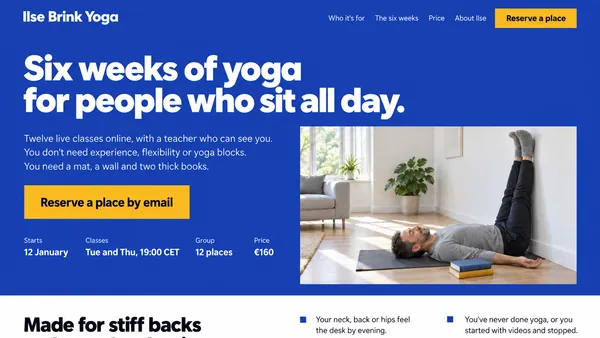

These designs are AI concepts drawn from the prompts, not screenshots of websites built in Playcode. A short prompt works too: you can change everything after the first version.
An AI website builder for your kind of business.
A restaurant needs its menu and opening hours, a law firm its practice areas, a photographer a gallery. Pick yours to see what its website can include.

- Real estate website builder
- Music website builder
- Dental website builder
- Auto repair website builder
- Fitness website builder
- Car dealer website builder
- Electrician website builder
- Photography website builder
- Salon website builder
- Landscaping website builder
- Doctor website builder
- Law firm website builder
- Florist website builder
- Insurance website builder
- Restaurant website builder
Redesign the website you already have.
Your business has moved on. Your website can too.
Share your current website and tell Playcode what feels dated, what should stay and what visitors should do next. Get a modern design built for phones and desktops, and check each size in the preview. Your current site stays live until you switch your domain.
Bring the content of pages Playcode cannot read, such as pages behind a login. Customer records, bookings and connected services need a separate migration.

Go live with hosting included. Keep improving your website.
Publish with Playcode hosting and HTTPS. Use a free Playcode address, or connect a custom domain on a paid plan. Buy a domain in Playcode and we handle its connection.
Add your next service. Show your latest work. Give a new offer its own landing page. Open the same project, ask for the change and review it before publishing.
Continue from your phone’s browser or invite someone to work with you. Your website can keep up with the business behind it.
Domain registration and renewal are charged separately to your saved card.

Help customers find your website on Google.
Your website is live. Now find out how people search for what you do.
Ask Playcode to research the keywords people use and the pages that rank for them. Use the results to write a useful service page, make your offer clearer or improve existing content.
Connect Google Search Console to see which searches show your site and how often people click. Ask for a speed check with Google Lighthouse, then work through the changes.
The SEO research and the website are in the same project, so you can turn what you learn into the next update.
Search engines can index sites published on a paid plan; Free sites are not indexed. On paid plans, search research uses credits and runs when you ask.

Checks before you publish, and people to help when you get stuck.
A good-looking page also has to work when a customer taps a button.
For Cloud projects, Playcode’s agent can write and run tests, open the site in a browser and inspect screenshots. Ask it to check a visitor’s task, such as a booking, and work through the problems it finds before a customer runs into them. Review the result and try the journey yourself.
If a technical problem gets in the way, tell our team what you were trying to do and share the project. A person can look into it with you and help you work through the next step.

An AI website builder with code you own.
The code behind your website is yours. Export the whole project, tests included. Run it on any VPS you rent, or hand it to another developer.
Moving a website with live records or connected services also means planning their migration. You choose where your project goes next.

Start with a website. Grow it into an app when you need one.
The website can be the whole project. It can also be the beginning.
Let clients sign in to see their documents. Build an appointment workflow around the way you work. Add an AI assistant that answers questions from your own material.
Build these features into the same project with Playcode Cloud when you need them. Publishing a Cloud app requires a paid plan; some features need external services and usage fees.

What’s included, from the first draft to the next change.
The words, the design, the hosting and the work after launch, in one place you can come back to.
- Pages and copy. Headlines, service pages and FAQs written around your business.
- Layout, colors and fonts. A design that fits your brand, changed by asking.
- Images and logo concepts. Generated for your pages on paid plans, or bring your own.
- Video and sound. Short clips, product videos, narration and music on paid plans.
- Phone, tablet and desktop layouts. Playcode builds your pages to fit each size; check them in the preview before you publish.
- A visual editor. On static sites, adjust text and styles yourself.
- Hosting and HTTPS. A free Playcode address, or your own domain on a paid plan.
- Domains. On a paid plan, buy a domain in Playcode and we connect it for you; registration is charged separately.
- SEO research. Keywords, competing pages, Search Console and Lighthouse checks on paid plans.
- Room to grow. Sign-ins, bookings and an AI assistant with Playcode Cloud, on a paid plan.
- Code you own. Export the whole project and run it on any VPS you rent.
- People to ask. A person from our team can look into a technical problem with you.
How much does an AI website builder cost?
Playcode starts free: a public static website can stay on a Playcode address with Playcode branding, within Free limits. Pro costs $19 a month, or $199 a year ($17 a month), with 76 credits each month for AI work, plus your own domain and Cloud publishing. Max starts at $100 a month.

| What your website needs | Free | Paid plan |
|---|---|---|
| Price | $0 | Pro $19 a month, or $199 a year ($17 a month); Max from $100 a month |
| A public static website | Playcode address and branding, within Free limits; not indexed by search engines | Publish within your plan’s limits; search engines can index it |
| AI to build and revise it | Trial credits for eligible accounts | Included credits; optional top-ups for more work |
| Your own domain | Not included | Connect or buy a domain; registration and renewal cost extra |
| Accounts, saved records and other Cloud features | Cloud publishing is not included | Cloud publishing, subject to plan and usage limits |
Give the first version a clear job: explain your offer, show your work and give visitors a next step. Review that version and your credit usage before adding more.
Credits pay for AI work, including planning, building, checking and revisions. The total depends on your scope and changes. A subscription is not a fixed quote for a finished website.
Questions about the AI website builder
Updated

What is an AI website builder?
An AI website builder generates a website from your description. You explain your business in a prompt, and the AI writes the copy, designs the layout and builds the site. Other names for the same kind of tool: AI website generator, AI website maker, AI website creator and AI site builder. In Playcode you review the website in a live preview, change it by asking and publish it with hosting included.
Can AI build a whole website for me?
Yes, a first version. Describe your business and Playcode writes the headlines and page copy, generates images and logo concepts on paid plans, and builds the website for you to review. Treat the AI-generated website as a draft: check the facts, prices and contact details, and ask for changes until it fits. Sign-ins, bookings and other app features take more steps and a paid plan for Cloud publishing.
What kinds of websites can you build with AI?
A website for a service business, a portfolio, a landing page for one offer, a blog, a restaurant or event site, or a redesign of the site you have. See AI website builders by type of business.
Is Playcode a free AI website builder?
Yes, with limits. Free includes public static websites on a Playcode address with Playcode branding and usage limits. Search engines do not index sites on Free; on a paid plan they can. Eligible accounts receive trial AI credits; the amount and availability depend on the signup offer and country. More AI work, custom domains, code export and Cloud publishing require a paid plan. Every plan, Free included, can make a project private.
Is website hosting included?
Static website hosting is included through Playcode Pages under your plan’s limits. Free static sites use a Playcode address and show Playcode branding. Apps with a backend or database use Playcode Cloud, which requires a paid plan and has resource, balance and service limits. Domain registration and renewal are separate purchases.
How much will my website cost?
Free costs $0 and hosts a public static website on a Playcode address with Playcode branding. Pro is $19 a month, or $199 a year ($17 a month), with 76 credits each month; Max starts at $100 a month. AI work uses credits, so the total depends on the website’s scope and the changes you request. Cloud apps, connected services and domains can add costs. A subscription is not a fixed quote for a finished website. See plans, allowances and limits.
Which AI website builder is right for a small business?
The one that fits the job your website has to do. A one-page site for an offer, a service business with several pages, a redesign of an existing site and a website that should later take bookings or sign-ins each need different things. Playcode fits when you want AI to write and build the whole website, keep changing it in conversation and own its code. See our comparison of AI website builders.
Do I need to know how to code?
No. You create a website with AI by describing what you want in plain language; on a static site, you can also use the visual editor for supported changes. Playcode builds the code behind the website. You still review the content and test what visitors need to do before publishing.
Can ChatGPT make a website?
Yes. ChatGPT can write the code for a website, and ChatGPT Sites can publish one. Playcode is built for the website after the first draft: the pages, the live preview, hosting and every later change stay in one project, and you can ask our team for help when a technical problem gets in the way. See how ChatGPT Sites works.
What are the limits of an AI website builder?
AI can misread a vague request, so review every page before you publish, especially facts, prices, legal text and contact details. Payments, bookings and other integrations need setup, and some need external services with their own fees. AI work uses credits. No builder can promise rankings or customers: you still test what works with real visitors.
Can I redesign a website I already have?
Yes. Share its address and explain what should stay or change. Playcode can use accessible public pages as a reference; bring content it cannot read. Review the new website before switching your domain. Customer records, bookings, plugins and connected services need separate migration work.
Will my website show up on Google?
On a paid plan, search engines can index your website; Free sites are not indexed. Where it ranks depends on your content, your competitors and the sites that link to you. Ask Playcode to research keywords, competing pages, backlinks and search results, then improve the website. Search research needs a paid plan and uses credits for new lookups. You can also ask for a Lighthouse speed check or connect Search Console, read-only, to see how people find your site. Rankings, traffic and AI recommendations are not guaranteed.
Can I use my own domain?
Yes, on a paid plan. Connect a domain you own, or buy one in Playcode. Playcode handles the connection for domains bought here. Existing domains may need a setting changed at their current provider. Registration and renewal are charged separately to your saved card.
Can I edit my website after it is published?
Yes. Open the same project, ask for changes, such as a new page, a different layout or other colors, and review them before publishing. AI edits use credits. On a static site, supported visual edits let you adjust content and styling yourself. You can also invite a collaborator and choose their access.
Will my website work on phones?
Yes. Playcode builds responsive pages, designed to fit phones, tablets and desktops. On a computer, switch the preview between desktop, tablet and phone sizes and check each one before you publish. You can also keep working from your phone: open Playcode in a mobile browser, sign in and continue the conversation. You need an internet connection.
Can I export the code and move my website?
Yes. You own your code. Export the whole project, tests included. Run it on any VPS you rent, or hand it to another developer. Running it elsewhere may require setup. A website with a live database, uploaded files or connected services also needs a migration plan for those parts.
Can I go back if a change goes wrong?
For Cloud projects, saved versions can restore the code, files and database together. Choose the saved point carefully: later changes and data will be replaced. See Playcode Cloud for recovery and export details.
How do I write a good prompt for an AI website builder?
Say what you do, who the website is for and what a visitor should do next. List the pages you want and the facts to include, such as prices, hours and contact details, and name a website you like. Then review the first version and ask for one change at a time. See four example prompts.
Is it legal to use AI to make a website?
Yes, in general: the rules apply to what you publish. Check the facts, use only text, images and names you have the right to use, and add the legal pages your business needs, such as a privacy policy. Before you use a generated logo concept, check it against registered trademarks. This is general information, not legal advice.
See what the AI website generator makes of your business.
Describe what you do. Playcode designs the pages, writes the words and builds the website with you. No credit card needed to create an account.