A dependable CRM is not a pipeline board with editable labels. It is a set of related contact, company, opportunity, and activity records with explicit ownership, server-side access, allowed stage transitions, safe imports, understandable conflicts, and a recovery path that does not erase legitimate work.
This guide builds the smallest complete sales workflow first. A fictional consulting team imports contacts, assigns opportunities, records activities, moves deals through a controlled pipeline, handles an email-provider outage, exports an authorized workspace, and deletes personal fields without breaking the audit trail. Every critical rule is exercised by a downloadable deterministic artifact.
QUICK ANSWER
How do you build a CRM?
Define contacts, companies, opportunities, activities, roles, and allowed stage transitions before drawing the interface. Enforce workspace and record access on the server, use idempotency keys for retries and versions for concurrent changes, preview imports, separate provider delivery from CRM saves, then test export, deletion, recovery, and cross-account denial before real customer data enters the system.
Write the CRM contract before you build the pipeline
Use fictional data from two workspaces and at least two ordinary sales users. A single administrator account makes every access path look correct and hides the cross-account failures that matter most.
- One bounded sales process: Choose one kind of opportunity, one team, one pipeline, and one definition of done. Write the allowed stages, who may move each stage, the required next action while a deal is open, and the close reason required when it is won or lost.
- A record and relationship map: Define contact, company, opportunity, and activity records separately. Give every record a stable ID, workspace scope, owner where relevant, timestamps, and a version. State whether one contact may belong to several companies or opportunities instead of letting the interface decide accidentally.
- A role, privacy, and retention matrix: Name what sales representatives, managers, administrators, and read-only users may list, view, create, update, transition, import, export, delete, repair, and recover. Minimize personal data and name the owner and timing for retention, deletion, and authorized export.
- An import and provider boundary: Collect a small fictional spreadsheet with stable source-row keys, valid rows, invalid rows, and one ambiguous possible duplicate. If email or calendar activity is required, record the provider account, current plan, API or webhook path, scopes, limits, rotation, outage, and reconciliation behavior first.
Credentials and access
| Credential | Minimum access | Storage and rotation |
|---|---|---|
| Optional email or calendar provider credential A server-side OAuth credential, API key, or webhook signing secret issued by the provider you choose | Only the exact send, read, calendar, or event scopes required by the reproduced workflow; avoid account administration and unrelated mailbox access | Environment-specific server configuration only, never browser code, source control, URLs, screenshots, imported rows, CRM records, exports, or routine logs Authorize a replacement with the minimum scope, update one environment, verify one fictional attempt and any signature path, then revoke the previous credential using the provider procedure |
Choose where CRM truth lives
A useful first CRM keeps durable sales records authoritative and treats inboxes, calendars, notifications, and spreadsheets as import or delivery boundaries. This choice determines whether an outage can rewrite the pipeline and whether operators can explain what happened.
| Approach | Best for | Tradeoff |
|---|---|---|
| Application database as the CRM source of truth | Custom workflows that need explicit stages, owners, permissions, imports, audit history, and controlled provider retries. | The team must define synchronization and reconciliation instead of assuming an external inbox or spreadsheet always contains the current business state. |
| Existing CRM or spreadsheet as the source of truth | Teams that already operate a maintained system and only need a focused interface, report, or automation around supported records. | The application inherits provider schemas, permissions, rate limits, stale-data behavior, outages, and export constraints, and every write needs a conflict policy. |
| Bidirectional synchronization | Validated workflows with a documented owner for each field, stable external identities, conflict resolution, replay, and reconciliation operations. | It is the most complex choice because duplicate identities, partial writes, delayed events, deletions, and two concurrent edits all need explicit deterministic behavior. |
Recommended:Start with the application database as the authoritative record for one sales process. Import existing data through a previewed batch and keep provider attempts separate. Add synchronization only after the team can name the owner, identity, conflict rule, retry identity, and recovery procedure for every synchronized field.
Build a CRM step by step
Define the sales contract, model related CRM records, enforce server roles, implement transitions and conflicts, preview imports, isolate provider attempts, test failures, publish, and operate the workflow.
STEP 01
Define one complete sales workflow
Bound the first release around one opportunity lifecycle and the information a seller needs for the next action.
Write the journey from a contact and company entering the CRM through opportunity assignment, qualification, proposal, win or loss, and follow-up. Name who owns the opportunity, what the next action means, and which facts are required before each stage change.
List the loading, empty, denied, stale, validation-error, provider-error, deleted, and recovery states. Do not start with dashboards, scoring, forecasting, or automation whose definitions and source records do not exist yet.
Expected result: The brief identifies one authoritative record, current owner, stage, next action, version, and allowed actor for every point in the first opportunity lifecycle.
Verify it: Walk one fictional opportunity from creation to won and one to lost, then identify every required field, transition, denial, and operator repair without referring to a screen mockup.
STEP 02
Model contacts, companies, opportunities, and activities separately
Give each business fact a stable identity and connect records through explicit relationships.
A contact represents a person, a company represents an organization, an opportunity represents a possible deal, and an activity records a bounded interaction or next-action change. Store workspace scope on every private record and use stable IDs rather than names or emails as relationships.
An open opportunity needs an owner, current stage, next action, created and updated timestamps, and version. A terminal opportunity needs a close reason. Activities append history; they should not silently replace the current opportunity record.
type OpportunityStage = 'new' | 'qualified' | 'proposal' | 'won' | 'lost'

type Opportunity = {
  id: string
  workspaceId: string
  companyId: string
  primaryContactId: string
  ownerUserId: string
  stage: OpportunityStage
  nextAction: string | null
  closeReason: string | null
  version: number
  createdAt: string
  updatedAt: string
}
Expected result: Changing an opportunity stage does not rewrite the person, company, or prior activity, and deleting personal contact fields does not erase the opportunity audit history.
Verify it: Create two contacts with similar names in different workspaces, link one company and opportunity, append two activities, then verify every relationship resolves by scoped stable ID.
STEP 03
Derive workspace, role, ownership, and action on the server
Treat the authenticated session and server membership records as the authorization source of truth.
Resolve the current user from the server session, load active workspace membership, and authorize the requested record plus action before returning private fields or applying a change. Ignore browser-supplied role, workspace, owner, or permission claims.
Apply the check to lists, details, activities, updates, transitions, imports, exports, deletion, repair, and recovery. A sales representative may update assigned opportunities while a manager may reassign or export, but both still require the same workspace scope.
Expected result: A signed-out request, private session, another workspace, read-only user, or unassigned salesperson receives a bounded denial without CRM fields or a partial change.
Verify it: Replay the same known contact, company, opportunity, activity, import, export, and deletion IDs in each context and inspect the raw server result and final record state.
STEP 04
Enforce stage transitions and expected versions
Centralize the pipeline state machine and detect stale concurrent edits before overwriting them.
Allow only the documented transitions, such as new to qualified, qualified to proposal, and proposal to won or lost. Validate the owner and next action for open stages and require a close reason for terminal stages. Record previous and next state in a bounded audit event.
Require the caller to submit the version it read. One of two concurrent writes may advance the record; the other receives a conflict with the current safe summary and must reload or reconcile. An idempotency key is not a substitute for this version check.
Expected result: Invalid jumps, missing close reasons, wrong owners, and stale writes fail closed, while one authorized current-version transition increments the version exactly once.
Verify it: Submit two proposal updates with the same expected version, attempt new directly to won, close without a reason, and repeat the accepted request. Compare stage, version, idempotency record, and audit count.
STEP 05
Separate request retries from human duplicate decisions
Use a technical identity for one attempt and a reviewed policy for possibly matching people or companies.
Store an idempotency key and safe request fingerprint for retryable creates and commands. Return the prior result for an exact retry, but reject the same key when the workspace, actor, operation, or intended fields change.
Potential duplicate contacts require a written match policy and operator review. A shared name, phone number, or email address can be incorrect, reused, or shared. Never auto-merge solely from one human-readable field.
Expected result: A lost response can retry without creating another record, changed key reuse fails closed, and ambiguous people remain separate until an authorized reviewer decides.
Verify it: Repeat one create with the same key and fields, reuse the key with a changed company, and submit two similar contacts through the import preview. Compare results, record counts, and review queue.
STEP 06
Preview imports before applying accepted rows
Make field mapping, validation, duplicates, rejections, and apply results reviewable as one batch.
Give the import batch and every source row a stable key. Show mapped fields, normalized values, proposed action, validation errors, likely matches, and whether the row is accepted, rejected, or quarantined for ambiguous review before any business record changes.
Apply accepted rows idempotently and store row-level results. Invalid emails, missing company references, unknown owners, and forbidden stages should stay rejected. A retry of the same batch should return the same results rather than importing again.
Expected result: The operator can account for every source row, accepted records apply once, rejected rows explain why, and ambiguous rows remain unresolved without a silent merge.
Verify it: Preview valid, invalid, and ambiguous fictional rows, check the totals, apply once, retry the batch, then compare row keys, record IDs, rejection reasons, quarantine state, and final counts.
STEP 07
Keep provider attempts outside the CRM save boundary
Commit the sales record or activity before sending email, calendar, or another provider request.
Store a provider attempt with its own stable identity, linked CRM record, operation, safe request fingerprint, status, retry count, provider response ID, and bounded error. Provider credentials remain server-side and provider webhooks require their current signature and event-identity contract.
A timeout or outage must not erase, duplicate, advance, or roll back a contact, opportunity, or activity. Retry only the failed provider attempt. Reconcile a later provider event with the durable CRM record instead of trusting the browser or delivery screen as business truth.
Expected result: The CRM activity remains single and reviewable during an outage, while the provider attempt advances from failed to sent without changing the opportunity version.
Verify it: Record one fictional activity, simulate provider outage, retry to success, and replay a duplicate result. Compare activity count, opportunity version, attempt identity, retry count, and provider response ID.
STEP 08
Design export, deletion, repair, and recovery as separate actions
Give operators bounded tools instead of treating whole-app restore as the answer to every data problem.
Authorize exports on the server and define the exact contact, company, opportunity, activity, and audit fields each role may receive. Keep credentials, internal authorization data, deleted personal fields, and unrelated workspace records out of the file.
Delete or redact personal fields under the retention policy while preserving the minimum referential and audit facts the business is permitted to retain. Repair one record through an expected-version command. Include versions, idempotency decisions, import results, provider attempts, and audit order in recovery so old retries do not apply again.
Expected result: An authorized export is bounded to one workspace, deletion removes the selected personal fields, record repair remains audited, and recovery preserves prior retry and conflict decisions.
Verify it: Run authorized and denied exports, delete a fictional contact, repair one opportunity, restore the artifact state, then replay a prior request key and inspect record counts, versions, redaction, and audit facts.
STEP 09
Run the deterministic fictional CRM workbench
Exercise the domain rules and inspect the modern operator interface before using real sales data.
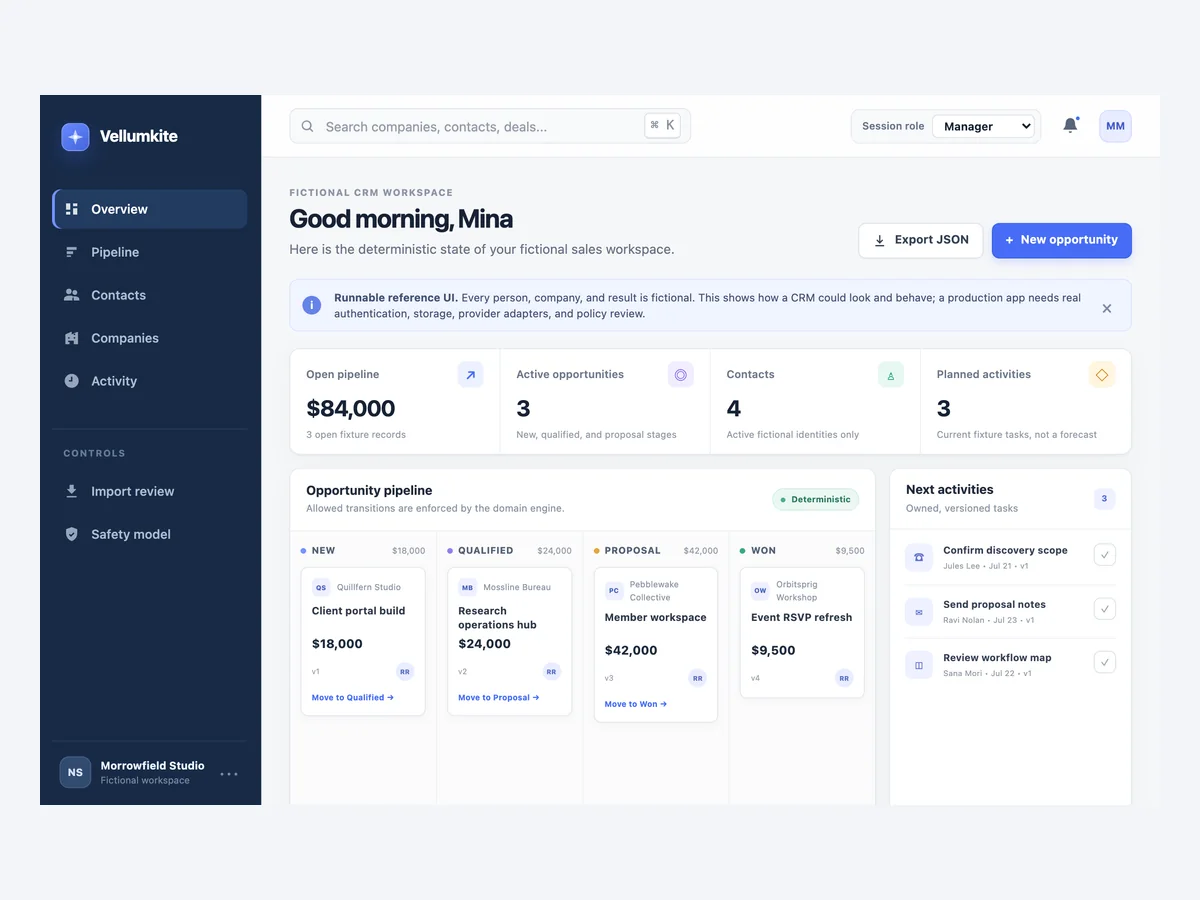
Download the fictional CRM workbench, extract it, run npm test with a current Node.js release, then open index.html. The package has no runtime dependencies, network calls, provider credentials, or real customer data.
Add fixtures for the actual stages, ownership policy, required fields, import mappings, deletion policy, provider behavior, and recovery process. Assert stored records and audit facts rather than only interface messages.
Expected result: The artifact proves the documented contacts, companies, opportunities, activities, roles, transition, version, retry, import, provider, export, deletion, repair, recovery, and cross-account boundaries.
Verify it: Run the suite twice, confirm every scenario passes, compare the archive SHA-256 with the evidence note, and inspect the fictional pipeline, selected opportunity, activity history, and import review in the interface.
STEP 10
Publish and run a two-account CRM smoke test
Verify the final HTTPS environment with fictional records before importing real customer information.
Publish the CRM, sign in as an ordinary salesperson, create one contact and company, create and advance one assigned opportunity, append one activity, preview and apply a small fictional import, simulate one provider failure, and export only the authorized workspace fields.
Repeat known list, detail, activity, transition, import, export, deletion, and repair requests signed out, in a private session, from another workspace, as a read-only user, and as an unassigned salesperson. Inspect bounded logs for personal data and secrets.
Expected result: The intended user completes one CRM lifecycle, provider failure remains separate, and every wrong account, role, owner, and stale version stays denied in the published environment.
Verify it: Record bounded request, workspace, user, record, import, and provider-attempt IDs, inspect final stored state and audit facts, then delete or retain the fixtures according to the written policy.
STEP 11
Monitor pipeline integrity and rehearse bounded recovery
Detect stuck work and authorization failures without copying customer data into logs.
Monitor denied actions by safe reason, stale-version conflicts, invalid transitions, opportunities without a next action, import batch outcomes, quarantined matches, provider retry age, exports, deletions, and operator repairs using stable bounded IDs.
Write separate runbooks for correcting one record, retrying one provider attempt, resolving one import row, exporting one workspace, deleting one contact, and restoring the whole app. A saved-point restore also moves the database to that point and can move later legitimate changes backward.
Expected result: An authorized operator can identify the authoritative record and safe next action without exposing secrets or personal payloads and without restoring the whole CRM for a bounded error.
Verify it: Rehearse one stale edit, incorrect stage, ambiguous import, provider outage, deletion request, authorized export, record repair, and restore-versus-repair decision with fictional IDs.
CRM tests that catch real workflow failures
Use stable fictional IDs and assert record counts, workspace scope, ownership, stages, versions, idempotency decisions, import rows, provider attempts, exports, redaction, and audit facts after every request.
| Test | Scenario | Expected result |
|---|---|---|
| happy path | Create a contact and company, assign an opportunity, advance new to qualified to proposal to won, append activities, and export the authorized workspace. | Separate records remain linked, every transition increments one version, the close reason is stored, activities are chronological, and the export contains only approved workspace fields. |
| invalid input | Request known CRM IDs signed out and from another workspace, jump directly to won, omit a close reason, use an unknown owner, import invalid rows, and delete as a read-only user. | Every action fails closed or stays rejected without leaking private fields, changing records, applying a partial import, or recording a successful audit event. |
| retry | Repeat one exact create, reuse its key with changed fields, submit concurrent transitions from one version, apply one import twice, and retry a provider attempt after an outage. | Exact retries return the prior result, changed reuse and the stale transition are rejected, import counts stay single, and only the provider attempt changes on delivery retry. |
| production smoke | On the final HTTPS CRM, complete one fictional opportunity as the assigned seller and repeat list, detail, activity, import, export, deletion, and repair paths across two workspaces and signed out. | The intended path works once while server-derived workspace, role, ownership, transition, privacy, and recovery boundaries remain enforced. |
Diagnose CRM failures from the authoritative record
The visible pipeline is only a projection. Compare identity, workspace membership, record ownership, current version, import row, provider attempt, and audit facts before changing data or asking a salesperson to retry.
| Symptom | Likely cause | Check | Fix |
|---|---|---|---|
| One workspace can see another workspace's contact or opportunity | The handler looked up a known record ID before applying server-derived membership and workspace scope. | Replay the exact list, detail, activity, update, export, and deletion request as an ordinary user in the second workspace and inspect the raw response plus authorization result. | Require current identity, active membership, workspace, record scope, ownership or role, and requested action before returning fields or changing state. |
| Two sellers overwrite each other's opportunity changes | The mutation used last-write-wins or treated an idempotency key as a concurrency version. | Compare the version each request read, submitted expected version, final version, actor, timestamp, and audit events. | Require an expected version, accept one current write, return a recoverable conflict for the stale write, and make the user review the current record. |
| The same retry creates two contacts or activities | The server did not persist the request idempotency key and safe fingerprint before returning the durable result. | Compare keys, fingerprints, actor and workspace scope, record IDs, response results, and audit counts for both attempts. | Persist one scoped idempotency decision with the business write, return it for an exact retry, and reject changed content under the same key. |
| The import count does not match the source rows | Rows were applied before the complete preview, invalid rows were skipped silently, or an ambiguous match auto-merged. | Compare batch ID, source-row keys, mappings, accepted, rejected, quarantined, applied, and retry results with the final record IDs. | Preview the complete batch, show every row result, apply only approved rows idempotently, and keep ambiguous matches quarantined for review. |
| An email-provider outage changes or loses the CRM activity | The activity save and provider request shared one success boundary or the user was asked to repeat both operations. | Compare the activity ID and opportunity version with the separate provider-attempt ID, status, retry count, error, and response ID. | Keep the durable activity authoritative and retry only the provider attempt under its original identity. |
| A deleted contact still appears in an export or log | Deletion changed the visible row but did not apply the retention rule to export fields, derived views, provider payloads, or routine logging. | Trace the contact ID through current records, authorized exports, import history, provider attempts, caches, and bounded logs under the deletion policy. | Redact or delete the approved personal fields across controlled copies, invalidate derived views, preserve only permitted referential facts, and record the bounded deletion action. |
| A restored CRM accepts an old import or create again | Recovery restored business records but omitted idempotency decisions, import row results, versions, provider-attempt identities, or audit order. | Compare pre-recovery and restored keys, fingerprints, batch rows, versions, attempt IDs, record counts, and audit sequence, then replay the prior request. | Treat retry and import decisions as durable CRM state, include them in recovery, and run duplicate replay after every restore change. |
Publish and operate the CRM as a private business system
Deploy
Publish over HTTPS and verify the final domain, authentication, session expiry, workspace selection, list and detail access, stage transitions, import preview and apply, provider failure, authorized export, deletion, and record repair with fictional accounts.
If email, calendar, analytics, or another provider is added, separate development and production accounts or credentials. Re-check current scopes, endpoint, webhook signature, limits, event identity, rotation, outage, and reconciliation before enabling real customer data.
Monitor
Monitor authentication outcomes, denied actions by safe reason, stale-version conflicts, invalid transitions, open opportunities without next actions, import batch totals, quarantined matches, provider retry age, export activity, deletion, and operator repairs with stable IDs.
Do not log passwords, sessions, credentials, raw provider payloads, full contact profiles, message bodies, imported personal rows, export contents, or free-text sales notes. Prefer bounded IDs, result classes, versions, stages, and reason codes.
Recover
Support correcting one record under expected version, reassigning an owner, resolving one import row, retrying one provider attempt, generating a scoped export, and applying a deletion request as separate authorized and audited commands.
Treat source-code export, CRM-record export, provider reconciliation, record repair, and whole-app restore separately. A whole-app saved-point restore returns code, files, and database to that point, so later legitimate CRM changes can also move backward.
CRM security and privacy checklist
CRM records contain personal and commercial context. Collect only what the workflow needs, enforce every action at the server boundary, and make sensitive exports, deletion, and operator repairs rare, scoped, and auditable.
- Derive identity, active workspace membership, role, record ownership, and allowed action on the server for every list, detail, activity, update, transition, import, export, deletion, repair, and recovery request.
- Never trust browser-supplied workspace IDs, roles, owner IDs, stages, close reasons, permissions, provider success, or hidden controls as authorization.
- Use idempotency keys plus safe fingerprints for technical retries, expected versions for concurrent changes, stable source-row keys for imports, and a documented operator policy for human duplicate review.
- Keep provider credentials and webhook signing secrets in environment-specific server configuration with minimum access, tested rotation, and no appearance in source, URLs, screenshots, CRM records, exports, analytics, or logs.
- Minimize personal fields, bound text and import sizes, name retention and deletion owners, and obtain separate legal, privacy, security, and compliance review before collecting sensitive or regulated data.
- Authorize export schemas and deletion commands explicitly. Exclude credentials, access-control internals, deleted personal fields, unrelated workspace rows, and private data outside the approved purpose.
- Rate-limit sign-in, search, bulk import, export, provider callbacks, destructive actions, and operator repair according to their abuse, privacy, and cost boundaries.
- Keep audit events bounded to actor, workspace, record, action, previous and next state, version, timestamp, and reason code rather than copying personal fields or free-text notes.
- Test signed out, private session, two ordinary workspaces, read-only role, assigned and unassigned sales users, current and stale versions, provider outage, deletion, export, and recovery before production data.
Questions about building a CRM
What is the minimum useful custom CRM?
Start with separate contacts, companies, opportunities, and activities; one opportunity pipeline; current owners and next actions; server-side roles; import preview; authorized export; and a test matrix covering another workspace, retries, stale writes, provider failure, deletion, and recovery.
Is Playcode a packaged CRM?
No. Playcode is an AI app builder that can build and run a custom CRM workflow as real code. This guide does not claim a native sales database, inbox, calendar sync, lead scoring, forecasting, attribution, or reproduced customer CRM service.
How should contacts and companies be related?
Use stable IDs and an explicit relationship that matches the business. A contact may have one primary company, several roles, or independent relationships. Do not use a company name or email domain as the authorization or identity source of truth.
How do I prevent duplicate CRM records?
Use an idempotency key and request fingerprint to stop one technical attempt repeating. Handle possible human duplicates through a written uniqueness rule and review queue. Never merge automatically on a shared name, phone number, or email alone.
How should a CRM import work?
Create a stable batch and source-row key, map fields, validate every row, show accepted, rejected, and ambiguous results before applying, then store each row result. Exact retries should return the prior outcome instead of creating records again.
Can a custom CRM connect to email or calendars?
Yes when the selected provider has a supported API, webhook, or other path and you supply the account, current plan, minimum server-side credentials, mappings, limits, rotation, and tests. Keep provider attempts separate so delivery failure never rewrites CRM truth.
What is the difference between idempotency and record versions?
Idempotency recognizes the same technical request so a retry returns one result. A record version detects that someone else changed the record after you read it. A CRM needs both because a lost response and a concurrent sales edit are different failures.
How should CRM deletion and export work?
Authorize each action on the server, define the exact record and field scope, remove or redact personal data according to the retention policy, and preserve only permitted referential and audit facts. Code export does not automatically include live CRM data.
Should I restore the whole CRM to fix one bad record?
Usually not. Prefer an authorized expected-version repair for a bounded error. A whole-app restore returns the code, files, and database to a saved point and may move later legitimate work backward. Reconcile providers and exports separately.
Build the smallest complete sales workflow
Turn Your CRM Contract into a Working App
Describe the records, roles, stages, imports, failures, and recovery path. Playcode can build the interface and database-backed workflow, then help you test it with fictional accounts before real customer data enters the system.
Start Building with PlaycodeNo packaged CRM, native inbox, calendar sync, scoring, forecast, or provider integration is implied.