A useful Slack bot needs more than an OAuth token and a message listener. Its public endpoint must authenticate the exact request bytes, reject replayed timestamps, answer Slack URL verification, acknowledge events within three seconds, and process every global event identity once even when Slack retries delivery.
This guide builds an incident-triage bot around a locally reproduced Node.js handler. The same-release artifact proves the inbound signature, replay, challenge, record-before-ack, and retry boundaries without using a real workspace. App installation, provider event delivery, and an actual bot reply remain explicit manual checks.
QUICK ANSWER
How do you create a Slack bot?
Create a Slack app, request only the scopes your workflow needs, install it to a controlled workspace, and expose an HTTPS Events API endpoint. Verify Slack HMAC signatures over the raw body, reject timestamps older than five minutes, answer `url_verification`, persist each `event_id`, return HTTP 200 within three seconds, and process the stored event asynchronously.
Prepare the Slack app and one narrow event contract
Start with a controlled workspace and an incident fixture that contains no customer or employee secrets. Decide exactly which event wakes the bot and which channel data it may read.
- A Slack workspace with installation authority: Use a development workspace or obtain administrator approval. Record who owns the app, who can rotate credentials, and whether the app will remain internal or require a distribution review.
- A public HTTPS Events API endpoint: The endpoint must preserve raw request bytes, read Slack signature headers, write a durable event claim quickly, and return HTTP 200 before doing incident lookup or message generation.
- A durable event store and worker: Use a unique constraint on `event_id`, keep a pending state before acknowledgement, and let a worker recover pending events if dispatch fails after the response.
- A least-privilege incident lookup: Define which incident fields may appear in a channel, who can request them, and how private channels or sensitive incidents are rejected. A mention does not automatically authorize every record.
Credentials and access
| Credential | Minimum access | Storage and rotation |
|---|---|---|
| Slack signing secret App credential used only to verify inbound Slack request signatures | Only the HTTPS request-verification adapter needs it. The browser, event worker, and ordinary channel members do not. | Store as a server-side Playcode secret such as `SLACK_SIGNING_SECRET`. Never put it in client code, a prompt, source, URL, screenshot, or routine logs. Rotate it in Slack app settings after exposure or ownership change, update the server secret atomically, and verify the new signature path before retiring the old deployment. |
| Slack bot OAuth token Installation credential used for authorized Web API methods | For this workflow, install only the scopes required for `app_mention` and `chat.postMessage`, beginning with `app_mentions:read` and `chat:write`. | Store separately as a server-side secret such as `SLACK_BOT_TOKEN`. Never send it to the browser or include it in fixture code, generated UI, or logs. Revoke or reinstall the app when the token is exposed, scopes change, or workspace ownership changes. Confirm the old token can no longer post. |
Slack platform constraints
- Slack signs HTTP requests with the app signing secret. Compute HMAC-SHA256 from `v0:{timestamp}:{rawBody}` before a framework parses or rewrites the body, then compare the complete `v0=` signature using a timing-safe function.
- Reject requests whose `X-Slack-Request-Timestamp` differs from local time by more than five minutes. Signature validity alone does not stop capture-and-replay inside an unlimited time window.
- Slack expects a successful Events API acknowledgement within three seconds and retries failed deliveries. Its outer event envelope includes a globally unique `event_id`, which is the correct idempotency key for one delivery effect.
- For a bot that listens only when mentioned and posts a reply, start with `app_mentions:read` and `chat:write`. Workspace administrators may still need to approve installation, and distribution or Marketplace review adds policy requirements.
- Slack plan features, rate limits, admin settings, retention, Marketplace rules, and API terms can change. Re-check official documentation and the target workspace before release.
Official references: Verifying requests from Slack, Slack Events API, Using HTTP Request URLs, url_verification event, app_mention event, chat.postMessage method
Choose the inbound Slack delivery model
The Events API can reach an HTTPS request URL or use Socket Mode. The event contract is similar, but the trust boundary and operations differ.
| Approach | Best for | Tradeoff |
|---|---|---|
| Events API over HTTPS | A deployed Playcode app with a stable public endpoint and durable storage. | It fits normal web infrastructure, but raw-body signature verification, replay protection, fast acknowledgement, TLS, and retries are your responsibility. |
| Socket Mode | Development or an internal service that cannot accept a public inbound URL. | It avoids a public request URL but requires a long-lived WebSocket worker and an app-level token, plus reconnect and deployment operations. |
Recommended:Use HTTPS for a hosted production bot because it aligns with Playcode deployment and keeps the sample reproducible. Persist `event_id` before acknowledging and process from storage. Choose Socket Mode only when the private-network constraint justifies a continuously connected worker.
Create a Slack incident-triage bot
Create and install a least-privilege Slack app, implement raw-body request verification and durable event identity, run fixtures, deploy HTTPS, and finish with a controlled workspace smoke test.
STEP 01
Define the mention and permitted response
Specify one event, one command shape, and one safe incident summary.
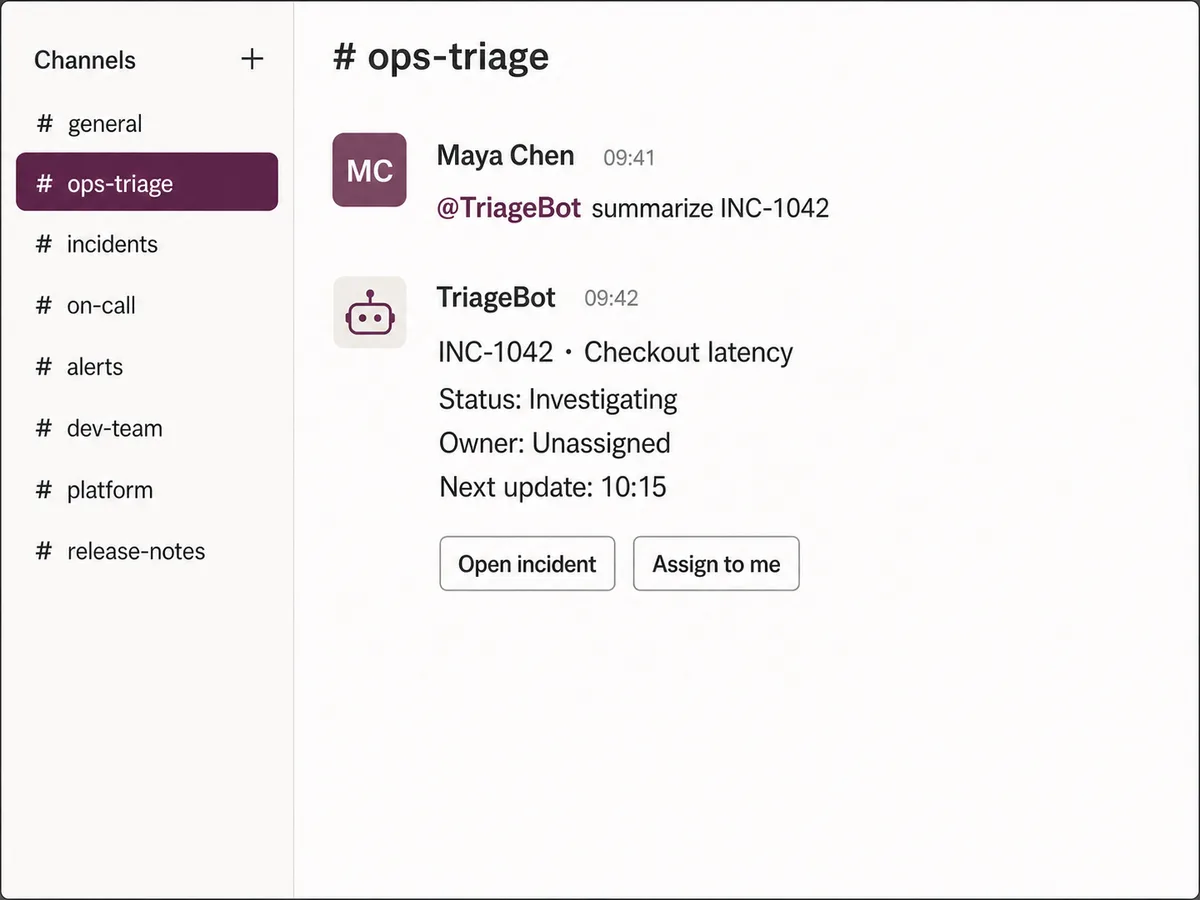
Use an `app_mention` such as `@TriageBot summarize INC-1042`. Define accepted incident IDs, not-found behavior, channel restrictions, and the exact fields the bot may reveal.
Keep the first fixture fictional. Decide whether the requester, channel, and workspace are authorized before connecting the handler to real operations data.
Expected result: The bot contract names the event, input grammar, response fields, authorization rule, and rejected cases.
Verify it: Review fixtures for a permitted incident, unknown incident, malformed identifier, unauthorized channel, and repeated event delivery.
STEP 02
Create the Slack app and install minimum scopes
Create one app identity without granting broad workspace history.
Create an app from Slack app settings, add bot scopes `app_mentions:read` and `chat:write`, install it to the controlled workspace, and record the owner and approval path.
Store the signing secret and bot token as separate server secrets. Do not enable unrelated event subscriptions or message-history scopes for this first workflow.
Expected result: The app is installed to the intended workspace with a bot identity and only the two documented scopes.
Verify it: Inspect the installed app permissions and source diff; confirm neither credential appears in code, browser assets, screenshots, prompts, or logs.
STEP 03
Verify timestamp and v0 signature over raw bytes
Authenticate the provider request before JSON parsing or business work.
Read `X-Slack-Request-Timestamp` and reject a difference greater than 300 seconds. Build the exact byte sequence `v0:{timestamp}:{rawBody}` and compute HMAC-SHA256 with the signing secret.
Compare the supplied complete `v0=` value with a timing-safe function. Capture the raw body before middleware parses or re-serializes JSON.
const base = Buffer.concat([
  Buffer.from(`v0:${timestamp}:`, 'utf8'),
  rawBody,
])
const expected = `v0=${createHmac('sha256', signingSecret)
  .update(base)
  .digest('hex')}`
if (!sameSignature(supplied, expected)) return unauthorized()
Expected result: Wrong signatures and stale timestamps return 401 before event parsing, lookup, storage, or outbound Slack calls.
Verify it: Run the wrong-signature fixture with malformed JSON and the 301-second stale fixture; both must return authentication errors, not JSON errors.
STEP 04
Answer URL verification and claim event_id
Support provider setup while making retries harmless.
After authenticating the signed request, return the `challenge` as plain text for `url_verification`. Ignore the deprecated token inside that JSON payload.
For `event_callback`, require the outer global `event_id` and insert it into durable storage under a unique constraint. A duplicate returns HTTP 200 without a second dispatch.
Return HTTP 200 after the durable record exists, within Slack’s three-second deadline. Process the incident and call `chat.postMessage` in a worker, not inside the request path.
Expected result: Slack can validate the URL, new events become pending records before acknowledgement, and retries do not duplicate the worker effect.
Verify it: Run the challenge, record-before-ack, and retry fixtures; confirm dispatch begins only through `afterResponse()` and occurs once for one event ID.
STEP 05
Run the deterministic handler artifact
Prove the inbound boundary without a live Slack credential.
Download and extract the same-release ZIP, enter `triage-slack-events`, and run `node --test slack-handler.test.mjs` with Node.js 22.
Inspect the test-generated signatures and injected event dispatcher. They prove local request handling but do not prove Slack installation, Events API routing, or `chat.postMessage` delivery.
Expected result: All six named fixture tests pass and the archive contains only reviewed source.
Verify it: Read each assertion, run `unzip -t`, and scan the source for OAuth token patterns, private keys, and unrelated network calls.
STEP 06
Deploy HTTPS and configure Event Subscriptions
Publish the authenticated endpoint before giving Slack its URL.
Deploy on Playcode with the signing secret and bot token stored server-side. Confirm an unsigned POST returns 401 and the endpoint preserves raw request bytes.
In Slack app settings, enable Event Subscriptions, enter the exact HTTPS Request URL, let Slack complete the signed challenge, and subscribe the bot to `app_mention`.
Expected result: Slack marks the Request URL verified and the subscription lists only the intended bot event.
Verify it: Inspect the provider verification state, a redacted request record, and endpoint latency. Do not print signature secrets, tokens, or full private messages.
STEP 07
Run a workspace smoke test and monitor retries
Close the manual provider boundary with controlled data.
Invite the bot to a controlled channel, mention it with a fictional incident, and verify one reply. Repeat the mention as a new Slack event and distinguish that from a retry of the same event ID.
Monitor acknowledgement latency, invalid signatures, stale requests, pending event age, duplicate event IDs, worker failures, Slack API errors, and rate-limit responses without logging tokens or full message bodies.
Expected result: A real Slack mention produces one authorized response and an operator can diagnose failed or duplicate delivery from bounded metadata.
Verify it: Capture a redacted smoke record with UTC time, workspace, channel class, event ID, acknowledgement latency, scopes, and response result.
What the result can look like
Test authentication, retries, and the real provider boundary
Local fixtures should prove deterministic request behavior. The final published smoke test is separate because it needs your Slack app, workspace, credentials, and channel.
| Test | Scenario | Expected result |
|---|---|---|
| happy path | Send a correctly signed fresh `app_mention` fixture with a new `event_id`, then invoke the returned post-response dispatcher. | The handler records one pending event, returns HTTP 200 before worker dispatch, and dispatches the stored identity once. |
| invalid input | Send malformed JSON with the wrong signature, then a correctly signed request whose timestamp is 301 seconds old. | Both requests return 401 before parsing or storage, with distinct invalid-signature and stale-request codes. |
| retry | Send the same signed event envelope again with Slack retry headers after the first event has been dispatched. | The handler returns HTTP 200 with a duplicate result, keeps one stored event, and does not dispatch it again. |
| production smoke | Mention the installed bot once in a controlled channel with a fictional incident after the Request URL is verified. | Slack receives HTTP 200 within three seconds, the event is stored once, and the channel receives exactly one permitted response. |
Common Slack bot failures
Use the request headers, bounded event metadata, provider settings, and durable state to locate the failed boundary before changing code.
| Symptom | Likely cause | Check | Fix |
|---|---|---|---|
| Every Events API request fails signature verification | The framework parsed or changed the body before HMAC calculation, the wrong app secret is deployed, or the full `v0=` prefix is omitted. | Compare raw-body capture order, deployed app ID, timestamp string, base-string bytes, and expected signature length without printing the secret. | Capture raw bytes first, deploy the matching signing secret, and compute the exact `v0:{timestamp}:{rawBody}` value. |
| Slack retries events with `http_timeout` | Incident lookup, AI generation, or `chat.postMessage` runs before the HTTP response and exceeds three seconds. | Measure time to durable insert and response separately from worker duration; inspect `x-slack-retry-reason` and pending-event age. | Persist the event quickly, return HTTP 200, and move all variable work to a recoverable worker. |
| The bot posts duplicate incident summaries | `event_id` is not unique in durable storage, or the idempotency record is written only after posting. | Search by outer event ID and compare insert, acknowledgement, worker, and outbound-message timestamps. | Claim the event ID transactionally before acknowledgement and make the worker resume the same stored effect. |
| The Request URL never becomes verified | The route rejects or wraps the authenticated `url_verification` challenge, uses the deprecated body token, or times out. | Inspect the signed request type, signature result, content type, exact returned challenge, status, and latency. | Verify the signature first, then return the exact challenge promptly as plain text or a supported response form. |
Operate the bot as a small event system
Deploy
Deploy the HTTPS receiver, durable event table, worker, and outbound Slack adapter as separate responsibilities. Keep signing and OAuth secrets server-side and validate the Request URL before enabling the event subscription.
Record the installed workspace, granted scopes, subscribed events, app owner, recovery owner, and last manual smoke date. Treat scope changes as a new security review and reinstall boundary.
Monitor
Track acknowledgement latency, signature and replay rejections, event inserts, duplicate IDs, pending age, worker attempts, Slack API errors, rate limits, and redacted end-to-end smoke results.
Use event ID, app ID, team ID, channel classification, timestamps, and bounded error codes for diagnosis. Do not log signing secrets, OAuth tokens, authorization headers, or full private messages by default.
Recover
If the receiver acknowledged but dispatch failed, scan pending durable records and resume by event ID. Do not rely on Slack to redeliver an event that already received HTTP 200.
If a credential is exposed, rotate or reinstall the app, update secrets, confirm old access is revoked, and rerun URL verification plus the controlled mention smoke test.
Keep workspace access and incident data bounded
The inbound signature proves which Slack app sent the request. It does not authorize every channel member to read every incident or make every action.
- Verify the fresh timestamp and HMAC signature over raw bytes before JSON parsing, storage, lookup, or outbound calls.
- Keep the signing secret and bot OAuth token separate, server-side, redacted, and rotatable. Never put either in generated UI or downloadable examples.
- Start with `app_mentions:read` and `chat:write`; add history, user, file, or admin scopes only for a reviewed feature that cannot work without them.
- Authorize the requester, workspace, channel, and incident record before revealing operational data or executing an action.
- Use durable `event_id` idempotency and a recoverable outbox or equivalent for outbound effects. Redact channel messages from routine logs.
Slack bot questions
What scopes does this Slack bot need?
For a bot that reacts only when mentioned and posts a response, begin with `app_mentions:read` and `chat:write`. Do not add channel-history or admin scopes unless a documented feature requires them and the workspace owner approves the increased access.
Why must the handler use the raw request body?
Slack signs the exact body bytes it sent. Parsing and re-serializing JSON can change whitespace or ordering, which changes the HMAC. Capture raw bytes before middleware parses them, verify the signature, and only then decode the event.
Why reject timestamps older than five minutes?
A valid HMAC can be copied with the original request. Slack’s timestamp check limits that replay window. Compare it with trusted local time and reject a difference greater than 300 seconds before processing.
How should a Slack bot handle retries?
Persist the outer globally unique `event_id` before returning HTTP 200. A later delivery with the same ID should be acknowledged without a second business effect. Keep the first pending record recoverable if worker dispatch fails.
Does the local artifact prove a real Slack bot works?
It proves six deterministic inbound handler behaviors and archive integrity. It does not create or install a Slack app, verify a live Request URL, receive a provider event, call the Web API, or post a real message. Those require your workspace and credentials.
Can the bot process the incident before acknowledging?
It should not perform variable work in the request path. Slack expects a successful response within three seconds. Persist the authenticated event, acknowledge quickly, then let a worker perform lookup, AI work, and `chat.postMessage` with recovery.
Build the event boundary first
Create the Slack bot as inspectable code
Describe the event, permitted data, response, idempotency rule, and failure states. Playcode can build the app and tests while you retain the real source.
Build with Playcode AINo credit card required. Provider app, credentials, scopes, approval, and live verification remain yours.