A production WhatsApp bot has two different webhook trust paths. Meta verifies your callback with a GET challenge and your chosen verification token; later POST deliveries must be authenticated with `X-Hub-Signature-256` over the exact raw body using the Meta App Secret. Treating those secrets as interchangeable creates a dangerous gap.
This guide builds an appointment-request flow in Playcode around a locally reproduced Node.js handler. The artifact proves challenge handling, POST authentication, message-identity idempotency, fast acknowledgement, and status-only behavior. A real Meta app, WABA subscription, phone registration, customer message, outbound reply, template approval, and provider billing remain manual boundaries.
QUICK ANSWER
How do you create a WhatsApp bot?
Create a Meta app and WhatsApp Business Account, register an owned phone number, and deploy an HTTPS webhook. Return `hub.challenge` only when the GET verification token matches; verify POST `X-Hub-Signature-256` over raw bytes with the App Secret; persist each message `id`; acknowledge quickly; process asynchronously; and, under the policy checked 2026-07-19, enforce the 24-hour customer service window or approved-template boundary before sending.
Prepare the Meta assets and conversation boundary
Start with a fictional appointment request and one owned test number. Decide which messages are safe to automate, which require a person, and how consent and cancellation are recorded.
- A Meta business and app ownership path: Identify the Business Portfolio, app owner, WhatsApp Business Account, payment owner, phone owner, recovery administrator, and whether business or display-name verification is required for the intended launch.
- A public HTTPS callback: The same route or route family must handle the GET challenge and signed POST deliveries without confusing their different secrets. It must preserve POST raw bytes and return promptly.
- Durable inbound state: Persist each provider message `id` under a unique constraint before acknowledging. Store processing state and bounded errors so a retry or worker restart does not create a second booking request.
- A reply and template policy: Record the last customer message time, decide which responses are free-form inside the customer service window, and map every permitted outside-window contact to an approved template and consent basis.
- Documented consent, privacy, opt-out, and human support: Record the phone number, opt-in source, UTC time, promised message purpose, and category. Publish the required privacy notice, minimize and delete data on a defined schedule, suppress contacts who opt out in or outside WhatsApp, and provide a clear direct route to a person by chat transfer, phone, email, web support, or support form.
Credentials and access
| Credential | Minimum access | Storage and rotation |
|---|---|---|
| Webhook verification token Random shared value used only during GET callback verification | Only the callback verification handler and the Meta webhook configuration need this value. | Store as a server-side secret such as `WHATSAPP_VERIFY_TOKEN`. Do not reuse the App Secret or access token. Choose a new random value, update the callback handler and webhook configuration together, and repeat the GET challenge before removing the old deployment. |
| Meta App Secret App credential used to authenticate signed POST webhook bodies | Only the raw-body webhook verification adapter needs it. The browser and ordinary message worker do not. | Store separately as `META_APP_SECRET` or an equivalent server-side secret. Never commit, render, log, or place it in a URL. Reset it through the Meta app ownership path after exposure, update the receiver, and verify signed delivery before retiring the old instance. |
| WhatsApp access token Bearer credential for authorized WhatsApp Graph API calls | Grant only required WhatsApp messaging or management permissions for the relevant app, system user, WABA, and phone number. | Keep server-side and separate from App Secret, verification token, Phone Number ID, and WABA ID. Redact Authorization headers. Replace temporary development tokens with the intended production credential path, revoke exposed tokens, and verify old access is invalid. |
WhatsApp Business Platform Cloud API constraints
- Webhook setup re-checked 2026-07-19: the GET callback handshake uses `hub.mode`, `hub.verify_token`, and `hub.challenge`. The verification token is a random value you choose and configure on both sides; it is not the Meta App Secret and is not an access token. See Meta Graph API Webhooks.
- Webhook authentication re-checked 2026-07-19: signed POST payloads use `X-Hub-Signature-256` and the Meta App Secret. Verify the HMAC over the exact raw request body before parsing. Re-serializing JSON can change the signed bytes. See Meta webhook setup.
- Cloud API sending re-checked 2026-07-19: keep the access token, Phone Number ID, and WhatsApp Business Account ID separate. The access token authorizes Graph API calls, the Phone Number ID selects the `/{Phone-Number-ID}/messages` endpoint, and the WABA ID identifies the business account and webhook subscription. See the official Meta Postman workspace.
- Messaging policy re-checked 2026-07-19: contact only people who supplied their number and opted in, honor opt-outs, use approved templates to initiate conversations, and use free-form replies only within 24 hours of the customer's last message. Automated replies must also provide a clear, direct escalation path. See the WhatsApp Business Messaging Policy.
- Pricing re-checked 2026-07-19: Meta and a solution provider can charge for delivered messages or platform service. Rates vary by message category, market, provider, and effective date. Check the current official pricing page and provider agreement before launch rather than copying an old dollar amount.
- Policy and approval state re-checked 2026-07-19: business verification, phone ownership, display-name review, template approval or pausing, messaging limits, consent, opt-out handling, and regional policy can affect launch and are not guaranteed by Playcode. Meta can update or enforce these rules, so review the current policy before each production release.
Official references: Meta Graph API Webhooks getting started (checked 2026-07-19), WhatsApp Cloud API webhook setup (checked 2026-07-19), Official Meta WhatsApp Business Platform Postman workspace (checked 2026-07-19), Official webhook subscription reference (checked 2026-07-19), Official messages reference (checked 2026-07-19), WhatsApp Business Messaging Policy (checked 2026-07-19), WhatsApp Business Platform pricing (checked 2026-07-19)
Separate receiving, conversation logic, and sending
The webhook proves and records provider delivery. A worker applies business rules. A send adapter checks timing, template, consent, number, and token before calling the messages endpoint.
| Approach | Best for | Tradeoff |
|---|---|---|
| Cloud API directly | A team that can own Meta setup, webhook operations, policies, templates, and billing. | You control the Graph API integration but also own business assets, tokens, provider changes, approvals, limits, monitoring, and support. |
| A WhatsApp solution provider | A team that wants onboarding, inbox, support, or multi-client operations supplied by a specialist. | Setup and operations may be easier, but provider fees, contracts, data flow, export, feature boundaries, and lock-in must be reviewed in addition to Meta charges. |
Recommended:Use Cloud API directly when you can own Meta assets and the operational checklist. Regardless of provider, keep the webhook verification token, App Secret, access token, WABA ID, and Phone Number ID as distinct fields, and make provider message ID the durable inbound idempotency key.
Create a WhatsApp appointment-request bot
Set up the Meta assets, build the service in Playcode, implement the GET and POST trust paths, persist message identity, run deterministic tests, deploy the callback, subscribe the WABA, and perform a controlled customer-message smoke test.
STEP 01
Define the appointment and message policy
Write the useful conversation and its provider boundaries before coding.
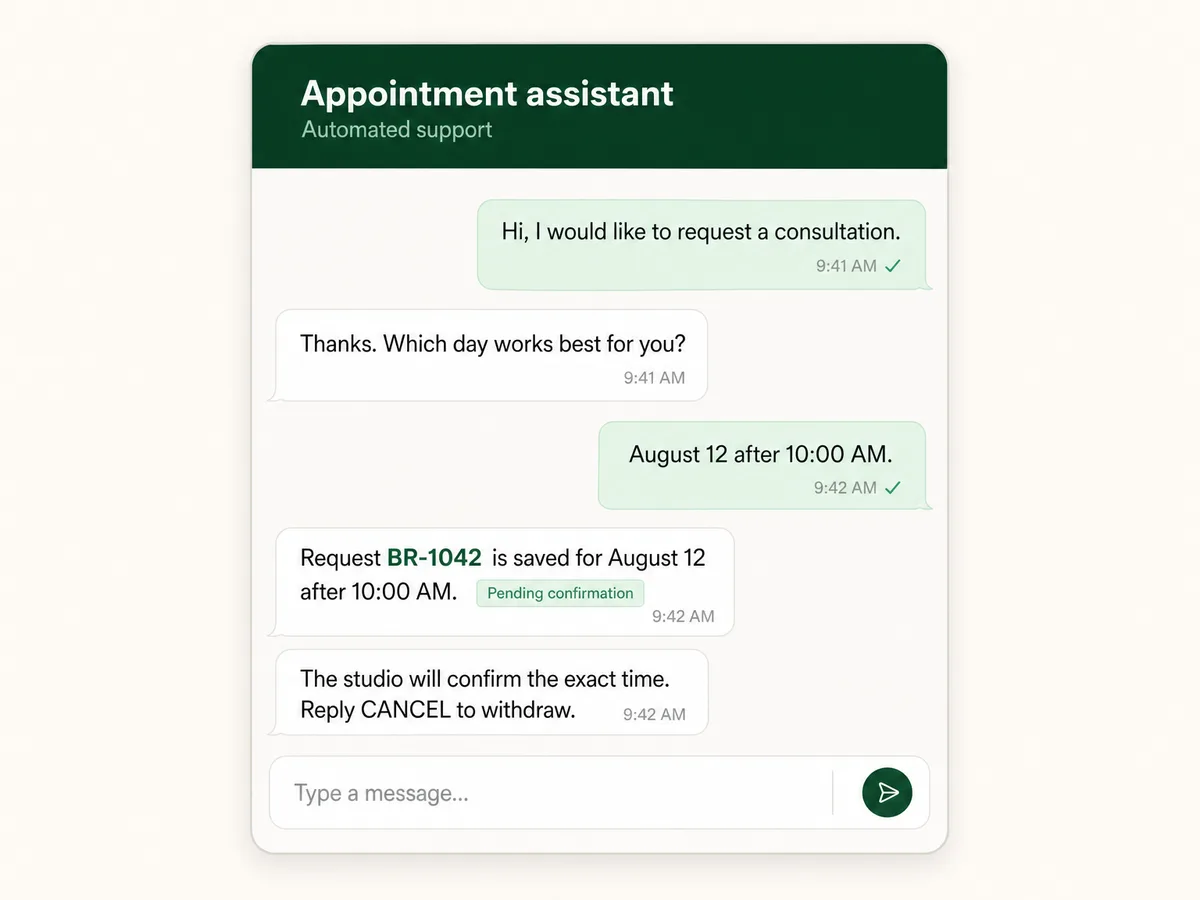
For the fixture, a customer requests a consultation date, receives request ID `BR-1042`, learns that the exact time is pending, and can reply `CANCEL`. No medical, payment, or sensitive personal data is needed.
Specify consent, opt-out, human handoff, retention, authorized staff, allowed free-form replies, and the approved template used when the customer service window is closed.
Expected result: The bot contract defines inputs, confirmation, cancellation, escalation, retention, window behavior, and prohibited data.
Verify it: Review fixtures for a new request, invalid date, duplicate provider delivery, cancellation, closed service window, and outbound delivery failure.
STEP 02
Create the Meta app, WABA, and phone assets
Record each provider identifier and credential by its real responsibility.
In Meta App Dashboard, create or select the app, add the WhatsApp product, create or select the WhatsApp Business Account, and use API Setup or WhatsApp Manager to register an owned phone number. Record the WABA ID and Phone Number ID, and complete required ownership, business, display-name, or payment steps.
Provider setup re-checked 2026-07-19: use Meta's test number and temporary access token only for initial development. For production, follow the current Meta credential path, grant only the required WhatsApp messaging and management permissions, and keep the token in server-side secret storage. See the official Meta workspace.
Create separate server secrets for the webhook verification token, App Secret, and access token. Subscribe the app to the intended WABA only after the callback is deployed and verified.
Expected result: The team can identify the app, WABA, phone number, owners, approval state, payment path, and separate secret storage without guessing.
Verify it: Inspect Meta settings and the server secret names. Confirm no live value appears in source, browser output, prompts, screenshots, issue text, or routine logs.
STEP 03
Build the webhook service in Playcode
Generate the receiver, durable work queue, policy guard, and sender as inspectable code.
Open Playcode AI, paste the build brief below, and review the resulting file tree before adding credentials. Keep the receiver, message store, worker, policy decision, and Cloud API sender as separate modules so each failure has a clear owner.
Playcode can build and host the server application, public HTTPS route, and background processing. You still own and configure the Meta app, WABA, phone registration, credentials, templates, policy compliance, live provider tests, and charges.
Build a Node.js WhatsApp Cloud API appointment-request service.

Requirements:
- GET /webhooks/whatsapp verifies hub.mode, hub.verify_token, and returns hub.challenge.
- POST /webhooks/whatsapp captures raw bytes and verifies X-Hub-Signature-256 with META_APP_SECRET before JSON parsing.
- Store every provider message id under a durable unique constraint before HTTP 200.
- Process pending records in a recoverable worker and keep status-only callbacks separate from customer messages.
- Before sending, check opt-in, opt-out, last customer message time, 24-hour window, approved template, destination, Phone Number ID, WABA ID, and rate limit.
- Send through /{PHONE_NUMBER_ID}/messages using a server-side bearer token. Store returned message ids and reconcile status callbacks.
- Never expose secrets in client code, URLs, prompts, screenshots, or logs.
- Add tests for wrong GET token, wrong POST signature with malformed JSON, duplicate delivery, missing and multi-message ids, status-only callbacks, and worker recovery.
Expected result: The project contains a reviewable HTTPS receiver, durable message claim, recoverable worker, outbound policy guard, Cloud API adapter, and tests without live credentials.
Verify it: Inspect the generated modules and secret references, then run the focused tests before entering any development credential.
STEP 04
Handle the GET challenge with the verification token
Prove callback ownership without misusing the App Secret.
Require `hub.mode=subscribe`, compare `hub.verify_token` with the configured verification token using a safe comparison, and return the exact `hub.challenge` as plain text.
Reject a wrong token with 403. Do not accept an App Secret or access token in place of the verification token, and do not print query values.
Expected result: The correct setup request receives the exact challenge while incorrect tokens cannot validate the callback.
Verify it: Run the accepted and rejected GET fixtures and compare status, content type, and response body.
STEP 05
Verify signed POST bytes and persist message ID
Authenticate delivery before parsing, then make retries harmless.
Capture the raw POST body and calculate `sha256=` plus HMAC-SHA256 using the Meta App Secret. Compare it with `X-Hub-Signature-256` before JSON parsing.
Require the WhatsApp business account object, extract message payloads, validate every provider message `id`, and insert each identity under a unique constraint before HTTP 200.
A status-only callback is valid but is not an inbound customer message. A duplicate message ID is acknowledged without a second booking effect. Process new records after the response.
const expected = `sha256=${createHmac('sha256', appSecret)
  .update(rawBody)
  .digest('hex')}`
if (!sameSignature(headers.get('x-hub-signature-256'), expected)) {
  return Response.json({ ok: false }, { status: 401 })
}
const payload = JSON.parse(rawBody.toString('utf8'))
Expected result: Unsigned or changed bodies stop before parsing, valid new messages become durable, status callbacks are harmless, and retries do not duplicate requests.
Verify it: Run the wrong-signature, valid-message, duplicate, status-only, missing-ID, and multi-message identity fixtures.
STEP 06
Run the deterministic webhook artifact
Prove local trust and identity boundaries without Meta credentials.
Download and extract the same-release ZIP, enter `appointment-whatsapp-webhook`, and run `node --test whatsapp-handler.test.mjs` using Node.js 22.
Inspect the generated test signatures and in-memory store. They demonstrate handler behavior, not a registered phone, subscribed WABA, live webhook, template approval, provider billing, or Graph API delivery.
Expected result: All eight named tests pass and only reviewed source appears in the archive.
Verify it: Run the tests, `unzip -t`, source-byte comparison, and secret-pattern scan. Confirm fixture IDs and phone values are unmistakably fictional.
STEP 07
Deploy HTTPS, verify the callback, and subscribe the WABA
Connect Meta only after both request paths are ready.
Deploy on Playcode with separate server-side secrets. In Meta webhook settings, enter the public HTTPS callback and your verification token, then complete the GET challenge.
Subscribe the app to the WABA and required webhook field. Confirm the deployed POST route has raw-body access and the App Secret matching the configured Meta app.
Expected result: Meta accepts the callback, the intended app is subscribed to the intended WABA, and an unsigned POST is rejected.
Verify it: Inspect the provider subscription state and a redacted callback record showing app, WABA, field, status, and UTC time without secrets or customer text.
STEP 08
Run a customer-message smoke and enforce send rules
Finish the provider boundary with controlled consent and current pricing rules.
From an allowed test number, send an appointment request and verify one stored message, one pending request, one permitted reply, and one outbound status trail.
Send with `POST /{PHONE_NUMBER_ID}/messages` and a server-side bearer token. Store the returned provider message ID, then reconcile webhook status events as an audit trail rather than treating the initial API response as proof of delivery.
Before every outbound message, check the last customer-message time, service-window state, template requirement, template approval, consent, destination, Phone Number ID, rate limit, and current provider cost.
Expected result: A real customer message creates one authorized request, the permitted reply is delivered once, and closed-window messaging uses only an approved template.
Verify it: Capture a redacted smoke record with UTC time, WABA and phone IDs, inbound message ID, service-window decision, template name when used, and delivery status.
What the result can look like
Test both trust paths and the outbound policy boundary
The GET setup handshake and POST delivery signature use different secrets and deserve separate tests. A final provider smoke then verifies assets, subscription, phone routing, and send rules.
| Test | Scenario | Expected result |
|---|---|---|
| happy path | Verify a correct GET challenge, then send a correctly signed POST containing one new fictional customer message. | The challenge is echoed, the message is stored before HTTP 200, and dispatch begins only after the response path. |
| invalid input | Use a wrong GET verification token, then send malformed JSON with a wrong `X-Hub-Signature-256` value. | The GET returns 403 and the POST returns 401 before parsing or storage. Neither reveals a configured secret. |
| retry | Deliver the identical signed payload and provider message ID after the first dispatch. | The retry receives HTTP 200, one durable record remains, and the booking worker is not dispatched twice. |
| production smoke | Send one controlled customer message to the registered number and reply according to the current service-window or template rule. | The subscribed WABA delivers one authenticated webhook, one request is created, and one permitted outbound message reaches the test customer with a status trail. |
Common WhatsApp webhook failures
Diagnose the GET handshake, POST authentication, subscription, business identity, number routing, and send policy as separate boundaries.
| Symptom | Likely cause | Check | Fix |
|---|---|---|---|
| Meta rejects the callback during setup | The verification token differs, `hub.mode` or `hub.challenge` is mishandled, the public URL is unavailable, or the route wraps the challenge. | Inspect the GET query keys, safe token comparison result, exact plain-text body, status, TLS, and response latency without logging the token. | Deploy the matching verification token and return the exact challenge promptly only for `subscribe` mode. |
| Every POST fails signature verification | The code uses the verification token instead of App Secret, parses the body first, or has the App Secret for a different Meta app. | Compare the app ID, raw-body capture order, `sha256=` header shape, body byte count, and secret source without printing the secret. | Use the matching Meta App Secret and calculate HMAC-SHA256 on the untouched POST bytes before JSON parsing. |
| One customer message creates duplicate appointments | The provider message `id` is not unique in durable storage or the claim is written after the business effect. | Search records by provider message ID and compare receive, insert, acknowledgement, worker, and booking timestamps. | Claim message identity transactionally before HTTP 200 and resume the same pending record after worker failure. |
| Outbound sending returns a permission, number, or template error | The access token, Phone Number ID, WABA assignment, app subscription, service-window state, template approval, or consent does not match the request. | Inspect the redacted Graph API error and compare token permissions, phone ownership, WABA ID, subscription, last customer timestamp, template name, and destination. | Correct the specific asset or policy mismatch; do not substitute identifiers or bypass the service-window and template rules. |
Operate the bot as a regulated messaging workflow
Deploy
Deploy the GET verifier, raw-body POST verifier, durable message store, worker, and outbound Graph API adapter as explicit boundaries. Subscribe the app to the WABA only after the callback is verified.
Record asset ownership, WABA ID, Phone Number ID, app ID, required permissions, token owner, template names and status, payment owner, consent source and category, opt-out path, human escalation owner, recovery owner, and smoke date.
Monitor
Track challenge failures, signature failures, accepted and duplicate message IDs, pending age, worker attempts, Graph API errors, status callbacks, window and template decisions, opt-outs, rate limits, and provider charges.
Use redacted identifiers and bounded error codes. Do not log App Secrets, verification tokens, bearer tokens, Authorization headers, complete phone numbers, or full customer conversations by default.
Recover
Recover acknowledged-but-unprocessed messages from durable pending records. Do not assume Meta will redeliver after your server returned HTTP 200.
After credential exposure, rotate the affected credential only, confirm old access is revoked, reverify or resubscribe when required, and rerun a controlled inbound plus outbound smoke.
Protect secrets, identities, consent, and customer records
A valid Meta signature authenticates the app delivery. It does not by itself authorize an outbound message, a booking action, or access to every customer record.
- Keep webhook verification token, App Secret, access token, WABA ID, and Phone Number ID as separate named configuration values with different responsibilities.
- Verify POST HMAC on raw bytes before parsing; persist each provider message ID once before business effects; process from a recoverable worker.
- Authorize appointment lookup and changes, minimize stored conversation data, redact phone numbers and messages from routine logs, and enforce retention.
- Publish the required privacy notice, keep opt-in evidence, honor every opt-out, and give automated conversations a clear direct path to human support.
- Check consent purpose and category, opt-out, service-window state, approved-template requirement, destination, and current provider policy before every outbound send.
- Use official Cloud API and approved providers. Do not automate a personal WhatsApp client or bypass business, number, template, policy, or pricing requirements.
WhatsApp bot questions
Is the webhook verification token the Meta App Secret?
No. The verification token is a random value you choose for the GET challenge. The App Secret belongs to the Meta app and verifies signed POST payloads. Keep them separate, server-side, and rotatable.
Why must POST verification use the raw body?
The signature covers the exact bytes Meta delivered. Parsing and re-serializing JSON may change those bytes. Capture the raw body, calculate HMAC-SHA256 with the App Secret, compare `X-Hub-Signature-256`, and parse only after success.
What is the difference between WABA ID and Phone Number ID?
The WABA ID identifies the WhatsApp Business Account and its subscriptions and assets. The Phone Number ID selects the registered sending number for message API calls. Neither value is an access token or secret.
Can the bot send any message after 24 hours?
No. Under the policy checked 2026-07-19, free-form business replies are tied to the rolling 24-hour customer service window opened by the customer's latest message. Outside it, use an approved template only when consent, opt-out state, policy, and current provider rules permit the contact.
Does an automated WhatsApp bot need human support?
Yes. The WhatsApp Business Messaging Policy checked 2026-07-19 requires clear, direct escalation paths for automated conversations. Offer a human chat transfer, phone number, email, web support, or support form, and test that the route works when the bot cannot safely continue.
How much does a WhatsApp bot cost to operate?
Playcode and hosting are only part of the cost. The provider pricing page checked 2026-07-19 says Meta pricing applies to delivered messages, and a solution provider may add service charges. Rates vary by category, market, provider, volume, and effective date, so use the current official pricing page instead of a copied rate.
Does the artifact prove a real WhatsApp integration works?
It proves eight deterministic webhook-handler behaviors and archive integrity. It does not create or verify Meta assets, register a number, subscribe a WABA, receive a real customer message, approve a template, call Graph API, or prove delivery and billing.
Build the webhook boundary first
Create the WhatsApp workflow as inspectable code
Describe the conversation, business state, consent, service-window decision, template fallback, and failures. Playcode can build the application while you retain the source.
Build with Playcode AINo credit card required. Meta assets, credentials, approvals, policies, provider costs, and live verification remain yours.