QUICK ANSWER
What is the difference between a web app and a desktop app?
A web app opens from a URL and updates mainly through server releases; a desktop app installs through an operating-system-specific package or distribution path and can receive broader local access. Windows and macOS commonly require signing for mainstream distribution, while Linux paths vary. Start web-first when every target browser clears the hard workflow, offline, and device constraints.
A web app is delivered through a browser URL and usually keeps its authoritative shared state on a server. A desktop app is installed through an operating-system-specific package or distribution path and can receive broader local capabilities. Windows and macOS commonly add signing requirements; Linux packaging and trust paths vary. Progressive web apps and desktop wrappers overlap with both categories, so the useful decision is the delivery, permission, data, update, and recovery contract.
This guide compares a browser-hosted web app, an installed desktop app, and a web core with a bounded desktop companion. It does not claim that either category is always faster, cheaper, safer, offline, or more capable. It also does not imply that Playcode packages native desktop binaries, signs installers, or submits apps to desktop stores.
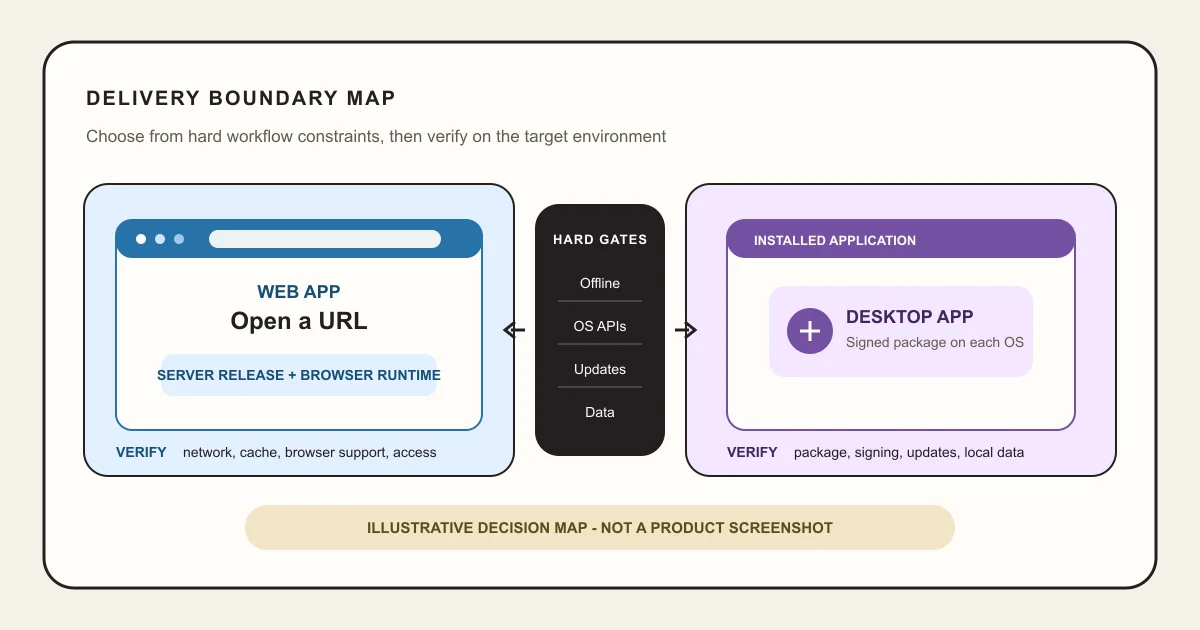
Run the Delivery Constraint Worksheet
Use four sourced passes. A hard requirement can reject an option; a preference should become a measurable test rather than a category assumption.
Inventory hard environment requirements
List target operating systems, browsers, managed devices, install authority, network-loss duration, local files and peripherals, background duration, permission scope, and the exact behavior that must continue when the server or network is unavailable.
Sources: [chrome-pwa-install], [edge-pwa-install], [safari-mac-web-apps], [safari-ios-web-apps], [firefox-windows-web-apps], [firefox-android-web-apps], [mdn-offline-background], [apple-sandbox]
Draw data and authority boundaries
Name authoritative server and local records, IDs, versions, synchronization, conflict policy, export, deletion, retention, backup, repair, and restore. A local cache is not automatically an authoritative offline database, and code rollback is not record recovery.
Sources: [mdn-service-worker], [mdn-file-system], [playcode-cloud]
Map release and security obligations
For web, define server releases, browser compatibility, cache or service-worker updates, and server authorization. For desktop, add package architectures, signing, notarization or store paths, entitlements, framework updates, binary rollout, version skew, and untrusted-content isolation.
Sources: [microsoft-msix], [apple-notarization], [electron-updater], [electron-security]
Test the riskiest constraint before selecting
Build one production-shaped workflow and verify the longest offline interval, largest file or device interaction, background requirement, update from the prior version, access boundary, keyboard and assistive-technology path, recovery, and support procedure on every target environment.
Sources: [mdn-offline-background], [wcag22], [electron-updater], [playcode-cloud]
What this comparison means by web and desktop
The labels describe delivery and authority boundaries. They do not imply one programming language, framework, performance level, or visual style.
Included
- Browser-hosted web apps reached through a URL, including installable progressive web-app behavior where supported
- Installed desktop applications distributed through operating-system-specific packages or channels, including signing and notarization where Windows or macOS paths require them
- A web core with a bounded desktop companion for a narrow verified local capability
- Distribution, offline and sync, device access, background work, updates, security, data, recovery, testing, accessibility, and operating workload
Not included
- Web app versus native mobile app, mobile stores, phone-first behavior, or mobile platform selection
- Website versus web app, public content architecture, or marketing-site selection
- A framework ranking or a claim that an Electron, PWA, native, or store path fits every desktop product
- Native desktop binaries, installer signing, notarization, store submission, or managed-device deployment provided by Playcode
- Guaranteed offline reliability, speed, lower cost, security, compatibility, approval, adoption, or revenue
Nine criteria that expose the real delivery boundary
Use the full matrix. A preference for browser reach or native power does not replace the versioned production, security, data, and support contract.
Distribution and installation
A URL, an installable web app, and a signed desktop package create different acquisition, trust, release, and support paths.
Offline work and synchronization
Offline is a designed data and conflict contract, not a property guaranteed by either category label.
OS, device, and file access
The core workflow may need capabilities or filesystem scope that browser permission models do not provide consistently.
Background and long-running work
Browser background execution is constrained and platform-dependent; desktop processes add power and responsibility.
Updates, rollback, and compatibility
Server releases and installed binaries have different version skew, signing, rollout, rollback, and recovery units.
Security and permission boundary
Browser sandboxing, desktop entitlements, local privileges, remote content, and server authorization need different controls.
Data custody, export, and recovery
Local records, server records, code, packages, caches, and whole-app restore are separate ownership and recovery contracts.
Testing and accessibility matrix
Browsers, operating systems, package architectures, permissions, keyboard use, and assistive technology expand the real test surface.
Operating workload and total cost
The durable production meter includes release channels, infrastructure, support, incidents, compatibility, and user update lag, not only build cost.
Delivery Boundary Matrix
Compare all nine rows before choosing. The recommended default is web-first only when the target browsers pass every hard constraint; it is not a rule that web fits every application.
Browser-hosted web app
Best for: Shared workflows that should open from a URL across desktop operating systems, update centrally, and use server-backed identity and records.
The browser supplies a sandboxed client while the deployed web application and server own shared behavior and state. Install, offline, file, and background features remain capability-specific and browser-dependent.
| Criterion | Finding |
|---|---|
| Distribution and installation | People can open a URL without a developer-built desktop package. Chrome and Edge provide install paths across supported desktop systems and Android; Safari provides web apps on current macOS and iPhone; Firefox supports web apps on Android and current Windows releases, but not macOS or Linux. Eligibility, packaging, prompts, and installed behavior differ, so test every named browser and operating system. Sources: [chrome-pwa-install], [edge-pwa-install], [safari-mac-web-apps], [safari-ios-web-apps], [firefox-windows-web-apps], [firefox-android-web-apps] |
| Offline work and synchronization | Service workers and local storage can support offline behavior, but the app must define cached assets, queued actions, authoritative records, conflict policy, retry, and what remains unavailable. Sources: [mdn-service-worker], [mdn-offline-background] |
| OS, device, and file access | Browser APIs can expose selected files and device features with secure-context and permission constraints. Support and scope vary, so test the exact target browsers and fallback. Sources: [mdn-file-system], [mdn-pwa-install] |
| Background and long-running work | Service workers can handle defined event-driven work, but browsers may stop them and background capabilities vary. Do not model them as an unlimited resident desktop process. Sources: [mdn-service-worker], [mdn-offline-background] |
| Updates, rollback, and compatibility | Deploy server and client assets centrally, then handle browser caches and service-worker version changes explicitly. Rolling code back does not automatically reconcile later server or offline writes. Sources: [mdn-service-worker], [playcode-cloud] |
| Security and permission boundary | Use the browser sandbox and permission prompts as one layer, while enforcing identity, authorization, validation, rate limits, secrets, and durable writes on the server. Sources: [mdn-file-system], [playcode-cloud] |
| Data custody, export, and recovery | Keep shared authoritative records on the server when the workflow requires multi-device consistency. Treat local cache, queued changes, server export, record repair, and whole-app restore as separate paths. Sources: [mdn-offline-background], [playcode-cloud] |
| Testing and accessibility matrix | Test supported browsers, operating systems, network and cache states, permissions, keyboard operation, focus, semantics, errors, zoom, and assistive technology. Installability is an additional matrix, not a substitute. Sources: [mdn-pwa-install], [wcag22] |
| Operating workload and total cost | Track the supported browser and operating-system combinations, server releases, active service-worker versions, incidents, and support hours. Central release does not remove infrastructure or compatibility work. Sources: [playcode-cloud], [mdn-service-worker] |
Tradeoffs
- URL delivery and central releases reduce package distribution work, while browser compatibility, network, caching, permission, service-worker, and backend behavior still need ownership.
- The web platform offers meaningful local capabilities, but a capability in one browser or operating system is not proof of support everywhere.
Installed desktop app
Best for: A workflow with verified requirements for deeper local integration, controlled installation, long-running local processes, large local files, or platform-specific behavior.
The team ships through an operating-system-specific package or distribution path and receives broader local powers according to the framework, platform, signing, sandbox, entitlement, and channel it chooses.
| Criterion | Finding |
|---|---|
| Distribution and installation | Create and test packages for the intended operating systems and architectures. Windows MSIX packages require signing; macOS direct distribution adds Developer ID signing and notarization requirements. Sources: [microsoft-msix], [apple-notarization] |
| Offline work and synchronization | Local execution can continue without a browser or server response only for data and functions actually stored on the device. Shared records still need explicit synchronization, conflict, deletion, and recovery rules. Sources: [mdn-offline-background], [playcode-cloud] |
| OS, device, and file access | Desktop packages can request broader filesystem and operating-system capabilities, subject to framework, platform, entitlement, sandbox, policy, and user controls. Request the minimum privilege needed. Sources: [apple-sandbox], [electron-security] |
| Background and long-running work | A desktop process can support longer local work when the operating system allows it, but the app must bound resource use, lifecycle, startup, failure, user control, and safe shutdown. Sources: [electron-security], [apple-sandbox] |
| Updates, rollback, and compatibility | Own package signing, update feed or store release, old-version compatibility, staged rollout, failed update, and support. Electron autoUpdater behavior and support differ by platform and packaging path. Sources: [electron-updater], [microsoft-msix], [apple-notarization] |
| Security and permission boundary | Broader local power raises the consequence of untrusted content and insecure IPC. Electron guidance requires secure content, isolation, sandboxing, narrow permissions, and current dependencies; platform sandboxes restrict declared capabilities. Sources: [electron-security], [apple-sandbox] |
| Data custody, export, and recovery | Define local database and file locations, encryption, OS-user scope, migration, export, deletion, backup, repair, and server reconciliation. A reinstalled package does not restore user records by itself. Sources: [microsoft-msix], [playcode-cloud] |
| Testing and accessibility matrix | Test every supported OS, architecture, upgrade path, clean install, permissions state, offline state, local-data migration, keyboard and assistive-technology behavior, and failure recovery. Sources: [microsoft-msix], [apple-notarization], [wcag22] |
| Operating workload and total cost | Track packages by operating system and architecture, signing identities where required, release channels, supported versions, update lag, crashes, local-data migrations, incidents, and support hours in addition to the backend. Sources: [electron-updater], [apple-notarization], [microsoft-msix] |
Tradeoffs
- Local power can satisfy hard workflows, while increasing package, signing where required, notarization or store, update, dependency, privilege, version-skew, and support obligations.
- An installed app may still depend on a server and network, and it is not offline-safe until data, sync, conflict, update, and recovery behavior are designed and tested.
Web core with a bounded desktop companion
Best for: A product whose shared workflow fits the browser but one narrow, verified job needs local files, device access, a resident process, or managed installation.
Keep identity, shared records, and most workflows in the web app, then add a least-privilege desktop component with a versioned protocol and explicit offline, update, and failure behavior.
| Criterion | Finding |
|---|---|
| Distribution and installation | Let most users start through the URL. Require installation only for the cohort whose named local job passes the desktop prerequisite and support policy. Sources: [mdn-pwa-install], [microsoft-msix], [apple-notarization] |
| Offline work and synchronization | Define which layer owns each offline record and how it synchronizes with shared server state. Keep technical retries separate from human conflict resolution. Sources: [mdn-offline-background], [playcode-cloud] |
| OS, device, and file access | Expose one narrow local capability through a versioned, authenticated boundary. Do not give remote content broad filesystem or shell access merely because the desktop shell can. Sources: [electron-security], [apple-sandbox] |
| Background and long-running work | Put only the proven resident or long-running job in the desktop component. Give it user-visible state, bounded resources, cancellation, retry safety, logs, and recovery. Sources: [electron-security], [mdn-offline-background] |
| Updates, rollback, and compatibility | Version the web API, desktop protocol, local schema, and supported client window together. A server rollback must not strand already-updated clients or reverse valid records. Sources: [electron-updater], [playcode-cloud] |
| Security and permission boundary | Authenticate the companion, validate every message, isolate remote content, enforce server permissions, and grant only the operating-system privileges required for the named job. Sources: [electron-security], [apple-sandbox], [playcode-cloud] |
| Data custody, export, and recovery | Name authoritative fields, queued local actions, sync checkpoints, export, repair, and whole-app restore separately. Test recovery with the desktop client offline and one version behind. Sources: [mdn-offline-background], [playcode-cloud] |
| Testing and accessibility matrix | Run the browser matrix plus package, upgrade, protocol, permission, keyboard, assistive-technology, offline, stale-client, and cross-version tests for the companion cohort. Sources: [wcag22], [electron-updater], [microsoft-msix] |
| Operating workload and total cost | Track both surfaces and their contract: supported browser/OS combinations, desktop packages, signing where required, release channels, client-version skew, protocol failures, incidents, update lag, and support hours. Sources: [electron-updater], [microsoft-msix], [playcode-cloud] |
Tradeoffs
- The split limits native scope and can preserve URL reach, while the team must operate two clients, their protocol, authentication, releases, compatibility, and partial failures.
- A wrapper that merely displays the web app inherits desktop packaging and security work without automatically gaining a useful local capability.
Hard gates, recommendation, and stop conditions
Treat hard environment requirements as gates and preferences as tests. The recommendation is reversible only when data, protocol, URL, and recovery contracts are designed for change.
The target browsers pass the required workflow, offline interval, file or device access, background, security, accessibility, and performance tests
Choose: Start with a browser-hosted web app and record the exact measured trigger that would justify desktop work.
Tradeoff: You gain URL distribution and central releases while accepting browser, network, cache, service-worker, permission, backend, and compatibility obligations.
The core workflow requires a verified local capability, managed package, long-running local process, or offline duration the target browsers cannot satisfy
Choose: Choose an installed desktop app and scope the supported operating systems, architectures, privileges, package, update, data, and recovery contract before implementation.
Tradeoff: You gain the needed local boundary while owning signing, packaging, security, updates, version skew, compatibility, local data, and multi-environment support.
Most shared work fits the browser and one narrow cohort has one proven local requirement
Choose: Keep a web core and add a least-privilege desktop companion around only that requirement.
Tradeoff: You avoid rebuilding every workflow as desktop software but must operate a secure, versioned, recoverable protocol between two clients.
The desktop proposal only cites imagined speed, prestige, generic offline use, or the possibility of future device access
Choose: Stop desktop implementation and benchmark the production-shaped web workflow on the real target machines first.
Tradeoff: You postpone local packaging while replacing assumptions with measured latency, capability, permission, and failure evidence.
The team cannot define local and server data authority, update behavior, old-version support, signing ownership, or recovery
Choose: Stop before release. Complete the data, update, compatibility, and recovery contracts and test the prior-version transition.
Tradeoff: The release moves later, but users are less likely to be stranded with incompatible software or unrecoverable local records.
PROVE THE HARD CONSTRAINT
Describe the workflow, target machines, offline interval, local access, and recovery
Give Playcode the browser-hosted path and the exact condition that could reject it. Build one production-shaped workflow and test that condition before adding desktop packaging work.
Start BuildingPlaycode proves the web path. Native desktop packaging, signing, notarization, and store delivery remain separate responsibilities.
Limits of this comparison
The guide supplies a delivery decision model. It is not a framework recommendation, benchmark, native-platform implementation guide, or desktop distribution service.
- Browser, operating-system, package, permission, and background support change. Recheck first-party documentation and test exact target versions before release.
- No performance, memory, battery, install, update, incident, support, or cost benchmark was run for the reader's workload.
- Desktop does not guarantee offline operation, and a progressive web app does not guarantee installability or offline behavior on every browser.
- An installed wrapper around remote content inherits desktop security and update obligations without automatically providing native behavior.
- Accessibility depends on semantics, focus, keyboard operation, contrast, zoom, errors, assistive technology, and platform behavior, not the category label.
- Privacy, encryption, regulated data, device management, store rules, export controls, and compliance need separate qualified review.
- Playcode builds and runs web apps. It does not prove native desktop binaries, code signing, notarization, desktop-store submission, or managed installer deployment.
Primary sources and review record
These first-party sources define the web, package, signing, sandbox, update, accessibility, and Playcode boundaries used in the matrix. Access dates record this review.
[chrome-pwa-install] web.dev by Google:PWA installation by browser and operating system
Checked August 1, 2026. Supports: Chrome and Chromium installation on desktop and Android, WebAPK versus shortcut behavior, install prompts, package handling, and the need to test each browser and operating system.
[edge-pwa-install] Microsoft Learn:Use Progressive Web Apps in Microsoft Edge
Checked August 1, 2026. Supports: Microsoft Edge install discovery, browser installation, Windows integration, and the distinction between browser and Microsoft Store distribution.
[safari-mac-web-apps] Apple Support:Use Safari web apps on Mac
Checked August 1, 2026. Supports: Safari web-app creation on macOS Sonoma 14 or later, Applications and Dock placement, isolated website data, settings, notifications, and removal.
[safari-ios-web-apps] Apple Support:Turn a website into an app in Safari on iPhone
Checked August 1, 2026. Supports: The manual Add to Home Screen and Open as Web App path for Safari on iPhone, including Home Screen launch and notification behavior.
[firefox-windows-web-apps] Mozilla Support:Use web apps in Firefox for Windows
Checked August 1, 2026. Supports: Firefox web-app installation on Windows from Firefox 143, the later Microsoft Store threshold, taskbar and Start behavior, and the explicit absence of this feature on macOS and Linux.
[firefox-android-web-apps] Mozilla Support:Use Web Apps with Firefox for Android
Checked August 1, 2026. Supports: Firefox for Android web-app installation through the Install and Add to Home Screen flow.
[mdn-pwa-install] MDN Web Docs:Making PWAs installable
Checked August 1, 2026. Supports: Installable web-app requirements, HTTPS, manifest behavior, app-like launch, and current browser and platform differences.
[mdn-service-worker] MDN Web Docs:Service Worker API
Checked August 1, 2026. Supports: Event-driven workers, programmable network handling, offline resources, lifecycle, update, and the browser-managed execution boundary.
[mdn-offline-background] MDN Web Docs:Offline and background operation
Checked August 1, 2026. Supports: Offline design, background constraints, data synchronization patterns, and the limits of browser-controlled worker execution.
[mdn-file-system] MDN Web Docs:File System API
Checked August 1, 2026. Supports: Browser file and directory handles, origin-private storage, permission boundaries, and the need to verify current browser support.
[microsoft-msix] Microsoft Learn:Package a desktop or UWP app in Visual Studio
Checked August 1, 2026. Supports: Windows package and bundle architecture, manifest and publishing fields, signing requirements, testing, and store association.
[apple-notarization] Apple Developer Documentation:Notarizing macOS software before distribution
Checked August 1, 2026. Supports: Developer ID signing, hardened runtime, notarization, tickets, Gatekeeper, package types, and the distinction between notarization and App Review.
[apple-sandbox] Apple Developer Documentation:Configuring the macOS App Sandbox
Checked August 1, 2026. Supports: Kernel-enforced containment, explicit entitlements, minimum required privileges, protected files, network access, and the Mac App Store sandbox requirement.
[electron-updater] Electron Documentation:autoUpdater
Checked August 1, 2026. Supports: Electron update events and platform-specific update behavior, prerequisites, signing requirements, feed configuration, and failure handling.
[electron-security] Electron Documentation:Security
Checked August 1, 2026. Supports: The increased risk of local powers, secure content, current dependencies, context isolation, sandboxing, narrow permissions, IPC validation, and untrusted-content restrictions.
[wcag22] W3C:Web Content Accessibility Guidelines 2.2
Checked August 1, 2026. Supports: Technology-independent accessibility requirements for perceivable, operable, understandable, and robust interfaces.
[playcode-cloud] Playcode:Playcode Cloud
Checked August 1, 2026. Supports: The current Playcode web-app runtime boundary: backend, database, files, HTTPS, jobs, WebSockets, previews, domains, snapshots, rollback, and code history within plan limits.
Web and desktop app questions
Are web apps always online?
No. A web app can cache assets and data and queue bounded work through service workers and local storage, but offline behavior must be designed and tested. Define what remains usable, which records are authoritative, how conflicts resolve, how retries behave, and what happens when browser storage is cleared.
Are desktop apps always offline?
No. An installed app may still depend on sign-in, licensing, shared server records, remote APIs, synchronization, or update services. Prove the exact workflow during the longest required network loss, then reconnect and reconcile duplicate, stale, conflicting, deleted, and partially uploaded records.
Can a web app access local files?
Some browsers expose file and directory capabilities with permission and security constraints, and all browsers support basic upload and download paths. Support and scope vary. Test the exact file sizes, directory behavior, repeated permission, fallback, privacy, and target browser versions before choosing web.
Is a progressive web app a desktop app?
An installed progressive web app can launch from the operating system and look app-like, but it still uses web-platform capabilities and browser support. Installation does not prove unrestricted filesystem access, unlimited background execution, identical behavior across browsers, or a signed native desktop package.
Is an Electron app a native desktop app?
Electron produces installed desktop applications with access to desktop capabilities through Chromium and Node.js. That makes packaging, signing, updates, dependency maintenance, local privilege, IPC, and untrusted-content isolation real obligations. It does not make every web workflow safer, faster, offline, or automatically store-ready.
Which is cheaper to maintain?
There is no universal winner. Measure the web runtime, database, browser support, network and cache incidents against desktop packaging, signing, platform versions, updates, local-data migration, crash support, and version skew. A hybrid carries both surfaces plus the protocol between them.
When should a web app add a desktop companion?
Add one only after a named cohort has a tested local requirement that the supported browsers cannot meet. Keep shared identity and records in the web core when appropriate, expose the narrowest local capability, authenticate the protocol, and test offline, stale-client, update, permission, and recovery behavior.
Can Playcode build a desktop app?
Playcode builds and runs web apps. This guide does not claim that Playcode produces native desktop binaries, signs installers, notarizes macOS packages, submits to desktop stores, or manages enterprise deployment. Use Playcode for the browser-hosted path when the matrix confirms that web fits the hard requirements.
START WITH THE VERIFIED BOUNDARY
Build the web app when the browser clears every hard requirement
Start with one shared workflow, one authority model, and one recovery test. Add a desktop companion only when measured evidence identifies the local capability it must own.
Start BuildingNo credit card required. AI credits are included to start; production requirements and plan limits still apply.