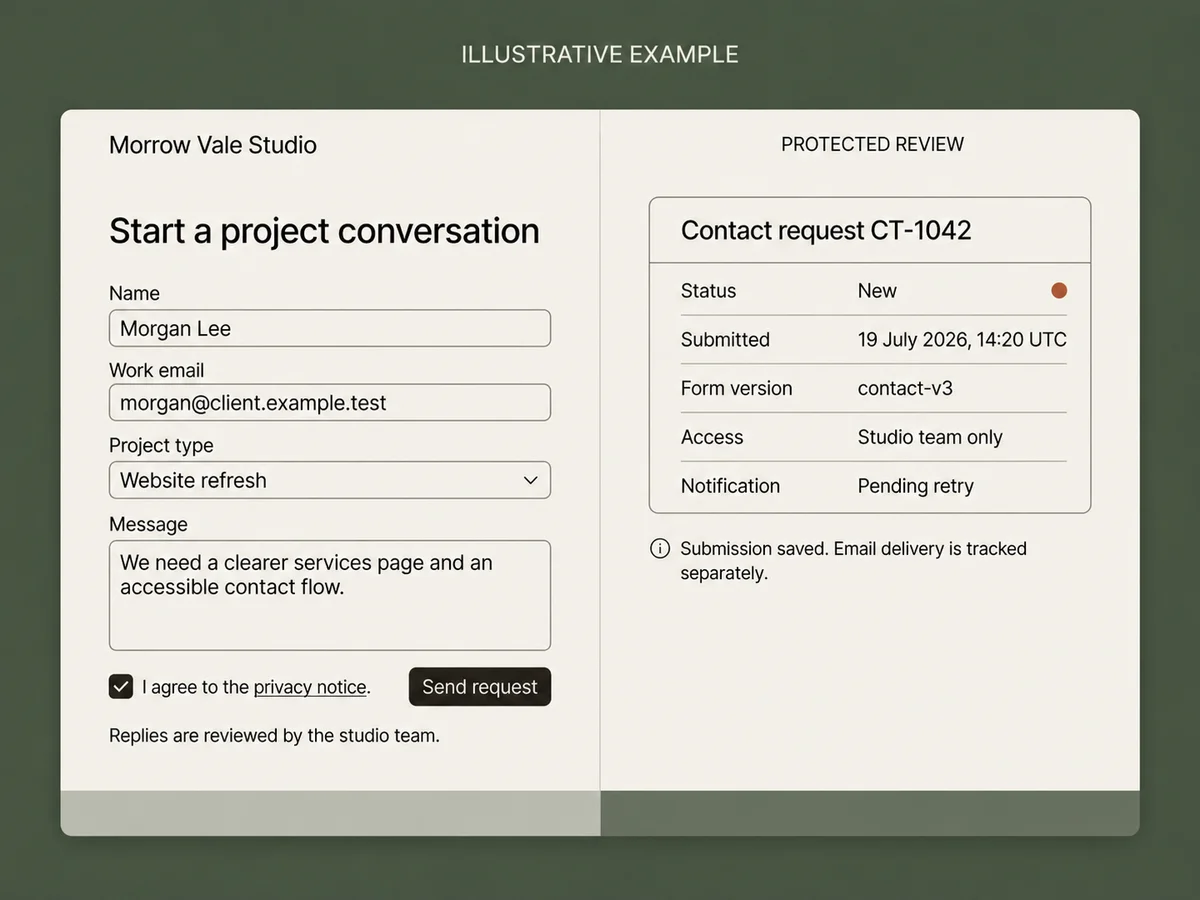
A contact form is a small public application, not a set of fields that sends an email. The reliable version gives every accepted request a stable ID, validates it on the server, saves it before any notification, protects the review view, and explains what happened through accessible success and error states.
This guide builds that record-first workflow with practical CSRF, spam, rate-limit, consent, retention, retry, and recovery boundaries. It keeps browser validation for fast feedback, treats the server as authoritative, and separates a technical retry from a human decision about whether two messages are duplicates.
QUICK ANSWER
How do you create a contact form?
Define the saved request before drawing fields. Build visible labels and browser feedback, repeat every rule on the server, protect state-changing requests, limit automated abuse, and save one durable record before email or CRM delivery. Then test invalid input, retries, provider failure, accessibility, protected review access, retention, and the final HTTPS page.
Define the request and its owner before designing fields
Use fictional `.test` addresses while building. Current MDN, OWASP, and W3C guidance was rechecked on 19 July 2026, but your privacy, consent, security, and retention decisions still need owners who understand the real data and jurisdictions.
- One purpose and one honest next step: Write what the form is for, who reviews it, and what the confirmation may promise. A saved request can be pending review; it is not a guaranteed reply, appointment, quote, approval, or engagement.
- A versioned submission record: Name the stable submission ID, form version, status, accepted fields, consent version when needed, attempt key, created and updated timestamps, access rule, retention review date, deletion owner, and notification state.
- A minimal field list with visible labels: Ask only what changes the first response. Follow the W3C accessible forms tutorial by using semantic controls, visible labels, clear required-field instructions, grouped choices, and notifications users can perceive and correct.
- A threat and abuse plan: Decide whether the endpoint relies on cookies or anonymous session state, which origins may submit, how request size and frequency are bounded, when a honeypot or challenge provider is justified, and who responds when abuse exceeds the application controls.
- Optional provider readiness: If email, CRM, anti-bot, analytics, or file storage is required, confirm the provider account, plan, region, sender or site approval, operation, rate limits, data handling, minimum credential scope, test mode, and failure behavior before making it part of the promise.
Credentials and access
| Credential | Minimum access | Storage and rotation |
|---|---|---|
| CSRF signing secret when the framework path requires it Server-side random secret used by the selected CSRF mechanism | Only the application environment and endpoint family that validates the same-origin state-changing request | Server-side secret configuration only, never a form field value committed to source, browser JavaScript, URLs, screenshots, analytics, or logs Use the framework rotation or overlap path, update the server environment, verify a new anonymous session and operator action, then retire the prior secret |
| Optional email API key or SMTP credential Provider-issued server credential for one approved sender or template path | Send only the notification or acknowledgement the workflow needs; no account-wide administrative scope | Encrypted server-side configuration separated by environment and never returned to the public form Create a replacement, update the server, send a fictional `.test` fixture where supported, confirm the provider result, then revoke the previous credential |
| Optional anti-bot site key and server secret Provider-issued public site identifier plus a separate server verification secret | Only the registered form origins and server-side verification operation for the selected environment | The documented site key may be public; keep the verification secret in server configuration and out of source and logs Register the replacement under the intended origins, update server verification, exercise allowed and denied fixtures, then revoke the old secret |
Choose what makes a submission successful
The safest boundary is a validated database record with one stable ID. Email, CRM, analytics, and other delivery attempts begin after that commit and keep their own state, so a provider outage cannot erase the request or make a visitor submit it again blindly.
| Approach | Best for | Tradeoff |
|---|---|---|
| Application record first, notification second | A form that matters to a real team and needs a protected queue, status, retries, retention, export, and recovery. | The application owns database and privacy operations, but provider delivery can fail and retry without becoming the source of truth. |
| Hosted form provider as source of truth | A standard questionnaire where the provider fields, inbox, access, exports, retention, pricing, and limits fit the job. | Setup may be faster, while record behavior, spam controls, delivery, exports, and future workflow depend on that provider contract. |
| Email-only submission | A temporary low-risk test where losing status, assignment, duplicate review, and structured recovery is explicitly acceptable. | A timeout leaves no authoritative answer about whether the message arrived, and the inbox cannot reliably model access, retries, or retention. |
Recommended:Use the application database as the source of truth when the request matters. Create one record, return its stable reference, and queue notifications separately. Use a hosted form provider when its complete operational contract is the simpler honest choice, not because the visible fields look similar.
Create a contact form step by step
Define the request, build an accessible form, enforce server validation and abuse controls, save before notification, protect review access, test, publish, and operate the workflow.
STEP 01
Write the record and confirmation contract
Define what is stored, who may see it, and what success means before arranging fields.
Create a record specification with submission ID, form version, status, necessary field values, consent evidence when needed, attempt key, timestamps, access scope, retention review date, deletion owner, and notification state. Start with new and resolved rather than inventing a complex pipeline.
Write the exact confirmation. It may say the request was saved and show a reference. Do not promise a response time, appointment, quote, approval, or engagement unless another tested workflow makes that decision.
Expected result: The first version has one bounded record, one owner, one retention rule, and one honest confirmation tied to a durable save.
Verify it: Give a fictional record to the future reviewer and ask them to identify what happened, who may act, what happens next, and when the data should be removed.
STEP 02
Build semantic fields and accessible feedback
Use the browser for fast guidance without making browser checks the security boundary.
Start with visible labels, semantic input types, required and length attributes, and plain instructions. The MDN validation guide explains why browser validation improves feedback but remains bypassable and must be repeated on the server.
On a rejected submit, preserve safe non-secret values, show a summary, link each message to its field, set `aria-invalid` and `aria-errormessage` where appropriate, move focus deliberately, and announce the result through a status or live region. Do not communicate errors by color alone.
<form aria-labelledby="contact-title">
  <h2 id="contact-title">Start a project conversation</h2>
  <label for="contact-email">Work email</label>
  <input id="contact-email" name="email" type="email"
    autocomplete="email" required maxlength="254"
    aria-describedby="contact-email-hint" />
  <p id="contact-email-hint">Used only to reply to this request.</p>
  <button type="submit">Send request</button>
  <p role="status" aria-live="polite"></p>
</form>
Expected result: Keyboard, screen-reader, zoom, mobile, and pointer users can understand every field, correct a specific error, and perceive the final state.
Verify it: Complete the form using only a keyboard, submit one invalid value, inspect each label and error association, zoom to 200 percent, and confirm the status is announced without losing the entered message.
STEP 03
Validate and authorize again on the server
Treat every browser value, hidden field, URL parameter, header, and provider callback as untrusted input.
Allowlist expected fields, reject unexpected properties, normalize carefully, and enforce type, length, and business rules before storing anything. Follow the OWASP Input Validation Cheat Sheet for syntactic and semantic server-side checks.
Derive the form version and reviewer scope from server configuration. Never accept a browser-supplied team, role, owner, status, retention override, or notification result as authority.
type ContactSubmission = {
  id: string
  formVersion: string
  status: 'new' | 'resolved'
  attemptKey: string
  name: string
  email: string
  projectType: 'website-refresh' | 'new-website' | 'other'
  message: string
  createdAt: string
  retentionReviewAt: string
}
Expected result: Only a bounded normalized record reaches the database, and the public request cannot select private scope or operational state.
Verify it: Bypass browser JavaScript, omit every required field in turn, exceed every length, add an unexpected admin field, and submit an unavailable project type. Assert zero records and no echoed private details.
STEP 04
Add CSRF, spam, size, and rate boundaries deliberately
Separate cross-site request protection from automated-submission controls because they address different threats.
If state-changing requests rely on cookies or session state, use the framework CSRF protection and validate it on the backend. The OWASP CSRF Prevention Cheat Sheet recommends the framework path first, with tokens for state-changing requests when needed. Exact allowed origins and SameSite cookies are defense layers, not substitutes for authorization.
For automated abuse, bound body and field size, use a server-derived privacy-safe rate key, add a honeypot, and monitor rejection patterns. The OWASP Denial of Service Cheat Sheet recommends rate limiting and makes clear that CAPTCHA is not denial-of-service protection. Introduce a challenge provider only when the traffic justifies its accessibility, privacy, cost, and failure tradeoffs. CSRF tokens do not stop bots that can load the page.
Expected result: A cross-origin or invalid-token request fails before business processing, obvious automation and excess traffic are bounded, and legitimate retries have a documented path.
Verify it: Send malformed JSON with the wrong origin and token, fill the honeypot, exceed the request limit, cross the rate window, and test the real browser flow without a pointer or challenge dead end.
STEP 05
Save one record before starting notifications
Give the submission a stable result before email, CRM, analytics, or other providers run.
Generate one attempt key for the same technical action and enforce it with a database unique constraint. Return the original record for an exact retry, but reject the same key when the normalized request changes. A new human message needs a new attempt even when the email matches.
Commit the contact record and a pending notification or outbox item together. Return the saved reference. A worker then sends the provider notification, stores its bounded result, and retries only delivery. Do not roll back or duplicate the contact record because email failed.
Expected result: One accepted action creates one reviewable record, an exact retry returns the same reference, and provider failure changes only delivery state.
Verify it: Repeat the exact request, reuse its key with changed text, submit a separate message from the same email, fail notification after commit, retry delivery, and compare submission and notification counts.
STEP 06
Protect review, consent, retention, and deletion paths
Treat the internal queue and every record action as server-authorized operations.
Apply the intended team and role scope to list, detail, search, export, assignment, status update, correction, deletion, and recovery paths before returning a record. A hidden URL and browser-only button are not access control.
Collect only necessary personal data. Store the consent purpose and content version when consent is required. Name retention and deletion owners, keep raw messages out of routine logs, and require separate legal, security, and compliance review before sensitive or regulated collection.
Expected result: The intended reviewer can operate the queue, other accounts receive bounded denials, and every stored field has a purpose, access rule, and deletion decision.
Verify it: Request the same known submission signed out and from another ordinary account, test every export and update path, inspect logs for payload leakage, and run one authorized correction and deletion fixture.
STEP 07
Run the record-first artifact and browser scenarios
Prove validation, request boundaries, retries, provider failure, and access before trusting the polished form.
Download the contact form handler artifact, extract it, run `npm test` with Node.js 22 or newer, and inspect the 11 deterministic scenarios. It has no runtime dependencies, network calls, provider credentials, or real personal data.
Add browser tests for label associations, keyboard order, error focus, value preservation, double-clicks, offline or interrupted requests, mobile width, zoom, live-region announcements, protected routes, and the final-domain form action.
Expected result: The state tests and browser tests agree on accepted, rejected, duplicate, delivery-pending, protected, and accessible outcomes.
Verify it: Run the archive tests twice, compare its SHA-256 with the evidence note, then record final submission, notification, access-denial, and accessibility results for each browser fixture.
STEP 08
Publish over HTTPS and run the final-domain smoke test
Verify the environment users will reach instead of assuming preview behavior will transfer.
Separate development and production domains, cookies, CSRF configuration, database, credentials, senders, challenge keys, logs, and rate policies. Confirm the canonical form action and trusted origin after the final domain is connected.
Submit one fictional valid request, one invalid request, one exact retry, one notification failure, and one protected-review denial. Confirm a reference appears only after the record is saved and clean up fixtures under the retention policy.
Expected result: The published form accepts one bounded fictional request, explains errors accessibly, keeps the record through provider failure, and denies unintended review access.
Verify it: Save the final-domain request and submission IDs, inspect the database and notification state, repeat as the wrong account, verify logs are bounded, and remove or retain the fixture according to the documented rule.
STEP 09
Monitor failures and rehearse bounded recovery
Operate from stable request, submission, and notification identities instead of asking visitors to submit again.
Monitor validation rejection classes, rate-limit volume, duplicate conflicts, save failures, notification retry age, queue age, denied review access, retention jobs, exports, and deletion requests. Keep names, emails, messages, secrets, tokens, and raw provider payloads out of routine logs.
Write repair paths for one submission, one notification, one access assignment, one export, and one deletion. Treat record repair, provider retry, authorized data export, and whole-app restore as different operations because restoring the database can move later valid requests backward.
Expected result: An operator can find the authoritative record, choose the smallest safe repair, and verify the result without repeating unrelated writes or exposing a message.
Verify it: Run a tabletop exercise for save outage, delayed email, abusive burst, unauthorized review, mistaken deletion request, and restore from a saved point using only fictional stable IDs.
Test the boundaries that decide whether a request is real
Assert record counts, stable IDs, normalized values, attempt fingerprints, notification attempts, access denials, and user-visible announcements. A green success toast alone proves none of them.
| Test | Scenario | Expected result |
|---|---|---|
| happy path | A visitor completes labeled fields, accepts the current privacy notice when required, and submits one valid fictional project request. | One durable record with one stable ID and form version exists, the success state is announced, and one notification attempt is pending or sent. |
| invalid input | Bypass browser checks, send invalid email and short message values, add an unexpected admin property, omit consent, fill the honeypot, and try another account on the review route. | The server rejects each invalid or unauthorized action without a record, state change, private payload, notification, or inaccessible error message. |
| retry | Repeat one exact attempt, change the request under the same key, send a new message from the same email, fail notification after save, and retry only delivery. | The exact retry returns the first reference, changed reuse fails, the separate message remains a review candidate, and delivery retries without duplicating either record. |
| production smoke | On the final HTTPS domain at mobile width, submit valid and invalid fictional data, test keyboard and live-region feedback, interrupt one request, inspect review access, and exercise provider failure. | The production origin, CSRF and abuse controls, database, accessible states, review authorization, notification retry, monitoring, and cleanup match the documented contract. |
Contact form failures should point to one authoritative boundary
Compare the browser request, server validation, submission record, attempt identity, notification attempt, access decision, and logs before telling a visitor to submit again.
| Symptom | Likely cause | Check | Fix |
|---|---|---|---|
| The form says sent, but no submission exists | The UI treated a button click, browser validation, or email request as success before the database commit returned a stable record. | Search by the bounded request or attempt ID and inspect the save result before checking email-provider logs. | Show success only after the durable insert returns the stable submission ID; represent provider delivery separately. |
| One click created two contact records | The same technical attempt used different or unprotected keys, or the uniqueness check was outside the database transaction. | Compare attempt keys, normalized fingerprints, timestamps, and record IDs for the repeated request. | Reuse one attempt key until the form resets, enforce it durably, return the original for an exact retry, and reject changed reuse. |
| A legitimate second message overwrote the first | Email normalization was used as automatic technical deduplication without a documented human update or merge policy. | Compare attempt keys, messages, times, and the merge decision for both user actions. | Keep separate attempts as separate records and surface normalized-email matches as review hints unless an explicit update policy applies. |
| The record exists, but email is missing or repeated | Notification and record persistence share one retry operation, or the provider attempt lacks its own identity and status. | Inspect the submission ID, notification attempt ID, provider response ID, bounded error, retry count, and final state. | Keep the saved record authoritative and retry only the notification with its own idempotency identity and bounded policy. |
| Bots pass the CSRF token and keep submitting | CSRF protection was mistaken for anti-automation; a bot can load the page, receive a session and token, and submit like a browser. | Inspect rate, request-size, honeypot, risk, origin, token, and challenge results by privacy-safe identifiers rather than raw personal payloads. | Keep CSRF for cross-site state protection, then add layered rate, honeypot, monitoring, and accessible provider challenge controls for automation. |
| The public page or wrong account can read messages | A list, detail, export, search, or update path relied on a hidden URL or client-side role check. | Request the known submission ID while signed out and from another ordinary account, then inspect the server authorization scope. | Apply server-derived team, role, record, and action scope before every private lookup and keep the cross-account regression tests. |
Keep the form explainable after launch
Deploy
Use separate development and production origins, CSRF settings, databases, credentials, provider senders, anti-bot keys, rate limits, and logs. Recheck the exact trusted origin after the custom domain and HTTPS are active.
Run one final-domain fictional request through validation, save, protected review, provider failure, retry, and cleanup. Do not import real messages until access, privacy, retention, deletion, monitoring, and incident owners have accepted the workflow.
Monitor
Monitor accepted and rejected counts by bounded reason, save errors, changed idempotency reuse, notification retry age, queue age, rate-limit volume, access denials, exports, retention jobs, and deletion requests.
Log request, submission, attempt, notification, result, and error-class identifiers with bounded context. Exclude secrets, CSRF tokens, names, emails, messages, raw provider payloads, and unnecessary network identifiers.
Recover
Back up submission records, form and consent versions, idempotency decisions, notification attempts, authorized operational state, and bounded audit facts. Test restore in an isolated environment and replay a prior exact attempt.
Prefer an authorized record repair or notification replay for one failed request. A whole-app restore also returns the database to a saved point and can remove later valid submissions, so reconcile authorized post-checkpoint records before acting.
A contact form is a public write boundary
Design it for untrusted input, automated abuse, private records, optional browser session state, and downstream providers. Security controls must remain useful without blocking accessible correction and legitimate retry.
- Allowlist server fields, normalize deliberately, enforce request and field sizes, use parameterized database operations, and encode untrusted text when it is later rendered.
- Use the framework CSRF path for cookie-backed state-changing requests, validate exact intended origins, configure cookies appropriately, and keep authorization independent of token validity.
- Layer privacy-safe rate limiting, honeypots, monitoring, and an accessible challenge provider when justified; a CSRF token is not spam prevention and a challenge is not complete denial-of-service protection.
- Protect every review, search, export, update, deletion, retention, and recovery path with server-derived team, role, record, and action scope.
- Keep email, CRM, anti-bot, analytics, and storage credentials in environment-specific server configuration with minimum access and tested rotation; never place them in the public form or logs.
- Collect only necessary personal data, version consent when required, document provider handling, bound retention, support correction and deletion, and obtain specialist review before sensitive or regulated collection.
- Use stable idempotency identities for technical retries, separate human duplicate decisions, save before side effects, and keep provider delivery attempts independently retryable and auditable.
- Keep routine logs free of names, email addresses, messages, CSRF values, secrets, and raw provider payloads; use bounded IDs, decisions, and error classes for diagnosis.
Contact form questions
Can I create a contact form with Playcode?
Yes. Describe the fields, validation, saved record, success and error states, review access, notification provider, privacy, retention, and tests. Playcode can build the interface and the full-stack workflow, but this guide does not claim a native inbox, email provider, anti-spam service, CRM, or guaranteed delivery.
Is browser validation enough for a contact form?
No. Browser validation gives fast feedback but can be bypassed with developer tools or a direct request. Repeat field, type, length, unexpected-property, consent, authorization, and business rules on the server before saving or starting a provider action.
Does a public contact form need CSRF protection?
It depends on the authentication and session design. State-changing requests that rely on cookies or ambient session state need the framework CSRF path and backend validation. Anonymous forms still need exact origin decisions, authorization where relevant, spam controls, rate limits, and monitoring. CSRF tokens do not stop bots.
How do I prevent duplicate contact form submissions?
Generate one idempotency key for the same technical attempt and enforce it durably. Return the original record for an exact retry and reject changed content under that key. Do not silently merge every message from the same email; show likely matches to an authorized reviewer under an explicit policy.
Should a contact form save to a database or only send email?
Use a database record when the request matters, needs status, assignment, protected review, retries, retention, export, or recovery. Email can remain a notification. An email-only path can fit a temporary low-risk test, but a timeout leaves no authoritative acceptance record.
What happens when notification email fails?
Keep the saved submission and mark the separate notification attempt for retry. Show the reviewer that delivery is pending or failed, then retry only the provider operation. Do not ask the visitor to resubmit or create a second contact record because email was delayed.
What personal information should a contact form collect?
Collect only the fields necessary for the stated first response, explain their purpose, restrict access, name retention and deletion owners, and document external providers. Sensitive or regulated information needs separate legal, security, privacy, and compliance review before collection.
How should contact form errors be accessible?
Use visible labels and instructions, preserve safe values, identify the exact field and correction, connect messages programmatically, use `aria-invalid` and `aria-errormessage` where appropriate, manage focus deliberately, and announce the updated result through a status or live region. Do not rely on color alone.
Build the website and its request path
Turn Your Contact Form Contract into a Working Website
Describe the fields, record, accessible states, validation, access, provider boundaries, tests, and recovery. Start with fictional data and prove one complete request before collecting real messages.
Build My WebsiteNo credit card required. The website-builder owner includes the shared product walkthrough.