If you only need a deterministic slash command, you do not need a model. This guide is for a Discord `/ask` command whose main job is to answer from an approved knowledge set, explain uncertainty, and stay inside a controlled permission, latency, privacy, and cost boundary.
The downloadable provider-neutral example was reproduced locally. It verifies signed Discord interactions, acknowledges slow AI work before the three-second deadline, queues one job per interaction, constrains model output to approved citations, disables mentions, respects retry timing, and expires follow-up credentials. Developer Portal setup, a live installation, and a real model call remain manual checks.
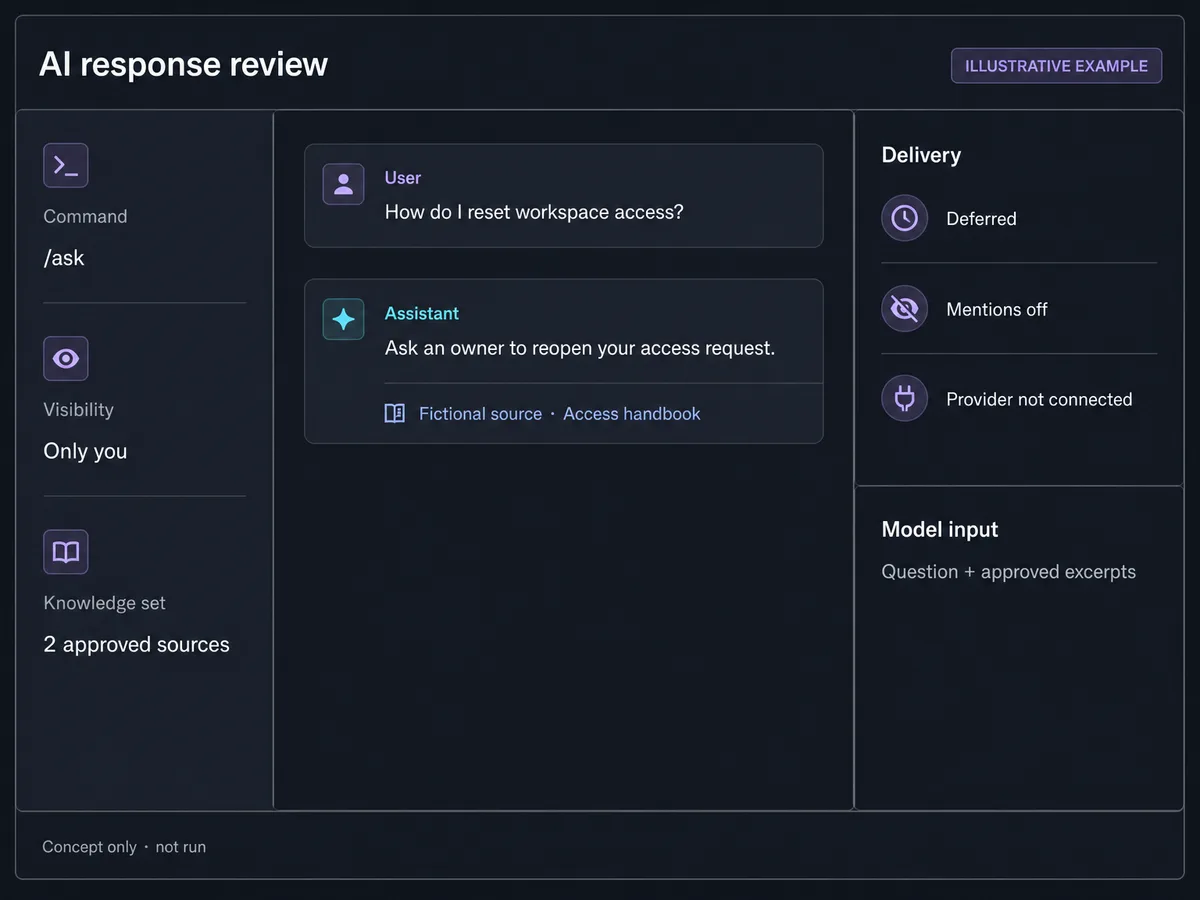
QUICK ANSWER
How do you create a Discord bot with AI?
Create a Discord application and a least-privilege `/ask` command, verify every HTTP interaction before parsing it, and defer the initial response before starting model work. Send the question and authorized source excerpts through a server-side model adapter, validate citations and uncertainty, post a private follow-up, then test rate limits, retries, token expiry, model outages, and prompt injection.
Prepare the app, knowledge boundary, and credentials
Start with one read-only question workflow in a controlled test server. Decide what the assistant may know and say before connecting a model.
- A Discord application and controlled server: Create an application in the Developer Portal, name an owner and recovery path, and use a test server. Record the Application ID and Application Public Key. The quick start also exposes the bot user and Bot page, but the HTTP command in this guide does not need a Gateway connection.
- An approved source registry: Give every source a stable ID, owner, audience, revision, and removal path. Authorize source retrieval by installation owner. Do not let a user prompt select an arbitrary URL, private record, or another server's source.
- A provider-neutral model contract: Choose a model provider only after checking its current retention, training, region, pricing, throughput, and outage behavior. Require structured status, answer, and source IDs so provider output can be validated before Discord sees it.
- Abuse, privacy, and budget rules: Define per-user, per-installation, and global model limits; maximum question and answer size; blocked data classes; retention; escalation; and a non-model response for overload or insufficient evidence.
Credentials and access
| Credential | Minimum access | Storage and rotation |
|---|---|---|
| Discord Application Public Key Ed25519 public key from the General Information page | It verifies HTTP interactions and grants no API access. Configure only the key for the intended application. | Keep it in server configuration such as `DISCORD_APPLICATION_PUBLIC_KEY`. It is public material, but one configured source prevents cross-application mistakes. Update the configured key and signed fixtures when moving applications or when the application key changes. Reject signatures for the previous application after cutover. |
| Discord bot token or registration credential Server-side credential from the Bot or OAuth2 setup path | Use it only for the registration or Gateway operation actually implemented. A command-only HTTP installation requests `applications.commands`; it does not need Administrator or a broad bot permission bitfield. | Keep it in a secret manager or protected server environment. Never put it in browser code, a ZIP, screenshots, source control, URLs, or logs. Reset a leaked bot token in the Developer Portal, update the server secret, invalidate old access where supported, and repeat registration and live smokes. |
| Model provider API key Server-side model inference credential | Use a separate project with only the model and quota the assistant needs. Do not give the model credential access to Discord administration or business actions. | Store in a server-side secret manager. Redact authorization headers, prompt bodies, source excerpts, and provider response bodies from routine logs. Rotate on provider schedule and immediately after exposure. Test the new key, revoke the old key, and confirm budget and rate alerts still target the active project. |
| Discord interaction token Expiring follow-up capability received in a verified interaction | Use only for follow-ups to its interaction and delete after completion or expiry. | Replace the token in queued payloads with an opaque vault reference. Encrypt persisted values, restrict worker access, and never log the token. It cannot be rotated. Expire queued work before the current 15-minute Discord window and ask the user to invoke the command again after expiry. |
Discord Developer Platform constraints
- Discord can deliver interactions through the Gateway or an HTTP outgoing webhook. These interaction receivers are mutually exclusive. The reproduced `/ask` example uses HTTP and does not maintain a Gateway connection.
- An HTTP Interactions Endpoint URL must verify `X-Signature-Ed25519` over the timestamp followed by the exact raw body before parsing. Invalid or malformed signatures return 401, including Discord validation probes.
- A signed interaction PING (`type: 1`) must receive PONG (`type: 1`). The current documentation requires the initial response within three seconds and allows follow-ups with the interaction token for 15 minutes. The artifact uses a conservative 14-minute job expiry.
- A command-only server installation can use `applications.commands` without the `bot` scope, a bot permission bitfield, or Gateway intents. A Gateway message listener needs a bot token and the exact intents its events require; reading message content can require the privileged `MESSAGE_CONTENT` intent.
- Discord rate limits are bucketed and may change. Read the current headers and `Retry-After` or `retry_after` response value instead of hardcoding a copied quota. Apply separate product limits before model work to control abuse and cost.
- Provider setup labels, installation contexts, review requirements, model terms, prices, data handling, and limits can change. Re-check Discord and the selected model provider on the day of configuration.
Official references: Discord Developer Quick Start, Interactions Overview, Receiving and Responding to Interactions, Application Commands, OAuth2 and Permissions, Discord Rate Limits, Gateway Events and Intents, Discord Permissions
Choose a command interaction before a message listener
The safest first AI bot is an explicit command with a private deferred response, not an assistant that reads every message.
| Approach | Best for | Tradeoff |
|---|---|---|
| HTTP `/ask` interaction | Explicit questions, private answers, components, and follow-up webhooks without a persistent connection. | Requires public HTTPS, exact raw-body signature verification, PING/PONG, a fast initial response, and an expiring follow-up path. |
| Gateway message listener | Workflows that genuinely need message or other Gateway events beyond interaction callbacks. | Adds a bot token, persistent WebSocket operation, reconnect and resume, event intents, and possibly privileged `MESSAGE_CONTENT` approval. It also creates a broader privacy surface. |
Recommended:Begin with HTTP `/ask`, one server installation context, ephemeral output, and `applications.commands` only. Add the `bot` scope, a permission bitfield, or Gateway intents only when a separately reviewed feature cannot work through interactions.
Create a grounded Discord AI ask command
Configure Discord, verify interactions, defer model work, ground output in approved sources, test failure paths, deploy HTTPS, and operate the assistant safely.
STEP 01
Write the answer, source, and action contract
Decide exactly what `/ask` can do before opening either provider console.
The example accepts one question up to 600 characters and answers only from two approved source IDs. It can answer with citations or say evidence is insufficient. It cannot browse, change access, run tools, grant roles, or authorize a business action.
Treat the user question and every source excerpt as untrusted data. Fixed instructions stay separate. Retrieval authorization happens before model input, and output is checked against the IDs actually retrieved.
Expected result: The brief names supported contexts, actors, sources, maximum sizes, model output schema, uncertainty copy, privacy rules, limits, and prohibited actions.
Verify it: Review normal, unauthorized-source, prompt-injection, invented-citation, insufficient-evidence, overload, and provider-outage examples with the source owner.
STEP 02
Create the Discord app and least-privilege command
Configure one `/ask` command without unused bot access.
Create the application in the Developer Portal. Record its Application ID and Public Key. If you use a bot token for command registration, copy it only into a protected server-side task. Reset it immediately if it appears in a client bundle, screenshot, terminal transcript, or commit.
Register `/ask question:<string>` in a controlled guild first. The included `command.json` uses server installation and server context. Install with `applications.commands` only; do not request `bot`, Administrator, guild permission bits, or Gateway intents for this HTTP-only flow.
Expected result: The test application has a named owner, protected registration credential, public verification key, one guild command, and no unused install scope or permission.
Verify it: Inspect the registered command JSON and authorization screen. Confirm `applications.commands` is the only scope and no bot permission integer is present.
STEP 03
Verify the raw interaction and answer PING
Authenticate Discord before parsing JSON or touching AI infrastructure.
Read `X-Signature-Ed25519`, `X-Signature-Timestamp`, and the untouched request bytes. Verify Ed25519 over timestamp plus raw body with the Application Public Key. Return 401 for missing, malformed, or invalid signatures and 413 for an oversized body.
Only after verification should the handler parse JSON. Return `{ "type": 1 }` for a signed PING. Discord sends intentional invalid-signature checks, so a handler that accepts them is not production-ready.
const verified = verify(
  null,
  Buffer.concat([Buffer.from(timestamp), rawBody]),
  applicationPublicKey,
  Buffer.from(signature, 'hex'),
)

if (!verified) return json(401, { error: 'invalid request signature' })
const interaction = JSON.parse(rawBody.toString('utf8'))
if (interaction.type === 1) return json(200, { type: 1 })
Expected result: Only interactions signed for the configured application reach command parsing, rate limiting, source retrieval, or model work.
Verify it: Send a signed PING, then replay malformed JSON with a one-byte-mutated signature. Expect PONG for the first and 401 before JSON parsing for the second.
STEP 04
Defer first, then claim and queue one AI job
Make the three-second response deadline structural.
Validate actor, installation owner, question length, and product rate limit before model work. Claim a stable interaction ID once so a Discord delivery replay cannot create two jobs or two provider charges.
Return callback type 5 with the ephemeral flag before storing the interaction token or enqueueing work. After the HTTP adapter has sent that response, store the token behind an opaque reference and queue the normalized question, approved source IDs, installation scope, and an expiry earlier than Discord's follow-up lifetime.
return json(200, { type: 5, data: { flags: 64 } }, async () => {
  const tokenRef = await tokenVault.store({
    interactionToken: interaction.token,
    expiresAt: followupExpiresAt,
  })
  await enqueueAiJob({ interactionId, question, sourceIds, tokenRef, followupExpiresAt })
})
Expected result: Discord receives a private defer promptly, and exactly one durable job carries bounded data plus an opaque expiring follow-up reference.
Verify it: Assert no token or queue call occurs when the handler returns. Invoke `afterResponse`, assert one queue call, then replay the same interaction and assert no second job is created.
STEP 05
Ground and validate the model response
Treat model output as untrusted until citations and limits pass.
Load only source IDs approved for the verified installation owner. Send fixed instructions, the user question, and source excerpts as separate fields through a provider adapter. Ask for structured `status`, `answer`, and `citations` rather than display-ready prose.
Reject unknown citation IDs, an answered status without citations, an empty answer, and output over the visible limit. Convert invalid output, model exceptions, and insufficient evidence to one bounded uncertainty response. Never let the model decide authorization or perform an external action.
const candidate = await aiProvider.answer({
  instructions: FIXED_INSTRUCTIONS,
  userInput: { question: job.question },
  sources: approvedSources,
})

const output = validateStatusAnswerAndCitationIds(candidate, approvedSources)
const content = output ?? 'I could not confirm that from the approved sources.'
Expected result: A supported answer names only approved sources; unsupported or malformed output becomes uncertainty instead of an invented answer.
Verify it: Inject a valid answer, a nonexistent citation ID, an instruction hidden inside a source, a provider exception, and an oversized answer. Inspect the private follow-up for each.
STEP 06
Run the same-release interaction artifact
Exercise the deterministic boundary without Discord or a model credential.
Download and extract the artifact, enter its directory, and run `node --test discord-ai-handler.test.mjs`. It generates an ephemeral Ed25519 key pair and uses only fictional users, source excerpts, tokens, and model results.
Read the interfaces before adapting them. Production needs a durable unique claim, multi-dimensional limiter, encrypted token vault, authorized knowledge store, durable queue, provider adapter, and Discord follow-up client.
Expected result: Nine tests pass for signature ordering, PING, defer ordering, duplicate suppression, application rate limiting, grounded output, invented citations, 429 retry, and token expiry.
Verify it: Run from a fresh ZIP extraction and confirm the suite reports nine passes, zero failures, and no network calls or credentials.
STEP 07
Deploy HTTPS and complete the live provider path
Publish the exact raw-body adapter and validate the real command manually.
Deploy the interaction endpoint, worker, queue, authorized source store, secret references, and provider adapter. Ensure framework body middleware does not consume or rewrite the bytes before signature verification. Keep the model key and bot token out of the frontend.
Set the current Interactions Endpoint URL in the Developer Portal, register the guild command, install it, and invoke normal, insufficient-evidence, unauthorized-source, duplicate, and overload cases. A locally passing handler does not prove this live configuration.
Expected result: Discord accepts the endpoint, `/ask` appears only in the intended test context, and controlled invocations produce private deferred follow-ups without extra permission grants.
Verify it: Record a redacted UTC smoke with endpoint host, application ID suffix, command version, scopes, contexts, response visibility, initial-response latency, provider class, and result.
STEP 08
Honor both Discord and product rate limits
Retry from current provider signals and control model spend before inference.
For Discord API responses, track response status, bucket metadata, and the current `Retry-After` header or JSON `retry_after` value. On 429, retain the unique job and token reference and retry only within the remaining follow-up window. Do not copy one fixed requests-per-second number into code.
Before inference, enforce user, installation, IP risk, concurrency, token, and budget limits. Shed load with a private deterministic message. Use bounded retries with jitter for retryable model failures, but do not retry invalid input, policy rejection, expired work, or an unsupported answer.
Expected result: Overload does not create uncontrolled provider spend, and a Discord 429 schedules one bounded retry without duplicate follow-ups.
Verify it: Inject Discord 429, model 429, model 5xx, timeout, queue replay, exhausted budget, and an expiry during backoff; confirm the final job and token states.
STEP 09
Monitor answers, deadlines, and recovery paths
Make silent grounding and delivery failures observable without logging sensitive content.
Measure signature rejection classes, PING success, initial-response latency percentiles, defer rate, queue age, duplicate claims, source authorization denial, model latency and response class, uncertainty rate, Discord 429s, follow-up result, and expired jobs.
Alert on rising initial-response latency, queue age approaching token expiry, follow-up failures, provider outage, budget exhaustion, or an unexpected change in uncertainty. Correlate with opaque request and interaction suffixes, not raw questions, excerpts, signatures, tokens, or usernames.
Expected result: Operators can distinguish endpoint, queue, source, model, Discord, and expiry failures and can recover without replaying every completed answer.
Verify it: Run a controlled incident drill for leaked credentials, model outage, stuck queue, expired jobs, and rollback. Confirm recovery preserves completed-job identity and deletes unusable token references.
Test the trust boundaries, not just the happy answer
A convincing model response is not proof. Test authenticated delivery, input and retrieval authorization, structured output, cost control, expiry, retry, and the final Discord client experience separately.
| Test | Scenario | Expected result |
|---|---|---|
| happy path | A signed `/ask` interaction from an allowed installation asks a question answered by one approved fictional source. | The endpoint defers privately before model work, the worker cites only the retrieved source, mentions are disabled, delivery completes once, and the token reference is deleted. |
| invalid input | Send a mutated signature with malformed JSON, an oversized question, a cross-installation source ID, prompt injection, and a model answer with an invented citation. | The endpoint rejects before parsing where appropriate, no unauthorized excerpt reaches the model, no invented citation is shown, and bounded private guidance replaces invalid output. |
| retry | Replay one interaction, return model 429 and Discord 429 with current retry timing, then let another job expire during backoff. | One interaction creates at most one logical job, retries stay bounded, one follow-up is delivered at most once, and expired work deletes its token without calling Discord. |
| production smoke | Save the HTTPS endpoint, register and install the guild command, then invoke answerable, uncertain, overload, and unauthorized-source cases from controlled accounts. | Endpoint validation passes, output stays private, no unnecessary scope or intent is granted, initial acknowledgements meet the deadline, and monitoring separates each result class. |
Troubleshoot from Discord ingress to the follow-up
Trace one interaction through signature verification, initial acknowledgement, unique claim, source authorization, provider call, output validation, follow-up, and expiry.
| Symptom | Likely cause | Check | Fix |
|---|---|---|---|
| The Developer Portal refuses the Interactions Endpoint URL. | PING/PONG is wrong, signature verification uses parsed JSON, invalid probes do not return 401, or the public HTTPS route is unreachable. | Replay a signed PING and a one-byte-mutated signature through the deployed request adapter while recording bounded response class and latency. | Preserve raw bytes, verify timestamp plus body before parsing, return type 1 PONG for PING and 401 for invalid signatures, then save the URL again. |
| Discord says the application did not respond. | Source retrieval, queue I/O, or model work runs before callback type 5 and crosses the three-second initial-response deadline. | Measure request receipt to initial response and split signature, parse, rate-limit, claim, token, queue, retrieval, and model durations. | Keep only bounded validation and a fast claim before the defer. Send type 5, then store the token and enqueue through an after-response hook. |
| The assistant gives a fluent answer with no valid source. | The provider returns display-ready prose, source excerpts contain instructions, or citation IDs are not checked against authorized retrieval results. | Replay the exact source revision with a fake citation, missing citation, source prompt injection, and insufficient evidence while inspecting structured output. | Separate fixed instructions from untrusted data, authorize sources before inference, validate status and citation IDs, and render uncertainty for every invalid output. |
| Users receive duplicate follow-ups or model spend doubles. | A retried delivery or queue job is not claimed by stable interaction ID, or retry creates a new logical job instead of resuming the existing one. | Group queue and follow-up records by interaction ID and compare claim, attempt, provider, and delivery timestamps. | Enforce a durable unique claim, keep one job identity across retries, mark follow-up completion atomically, and never replay a completed interaction. |
| A follow-up fails after model work completes. | The interaction token expired, a Discord 429 was ignored, the token reference was deleted early, or the application ID and token do not match. | Compare queue age, configured expiry, current Discord response class and retry value, token-vault state, and application ID suffix without exposing the token. | Expire work before the provider window, honor current retry signals, retain the token reference until success or expiry, and ask for a new command after expiry. |
| The command is missing or cannot read messages. | The command was registered in the wrong scope or context. A Gateway design may also lack the required standard or privileged intent. | Compare registered command JSON, installation scopes, contexts, bot permissions, Gateway identify payload, and enabled Developer Portal intents with the design. | For HTTP `/ask`, register in the test guild and install `applications.commands`. For a real Gateway listener, request only the exact bot scope, permissions, and intents its events require. |
Operate the AI bot as two expiring provider workflows
Deploy
Deploy the interaction endpoint and worker independently but from one compatible release. Configure Discord verification, token vault, queue, authorized source registry, model key, limits, and follow-up client before enabling the command.
Promote from deterministic fixtures to Developer Portal endpoint validation, guild command registration, controlled installation, live Discord invocation, live model smoke, and only then broader distribution. Record each evidence layer separately.
Monitor
Track ingress authenticity, initial acknowledgement, queue and expiry, source authorization, provider latency and errors, structured-output rejection, uncertainty, Discord rate limits, follow-up result, and spend by installation.
Use an internal correlation ID and bounded interaction suffix. Do not log raw interaction bodies, questions, source excerpts, usernames, signatures, bot tokens, model keys, or interaction tokens by default.
Recover
For a leaked bot or model credential, rotate it at the provider, update server secrets, revoke old access, inspect bounded audit metadata, and repeat registration, endpoint, model, and cost-limit smokes.
For a bad release or outage, disable or rate-limit `/ask`, restore the compatible endpoint and worker, reconcile claims and delivery status, delete expired token references, and never rerun completed interactions blindly.
Keep Discord, knowledge, and model trust separate
A valid Discord signature authenticates the provider request. It does not authorize a source, prove a model answer, or permit the model to act.
- Verify Ed25519 over timestamp plus exact raw body before parsing; reject missing or malformed headers, bound request size, and keep the public key separate from secrets and grants.
- Install `applications.commands` only for the HTTP command. If a later Gateway feature needs `bot`, permissions, or intents, request the smallest set and separately review privileged `MESSAGE_CONTENT`, member, and presence access.
- Keep bot tokens, OAuth credentials, model keys, and interaction tokens server-side. Vault expiring interaction tokens behind opaque references and delete them after delivery or expiry.
- Authorize source IDs by verified installation and actor before retrieval. Treat questions and excerpts as untrusted, keep fixed instructions separate, validate output and citations, and show uncertainty when evidence is insufficient.
- Never let the model grant a role, change access, spend money, delete data, or authorize another external action. Put deterministic server authorization and confirmation around any future action tool.
- Apply input, output, concurrency, per-user, per-installation, and budget limits before model work; disable mentions in generated output and render plain text unless a separately sanitized format is required.
- Minimize retained content, define source and conversation deletion ownership, review the model provider's current data terms, and test privacy, abuse, outage, retry, and recovery paths before distribution.
Discord AI bot setup questions
Do I need AI to create a Discord bot?
No. Use deterministic code for status lookups, moderation rules, and fixed workflows. Add a model only when interpreting or drafting language is the central requirement and you can define sources, uncertainty, privacy, limits, and tests.
Does a Discord AI slash command need a bot token?
Incoming HTTP interactions are verified with the Application Public Key, not a bot token. Command registration still needs an authorized server-side credential. The command-only installation can use `applications.commands` without the `bot` scope.
Which Discord intents does an AI bot need?
The HTTP `/ask` flow in this guide needs no Gateway intent. A Gateway listener needs only the intents for its subscribed events. Reading message content can require the privileged `MESSAGE_CONTENT` intent, so do not add it to an interaction-only design.
Should the bot receive Administrator permission?
No for this workflow. Administrator bypasses normal channel permission checks and is unnecessary for a private slash-command response. Request only the scope and permission bits tied to a reviewed, implemented action.
How do I stop an AI Discord bot from inventing answers?
You cannot guarantee that a model never errs. Reduce the risk with authorized approved sources, separate fixed instructions, structured output, citation-ID validation, bounded answer length, an uncertainty state, adversarial tests, and human escalation.
How should Discord and model rate limits work together?
Apply product limits before inference to control abuse and cost. For provider calls, use the current response headers and retry values, preserve one logical job across retries, add bounded jitter, and stop before the interaction token expires.
Does the downloadable example call Discord or an AI provider?
No. It uses generated test keys, fake provider output, fictional source excerpts, and injected adapters. It proves the local handler and worker boundary only. Developer Portal setup, installation, live invocation, live model behavior, and deployment remain manual evidence.
Build the workflow with Playcode
Describe the Discord command and its safety boundary
Playcode AI can build the endpoint, queue, grounded source workflow, tests, and operator view. You supply provider accounts, credentials, approved content, limits, and the final Discord and model smokes.
Build an app with AIDiscord installation, model-provider terms, credentials, moderation, source rights, and external services remain your responsibility.