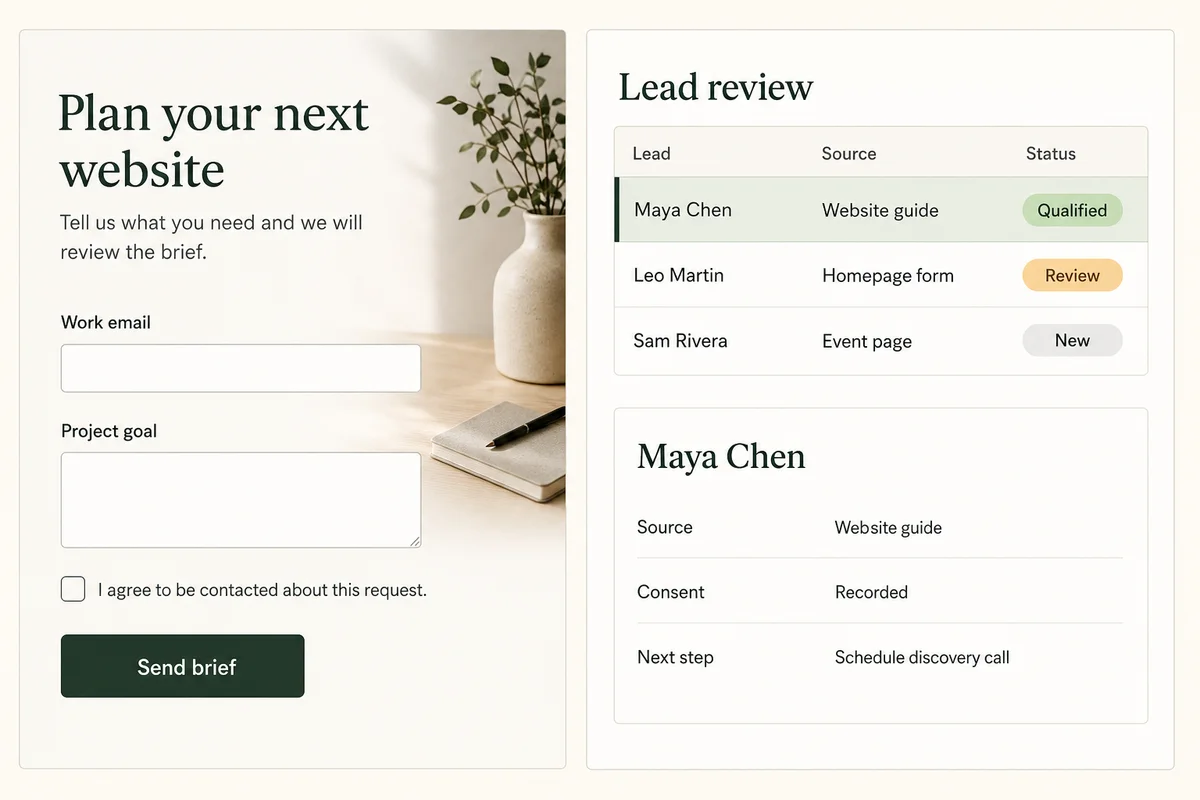
A useful lead generation website does more than email a contact form. It explains one offer, records which form and consent text the visitor saw, validates the submission on the server, saves one durable lead, and gives an authorized operator a clear qualification state, owner, and next step.
This guide builds that dependable core before adding email or CRM automation. It also separates technical retries from human duplicate matching, treats source and UTM fields as limited visit context rather than proof of influence, and keeps provider failure from erasing the only copy of an inquiry.
QUICK ANSWER
How do you create a lead generation website?
Choose one audience, offer, and next step. Define a versioned lead record before designing the form, enforce validation and access on the server, save the record before email or CRM delivery, and give operators an accountable review queue. Then test invalid input, repeated attempts, provider failure, production access, retention, and recovery.
Define the business and data contract first
Use fictional contacts while building and testing. Decide what value the visitor receives, what the operator must decide, and which personal fields are truly necessary before any real inquiry enters the system.
- One audience, offer, and next step: Write one sentence for who the page serves, what useful outcome or resource it offers, and the exact follow-up action: send information, review a project, schedule a call, or decline with a clear policy.
- One lead record and lifecycle: Name the stable ID, form ID and version, source context, consent evidence, submitted fields, status, owner, next step, idempotency key, created and updated timestamps, retention period, and deletion owner.
- Access and status rules: Decide which roles may list, read, export, assign, qualify, close, correct, or delete a lead. Define allowed moves among new, review, qualified, contacted, closed, and deleted states.
- Optional provider readiness: If the team needs email or CRM delivery, confirm the provider account, current plan, API operation, test mode, field mapping, rate limits, minimum credential scope, secret rotation, and partial-failure behavior.
- Privacy and retention review: Name the person responsible for data minimization, retention, corrections, deletion requests, and access review. Sensitive or regulated fields need separate legal, security, and compliance approval before collection.
Credentials and access
| Credential | Minimum access | Storage and rotation |
|---|---|---|
| Optional email API key Provider-issued server API credential | Only the send operation and verified sender or template scope required for the follow-up flow | Server-side secret configuration only, never browser code, source control, URLs, screenshots, generated assets, or routine logs Create a replacement in the provider dashboard, update the server configuration, verify a test send, then revoke the old key |
| Optional CRM API token Provider-issued server OAuth token or scoped private-app token | Create or update only the lead or contact objects and fields required by the documented mapping | Encrypted server-side secret configuration, separated by environment and never returned to the public form Use the provider refresh or replacement path, verify read and write scope with a fictional record, then revoke the previous token |
| Optional webhook signing secret Provider-issued signature-verification secret for one callback endpoint | Verification for only the selected environment and event set; no broader account access | Server-side secret configuration, never inside the webhook URL and never printed with the request body Follow the provider overlap procedure when available, verify both during the transition, then remove the previous secret |
Save the lead before any external handoff
The most important boundary is what success means. The visitor should see success only after the accepted lead has one durable ID. Email, CRM, analytics, and other provider calls happen after that boundary and keep their own retry state. If the visitor should receive an explainable result before optional follow-up, use the interactive quiz builder instead of hiding scoring inside a generic lead form.
| Approach | Best for | Tradeoff |
|---|---|---|
| App record first, provider handoff second | Teams that need a dependable review queue, accountable status, and recovery when an external service is slow or unavailable. | The app owns retention and operator access, but provider outages cannot erase the only copy and delivery can retry independently. |
| Provider as the first destination | A very small temporary test where the provider is explicitly accepted as the only source of truth. | Setup can be shorter, but a timeout creates uncertainty about whether to retry, and provider changes control the core acceptance path. |
| Email-only notification | Low-risk, low-volume tests where losing, assigning, or reconciling a submission is not business-critical. | There is no structured status, shared owner, safe duplicate policy, or reliable recovery if the message is delayed, filtered, or rejected. |
Recommended:Use the app database as the source of truth: accept, validate, and save one lead, then create separate delivery attempts. Start with manual qualification. Add provider automation only after real volume reveals stable rules and someone owns monitoring and recovery.
Create a lead generation website step by step
Define the offer and record, build the public form, save and review leads safely, add optional provider delivery, test the failure boundaries, publish, and operate the workflow.
STEP 01
Write the offer and form contract
Make the page promise, collected fields, consent text, and operator decision agree before designing layouts.
Name one audience, one offer, and one next step. For each proposed field, write why it is required at this stage and who will use it. Remove fields that do not change delivery or qualification.
Give the form a stable ID and version. Store the exact consent version and capture time rather than one mutable yes-or-no label. Decide what happens when a visitor declines optional contact permission.
Choose which source, campaign, referrer, or UTM values to retain. These values reflect what reached the page when available; they do not prove which interaction caused a later purchase.
Expected result: The brief names the visitor value, required fields, optional fields, consent version, form version, source context, and one accountable next step.
Verify it: Ask an operator to explain how every field changes a real decision. If a field has no owner or use, remove it from the first version.
STEP 02
Model the lead and delivery attempts separately
Give the accepted inquiry an identity and lifecycle independent of email, CRM, analytics, or advertising tools.
Ask Playcode to create a lead record with a stable ID, form version, bounded submitted values, source context, consent evidence, qualification state, owner, next step, idempotency key, timestamps, and a version for concurrent operator changes.
Create a separate delivery-attempt record for each optional provider. Store the lead ID, provider name, operation, status, attempt count, bounded error class, provider response ID, and timestamps. Do not store provider secrets or full personal payloads in routine logs.
type Lead = {
  id: string
  formId: string
  formVersion: string
  attemptKey: string
  email: string
  projectGoal: string
  source?: string
  utmCampaign?: string
  consentVersion: string
  consentCapturedAt: string
  status: 'new' | 'review' | 'qualified' | 'contacted' | 'closed'
  ownerId?: string
  nextStep?: string
  version: number
  createdAt: string
  updatedAt: string
}

type DeliveryAttempt = {
  id: string
  leadId: string
  provider: 'email' | 'crm'
  operation: string
  status: 'pending' | 'sent' | 'failed'
  attemptCount: number
  providerResponseId?: string
  errorClass?: string
  createdAt: string
  updatedAt: string
}
Expected result: One accepted lead can remain reviewable while zero, one, or several provider delivery attempts change state independently.
Verify it: Create one fictional lead with a failed email attempt and a successful CRM attempt, then confirm changing either attempt cannot duplicate or overwrite the lead.
STEP 03
Build browser feedback and server authority
Use browser validation to help the visitor and server validation to decide whether a record is accepted.
Validate required values, types, maximum lengths, allowed status-independent fields, consent requirements, form version, and request size on the server. Normalize only what your duplicate policy understands; preserve the original bounded value when operators need it.
Use a client-generated attempt key or a server-issued submission token with a unique database constraint. On a retry of the same attempt, return the original stable result. Do not use normalized email alone as a technical idempotency key.
Return success only after the lead commit completes. If a later provider call fails, the public success state remains tied to the durable lead, while the operator view shows the delivery problem.
Expected result: Valid input returns one stable lead ID; missing, malformed, overlong, unauthorized, or unsupported input creates no record and returns a safe actionable error.
Verify it: Call the server handler with valid input, missing consent, an overlong message, a malformed email, an old form version, and a repeated attempt key, then compare responses and row counts.
STEP 04
Build a protected qualification queue
Turn the submission into an accountable workflow without exposing personal data to the public page.
Create loading, empty, populated, read-error, write-error, stale-version, and unauthorized states for the lead list and detail view. Show the form version, source context, consent evidence, current status, owner, next step, and delivery state.
Enforce the operator role and record scope on the server for list, detail, export, assignment, status update, correction, and deletion routes. Hiding the navigation or guessing an organizer URL is not authorization.
Use a record version when two operators may update the same lead. A stale write should explain the conflict and reload current state rather than silently overwrite a newer decision.
Expected result: Authorized operators can assign and qualify a lead, while signed-out visitors and unrelated accounts cannot read, export, or change it even with a known ID.
Verify it: Repeat every route from a private browser and a second ordinary account. Then edit one fictional lead from two operator sessions and confirm the stale update is detected.
STEP 05
Add provider delivery as a retryable side effect
Keep provider credentials and failures behind the server boundary and outside the original submission transaction.
Store API keys, OAuth tokens, and signing secrets in server-side secret configuration. Request only the provider scopes needed for the documented object and operation. Separate development and production credentials.
Map only required fields. Record a delivery-attempt ID before sending, attach the stable lead ID or a safe provider idempotency value when supported, and update the attempt from the bounded provider response.
When a provider fails, retry the delivery attempt with backoff and a limit. Do not resubmit the public form, recreate the lead, or print the credential and personal payload into logs. Send exhausted attempts to an operator-visible recovery state.
Expected result: Email or CRM can fail and recover without changing the accepted lead count or hiding the original inquiry from the operator.
Verify it: Use a provider test mode or controlled bad mapping, verify one failed attempt beside one lead, correct the setup, retry only that attempt, and confirm the provider response ID is recorded once.
STEP 06
Exercise retries, abuse, attribution limits, and access
Test the boundaries that create silent loss, duplication, exposure, or false marketing certainty.
Run a happy path, invalid and overlong input, missing consent, repeated attempt key, a new inquiry with the same normalized email, provider timeout, rate-limit burst, signed-out access, cross-account access, stale operator update, and a source-less visit.
Confirm the same-attempt retry returns the original lead, while a later business duplicate follows an explicit link, update, or human-review policy. Do not silently merge distinct inquiries.
Compare stored source context with the original URL and redirect chain. Label unknown values honestly and document the attribution window and model before presenting totals.
Expected result: The workflow has one deterministic result for every tested submission, access attempt, provider failure, and operator conflict, without unsupported attribution claims.
Verify it: Save a test matrix with expected row counts, status values, response codes, access results, and redacted log identifiers, then rerun it against the release candidate.
STEP 07
Publish over HTTPS and run a production smoke test
Verify the public page, protected queue, secrets, and recovery path in the environment visitors will use.
Publish the site, confirm HTTPS and the intended domain, set environment-specific provider credentials, and verify that browser bundles, source maps, HTML, URLs, and client errors do not expose secrets.
Submit one fictional lead from a fresh private browser. Record the public request ID, returned lead ID, stored form and consent versions, operator-visible status, and each provider delivery attempt.
Exercise the operator access test and one controlled provider failure. Verify rate limits and request-size limits fail predictably without logging personal content.
Expected result: The production site accepts one fictional lead, shows it only to the authorized operator, and keeps provider failure separately diagnosable and retryable.
Verify it: Match the public result, database lead, operator detail, delivery-attempt record, redacted logs, and provider test result by stable IDs, then delete the fictional data through the documented path.
STEP 08
Review delivery, retention, and recovery on a schedule
A lead workflow stays reliable only when someone owns failed delivery, stale records, access, and deletion.
Monitor accepted leads, validation rejections, duplicate-attempt returns, provider failure classes, exhausted retries, rate-limit events, queue access denials, and age by status. Use counts and stable IDs, not complete personal payloads.
Review provider credentials and operator access regularly. Reconcile saved leads against provider delivery attempts, especially after an outage or mapping change.
Delete or anonymize expired data according to the approved policy. For one bad record, prefer a scoped correction from an audit trail. A whole-app restore can also rewind newer leads, so reconcile authorized post-checkpoint data before using it.
Expected result: An owner can find failed handoffs, stale leads, unusual rejection patterns, expired data, and unauthorized access attempts before they become invisible business loss.
Verify it: Run the support checklist with one fictional failed delivery, one stale lead, one access denial, and one retention-due record, then document the observed final state.
Use a test matrix, not one successful submit
A reliable lead website proves record counts, statuses, access responses, and partial-failure behavior. Keep all test data fictional and remove it after the production smoke test.
| Test | Scenario | Expected result |
|---|---|---|
| happy path | Submit bounded fictional contact data with the current form version, explicit consent, and known source context. | One lead receives a stable ID, new status, form and consent versions, source context, and operator-visible next step before provider delivery completes. |
| invalid input | Omit consent, exceed a field limit, submit a malformed email, use an unsupported form version, and access the queue signed out or from another account. | The server saves no invalid lead, returns bounded errors, and denies every unauthorized list, detail, export, and update request. |
| retry | Repeat one interrupted submission with the same attempt key, then submit a separate inquiry using the same normalized email. | The technical retry returns the original lead once; the separate inquiry follows the documented human duplicate policy rather than being silently merged. |
| production smoke | Open the live HTTPS site in a fresh private browser, submit one fictional lead, inspect it as an authorized operator, and trigger one controlled delivery failure. | The public and operator states reference the same lead, the failed delivery can retry separately, no secret reaches the browser, and the test data can be deleted through the approved path. |
| invalid input | Send a bounded burst, a very large body, missing source tags, and a stale operator update from a second session. | Rate and size limits respond predictably, unknown attribution stays unknown, and the stale write cannot overwrite the current lead state. |
Diagnose the boundaries that fail silently
Start with stable request, lead, and delivery IDs. Inspect bounded error classes and state transitions without copying provider secrets, emails, or free-text inquiry bodies into routine logs.
| Symptom | Likely cause | Check | Fix |
|---|---|---|---|
| Success appears, but no lead is in the queue | The page used an email or CRM response as the success condition before the database transaction committed. | Trace the request ID and compare the lead-save event with each provider-delivery event. | Return success only after the lead is durable, then run provider delivery as a separate retryable attempt. |
| One click creates several leads | The retry sent the same logical attempt without a unique idempotency key or the server did not enforce uniqueness. | Compare attempt keys, timestamps, normalized fields, and database uniqueness errors across the requests. | Require one attempt key, return the original stable result on retry, and handle later human duplicates with a separate policy. |
| The lead is saved, but email or CRM delivery fails | The credential, scope, sender, field mapping, rate limit, endpoint, or provider availability failed after the save. | Inspect the redacted delivery attempt, response code, credential expiry, required scope, and mapped field names. | Correct the provider configuration and retry only the delivery attempt associated with the existing lead ID. |
| Two campaign reports disagree | Source tags were missing or overwritten, redirects changed them, privacy controls removed them, or the tools use different attribution models and windows. | Compare the original landing URL, redirect chain, raw stored context, time window, identity rule, and model in each report. | Preserve raw context, keep unknown values, label the model and limitation, and do not present source fields as causal proof. |
| An unrelated account can read or export leads | One list, detail, export, assignment, or status route relies on a hidden control or omits the server-side operator check. | Repeat every lead route from a private session and a second ordinary account with a known fictional lead ID. | Apply one server-side role and scope policy to every read and write route, then rerun the full cross-account matrix. |
| A lead contains the wrong or outdated consent context | The form overwrote mutable consent text instead of storing the submitted version and capture time. | Compare the lead form version, consent version, deployed copy history, capture timestamp, and original request metadata. | Version the form and consent text, store those versions on each new lead, and correct historical records only through an approved audit path. |
Publish, monitor, and recover the workflow
Deploy
Publish over HTTPS on the intended domain. Configure optional provider credentials separately per environment and confirm that no key or token appears in public HTML, browser JavaScript, source maps, URLs, screenshots, or client-side error payloads.
Run the private-browser smoke test with fictional data. Verify one durable lead, protected operator access, separate delivery attempts, rate and size limits, redacted logs, and the approved delete path before accepting real submissions.
If the site has several campaign pages, preserve the landing path, form ID and version, and raw source context consistently. Document redirects and attribution windows so later reports remain explainable.
Monitor
Track accepted and rejected submissions, attempt-key reuses, provider failure classes, exhausted retries, rate-limit events, access denials, stale-write conflicts, and lead age by status. Use stable IDs and aggregate counts rather than personal payloads.
Reconcile accepted leads with delivery attempts after provider outages, credential rotation, field-mapping changes, and deploys. A saved lead with no successful delivery should be visible to an operator, not silently abandoned.
Review operator access, provider scopes, retention-due records, and deletion requests on a named schedule. The page itself cannot establish legal or regulatory compliance.
Recover
For a failed provider handoff, repair the credential, mapping, endpoint, or rate-limit behavior and retry only the existing delivery attempt. Never recreate the lead from a logged request body.
For one incorrect status or field, use a scoped correction with actor, reason, before value, after value, and timestamp. Preserve the audit information required by the approved policy without retaining unnecessary personal content.
A full snapshot restore can return code, files, and the database to a saved point, which may also rewind newer leads. Before restoring, compare record-level repair with whole-app recovery and plan an authorized reconciliation of post-checkpoint records.
Protect personal data and provider access
A public lead form is an untrusted input surface and a protected lead queue is a personal-data system. Treat both as server-enforced boundaries and collect only what the promised follow-up needs.
- Validate type, length, allowed values, request size, consent requirements, form version, and status transitions on the server. Browser validation is feedback, not authority.
- Rate-limit submission and provider delivery separately. Add a documented spam response and use a bot-check provider only when the abuse pattern justifies its account, policy, and credential cost.
- Authorize every lead list, detail, export, assignment, status, correction, and deletion route on the server. Test signed out, in a private browser, and across two ordinary accounts.
- Store API keys, OAuth tokens, and signing secrets only in server-side secret configuration. Request minimum scopes, separate environments, rotate credentials, and revoke unused access.
- Minimize personal data, bound free text, exclude complete payloads from routine logs, name a retention owner, and make approved correction and deletion paths operable.
- Do not claim legal, privacy, security, advertising, or regulatory compliance from a technical checklist. Sensitive or regulated collection requires separate expert review for the actual business, jurisdiction, provider, and policy.
Lead Generation Website FAQ
What pages should a lead generation website include?
Start with one focused offer page, enough proof and context to make the request reasonable, the versioned form, a specific success state, and the required policy information. Add audience or campaign pages only when their offers, questions, or follow-up paths are genuinely different.
What fields should a lead form collect?
Collect only what the promised value and immediate qualification decision require. Store the form version, consent version and timestamp, stable lead ID, source context, status, owner, next step, and timestamps alongside the bounded visitor fields. Remove personal fields without a named user and purpose.
Should a form save to a database or send directly to a CRM?
For a dependable workflow, save one lead in the application database first and make CRM delivery a separate attempt. This gives the visitor a stable acceptance result and lets operators retry a provider failure without resubmitting or duplicating the original inquiry.
How do I prevent duplicate leads?
Use an idempotency key for the same technical submission attempt. A later inquiry from the same normalized email is a business duplicate and needs an explicit update, link, or human-review rule. Do not silently merge separate needs or use email alone as the retry key.
How should lead source and UTM data be interpreted?
Treat them as visit context when they are present. Missing tags, redirects, privacy controls, multiple devices, attribution windows, and multi-touch journeys limit what they prove. Preserve raw values, keep unknowns, name the model, and avoid claiming one source caused a customer or revenue.
How do I connect email or a CRM?
Choose a provider with a documented API path, then obtain the account, plan, minimum-scope server credential, field mapping, rate-limit policy, test mode, and rotation path. Save the lead first, record a separate delivery attempt, and retry only that attempt after a partial failure.
How do I reduce form spam?
Start with bounded input, request-size limits, server validation, attempt idempotency, rate limits, and monitoring. Add a honeypot or provider-backed bot check only when the observed abuse warrants it. Keep a legitimate recovery path and do not treat every repeated human inquiry as technical spam.
Does this workflow make the site privacy-law compliant?
No. Data minimization, consent versioning, access control, retention, deletion, and safe logging are useful technical controls, but compliance depends on the real business, jurisdiction, purpose, disclosures, providers, contracts, and practices. Get separate legal, security, and compliance review where required.
Build the dependable core first
Create the Website and the Lead Workflow Behind It
Describe one offer, a versioned form, the lead record, consent fields, qualification states, operator access, and the next step. Save first, automate second, and test every failure boundary before collecting real inquiries.
Start Building with PlaycodeNo credit card required. Provider accounts and credentials remain explicit.