A Slack AI bot is two systems joined at a strict boundary. Slack provides the app identity, installation, events, interactions, and message surfaces. Your application owns authorization, approved knowledge, model access, citations, uncertainty, confirmation, retries, and recovery. A prompt alone covers neither system.
This guide builds a grounded support-policy assistant with a same-release Node.js artifact. Ten deterministic fixtures prove raw-body signing, replay rejection, URL verification, record-before-ack ordering, duplicate delivery, access-scoped retrieval, cited and uncertain answers, prompt-injection resistance, provider outage, and Slack rate-limit scheduling. Real workspace installation, model quality, event delivery, and `chat.postMessage` remain explicit provider smokes.
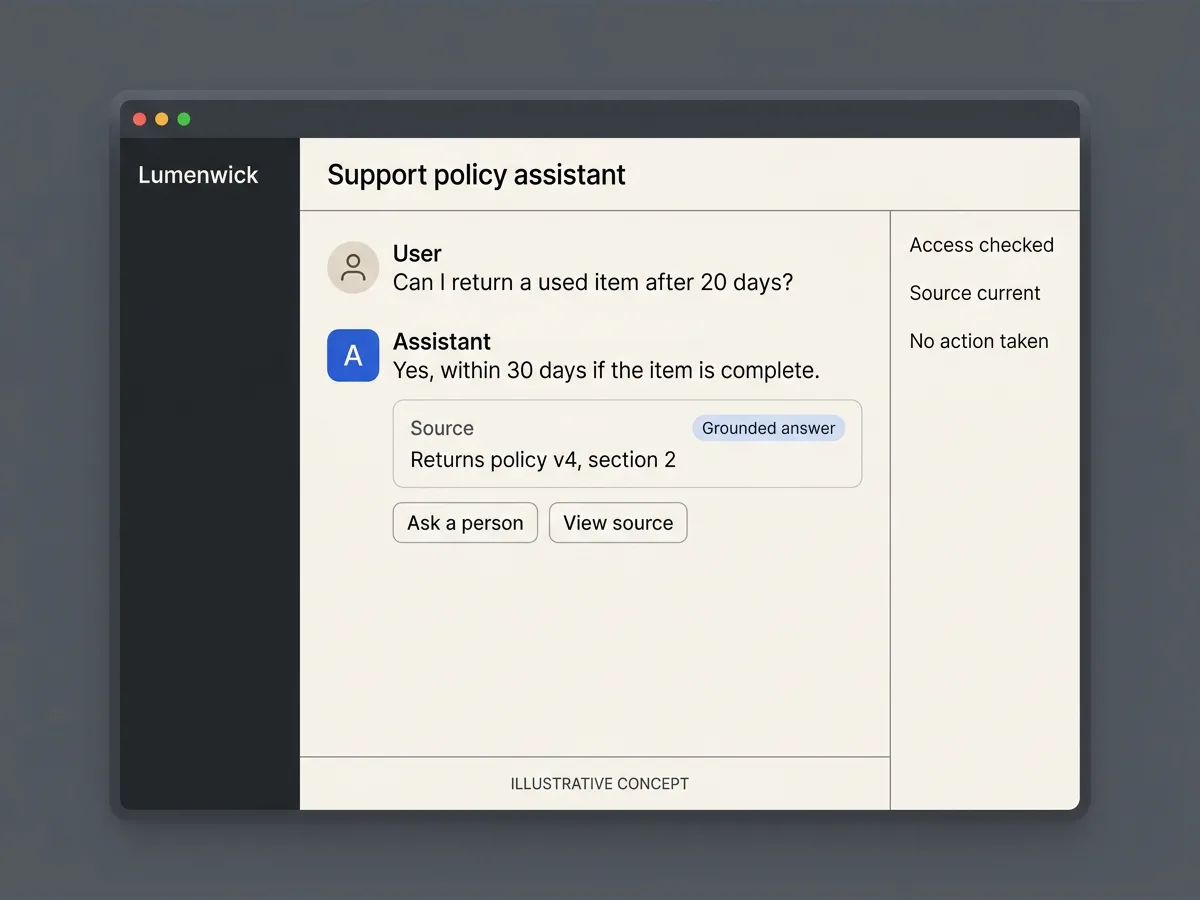
QUICK ANSWER
How do you create a Slack bot with AI?
Create a Slack app, choose a mention, direct-message, or Agent surface, install only the required OAuth scopes, and choose HTTP Events API or Socket Mode. Authenticate and acknowledge Slack events quickly, persist each `event_id`, retrieve only approved sources the user may access, require citations or an explicit uncertain state, keep model-proposed actions behind human confirmation, post through a retryable outbox, then test the live workspace and model separately.
Define the assistant before creating the Slack app
Begin with one user job and a fictional source set. Decide what the assistant may read, what it may answer, when it must say it is uncertain, which actions require confirmation, and who owns the human exit.
- A Slack development workspace and app owner: Use a Developer Program sandbox or a controlled workspace where you may install apps. Record the app owner, workspace administrator, credential-rotation owner, plan eligibility, distribution choice, and last provider smoke date.
- A versioned approved-source registry: Give every source a stable ID, title, version, owner, effective date, status, allowed audience, and canonical location. Draft, expired, deleted, inaccessible, and conflicting sources need explicit behavior rather than silent inclusion.
- A model and data-handling decision: Choose a model provider, region where relevant, purpose, fields sent, retention, training or reuse terms, access, deletion, incident owner, and cost limits. Slack access does not automatically authorize sending the same content to a model provider.
- A durable event store, outbox, and human queue: Persist `event_id` under a unique constraint before acknowledging. Store one retryable outbound effect and one idempotent escalation record. A memory set, best-effort message, or unverified support address is not a recovery path.
Credentials and access
| Credential | Minimum access | Storage and rotation |
|---|---|---|
| Slack signing secret HTTP request-authentication secret for one Slack app | Only the HTTP request-verification adapter needs it. Socket Mode event delivery does not use it for per-event HTTP signature checks. | Store as a server-side Playcode secret such as `SLACK_SIGNING_SECRET`. Never place it in browser code, a prompt, repository fixture, URL, generated image, or routine log. Rotate after exposure or ownership change, update the matching app deployment, reject requests signed with the old value, and repeat Request URL verification before restoring traffic. |
| Slack bot OAuth token Workspace installation credential for approved Slack Web API methods | A mention-and-reply bot can begin with `app_mentions:read` and `chat:write`. A current Agent messaging implementation may also need `assistant:write`, direct-message events, and `im:history` according to the selected surface and current manifest. | Store separately as a server-side secret such as `SLACK_BOT_TOKEN` and send it only in the Web API Authorization header. Never expose the `xoxb-` value to the browser, model, source registry, or logs. Revoke or reinstall after exposure or scope changes. For distributed apps, evaluate Slack token rotation; current rotating access tokens expire after 12 hours and require safe storage of the changing refresh token. |
| Slack app-level token Socket Mode connection credential | Request `connections:write` only when Socket Mode is the chosen transport. HTTP Request URL deployments do not need this token. | Store the `xapp-` value as a separate server secret available only to the long-lived Socket Mode worker. Revoke and replace after exposure, then confirm the old connection cannot reopen and the replacement worker handles reconnects and acknowledgements. |
| Model-provider API credential Server credential for the selected AI model provider | Use the narrowest project, model, budget, and environment access the provider offers. The Slack app and browser never need this credential. | Store separately from Slack credentials as a server secret. Do not pass it to user-visible tools, model input, generated UI, downloadable fixtures, or logs. Rotate on exposure, owner or environment change, and provider policy. Re-run known, unknown, injection, outage, and budget fixtures after changing the credential or model configuration. |
Slack platform constraints
- Provider UI and terms checked 2026-07-19: new AI apps use Slack's Agent messaging experience with `agent_view`. Existing `assistant_view` apps may continue temporarily, but Slack recommends migration and states that the older experience will be deprecated. Switching an existing app to `agent_view` cannot be reversed.
- Developing and using some Agent features requires a paid Slack plan. A fully featured Developer Program sandbox can cover development, but production workspace access, administrator approval, and plan eligibility remain separate checks.
- For HTTP delivery, verify `v0:{timestamp}:{rawBody}` with HMAC-SHA256 and the signing secret before parsing. Reject a timestamp more than five minutes from trusted local time. Socket Mode uses a pre-authenticated WebSocket and envelope acknowledgements instead of per-request HTTP signatures.
- Slack expects Events API and interactivity acknowledgements within three seconds. It retries failed event delivery, so the outer globally unique `event_id` must be claimed before acknowledgement and variable AI work must run after the response.
- Web API rate limits are evaluated per method and per workspace. On HTTP 429, wait for the returned `Retry-After` interval. Slack does not provide one universal idempotency header for every Web API write, so keep your own stable outbox identity around the originating event and intended effect.
- Scopes, Agent events, app manifests, plan rules, rate tiers, distribution, Marketplace review, AI data disclosure, and token-management terminology are time-sensitive. Re-check the official docs and target workspace immediately before publication or installation.
Official references: Slack app quickstart, checked 2026-07-19, Developing an agent, checked 2026-07-19, Agent governance and trust, checked 2026-07-19, Installing with OAuth, checked 2026-07-19, Using token rotation, checked 2026-07-19, Verifying Slack requests, checked 2026-07-19, Slack Events API, checked 2026-07-19, Using Socket Mode, checked 2026-07-19, Handling interactivity, checked 2026-07-19, Slack Web API rate limits, checked 2026-07-19, Slack Marketplace guidelines, checked 2026-07-19
Separate Slack app, bot, workflow, assistant, and agent intent
A Slack app is the installable container. A bot is an identity and reactive message surface. A workflow is a deterministic automation. An assistant answers conversationally. An agent may choose tools and multiple steps within explicit boundaries. These are different product contracts, even when one Slack app contains more than one.
| Approach | Best for | Tradeoff |
|---|---|---|
| Mention or direct-message AI bot | A first release that answers one grounded question when mentioned or messaged directly. | Smallest scope and easiest recovery boundary, but it does not use the dedicated Agent container or imply autonomous tool use. |
| Slack Agent messaging experience | A multi-turn assistant that benefits from Slack's current `agent_view`, suggested prompts, app context, streaming, and dedicated entry point. | May require a paid plan, extra events and scopes, Agent configuration, stronger conversation-state rules, governance disclosure, and migration care. |
| Slack workflow with one AI step | A predictable trigger and sequence where AI transforms content inside a deterministic automation. | Useful for bounded automation, but it owns workflow intent rather than a conversational bot or autonomous agent job. |
| Tool-using AI agent | A task that genuinely needs planning, approved tools, state, observation, and multiple bounded steps. | Highest operational and security burden. Every external effect needs visible intent, confirmation where consequential, deterministic authorization, idempotency, and recovery. |
Recommended:Start with a mention or direct-message bot that answers from a small approved source set. Move to Slack's current Agent surface only when the dedicated experience improves the user job. Add tools one at a time after citations, uncertainty, human handoff, audit, and retry behavior are already proven.
Create a grounded Slack AI assistant
Define the source and answer contract, create and install a least-privilege Slack app, choose HTTP or Socket Mode, authenticate and deduplicate events, integrate a bounded model adapter, test failures, deploy on Playcode, and operate the complete flow.
STEP 01
Choose one question, source set, and visible failure contract
Make truth, access, uncertainty, and human review explicit before adding a model.
Define the first job, such as answering support-policy questions in one channel. Name the permitted workspace, channel class, user roles, approved source collection, citation shape, no-grounding message, human queue, and data-retention decision.
Write known, unknown, stale, conflicting, inaccessible, malicious, private, abusive, and provider-outage fixtures. Do not train the acceptance test around only a polished happy answer.
Expected result: The release has one user job, one bounded audience, a versioned source registry, a validated answer shape, and named states for uncertainty, refusal, outage, and escalation.
Verify it: Review each source ID, owner, version, status, access rule, and expected fixture result with the business and privacy owners.
STEP 02
Choose bot, workflow, assistant, or agent behavior
Do not request an Agent surface for a deterministic workflow.
Use a mention or direct message for a reactive grounded bot. Use a Slack workflow for a fixed trigger and sequence. Use the Agent messaging experience for contextual multi-turn work. Call the system an agent only when it can choose among approved tools or steps within a defined goal.
For consequential actions, define proposal, visible target and consequence, human confirmation, permission re-check, current-state re-check, idempotency, and recovery before enabling the tool.
Expected result: The selected Slack surface and product noun match the actual autonomy, context, permissions, and user expectation.
Verify it: Ask whether the same value could be delivered by a button or workflow. If yes, prefer that simpler, more deterministic contract.
STEP 03
Create the Slack app from a reviewed manifest
Make the installable app configuration reviewable and reproducible.
Create the app in a controlled workspace and review its display, owner, OAuth scopes, bot events, interactivity, redirect URLs, Agent configuration, and distribution setting. Keep internal distribution while the workflow depends on private systems.
For a new Agent app, use the current `agent_view` experience checked 2026-07-19. Existing `assistant_view` apps need a deliberate one-way migration plan; do not copy an older Assistant tutorial unchanged.
Expected result: One Slack app exists in the intended workspace with a version-controlled configuration and no unrelated scope, event, surface, or redirect URL.
Verify it: Compare the manifest and provider settings field by field, then record the app ID, owner, workspace, surface, events, scopes, plan requirement, and review date without recording secrets.
STEP 04
Install minimum OAuth scopes and separate every credential
Installation authorizes a bounded app identity, not every workspace record.
A mention-and-reply bot can begin with `app_mentions:read` and `chat:write`. Add Agent or direct-message scopes only for the chosen surface. Avoid channel history, files, users, admin methods, and public posting unless a reviewed requirement cannot work without them.
Store the signing secret, bot token, Socket Mode app token, OAuth client secret if distribution needs one, and model-provider credential as separate server secrets. Choose a revocation and rotation owner for each.
Expected result: The app installs to the controlled workspace with the smallest reviewed scope set and no credential in source, browser output, model input, image, URL, or routine log.
Verify it: Inspect the Slack authorization screen, installed app permissions, deployment secret names, repository diff, generated assets, archive, and logs for unexpected scopes or token-like values.
STEP 05
Choose HTTP Events API or Socket Mode
Select the transport from deployment constraints, not convenience alone.
Use an HTTPS Request URL for a normal hosted service. Preserve raw bytes, verify the signing secret, protect against replay, answer URL verification, and return the fast acknowledgement. This fits a Playcode Cloud deployment with a public endpoint and durable storage.
Use Socket Mode when a public inbound URL is not acceptable or during controlled development. Request only `connections:write` on the app-level token, keep a long-lived worker, acknowledge each envelope ID, handle reconnects and rotating WebSocket URLs, and understand that enabling Socket Mode stops HTTP event and interaction delivery.
Expected result: Exactly one inbound transport is active for the release and its authentication, acknowledgement, reconnect, deployment, and failure contract is documented.
Verify it: For HTTP, prove an unsigned request is rejected and the signed challenge returns promptly. For Socket Mode, terminate connections deliberately and verify reconnect plus envelope acknowledgement without duplicate work.
STEP 06
Authenticate Slack before parsing and claim event_id before acknowledgement
Keep provider authenticity, replay protection, and duplicate delivery outside the model.
For HTTP, compute HMAC-SHA256 over the exact `v0:{timestamp}:{rawBody}` bytes, timing-safe compare the full `v0=` value, and reject a timestamp more than 300 seconds from trusted local time before JSON parsing. Authenticate `url_verification` through the same path and ignore the deprecated body token.
For `event_callback`, require the outer global `event_id` and insert it under a durable unique constraint before returning HTTP 200. Treat `x-slack-retry-num` and `x-slack-retry-reason` as diagnostics; the event ID decides whether the effect already exists.
const base = Buffer.concat([
  Buffer.from(`v0:${timestamp}:`, 'utf8'),
  rawBody,
])
const expected = `v0=${createHmac('sha256', signingSecret)
  .update(base)
  .digest('hex')}`
if (!sameSignature(supplied, expected)) return unauthorized()
await events.insertPendingOnce(envelope.event_id, envelope)
return acknowledgeWithinThreeSeconds()
Expected result: Invalid or stale requests fail before parsing, authenticated URL verification works, and a retried Slack event cannot create a second pending job.
Verify it: Run malformed JSON with a wrong signature, a request 301 seconds old, a signed challenge, a new event, and the same event with Slack retry headers.
STEP 07
Acknowledge interactions first and process AI work from stored state
A model call, retrieval query, or Slack post does not belong in the three-second request path.
Return the valid Events API or interactivity acknowledgement only after the durable claim exists. Move retrieval, model generation, tool planning, and outbound posting to a recoverable worker that scans pending records.
Keep event, interaction, and outbound operation identities separate. An Events API `event_id` deduplicates the inbound delivery. A stable outbox key protects the intended post or update if the worker crashes after Slack accepts it.
Expected result: Slack receives a timely acknowledgement while long-running work remains observable, retryable, and independent of provider redelivery.
Verify it: Inject slow retrieval, model timeout, worker crash before post, Slack post success followed by local failure, and a repeated worker lease. Inspect states instead of relying on timing alone.
STEP 08
Retrieve only authorized approved sources
Channel membership and source access are separate authorization decisions.
Resolve the Slack team, user, channel, app installation, application membership, role, and permitted source collection from server state. Query only approved current versions and return stable citation metadata with a small evidence set.
Treat the user message and source text as untrusted data. Source content may answer the question but cannot grant access, change system rules, reveal another source, request a secret, or authorize a tool.
Expected result: Two users can ask the same question and receive only the sources each is authorized to see; absent evidence becomes an explicit uncertain answer.
Verify it: Test signed out, another workspace, another channel, another role, a known private source ID, a draft source, a removed source, and a malicious source instruction.
STEP 09
Wrap the model in a validated answer contract
The provider generates language while application code owns truth states and policy.
Send fixed instructions separately from delimited untrusted user and source data. Require `status`, `answer`, approved citation IDs, escalation, and optional typed proposal. Reject unknown fields, unapproved citations, an answered state without evidence, and a proposed action outside the allowlist.
Set time, token, and cost budgets. Convert timeout, quota, malformed output, missing citations, refusal, or outage into visible application states. A fallback model is acceptable only when it receives the same authorized sources and obeys the same contract.
Expected result: Changing or failing the model provider cannot silently broaden access, remove citations, invent certainty, authorize an action, or trap the user in a spinner.
Verify it: Run deterministic, real-provider, malformed JSON, unapproved citation, no citation, injected source, timeout, quota, safety refusal, and provider-outage cases.
STEP 10
Put every tool effect behind deterministic authorization
A model can propose an action but cannot approve or execute it by itself.
Allowlist each tool and field. Show the exact target and consequence in Slack, obtain an unambiguous confirmation from the same authorized actor, then let server code re-check identity, workspace, role, record access, current state, limits, and idempotency before execution.
Do not treat a generated button label, Slack signature, channel membership, prior confirmation, or model confidence as business authorization. Make cancel, expiry, changed state, partial failure, and duplicate click recoverable.
Expected result: The assistant may explain or propose an operation, but no prompt injection, provider retry, wrong user, stale confirmation, or duplicate click can create the effect.
Verify it: Test no confirmation, another user, another workspace, expired confirmation, changed target, changed consequence, repeated idempotency key, tool timeout, provider success plus local failure, and malicious execute-now instructions.
STEP 11
Handle Slack rate limits, retries, token rotation, and privacy
Treat Slack and the model provider as independent failure and cost boundaries.
When Slack returns HTTP 429, stop that method for that workspace until `Retry-After` elapses. Keep the outbound record pending and reuse its operation identity. Do not apply the delay globally to unrelated methods or workspaces.
Redact tokens, authorization headers, raw private messages, model prompts, retrieved documents, and tool payloads from routine logs. Track data purpose, fields, provider transfer, retention, deletion, export, incident response, and credential rotation. Token rotation must update access and refresh tokens safely before the current access token expires.
Expected result: Rate limits and provider failures delay or degrade one bounded operation without duplicating it, exposing data, or losing the recoverable event.
Verify it: Inject 429 with several `Retry-After` values, 5xx, timeout, revoked token, rotated token, model quota, log redaction markers, deletion, and another workspace using the same method.
STEP 12
Run the deterministic Slack and AI artifact
Prove the surrounding contract before using workspace or model credentials.
Download and extract the same-release ZIP, enter `grounded-slack-ai-assistant`, and run `node --test slack-ai-assistant.test.mjs` with Node.js 22. The fixture uses only Node built-ins, fictional sources, and reserved `.test` URLs.
Read the assertions and README. The memory store proves ordering and duplicate behavior in one process; replace it with a durable unique event table and recoverable worker before a deployment.
Expected result: All ten named tests pass without network calls, Slack credentials, model credentials, customer data, or external actions.
Verify it: Run archive integrity, list its exact files, scan for token and private-key patterns, fresh-unzip the package, rerun tests, and compare the recorded SHA-256.
STEP 13
Deploy on Playcode and complete the real provider smoke
Exercise the exact Slack app, host, source access, model, and message path.
Deploy the tested receiver or Socket Mode worker, durable event store, queue, source registry, model adapter, outbox, and monitoring on Playcode. Configure credentials only through server-side secrets and keep the shared product walkthrough intact on commercial surfaces.
For HTTP, submit the exact HTTPS Request URL and finish the signed challenge. For Socket Mode, establish and rotate the WebSocket connection. Install the intended scopes, subscribe only to selected events, then use fictional data to test a grounded answer, unknown answer, private source, injection, model outage, duplicate delivery, interactivity, and Slack post.
Expected result: The real workspace receives one bounded response from one authenticated event, citations point to authorized sources, failures are visible, and duplicate delivery does not repeat the effect.
Verify it: Capture a redacted smoke record with UTC time, app and workspace IDs, channel class, scope set, surface, transport, event ID, acknowledgement latency, source IDs, answer state, outbox result, and provider error codes.
STEP 14
Monitor truth, access, delivery, cost, and recovery
An AI bot is healthy only when supported answers and safe exits remain healthy.
Track signature and replay rejection, acknowledgement latency, duplicate IDs, pending age, worker attempts, source freshness, citation coverage, no-grounding rate, denied access, validation failures, model latency and cost, Slack errors, 429 waits, confirmations, tool failures, escalation delivery, and deletion requests.
Version the app manifest, scopes, source registry, prompt, model and provider configuration, tool contracts, and privacy policy. Rerun deterministic and live fixtures after any change, rotate exposed credentials, and reconcile pending or ambiguous effects before replaying them.
Expected result: Operators can distinguish Slack delivery, application authorization, source retrieval, model generation, outbound posting, and human-handoff failures without reading private conversations.
Verify it: Run a scheduled fictional smoke, inspect each boundary by stable ID, sample supported and unsupported answers with the source owner, and rehearse credential rotation plus pending-event recovery.
What the result can look like
Test Slack delivery and AI behavior as separate systems
A green model evaluation does not prove provider delivery, and a valid Slack signature does not prove an authorized or grounded answer. Keep deterministic fixtures, live Slack smokes, and model evaluations distinct so each failure has an owner.
| Test | Scenario | Expected result |
|---|---|---|
| happy path | Send a fresh correctly signed `app_mention` with a new `event_id` from an authorized fixture channel, retrieve an approved policy, and run the worker after the HTTP acknowledgement. | The handler records one pending event, returns HTTP 200 before retrieval, posts one answer with the approved source ID, and marks one outbound effect complete. |
| invalid input | Send malformed JSON with the wrong signature, a correctly signed stale request, an unauthorized channel, a private source request, malicious instructions, and invalid model output. | Authentication fails before parsing where applicable; authorization, retrieval, and validation fail closed without leaking sources, executing an action, or inventing an answer. |
| retry | Redeliver the same Slack `event_id`, crash the worker around the outbound post, then return HTTP 429 with `Retry-After` from the Slack adapter. | One durable event and one intended outbound effect remain; the duplicate is acknowledged, the pending work is recoverable, and the workspace-method retry waits for the provider interval. |
| production smoke | In the controlled real workspace, ask one known and one unknown question, attempt one private source and one injected action, trigger one model outage, and use one reviewed interactive confirmation. | The known answer cites approved evidence, the unknown and outage states offer a person, the private and injected requests fail closed, the valid interaction is acknowledged within three seconds, and the confirmed effect occurs once. |
Common Slack AI bot failures
Locate the failing boundary before changing prompts. Provider authentication, event delivery, application authorization, retrieval, model output, Slack posting, and human escalation have different evidence and fixes.
| Symptom | Likely cause | Check | Fix |
|---|---|---|---|
| Every HTTP Slack request fails signature verification | The framework parsed or changed the body before HMAC, the wrong app signing secret is deployed, the timestamp string changed, or the full `v0=` format is missing. | Inspect raw-body capture order, app ID, timestamp header, basestring byte length, signature length, and deployed secret version without printing the secret or message body. | Capture exact raw bytes first, deploy the matching signing secret, compute `v0:{timestamp}:{rawBody}`, timing-safe compare, and rerun the signed fixture. |
| Slack reports a timeout or repeatedly delivers the same event | Retrieval, model generation, or `chat.postMessage` runs before the three-second acknowledgement, or `event_id` is not claimed durably before the response. | Separate time to authenticate, insert, and acknowledge from worker time; inspect Slack retry headers, one event ID, event-table uniqueness, pending age, and worker attempts. | Claim the event quickly, acknowledge, move variable work to a recoverable worker, and make duplicate event IDs return the existing result without redispatch. |
| The bot gives a confident answer with no valid source | Retrieval accepted a weak semantic match, included draft or inaccessible content, or the output validator allows an answered state without approved citations. | Inspect the query, authorized source candidates, versions, match evidence, citation IDs, validation result, and no-grounding threshold using fictional or redacted content. | Tighten source status and access filters, require stronger evidence, reject unapproved or absent citations, and show explicit uncertainty with a human option. |
| An injected message or document tries to reveal data or run a tool | User or retrieved text is treated as instruction authority, tool fields are open-ended, or the model is allowed to authorize its own proposal. | Replay the exact fixture against source authorization, prompt assembly, output validation, proposal allowlist, confirmation actor, permission check, and execution idempotency. | Delimit untrusted data, minimize sources, validate citation and proposal fields, require human confirmation, and re-check identity, permission, current state, and limits in server code. |
| Slack returns HTTP 429 or the bot posts duplicate replies after recovery | The worker ignores `Retry-After`, retries the wrong scope, or lacks a stable outbound operation identity around the event. | Inspect workspace, Web API method, `Retry-After`, event ID, outbox key, provider response, local commit time, and worker lease history. | Pause only that method-workspace pair until the provider interval, keep the outbox pending, and reconcile ambiguous posts before retrying the same operation identity. |
| The Agent container or events do not appear in Slack | The workspace plan is ineligible, the app still uses an older Assistant manifest, the Agent feature or current events are disabled, scopes changed without reinstall, or Slack needs a hard refresh after migration. | Check plan and sandbox eligibility, current provider docs, manifest `agent_view`, app settings, subscribed events, installed scopes, migration history, Slack client refresh, and app logs. | Update the reviewed manifest and scopes to the current Agent contract, reinstall when required, complete the one-way migration deliberately, hard refresh the client, and repeat the controlled smoke. |
Operate Slack transport and AI decisions with separate evidence
Deploy
Deploy the receiver or Socket Mode worker, durable event store, queue, approved-source registry, model adapter, answer validator, outbox, confirmation service, and human queue as explicit responsibilities. Playcode can build and host this application under current plan and runtime limits; Slack app creation, scopes, plan access, distribution, and credentials remain provider setup.
Record the app ID, workspace, owner, selected surface, transport, Request URL or Socket Mode worker, manifest version, installed scopes, subscribed events, source version, model configuration, retention decision, recovery owner, and last redacted live smoke. Never record token values.
Monitor
Track authentication and replay failures, acknowledgement latency, new and duplicate event IDs, pending age, worker attempts, source freshness, citation coverage, no-grounding, access denial, output validation, model latency and cost, Slack Web API results, 429 intervals, confirmations, action outcomes, and escalation delivery.
Use stable event, outbox, confirmation, source, and escalation IDs plus bounded error codes. Keep tokens, authorization headers, raw private messages, retrieved documents, model prompts, full generated answers, and tool payloads out of routine logs.
Recover
If Slack was acknowledged but AI work failed, resume the pending durable event. If a post may have succeeded before local state committed, reconcile the intended effect before retrying. Do not depend on Slack to redeliver an event that already received HTTP 200.
If a Slack or model credential is exposed, revoke or rotate it, update the exact environment, confirm old access is gone, and rerun signature or connection, installation, known-answer, unknown-answer, injection, provider-outage, post, and redacted-log smokes.
Keep Slack identity, source access, model access, and action authority separate
A valid Slack request proves the provider boundary for one app. It does not prove that the actor may read a business record, that the model may receive it, that a generated answer is true, or that a proposed action may execute.
- For HTTP, verify the fresh timestamp and signature over exact raw bytes before parsing, storage, retrieval, or model work. For Socket Mode, protect the app-level token and acknowledge the authenticated envelope ID.
- Resolve workspace, installation, user, membership, role, channel, record, and source permissions in server code. A browser field, message text, channel mention, or model output cannot expand them.
- Treat user messages and retrieved sources as untrusted data. Minimize them, delimit them, require approved citation IDs, reject unsupported certainty, and do not put secrets in model context.
- Keep signing, bot, app-level, OAuth client, refresh, and model-provider credentials separate, server-side, least-privilege, redacted, revocable, and owned.
- Put every consequential effect behind an allowlisted typed proposal, exact visible target and consequence, human confirmation, deterministic authorization, current-state validation, limits, idempotency, audit, and recovery.
- Define purpose, provider transfer, consent where required, PII minimization, redaction, retention, deletion, export, incident response, abuse handling, and Marketplace AI-data disclosures before real conversations.
Slack AI bot questions
What is the difference between a Slack app and a Slack bot?
The Slack app is the installable container for scopes, events, interactivity, tokens, surfaces, and distribution. A bot is one identity and interaction mode inside that app. The same app may also expose shortcuts, modals, workflows, an App Home, or an Agent surface.
Is a Slack workflow the same as an AI bot?
No. A workflow runs a defined sequence from a trigger. An AI bot interprets a conversational input and generates a bounded response. A workflow can contain an AI step, but workflow intent, failure handling, and predictability are different from a conversational assistant.
When should the product be called an AI assistant or an AI agent?
Call it an assistant when it reacts conversationally and helps a person reason or answer. Call it an agent only when it can choose tools or multiple steps toward a goal within explicit boundaries. The agent label does not remove confirmation, permission, audit, or recovery requirements.
What changed in Slack Agent app setup?
Provider docs checked 2026-07-19 say new apps use the Agent messaging experience with `agent_view`. Existing `assistant_view` apps may continue for now, but Slack recommends migration and says that experience will be deprecated. The switch to `agent_view` is one-way, and some Agent features require a paid plan.
Should a Slack AI bot use Socket Mode or an HTTP Request URL?
Use HTTP for a hosted app with a stable public HTTPS endpoint and normal durable web infrastructure. Use Socket Mode when the app cannot accept inbound public traffic or for controlled development. Socket Mode needs an app-level `connections:write` token and long-lived reconnecting worker; HTTP needs raw-body signing and replay verification.
What OAuth scopes does a Slack AI bot need?
A mention-and-reply bot can begin with `app_mentions:read` and `chat:write`. A current Agent or direct-message experience may also need `assistant:write`, direct-message events, and `im:history` according to the selected surface. Do not add channel history, files, users, admin, or public-posting access until a reviewed feature requires it.
Are the signing secret, bot token, and app token interchangeable?
No. The signing secret verifies inbound HTTP requests. The bot OAuth token authorizes approved Web API calls for an installation. The app-level token opens Socket Mode connections. Store and rotate them separately, and do not give any of them to the model or browser.
How should the bot handle duplicate events and Slack rate limits?
Claim the outer global `event_id` durably before acknowledging, then process it from pending state. Keep a stable outbox identity for each intended post. If Slack returns HTTP 429, wait for `Retry-After` for that method and workspace and resume the same pending operation instead of creating another one.
Can the model execute Slack or business actions directly?
It should not authorize its own action. Let the model propose an allowlisted typed operation, show the exact target and consequence, obtain confirmation, and have server code re-check the actor, permission, current state, limits, and idempotency before executing.
Can Playcode host a Slack AI bot?
Playcode can build and run the HTTPS backend, database-backed event state, jobs, secrets, and worker needed for the application under current plan and runtime limits. You still create the Slack app, choose scopes and transport, provide Slack and model credentials, satisfy workspace policies, and complete live provider tests.
Build the trustworthy boundary first
Create your Slack AI assistant as inspectable software
Describe the Slack surface, source registry, answer contract, scopes, event identity, confirmation rules, and failure states. Playcode can build and host the application while you retain the source.
Build with Playcode AINo credit card required. Slack app setup, plan access, scopes, credentials, model provider, policy review, and live verification remain yours.