An RSVP website is more than an invitation page with a yes-or-no form. A dependable version needs an event and guest model, server-side validation, retry-safe saves, confirmations and edits, a private organizer view, reminder boundaries, export, mobile and accessibility testing, and a recovery plan for late changes.
This guide shows how to specify and build that complete workflow in Playcode. If you first want the commercial overview, see the RSVP website builder page. The article below stays focused on implementation decisions and checks rather than repeating the landing page.

QUICK ANSWER
How do you create an RSVP website?
Define the event, invitation party, guest, and submission records first. Then choose only necessary fields, make plus-one and consent rules explicit, and build the page, server-validated form, confirmation, edit path, organizer view, reminders, and export. Test valid, invalid, repeated, mobile, keyboard, and screen-reader paths before launch, then monitor saves and keep bounded recovery procedures.
Decide these details before you ask AI to build
The fastest way to get a useful first build is to remove ambiguity from the guest rules and record model. Prepare real examples, but use fictional guest data while building and testing.
- Event information: Confirm the public name, date, time zone, venue, map or travel notes, schedule, host contact, RSVP deadline, and what guests should see after the deadline.
- Invitation list and response unit: Choose one response per invitation party, household, or individual guest. Record named invitees, allowed plus-one count, children or age-sensitive rules, capacity limits, and which event sessions each person may attend.
- Field-purpose and consent matrix: For every field, name its purpose, whether it is required, the condition that shows it, who can read it, and when it is deleted. Treat attendance, event-update permission, and any marketing permission as separate choices.
- Organizer operations: Choose who may view, edit, remind, and export responses; how guests confirm or edit answers; which channel sends event updates; how long private notes are kept; and who handles corrections, deletion, and launch recovery.
Household response or per-guest response?
This decision changes the form, uniqueness rule, organizer totals, and correction flow. Do not postpone it until after records exist.
| Approach | Best for | Tradeoff |
|---|---|---|
| One flat record per household or invitation | Weddings, parties, reunions, and family invitations where one person answers for a group. | The form is shorter, but partial attendance, meal choices, accessibility answers, and named plus-ones become awkward or lossy. |
| One record per guest | Conferences, seated dinners, ticketed events, or sessions where every person needs separate status and choices. | Reporting is simpler, but households repeat contact information and hosts need a way to link related guests. |
| Invitation party plus per-guest records | Events that invite groups but still need meal, accessibility, or session choices per person. | It models the real invitation well, but requires stable party and guest IDs, per-person validation, and clearer organizer summaries. |
Recommended:For most social events, start with an invitation-party record plus one guest record per person. Count attendance from guest records, not submission or household rows. Use an independent guest invitation when admission, identity, compliance, or seat assignment is individual. This is a planning recommendation, not a universal event rule.
Create the RSVP website step by step
Turn the event rules into a public page, protected save path, organizer view, tested production link, and recoverable operating process.
STEP 01
Turn the event rules into a reusable RSVP brief
Separate confirmed event facts from planning assumptions, then record the complete guest and organizer journey.
Confirmed facts come from the host: event name, local date and time zone, venue, deadline, access notes, and contact. Treat the invitation unit, plus-one limit, edit deadline, reminder channel, retention period, and provider choices as illustrative planning assumptions until the host approves them.
Include one complete fictional example and one difficult example, such as an invitation party where two of three guests attend, one authorized plus-one is added, and each attending guest chooses a different meal.
[ ] Confirm event name, local date, time zone, venue, deadline, and contact
[ ] Choose invitation party, household, or independent guest as the response unit
[ ] Record named invitees, allowed plus-ones, capacity, and session rules
[ ] Give every field a purpose, condition, reader, and deletion date
[ ] Define durable confirmation, guest verification, edits, and version conflicts
[ ] Define reminder channel, permission, audience, attempt identity, and fallback
[ ] Define organizer roles, export columns, correction owner, and audit trail
[ ] Test mobile, keyboard, screen reader, invalid input, retries, and signed-out access
[ ] Run a published smoke test and record monitoring, rollback, and late-response steps
Expected result: The checklist names every event fact, planning assumption, owner, and acceptance check needed for the first build.
Verify it: Ask another organizer to predict the stored records, confirmation, edit behavior, reminder audience, and export from each example. If two interpretations are possible, refine the rule before building.
STEP 02
Define event, invitation party, guest, and submission records
Model stable identities and versions before styling the invitation so totals, edits, reminders, and exports share one foundation.
Use an invitation-party ID plus a one-way hash of a private lookup secret when invitations are pre-created. For an open form, normalize the chosen contact field and send ambiguous matches to review instead of silently merging people with the same name.
Give the event, party, each guest, and each technical submission a stable ID. Use one idempotency key for a retry and a record version for a later human edit. Never use submission or household row count as the attendee count.
// Illustrative starting point: adapt fields and retention to the event.
type Event = {
  id: string
  formVersion: string
  timeZone: string
  rsvpDeadline: string
  status: 'draft' | 'open' | 'closed'
}

type InvitationParty = {
  id: string
  eventId: string
  lookupSecretHash: string
  contactEmail?: string
  allowedGuestCount: number
  version: number
}

type GuestResponse = {
  id: string
  partyId: string
  invitationKind: 'named' | 'permitted-plus-one'
  attending: boolean
  mealChoice?: string
  accessibilityNotes?: string
}

type RsvpSubmission = {
  id: string
  eventId: string
  partyId: string
  idempotencyKey: string
  expectedPartyVersion: number
  formVersion: string
  status: 'submitted' | 'updated' | 'needs-review'
  submittedAt: string
  eventUpdateConsent?: {
    purpose: string
    noticeVersion: string
    acceptedAt: string
  }
}
Expected result: Every accepted submission maps to one event and party, every attendee choice maps to one guest, and a retry keeps the same submission identity.
Verify it: Write one initial response, the same technical retry, and a later edited response. Confirm the retry reuses its idempotency key while the edit uses the current party version and changes only intended guest records.
STEP 03
Choose the minimum fields and conditional rules
Ask only for information the host will use, and make every conditional answer authoritative on the server.
Start with attendance, invited guest names, and one bounded contact method. Add meal, plus-one, session, travel, or accessibility fields only when they change a real event decision. The W3C Forms Tutorial recommends clear labels, instructions, grouping, validation, and notifications; use it as the implementation reference.
Record field purpose and retention before collecting data. As one jurisdiction-specific reference, the UK ICO data-minimisation guidance says to collect personal data that is adequate, relevant, and limited to the stated purpose. Check the rules that apply to the event and guests rather than assuming one privacy or consent model works everywhere.
Require a meal only for an attending guest, reject an unlisted plus-one, enforce the party guest limit, and decide whether a newly hidden answer is cleared, retained privately, or sent to review after an edit.
Expected result: Every field has a purpose, required condition, access rule, retention decision, and server-side validator.
Verify it: Review the field matrix with the host, then send payloads that omit each conditional requirement or exceed the plus-one limit and confirm no partial record is stored.
STEP 04
Build the public event page and accessible conditional form
Keep the event facts and primary RSVP action obvious on phones before adding decorative sections.
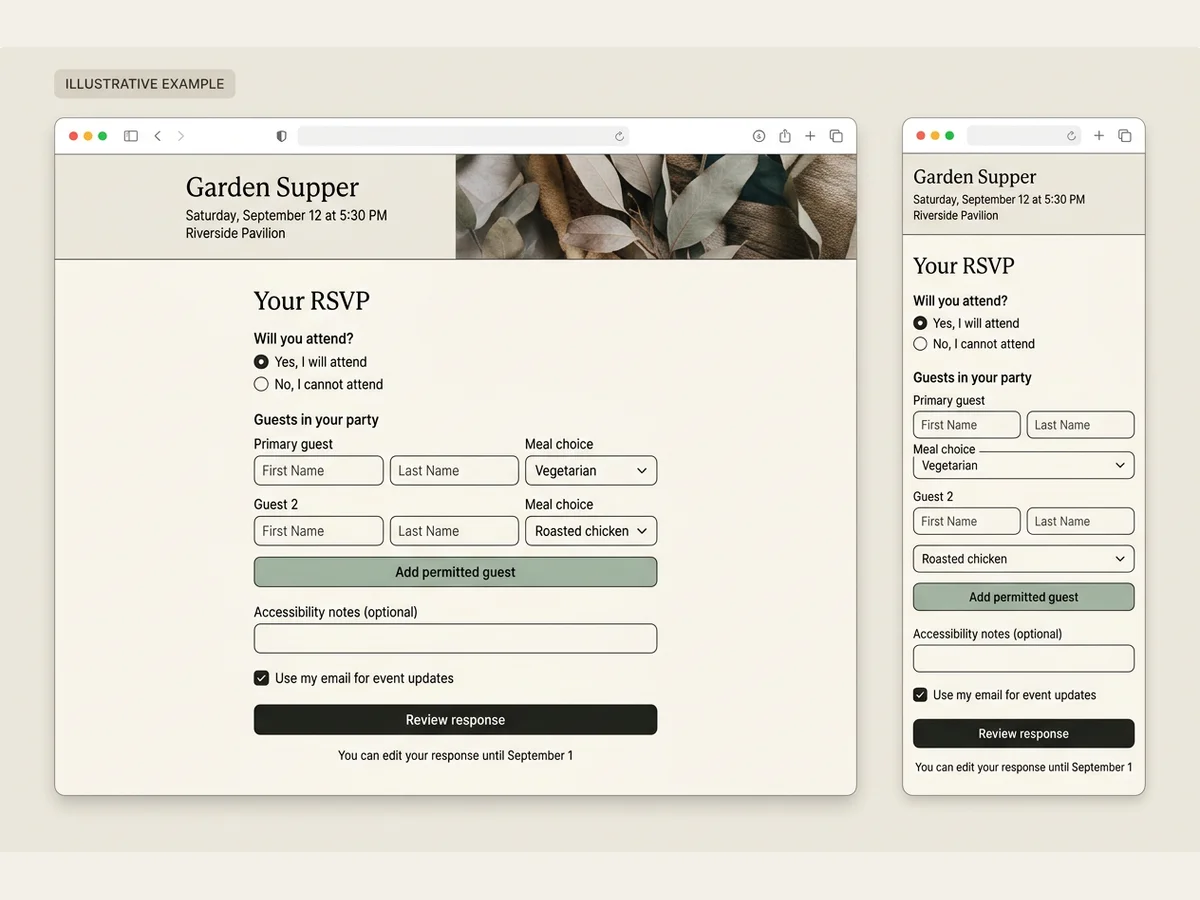
Ask Playcode to place the event name, local date and time zone, venue, deadline, schedule, accessibility contact, and RSVP action in a clear reading order. Use visible labels, fieldsets and legends for grouped choices, descriptive error text, visible keyboard focus, and a logical heading order.
Show conditional questions only when relevant, but enforce the same rules on the server. Preserve entered values after an error and move focus to an error summary or the first invalid field instead of using color alone.
Expected result: A guest can find the date, place, deadline, and response action without opening another message or zooming the page.
Verify it: Open the page at small and large phone widths, zoom to 200%, navigate with a keyboard, and complete attending, declining, and plus-one paths with a screen reader. Confirm labels, errors, and success messages are announced.
STEP 05
Save responses server-side and make retries idempotent
Validate and normalize the payload again on the server before creating or updating a record.
Trim names, lowercase emails used for matching, enforce allowed guest counts, reject impossible conditional combinations, and apply a maximum length to notes.
Use the submission idempotency key with a database uniqueness rule. An exact retry returns the existing result; a later guest edit uses the current party version and returns a conflict instead of overwriting a newer change. Return success only after the durable write completes.
Expected result: One valid attempt creates one submission result, an exact retry creates nothing new, and a later authorized edit changes the intended party and guest versions without inflating totals.
Verify it: Submit the same idempotency key twice, then make one edit with the expected party version and one stale edit. Confirm the retry returns the same result, the valid edit advances the version once, and the stale edit is rejected.
STEP 06
Design confirmation, edits, and reminders as separate flows
Do not let an email or messaging provider decide whether the RSVP itself was saved.
After the durable save, show an on-page confirmation with response ID, submitted time, event-local summary, and the documented edit path. If email delivery is enabled, store a separate confirmation attempt so a provider outage can be retried without resubmitting the RSVP.
Verify the guest before showing or changing an existing response. Use a signed, expiring edit link or another approved lookup flow; enforce the current record version and keep an audit event for the actor, time, and changed fields.
Select reminders from authoritative RSVP state, such as parties still unanswered before the deadline. Define the channel, applicable permission or legal basis, frequency, stop rule, owner, and fallback for the served jurisdiction. Store one reminder-attempt ID and provider result; never turn event-update permission into unrelated marketing permission.
Expected result: Guests receive a durable confirmation and bounded edit path, while reminder attempts remain reviewable and cannot duplicate or recreate an RSVP.
Verify it: Simulate a saved RSVP with failed confirmation delivery, retry only the delivery, edit the response through the guest-verification path, and run a reminder selection preview that excludes responded or ineligible parties.
STEP 07
Add a private organizer view and authorized export
Give hosts a protected way to review responses, exceptions, and the actual number of attending people.
Protect the organizer route with the intended sign-in or access check. Do not include the guest list in the public page payload or expose a guessable admin link as the only control.
Show response status, attending-person total, unanswered invitations when known, confirmation and reminder delivery state, dietary or accessibility flags, last update time, and a needs-review queue. Avoid putting sensitive notes into analytics or general application logs.
Define one export schema with event ID, party ID, guest ID, attendance, approved operational fields, form version, record version, and export time. Enforce organizer authorization, escape spreadsheet-formula prefixes, and omit lookup secrets, private audit payloads, and fields the recipient does not need.
Expected result: Authorized organizers can reconcile totals, delivery exceptions, and a documented export, while a signed-out or unrelated visitor cannot retrieve guest records or files.
Verify it: Compare the attending total and CSV row count with the same fictional guest records, test the export in a spreadsheet, then request the view and export while signed out and from an unrelated account and confirm both are denied.
STEP 08
Exercise validation, privacy, mobile, and accessibility behavior
Test the paths that commonly make an RSVP site look successful while quietly losing or miscounting responses.
Run a valid invitation party, a missing required field, an impossible plus-one count, a repeated submission, a stale edit, a failed confirmation delivery, and signed-out organizer and export requests. Inspect records and attempts after each case.
Test at phone width with slow network simulation, keyboard only, 200% zoom, and a screen reader. Use the W3C Easy Checks as a first review, then include the applicable WCAG 2.2 criteria in the release check. Preserve typed answers after a recoverable error and announce both errors and durable success.
Expected result: Invalid input changes no data, retries and reminders do not duplicate effects, private data stays private, and guests can complete and correct the flow across mobile and assistive-technology paths.
Verify it: Record submission, party, guest, delivery-attempt, reminder-attempt, and export counts before and after every test, then reload the guest confirmation, edit flow, organizer view, and exported file.
STEP 09
Publish, then run a real production smoke test
Treat the published HTTPS page as a separate environment that needs one complete, harmless test.
Publish the project, open the final URL from a phone on mobile data, submit a clearly labeled fictional response, edit it once, and confirm it appears once in the organizer view and export.
Check the canonical event information, time zone, venue or map link, form version, confirmation, edit deadline, reminder preview, organizer access, export, and custom domain or DNS setup before sharing invitations.
Expected result: The public URL loads over HTTPS and one labeled production test travels through save, confirmation, edit, organizer review, and export without duplication or unauthorized access.
Verify it: Save the event, party, guest, submission, and export IDs plus timestamps; refresh all views; confirm no real reminder was sent; then delete or archive the fictional records according to the retention policy.
STEP 10
Monitor failed saves and make corrections recoverable
Plan how hosts will handle a changed answer, ambiguous duplicate, venue update, or failed submission after invitations are sent.
Track counts of successful and failed saves, confirmation and reminder attempts, validation failures by field, stale edit conflicts, export failures, and needs-review records without logging guest answers. Alert the organizer when save failures rise or no responses arrive after a known invitation send.
Keep a manual correction path that records who changed a response and when. Publish event-detail changes to the same URL, version changed notices or consent copy, preview the next reminder audience, and repeat the mobile smoke test.
Expected result: The host can diagnose failed saves or delivery attempts, correct an ambiguous record, export the current list, and update event details without replacing the invitation link.
Verify it: Simulate one needs-review record, one recoverable save error, one failed confirmation attempt, and one reminder preview. Resolve them, export the final state, and confirm totals and the guest-facing page remain correct.
What the result can look like
Minimum RSVP test matrix
Run these against the same save path and database you plan to publish. A visual preview alone cannot prove that responses are counted or protected correctly.
| Test | Scenario | Expected result |
|---|---|---|
| happy path | A three-person invitation party accepts, two people attend, one is an allowed plus-one, and each attending guest chooses a different meal. | One party and submission result are stored, two guest records are attending, the confirmation matches the saved choices, and the export contains the same two attending rows. |
| invalid input | An attending guest omits a required meal choice or sends more guests than the invitation allows. | The server rejects the payload, stores no partial record, and returns text guidance associated with the invalid fields without erasing other answers. |
| retry | The same submission idempotency key arrives twice after a timeout, followed by one authorized edit and one stale-version edit. | The exact retry returns the prior result, the authorized edit advances the party version once, the stale edit returns a conflict, and totals are not doubled. |
| retry | The RSVP saves, confirmation delivery fails, and the organizer retries the delivery attempt. | The guest response remains single and reviewable, only the confirmation attempt is retried, and no second submission or guest row is created. |
| invalid input | A signed-out or unrelated account requests the organizer list, reminder preview, or CSV export by known event and party IDs. | Every private route denies access without returning guest details, counts, reminder recipients, or an export file. |
| production smoke | A labeled fictional party submits and edits from the published HTTPS URL on a phone, then an organizer checks the protected view and export. | The response appears exactly once with the correct versions and timestamps, the export reconciles, no real reminder is sent, and private routes remain inaccessible when signed out. |
Common RSVP failures and exact checks
Start with the visible symptom, inspect the stored record or access boundary, and change one rule at a time. Guessing from the form UI can hide the real cause.
| Symptom | Likely cause | Check | Fix |
|---|---|---|---|
| The organizer total is lower than the expected guest count | The dashboard counts household response rows instead of nested attending people. | Compare the response-row count with the sum of guests whose attending field is true. | Calculate attendance from guest entries and label response count separately. |
| The same invitation appears twice | The save path creates a new submission on every retry or normalizes the party lookup value inconsistently. | Compare party IDs, submission idempotency keys, normalized contact values, and timestamps for the two results. | Use a unique idempotency key for the same attempt, a stable party lookup rule, and a separate record-version check for later edits. |
| A guest sees success but no record exists | The UI shows confirmation before the server write completes or treats a failed response as success. | Inspect the network status and server-side save result for the submission timestamp. | Show success only after the confirmed write, keep answers on failure, and offer a safe retry. |
| Invalid conditional answers are stored | Required and conditional rules run only in the browser or differ from the server schema. | Send a request that bypasses the browser and inspect whether a partial record is created. | Apply the same conditional rules server-side and reject impossible field combinations before writing. |
| A signed-out visitor can retrieve guest information | The organizer route lacks the intended access check or guest data is embedded in the public page payload. | Open organizer URLs and guest-list requests in a private window with no session. | Remove guest data from public responses and enforce organizer authorization on every server-side read. |
| The RSVP is saved but no confirmation or reminder arrives | The provider delivery attempt failed after the guest record was committed, or the recipient was correctly excluded by the reminder rule. | Inspect the response ID, delivery-attempt ID, provider result, reminder audience preview, and stop rule without logging message contents or guest notes. | Keep the RSVP authoritative, correct the recipient or provider cause, and retry only the failed delivery attempt with the same attempt identity. |
| The CSV export disagrees with the organizer totals | The dashboard counts guests while the export emits party or submission rows, or the two paths use different filters and form versions. | Compare event, party, and guest IDs plus attendance filters, form versions, record versions, and export time for the same fictional fixture. | Derive the view and export from one authorized guest-level contract and label party, submission, and attendee counts separately. |
| The form is difficult or impossible to submit on a phone | A fixed element covers fields, the keyboard hides the action, or an error resets the form. | Complete attendance, decline, edit, and error paths at small phone widths with the on-screen keyboard open, 200% zoom, keyboard-only navigation, and a screen reader. | Restore normal document flow, keep the action reachable, preserve entered answers, provide visible labels and focus, and associate text errors with their fields. |
Publish and operate the RSVP website
Deploy
Publish to a Playcode URL first, verify HTTPS and the final form path, then connect a custom domain according to the current plan limits and DNS setup. Keep the same public URL for later event-detail corrections.
After every change to the response model, run a migration or compatibility check on existing records before publishing. A copy or color change does not need to rewrite guest data.
Before sharing invitations, freeze the approved event facts and form version, verify the edit and reminder rules, save the checklist owners, run the phone and accessibility smoke tests, and export the labeled fictional record once.
Monitor
Monitor save success and failure counts, validation problems by field, version conflicts, confirmation and reminder attempts, export failures, needs-review records, and organizer access failures. Use stable IDs and timestamps for diagnostics, not names, emails, meal choices, or accessibility notes.
Compare invitation-party count, submitted-party count, attending-person total, unanswered parties, delivery attempts, and export rows as separate numbers. A sudden flat line after invitations are sent is a reason to run the published smoke test again.
Recover
For a failed save, keep the guest inputs in the browser, show a retryable message, and reuse the attempt identity. For an ambiguous match, preserve both submitted values in a private review state instead of silently overwriting. For a delivery failure, replay only the provider attempt.
Prefer a bounded record correction or export reconciliation for one bad response. Before a risky form or data-model change, create the supported whole-project recovery point. If a restore is necessary, reconcile every response, edit, consent record, and delivery attempt received after that saved point before reopening the form.
Privacy and security checklist
RSVP records can contain contact details, dietary information, travel plans, and accessibility needs. Collect only what the host will use, keep every private read on the server side, and document the applicable privacy and messaging rules. The UK ICO data-minimisation guidance is one official jurisdiction-specific reference, not a substitute for reviewing the laws and policies that apply to your event.
- Protect the organizer view and every guest-record endpoint with the intended authorization check; a hidden or unlinked URL is not access control.
- Validate, normalize, and limit every field on the server. Rate-limit the public save path and add abuse protection when an open link attracts automated submissions.
- Do not place the full guest list, private invitation codes, or organizer credentials in browser source, URLs, analytics, screenshots, or logs.
- Store the purpose, notice version, actor, and time for any consent or permission you rely on. Keep attendance, necessary event updates, and unrelated marketing as separate decisions.
- Restrict who can remind, export, or correct records; record the time and actor for manual changes; escape spreadsheet-formula prefixes; and use fictional data in development screenshots.
- Set a retention date for contact and sensitive notes, provide a correction or deletion path, and remove data that is no longer needed after the event. Re-check local requirements before collecting accessibility, dietary, age-sensitive, or other sensitive information.
RSVP website implementation questions
Should an RSVP response be per household or per guest?
Use one invitation-party record when one person answers for a group, plus one guest record for each person who needs attendance, meal, session, or accessibility choices. Use an independent guest invitation when admission, identity, compliance, ticketing, or seat assignment is individual.
How do I prevent duplicate RSVP responses?
Use a stable party lookup rule and one idempotency key for the same technical attempt, both enforced by database uniqueness. A later guest edit is a different operation: verify the guest, require the current record version, and return a conflict instead of silently overwriting a newer answer.
Can I make an RSVP website without coding?
Yes. You can describe the event page, form rules, database record, and organizer view to Playcode in plain language. You still need to make the guest-model and privacy decisions, then inspect and test the result before sharing it.
What fields should an RSVP form include?
Start with the invitation or party key, attendance, named guests, one bounded contact method, form version, and submission timestamps. Add meal, plus-one, session, travel, or accessibility fields only when the host will use them. Give every field a purpose, condition, reader, and deletion date.
How should confirmations, edits, and RSVP reminders work?
Show an on-page confirmation only after the RSVP is saved. Treat email or message delivery as a separate retryable attempt. Verify a guest before loading or editing a response, require the current record version, and send reminders only to the defined eligible audience under the applicable permission and messaging rules.
What should an RSVP export contain?
Export stable event, party, and guest IDs; attendance; approved operational fields; form and record versions; and the export timestamp. Exclude lookup secrets, private audit payloads, and unnecessary personal data. Authorize the export on the server and make its guest-row count reconcile with the organizer totals.
How should an organizer dashboard count attendees?
Count the guest entries marked attending, not the number of household response records. Show response count, attending-person total, declined people, unanswered invitations when known, and needs-review records as separate metrics.
How do I test an RSVP website before sending invitations?
Submit valid, invalid, repeated, and stale-version fictional invitations; fail and retry confirmation delivery; test organizer and export access while signed out; and complete keyboard, screen-reader, zoom, phone, and published HTTPS smokes. Inspect records, attempts, totals, and export rows instead of trusting the confirmation screen alone.
Is the RSVP website a native Playcode product?
No dedicated one-click RSVP service is implied here. This is a general workflow that Playcode can build as a responsive page, custom form, database-backed records, protected organizer view, and hosted app based on your brief.
BUILD YOUR RSVP WORKFLOW
Turn the event rules into one guest-ready website
Describe the event, response model, questions, organizer view, and tests. Playcode can build the page and app workflow, then help you review and publish it.
Create my RSVP websiteGeneral AI-built workflow, not a native one-click RSVP service.