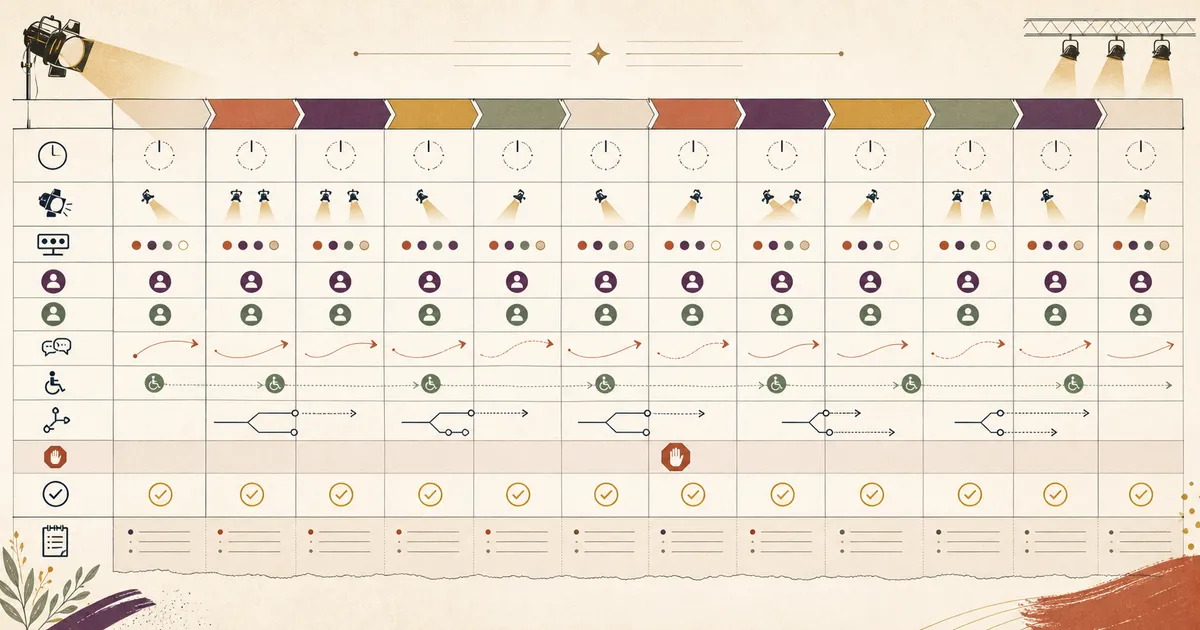
A run of show becomes operational only when each timed cue has a stable identity, accountable owner, backup, readiness trigger, dependency, production or communication handoff, accessibility handoff, contingency, and stop condition. The current version and change authority matter as much as the sequence itself.
Download the Event Run of Show Template Kit. It includes a blank governed CSV, twelve-row fictional example, semantic HTML companion, cue register, change and deviation log, manifest, dated source register, and dependency-free validator. It contains no attendee records, credentials, formulas, macros, or external fetches.
This page owns cue-level event-day execution. The Event Planning Checklist remains the upstream owner for the event brief, budget, venue, vendors, registration readiness, communications planning, qualified safety and accessibility ownership, and closeout.
QUICK ANSWER
What is an event run of show template?
A run of show is a versioned event-day control sheet that tells each owner what happens, when it starts, what must be ready, which cue or handoff triggers the next action, and what to do when the plan changes. Use stable cue IDs, local time plus an explicit time zone, accountable owner and backup roles, dependencies, accessibility handoffs, contingencies, stop conditions, and a deviation log.
Define the control boundary before adding times
The run of show should coordinate approved event-day facts without becoming a second store for attendee data, contracts, credentials, accommodation details, incident narratives, or emergency authority.
- Approved upstream event facts: Bring the reviewed date, venue or platform, program, owners, vendor handoffs, attendee communication paths, and stop authorities from the event planning checklist. Unresolved facts remain blockers instead of fictional cue detail.
- One version, effective time, and IANA time zone: Give the live sheet a version and effective timestamp, state one IANA time zone such as America/New_York, and keep every local start, end, update, and deviation in that zone. For remote audiences, communicate their display time separately without changing the operational clock.
- Named plan owner and change authority: One role owns distribution and retirement of the current sheet. One authorized role approves a material timing, venue, program, or message change. Record backups and escalation routes so a private conversation does not become the only operational record.
- Qualified safety, accessibility, and venue authorities: The template records handoffs and stop conditions chosen by accountable people. It is not an emergency plan and does not decide venue clearance, emergency procedure, medical response, crowd control, legal duty, or accessibility conformance. Keep those decisions with the qualified owner and approved system.
Choose one version, time-zone, and change-authority model
Choose the lightest live-sheet model that lets every role retrieve the same current version, acknowledge changes, and recover when the preferred owner or tool is unavailable.
| Approach | Best for | Tradeoff |
|---|---|---|
| Governed CSV and printed companion | A smaller event with one operations lead, a limited cue sequence, and a deliberate offline distribution plan. | The format is portable and inspectable, but version distribution, acknowledgements, and deviation logging require explicit human discipline. |
| Shared sheet with controlled export | A distributed event team that needs simultaneous visibility and can manage access, version history, offline export, and change authority in the chosen provider. | Live collaboration helps coordination, but provider availability and ambiguous edit permissions can create stale copies or unapproved changes. |
| Custom operations interface | A recurring or complex program that needs server-enforced roles, acknowledgements, validation, audit events, and integrations around a reviewed data model. | The interface can make state explicit, but it adds implementation, authorization, provider, monitoring, recovery, and support responsibilities. |
Recommended:Start with the governed CSV and semantic HTML companion. Move to a shared sheet or custom interface only when the real ownership, concurrency, access, acknowledgement, and recovery needs justify it. Keep an offline current copy and a single authority for material changes in every model.
Create and operate an event run of show in eight steps
Freeze the control manifest, build cue dependencies, assign role handoffs, schedule accessibility work, rehearse exceptions, distribute one version, record live deviations, and debrief without copying sensitive data.
STEP 01
Freeze the manifest and authority model
Record the fictional or real event identifier, event date, version, effective local timestamp, IANA time zone, source-of-truth filename, plan owner, and change authority before adding cues.
Use role names in the working template and keep personal contacts in the approved restricted directory. Give every distributed copy the same version and effective time.
Georgia Tech currently lists both a run-of-show and an AV run-of-show template in its Georgia Tech Templates and Forms. Treat that as an institutional example rather than a universal field set or event standard.
Define how a material change is approved, when a new version is issued, how stale copies are retired, and which roles must acknowledge the revision.
Expected result: The manifest identifies one current file, version, effective time, time zone, plan owner, change authority, and approved status vocabulary.
Verify it: Ask two role owners to retrieve the sheet independently and compare the version, effective time, time zone, owner, and change authority. Resolve any mismatch before rehearsing cues.
STEP 02
Build cues from readiness triggers and dependencies
Give each activity a stable cue ID, sequence, start and end time, event state, area or channel, readiness trigger, dependencies, production cue, evidence reference, and status.
Use local start and end times under the manifest time zone. Calculate duration from those fields and reject negative duration or unintended overlap before distribution.
Dependencies name the earlier cue or readiness state that must finish first. A cue should not begin merely because the clock advanced when its room, owner, equipment, access, or communication state is not ready.
Use opaque evidence references such as evidence/setup-check. Keep attendee data, contracts, credentials, screenshots with personal information, and confidential incident records in their accountable systems.
Expected result: Every row has a unique cue ID, sequential order, valid duration, explicit time zone, known acyclic dependencies, readiness trigger, and opaque evidence reference.
Verify it: Run the validator, inspect the timeline for gaps or overlaps, and walk every dependency from the last cue back to setup without finding an unknown or cyclic reference.
STEP 03
Separate owner, backup, sender, recipient, and attendee messages
A cue owner performs the activity, a distinct backup can assume it, a sender issues the handoff, a recipient acknowledges it, and attendee copy remains a separate approved message.
Princeton describes a shared run of show plus backstage speaker requests, assigned chat and question roles, and follow-up in its Princeton Virtual Event Run of Show Template. Use it as an institutional example, not a universal staffing or platform requirement.
Put the trigger, cue type, sender, recipient, channel, acknowledgement expectation, fallback, and evidence reference in the handoff register. Do not treat a sent message as acknowledged.
Write attendee-facing messages separately from production shorthand so an internal cue, venue instruction, or unverified fact cannot be published accidentally.
Expected result: Each cue has one accountable owner, a different backup, one registered inter-role handoff, an acknowledgement expectation, a fallback, and an independently reviewable attendee message.
Verify it: Ask the sender, recipient, cue owner, backup, and communications owner to explain their distinct action for three sampled cues and demonstrate the acknowledgement path.
STEP 04
Put accessibility handoffs inside the schedule
Schedule access work as readiness and transition activity rather than leaving it as a final general note.
W3C guidance on W3C Making Events Accessible covers accessible venue or platform arrangements, captions, interpreters, materials, transition and break time, and communication of schedule changes. It does not certify a template or event.
For each relevant cue, name the access readiness trigger, responsible role, backup, communication format, transition time, contingency, and stop condition approved for the real event.
Keep individual accommodation requests and disability or health details in the restricted workflow. The run of show needs the operational handoff, not a copy of the participant record.
Expected result: Relevant setup, check-in, stage, session, transition, message, departure, and handback cues contain explicit access handoffs and reviewed alternatives.
Verify it: Have the qualified accessibility owner trace one participant path and one schedule-change message across the venue or platform context, then record only the bounded readiness result and evidence reference.
STEP 05
Rehearse the happy path and exception decisions
Exercise normal sequencing plus a late change, missing owner, technical failure, venue delay, accessibility handoff, and stop condition before the live event.
Use fictional inputs. For every scenario, record the initiating cue, observed result, decision owner, approved action, downstream notifications, evidence, follow-up owner, and whether the sheet needs a new version.
The FEMA FEMA ICS operational briefing lesson supports concise situation, objective, task, area, communication, schedule, expectation, authority, and question concepts. Its incident-command context is not an ordinary-event standard or substitute for an emergency plan.
A rehearsal cannot approve safety, venue, emergency, legal, or accessibility decisions. It can show whether the recorded roles can retrieve the plan, use the handoff, apply the qualified owner’s instruction, and communicate the result.
Expected result: The team can execute the preferred sequence, use a backup, invoke a reviewed fallback, stop when authority or readiness is absent, and preserve a bounded decision record.
Verify it: Repeat the scenario after corrections. Require the relevant owner and backup to retrieve the current version and produce the expected acknowledgement and evidence without relying on a private message.
STEP 06
Distribute one current version and retire stale copies
Release the sheet only after cue, role, dependency, message, accessibility, contingency, and stop-condition review is complete for the chosen boundary.
Record distributor, version, effective time, recipients, acknowledgement expectation, offline copy, and retired version. Give each role only the information and access needed for its task.
If an authorized material change affects timing, place, program, access, message, or dependencies, issue the next version and notify every downstream role named by the affected cue graph.
Do not silently edit a printed or downloaded copy. Mark stale versions retired and make the retrieval path for the current one observable before event-day operation begins.
Expected result: Every active owner and backup can retrieve one current sheet, identify its version and time zone, and distinguish it from retired copies.
Verify it: Sample roles across venue, production, program, registration, communications, and accessibility. Compare their version and next cue, then correct and re-acknowledge every mismatch.
STEP 07
Acknowledge changes and record live deviations
Use the live sheet as a controlled decision surface, not an editable chat transcript.
A change record needs a stable record ID, effective local time, time zone, version, affected cue, observed or requested change, impact, decision owner, decision, downstream notification, evidence, follow-up owner, and status.
Material or stop-level changes cannot remain unacknowledged. Confirm the current decision with affected roles, preserve the former version, and record who owns the follow-up.
Keep confidential incident facts in the restricted incident workflow. The general deviation log should carry only the minimum operational fact, opaque evidence reference, decision, notification, and follow-up state.
Expected result: Authorized changes produce a versioned and acknowledged record; minor deviations remain traceable without turning the sheet into a store for personal or confidential information.
Verify it: For each material change, compare the decision log, current manifest, affected cue, handoff acknowledgement, downstream message, and retired copy. No affected owner should be operating from an unacknowledged state.
STEP 08
Debrief the control system without copying sensitive data
After handback, use the cue and deviation records to improve timing, handoffs, evidence, backups, and stop conditions while preserving data boundaries.
Compare planned and observed timing, identify the cause of every material deviation, and distinguish a weak cue from an upstream planning, venue, vendor, access, staffing, or communication issue.
Assign improvements to the correct owner. Update the run-of-show template only for reusable event-day controls; send broader budget, venue, vendor, registration, or closeout changes back to the event planning process.
Remove temporary access and dispose of working copies under the approved policy. Retain only the bounded record and evidence references required by the accountable owner.
Expected result: The debrief produces owned improvements, source review dates, a deliberate retention decision, and no unnecessary attendee, credential, payment, accommodation, or incident data in the general pack.
Verify it: Review every open change, deviation, failed handoff, evidence reference, temporary access grant, and improvement action for an owner, disposition, retention decision, and next review date.
Rehearse decisions instead of assuming the schedule will hold
Run all checks with fictional or redacted facts and the real accountable roles. A passing validator proves structural consistency, not venue readiness, safety, accessibility, legal compliance, or event success.
| Test | Scenario | Expected result |
|---|---|---|
| happy path | Run setup, briefing, access handoff, doors, opening, session, transition, closing, departure, and handback in cue order. | Every owner receives a known cue, acknowledges the handoff, observes the readiness condition, and produces the expected evidence without an unintended overlap. |
| invalid input | Submit an invalid time zone, overlapping cue, unknown dependency, late venue change, or attendee message that conflicts with the current approved fact. | The validator or human review blocks the row, identifies the authority and affected downstream cues, and prevents distribution until the current fact and plan version agree. |
| retry | Make the primary owner unavailable and simulate a technical failure on the preferred communication channel. | The distinct backup retrieves the current offline-capable plan, uses the registered fallback, obtains acknowledgement, and continues or stops within the assigned authority. |
| production smoke | At the real venue or platform boundary, sample clock, version, rooms or channels, equipment, accessibility handoffs, owner contacts, venue delay route, and one stop condition. | Observed facts match the released sheet, discrepancies create bounded deviation records, and qualified venue, accessibility, safety, and emergency owners retain decision authority. |
Run-of-show failures that more rows will not fix
Most live-sheet failures come from ambiguous authority, stale versions, missing readiness, weak acknowledgements, or hidden data boundaries rather than from a missing color or extra column.
| Symptom | Likely cause | Check | Fix |
|---|---|---|---|
| Different owners quote different start times or room facts. | Several copies are treated as current or a material change did not issue a new version. | Compare version, effective time, time zone, source filename, retired-copy marker, and acknowledgement across owners. | Pause affected cues, choose the authorized fact, issue one version, retire stale copies, notify downstream owners, and re-acknowledge. |
| A cue reaches its clock time but the next owner is not ready. | The row relies on time alone and lacks a readiness trigger or acknowledged dependency. | Trace the cue’s dependencies, evidence, handoff sender, recipient, acknowledgement, contingency, and stop condition. | Hold the cue, use the approved contingency, record the deviation, and add an observable readiness trigger before the next release. |
| The backup cannot assume the role when the owner is missing. | Backup is only a name and lacks the current plan, access, context, authority, or rehearsal. | Have the backup retrieve the sheet and demonstrate the next cue, evidence, communication channel, fallback, and escalation without private help. | Provide minimum required access and context, clarify authority, rehearse the handoff, and stop the activity when no qualified backup exists. |
| Schedule changes reach production but not attendees or accessibility support. | Internal production cues, attendee messages, and accessibility handoffs were collapsed into one informal notification. | Compare the cue row, handoff register, accessible message format, recipient acknowledgement, and downstream notification record. | Separate the three paths, assign senders and recipients, use approved formats, record acknowledgement, and verify the published fact. |
| The shared sheet contains personal contacts or confidential incident detail. | The run of show became the default store for every operational fact. | Inspect each field for purpose, minimum audience, system owner, retention, and whether an opaque evidence reference is sufficient. | Move restricted data to its approved system, limit access, replace it with a bounded role or evidence reference, and follow the incident owner’s retention process. |
Operate the live sheet as a controlled release
Deploy
Release one version with an effective time, IANA time zone, plan owner, change authority, recipient list, acknowledgement state, offline copy, and retired-version record.
Verify cue order, duration, overlaps, dependencies, roles, handoffs, messages, accessibility arrangements, contingencies, stop conditions, and evidence references before distribution.
Monitor
Watch schedule drift, owner availability, room or channel readiness, production state, accessibility handoffs, attendee messages, acknowledgements, venue changes, and invoked stop conditions.
Log bounded operational deviations with stable record IDs and route confidential facts to the restricted system owned by the qualified role.
Recover
When the current sheet becomes unreliable, pause affected cues, establish the last confirmed fact, use the approved fallback, issue a versioned correction, retire stale copies, and collect downstream acknowledgements.
Do not improvise beyond assigned authority. Qualified venue, accessibility, safety, emergency, legal, and operational owners control their respective real-world decisions.
Keep the live sheet useful without turning it into a sensitive-data store
Use roles, bounded operational facts, and opaque evidence references. Put personal, credential, payment, accommodation, contract, and incident records in their approved restricted systems.
- Do not store attendee names, personal contacts, credentials, payment details, accommodation requests, medical information, identity documents, or incident narratives in the general run of show.
- Grant each role only the access needed to read, acknowledge, or change its assigned fields. A shared edit link is not a change-authority model.
- Reject spreadsheet cells that begin with formula characters after whitespace and review imported text before enabling links, formulas, macros, scripts, or external data connections.
- Use opaque evidence references and bounded operational logs. Do not expose private evidence paths or copy restricted documents into the downloadable pack.
- Review the source register by 2026-11-01 or earlier after a material source, venue, platform, policy, authority, or accessibility change. Structural validation does not establish safety, accessibility conformance, privacy compliance, legal compliance, or event success.
Run of show template questions
Is an event run of show the same as a public agenda or event program?
No. A public agenda or event program tells attendees what sessions, speakers, locations, and times they can expect. An event run of show is the private, versioned operations sheet for cue timing, readiness, production instructions, owner and backup roles, internal handoffs, contingencies, stop conditions, acknowledgements, and live deviations. Keep public copy separate so internal shorthand, restricted references, or unapproved changes are not published accidentally.
What is the difference between an event plan and a run of show?
The event plan owns the broader brief, budget, venue, vendors, registration readiness, communications planning, qualified safety and accessibility ownership, and closeout. The run of show owns the versioned event-day cue sequence, timing, role handoffs, readiness, messages, contingencies, acknowledgements, and deviations.
Should a run of show use local time or attendee time?
Use one explicit IANA time zone for the operational sheet and label every local start, end, version, and deviation consistently. Remote attendee messages can show converted display times, but the control clock should not silently mix zones or abbreviations.
What columns belong in a run of show template?
Use stable cue ID, sequence, start and end local time, time zone, area or channel, event state, activity, owner, backup, readiness trigger, dependency IDs, production cue, attendee message, accessibility handoff, contingency, stop condition, change authority, evidence reference, status, and notes.
How should a run of show handle overlapping activities?
First verify that the overlap is intentional. Separate areas or channels, assign distinct owners and backups, name shared dependencies and resources, and test the handoffs. The downloadable example rejects overlap because it models one sequential control path; extend the data model deliberately for parallel tracks.
How should last-minute changes be recorded?
Record a stable change ID, effective local time, time zone, current version, affected cue, requested or observed change, impact, decision owner, decision, downstream notification, evidence reference, follow-up owner, and status. Issue a new version for an authorized material change and retire stale copies.
Does the template replace an emergency plan?
No. It can record a stop condition, assigned authority, communication handoff, and opaque reference to an approved procedure. Qualified venue, safety, emergency, medical, accessibility, legal, and public authorities define and control the real response.
Should attendee information be stored in the run of show?
No attendee-level or sensitive data belongs in the general sheet. Use role names and aggregate operational facts. Keep personal contacts, accommodation requests, payment records, credentials, identity data, and incident details in their approved restricted systems.
Can I use the template in Excel or Google Sheets?
Yes. Import the CSV as text, preserve the exact headers and IDs, verify time fields and delimiters, and review untrusted content before enabling formulas, links, macros, scripts, or external connections. Re-export and run the validator after structural edits. The pack does not include or claim a native XLSX file.
Public event surface
Turn the reviewed event model into a website or operations interface
Bring the approved public facts, audience paths, event states, and the bounded operations data model to Playcode. Build the public event surface separately from the restricted run-of-show and attendee records.
Build an Event WebsiteThis informational article does not grant AI signup credits. Registration, ticketing, check-in, payments, messaging, calendars, streaming, and event operations require supported providers, credentials, testing, and accountable human review.