QUICK ANSWER
What makes an event website example useful?
Useful event website examples make the attendee’s next decision obvious for the event’s current phase. Before registration they foreground the date, place, audience, value, and primary action. During selection they expose schedules, speakers, pass rules, venue details, and attendee guidance. Afterward they preserve recordings or a clear next step. Reuse the information architecture and state handling, not another event’s brand or visual design.
The strongest event sites do more than announce a date. They help a specific visitor identify the event, decide whether it fits, choose an audience or attendance path, understand the current registration state, and recover when a deadline, schedule, location, name, or live experience changes.
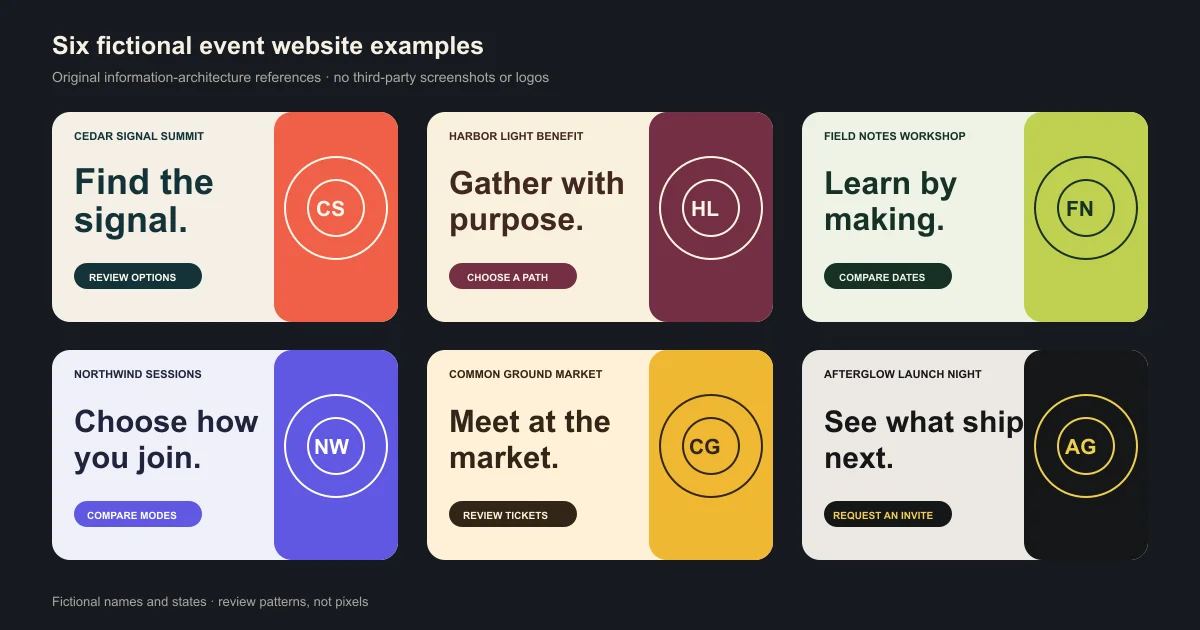
This guide reviews observable information patterns on six official event websites checked on 2026-09-06. It uses text observations rather than copied screenshots, ranks no event, and includes a separate pack of original fictional layouts for teams that need a rights-safe starting point.
How the examples were selected and reviewed
The exact search results favor visual galleries. We used current official pages for observable structure, then built an original fictional pack so readers can inspect and edit patterns without copying protected creative work.
Observe the current official state
We opened the official home and one supporting page for each event, recorded what was visible on the review date, and avoided claims about conversion, performance, accessibility, attendee satisfaction, or event success.
Sources: [adobe-max-home], [adobe-max-pricing], [ces-home], [ces-registration], [figma-config-home], [figma-config-agenda], [google-io-home], [google-io-explore], [unbound-home], [unbound-speakers], [web-summit-home], [web-summit-schedule]
Separate the visitor decision from the visual style
We identified the event phase, visitor question, primary action, audience routes, information order, handoff, and stale-state risk. Meaningful regions and logical headings make that structure easier to navigate and review.
Sources: [w3c-page-structure]
Review narrow-screen and control behavior
The downloadable HTML makes every fictional composition stack into one reading path. Reviewers should still test reflow at the defined narrow equivalent and provide visible, programmatic labels for any real controls they add.
Sources: [w3c-reflow], [w3c-form-labels]
Keep the canonical event record current
The event page, visible dates, location or attendance mode, offers, status, structured data, linked schedule, and registration system should move together through validation, release, inspection, and later updates.
Sources: [google-event-data]
What this examples page owns
This article owns inspiration and evaluation intent. It shows how current event pages organize decisions and lifecycle states, then hands implementation, operations, and software selection to their existing owners.
Included
- Observable page structure, visitor decisions, audience routing, schedules, speakers, registration handoffs, event states, and post-event archives.
- Six first-party examples in alphabetical order with dated source URLs and explicit limitations.
- Six separate fictional compositions, a machine-readable brief, contact sheet, and review checklist.
Not included
- A tutorial for building an event or RSVP website, a downloadable production template, or a commercial event website builder comparison.
- End-to-end event planning, vendor selection, check-in software, ticketing contracts, payments, venue safety, privacy, legal, tax, or accessibility approval.
- Third-party screenshots, logos, copied layouts, rankings, review scores, performance findings, conversion claims, or attendee outcomes.
DOWNLOADABLE RESOURCE
Download six original fictional page examples
The pack turns the observed lessons into six independent, rights-safe compositions for a conference, benefit, workshop series, hybrid summit, festival, and launch night. Use the brief and checklist to replace every placeholder with approved event facts.
Event website examples review kit
Six original fictional event-page compositions with explicit visitor decisions, mobile order, lifecycle states, handoff cautions, dated sources, and a dependency-free validator.
Format: ZIP containing HTML, SVG, JSON, Markdown, and JavaScript validation
Locally reproduced August 1, 2026. SHA-256: 46501276cd86601e5c884970b4461292e7739d079486b146382de50f7df10858
Included
- Responsive browser-openable HTML with six distinct compositions
- Editable 1200 by 630 SVG contact sheet
- Closed JSON briefs with sections, mobile order, and lifecycle states
- Review checklist for decisions, structure, handoffs, mobile, lifecycle, and evidence
- Dated primary-source register and local validation script
Verification boundary
Local checks passed for six exact fictional examples, HTML and SVG name parity, 320-pixel responsive rules, no scripts or forms, no external media or network references, source dates, closed JSON keys, and exact ZIP byte parity. Public availability remains unverified until release.
Six current event website examples
Examples appear in alphabetical order and are not ranked. Each note describes what was visible on the reviewed official pages and one reusable information pattern, not a judgment about the event, company, technology, performance, accessibility, or results.
Adobe MAX
Use when: A conference needs to expose its date, place, remote option, program categories, speakers, registration path, and time-sensitive pass choices.
On the reviewed official pages, Adobe MAX presents the event contract on the main page and separates pass categories, pricing states, and deadlines on a dedicated pricing page. The useful pattern is the visible transition from learning about the event to choosing a current registration option.
Structure
- Date, location, and online participation near the event promise
- Track and speaker context before the registration handoff
- Separate pass and pricing surface for time-sensitive choices
- Explicit state changes when a price or registration deadline passes
Watch for: A current pass, deadline, price, included benefit, and online option can change. Copy the state model, not the facts, copy, brand, or visual design.
Sources: [adobe-max-home], [adobe-max-pricing]
CES
Use when: An event serves materially different audiences and some participation paths require eligibility or approved-provider guidance before registration.
The reviewed CES pages route visitors toward attending, exhibiting, awards, and update paths, while registration information makes eligibility and official-provider boundaries visible. The pattern qualifies the audience before sending every visitor into one generic form.
Structure
- Audience routes before detailed registration
- Eligibility and required evidence beside the relevant path
- Authorized-provider and impersonation boundaries in official guidance
- Different next actions for attendees, exhibitors, and other roles
Watch for: Audience, eligibility, identity, vendor, payment, and registration rules are event-specific. Do not turn this observed structure into generic admission or safety advice.
Sources: [ces-home], [ces-registration]
Figma Config
Use when: A completed event should preserve useful session detail and recordings while giving visitors a current next step.
The reviewed Config homepage had moved into a completed-event state with recording and next-event handoffs, while the San Francisco agenda preserved session detail and recording links. The pattern treats post-event content as a designed state rather than an expired registration page.
Structure
- Completed-event state on the main page
- Clear path to recordings or preserved session detail
- Agenda pages that remain useful after the live date
- A distinct next-event route instead of a stale registration action
Watch for: Recording availability, rights, captions, links, regions, and retention can change. Verify every archive item and do not imply that all sessions were recorded.
Sources: [figma-config-home], [figma-config-agenda]
Google I/O
Use when: A content-heavy event needs a durable on-demand archive organized around visitor topics rather than the original ticket funnel.
The reviewed Google I/O homepage and Explore surface route post-event visitors into on-demand material and topic-led exploration. The useful pattern is the change in page job: after the event, finding relevant content can become more important than replaying the original registration hierarchy.
Structure
- Post-event orientation rather than an expired attendance prompt
- Topic-led exploration for a large content catalog
- Session and content cards with enough context to choose
- Current event identity and year carried across the archive
Watch for: A content archive still needs accurate titles, speakers, dates, formats, captions, rights, and link states. The visible organization is not evidence of accessibility or engagement.
Sources: [google-io-home], [google-io-explore]
UNBOUND
Use when: An established event changes its identity and needs to preserve visitor continuity while presenting the current date, audience, program, and action.
The former INBOUND domain now redirects to the UNBOUND site while preserving the requested path, and the destination explains the identity change. The reviewed homepage and speaker surface combine continuity, date, place, audience, program, and registration state, including a sold-out notice with a next-year path. The pattern makes the rename part of the user journey instead of silently breaking recognition.
Structure
- Explicit continuity statement between former and current identities, carried by a redirect from the old domain
- Current date, place, audience, and primary action
- Program and speaker context under the current event name
- Redirect, metadata, link, and message consistency across the transition
Watch for: A rebrand affects more than the logo. Historical references, domains, redirects, email, social links, tickets, structured data, and support language need coordinated ownership.
Sources: [unbound-home], [unbound-speakers]
Web Summit
Use when: A large event needs role-specific routes for attendees, speakers, partners, startups, investors, media, travel, and other participation jobs.
The reviewed Web Summit homepage exposes many audience paths, and its linked schedule carried the same edition, year, and dates as the homepage on the review date. A wide navigation only stays trustworthy when every linked subpage moves to the current edition together, which makes cross-page year and lifecycle consistency the most useful lesson from this example.
Structure
- Role-specific routes from the event homepage
- Separate paths for program, participation, experience, and commercial audiences
- Year and edition visible on every linked subpage
- Release checklist that updates content and links as one event state
Watch for: A broad navigation can serve distinct audiences and create stale-state risk. Verify the current year, date, schedule, venue, prices, availability, and action on every linked path.
Sources: [web-summit-home], [web-summit-schedule]
Choose a pattern from the event phase and visitor decision
Do not start from the closest color palette. Start from what a visitor needs to decide now and which external system owns the resulting record.
Registration has not opened yet.
Choose: Lead with the event contract, audience, date, mode, place, value, and one accountable update path. Offer notification only if consent, delivery, and removal are actually supported.
Tradeoff: The page collects less data and cannot imply registration, pricing, or capacity that the responsible system has not opened.
Several audiences or eligibility rules change the next step.
Choose: Route visitors by role before the registration handoff and show the exact qualification or evidence boundary beside each path.
Tradeoff: More routing increases content and maintenance work, but avoids sending everyone into one misleading form.
The event has many tracks, sessions, or days.
Choose: Give the schedule an orientation layer with dates, time zones, track purpose, filters, entitlement notes, and stable detail links before exposing every session.
Tradeoff: The summary cannot replace the authoritative schedule or promise that a session, seat, speaker, recording, or time will remain unchanged.
The event is over.
Choose: Move the homepage into an explicit post-event state with verified recordings, preserved session context, an archive boundary, and a current next action.
Tradeoff: Archive content needs ongoing rights, caption, link, year, speaker, and retention maintenance instead of an automatic permanent replay promise.
The event name, venue, date, or edition changes.
Choose: Update visible content, metadata, structured data, schedules, redirects, registration messages, support pages, and linked systems as one governed release.
Tradeoff: A visible continuity message can add temporary copy, but silent changes create stale-year, wrong-location, and broken-recognition risk.
REVIEW PATTERNS, NOT PIXELS
Turn six examples into one original event brief
Download the fictional HTML gallery, editable SVG contact sheet, closed JSON briefs, review checklist, dated source register, and validator. Every brand, date, place, state, and outcome in the example pack is fictional.
Download the Event Website Review KitVerified 2026-08-01. ZIP SHA-256: 46501276cd86601e5c884970b4461292e7739d079486b146382de50f7df10858. The pack contains no third-party screenshots or working provider integrations.
Learn how to create an RSVP websiteUse that guide when the primary implementation job is a focused invitation and response workflow.
What these examples cannot prove
A public page can show information architecture and current state. It cannot reveal private research, implementation quality, operational readiness, or user outcomes.
- We did not copy or reproduce third-party screens, logos, code, imagery, analytics, testing, registration records, tickets, attendee data, or contracts.
- Visible content does not establish conversion, performance, security, privacy, accessibility conformance, search eligibility, attendee satisfaction, or event success.
- Dates, years, locations, modes, speakers, schedules, prices, deadlines, availability, recordings, names, navigation, and links can change before the stated review date.
- The fictional pack has no registration, payment, ticket, invitation, donation, waitlist, analytics, storage, email, identity, or provider integration.
- A real event still needs accountable review for venue, safety, accessibility, privacy, payment, tax, legal, support, cancellation, and emergency requirements.
Dated first-party and standards sources
The twelve event pages and four official guidance pages were checked on 2026-09-06. Event-page facts expire on 2026-10-07 because lifecycle state can change quickly.
[adobe-max-home] Adobe:Adobe MAX
Checked September 6, 2026. Supports: Visible event dates, location and online option, tracks, speakers, and registration path on the official event site.
[adobe-max-pricing] Adobe:Adobe MAX Pricing
Checked September 6, 2026. Supports: Official pass categories, pricing states, deadlines, and related registration boundaries visible on review date.
[ces-home] Consumer Technology Association:CES
Checked September 6, 2026. Supports: Official audience routes for attending, exhibiting, awards, updates, and other event participation paths.
[ces-registration] Consumer Technology Association:CES Registration Information
Checked September 6, 2026. Supports: Official registration eligibility, attendee guidance, and authorized-provider boundaries visible on review date.
[figma-config-home] Figma:Figma Config
Checked September 6, 2026. Supports: Official completed-event homepage state, recording handoff, and next-event routing visible on review date.
[figma-config-agenda] Figma:Figma Config San Francisco Agenda
Checked September 6, 2026. Supports: Official session-detail archive and recording links preserved after the event.
[google-io-home] Google:Google I/O 2026
Checked September 6, 2026. Supports: Official post-event homepage and on-demand content handoff visible on review date.
[google-io-explore] Google:Google I/O Explore
Checked September 6, 2026. Supports: Official topic-led exploration of event sessions and on-demand content.
[unbound-home] HubSpot:UNBOUND
Checked September 6, 2026. Supports: Official transition from the former INBOUND name and domain plus date, place, audience, program, and registration state.
[unbound-speakers] HubSpot:UNBOUND Speakers
Checked September 6, 2026. Supports: Official speaker context connected to the current event identity.
[web-summit-home] Web Summit:Web Summit
Checked September 6, 2026. Supports: Official audience paths for attendees, speakers, partners, startups, investors, media, volunteers, and related roles.
[web-summit-schedule] Web Summit:Web Summit Schedule
Checked September 6, 2026. Supports: Official linked schedule state, including the year visible on the schedule at review time.
[w3c-page-structure] W3C Web Accessibility Initiative:Page Structure Tutorial
Checked September 6, 2026. Supports: Meaningful regions, logical headings, and content structure for navigation and orientation.
[w3c-reflow] W3C Web Accessibility Initiative:Understanding Success Criterion 1.4.10: Reflow
Checked September 6, 2026. Supports: Content reflow at the defined narrow equivalent without loss of information or functionality, subject to bounded exceptions.
[w3c-form-labels] W3C Web Accessibility Initiative:Labeling Controls
Checked September 6, 2026. Supports: Visible and programmatic labels for interactive form controls.
[google-event-data] Google Search Central:Event structured data
Checked September 6, 2026. Supports: Required event properties, guideline review, validation, release, URL inspection, and update workflow for canonical event pages.
Event website examples questions
What information should an event website show first?
Show the event identity, audience, date, time zone, in-person or remote mode, location, value, current phase, and primary next action. If eligibility, price, capacity, or attendance mode changes the path, expose that boundary before sending the visitor elsewhere.
Should I copy an event website example I like?
No. Reuse a general information pattern such as audience routing, schedule orientation, or post-event archives. Create original brand, copy, assets, layout, and code, and verify rights for every third-party image, logo, quote, recording, and speaker detail.
How should an event website handle registration?
Name the registration handoff and the state it owns. The event page should not present a click, submitted request, payment attempt, waitlist entry, or invitation request as confirmed registration, capacity, ticket validity, or admission until the accountable system confirms it.
What should happen when an event sells out?
Replace the open action with the verified sold-out state and only offer a waitlist or notification path if that workflow exists. State what the visitor submitted, what remains unconfirmed, who sends updates, and how to leave the list.
How should a conference schedule work on mobile?
Keep date, time zone, track purpose, session identity, status, and detail links in one intentional reading path. Ordinary content should reflow at narrow widths, while any schedule grid that needs two-dimensional layout should stay inside a bounded scroll area.
What should an event website show after the event?
Use an explicit post-event state with verified recordings or resources, preserved session context, current rights and caption status, a retention boundary, and one next action. Remove stale registration, price, availability, and live-event promises.
Should this examples article use Event structured data?
No. This page is an Article with an unordered ItemList of examples, not the canonical organizer page for one event. A real event page can evaluate Event structured data against current official guidance and its visible event record.
How current are these event website observations?
All pages were checked on 2026-09-06 and should be reviewed again by 2026-10-07. Reopen every official source before relying on a date, year, place, mode, schedule, speaker, price, pass, availability state, recording, name, or link.
BUILD THE ORIGINAL EVENT EXPERIENCE
Start from your audience, event state, and real handoffs
Describe the event, audiences, date, modes, information order, schedule, registration boundary, lifecycle states, accessibility needs, providers, and recovery paths. Playcode can help turn the approved brief into an event website.
Build an Event WebsiteRegistration, ticketing, payment, email, calendar, streaming, and analytics connections require supported APIs, credentials, testing, and ongoing operations.