QUICK ANSWER
What should a system architecture diagram template include?
A system architecture diagram template should include a named viewpoint, audience, review date, stable node and edge IDs, a legend, explicit system or trust boundaries, labeled relationship directions, and a text alternative. Use separate context, container or dependency, and deployment views when each answers a different review question. Keep full requirements, design rationale, API contracts, and field definitions in their owning documents.
A system architecture diagram should make a specific boundary and relationship set reviewable. A context view explains who interacts with the system, a container view exposes running parts and dependencies, and a deployment view shows where trust assumptions change.
This download keeps those views editable and synchronized across one JSON model, Mermaid sources, and accessible SVG previews. It does not replace the full design rationale in a software design document, the approved requirements in an SRS, or field definitions in a data dictionary.
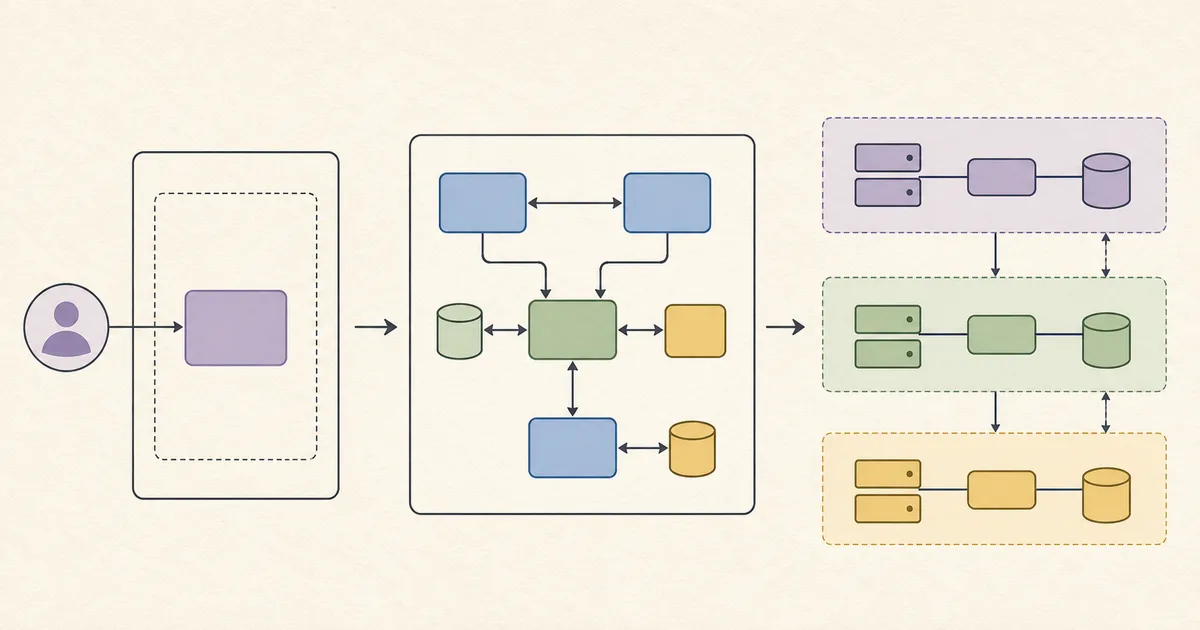
How the diagram pack was assembled
The pack turns architecture-description, diagram-notation, accessibility, and schema guidance into three bounded review views. Source IDs connect each design choice to the primary references below.
Choose the viewpoint before drawing
Name the audience and concern for each view. Use the context view for people and external systems, the container view for running applications and data stores, and the deployment view for runtimes and trust zones.
Sources: [iso-42010], [c4-model]
Give every element a stable identity
Record nodes, edges, boundaries, types, labels, and positions in one closed JSON model. Generate editable Mermaid and rendered SVG from that model so source and review evidence can be compared for drift.
Sources: [mermaid-flowchart], [json-schema-2020-12]
Label boundary direction explicitly
Mark each relationship as within, inbound, outbound, or cross-boundary based on its endpoints. This exposes ownership and trust changes without claiming that a diagram discovers or verifies a live architecture.
Sources: [iso-42010], [c4-model]
Review the visual and text alternative together
Keep a concise title and equivalent description beside every diagram. The validator checks their presence and exact parity in Mermaid and SVG, while human reviewers decide whether the description conveys the same meaningful relationships.
Sources: [wcag-non-text], [mermaid-flowchart]
What these diagram templates own
Use the pack for editable architecture views and their review evidence. Link each view to the document that owns the underlying requirements, decisions, contracts, or data definitions.
Included
- System context with people, owned system boundary, and external systems
- Container and dependency view with running applications, data stores, and relationship direction
- Deployment and trust-boundary view with runtimes, zones, and crossings
- Stable IDs, type legends, audiences, review date, accessible descriptions, and deterministic render parity
Not included
- Full software design rationale, alternatives, API contracts, operational plan, or implementation authority
- Requirement approval, acceptance criteria, prioritization, and SRS ownership
- Field definitions, data dictionary ownership, retention policy, and legal or compliance advice
- Cloud-vendor recommendations, automatic discovery, live-system verification, or security certification
- Performance, availability, deployment-success, or architecture-correctness guarantees
DOWNLOADABLE RESOURCE
Download the editable architecture diagram pack
The archive contains three original diagram views backed by one closed model. Mermaid files remain editable, SVG files preserve accessible title and description, and dependency-free tests verify the same nodes, edges, boundaries, and labels across every representation.
System architecture diagram template pack
A reproducible, fictional starter pack for context, container or dependency, and deployment or trust-boundary architecture views.
Format: ZIP with JSON, JSON Schema, Mermaid, SVG, and Node.js validation scripts
Locally reproduced August 1, 2026. SHA-256: 3e97b337edc177e2f8ffe7b6b781f3558e2890733c2a1e9735e341b61057ce20
Included
- Three editable Mermaid sources and three accessible SVG previews
- One combined diagram model and closed Draft 2020-12 JSON Schema
- Dependency-free validator with source, model, render, boundary, reachability, and safety tests
- Deterministic 13-file allowlisted ZIP builder with fixed timestamps
Verification boundary
After extraction, run npm test and npm run validate. Run npm run render after editing the model, rebuild with npm run pack, and compare the archive SHA-256 with the value shown here for the unchanged release.
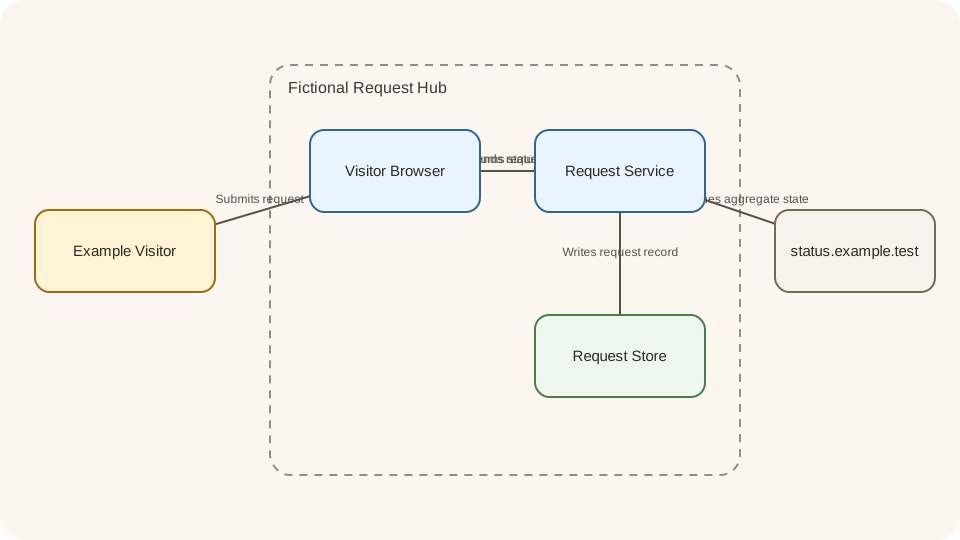
System context
People, owned system boundary, and external systems
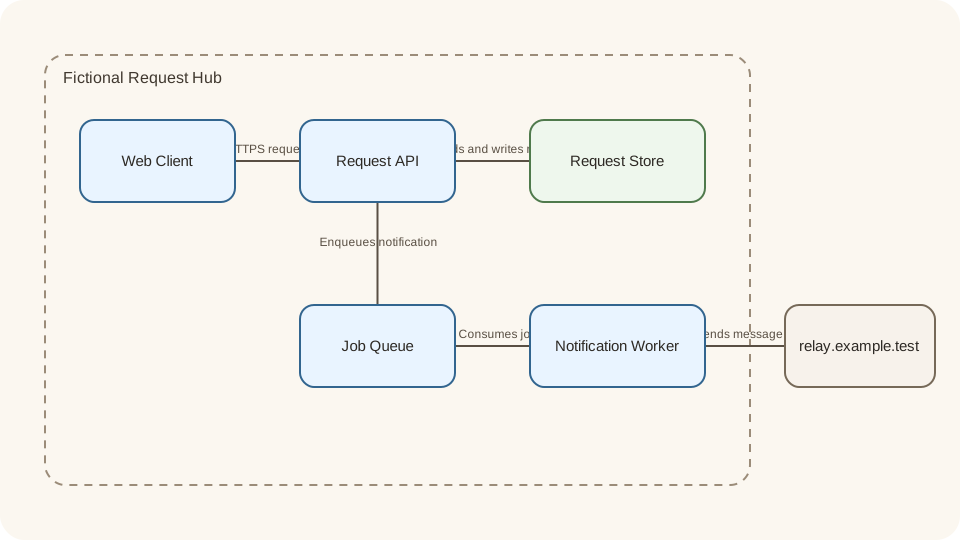
Container dependencies
Runnable applications, data stores, and dependency direction
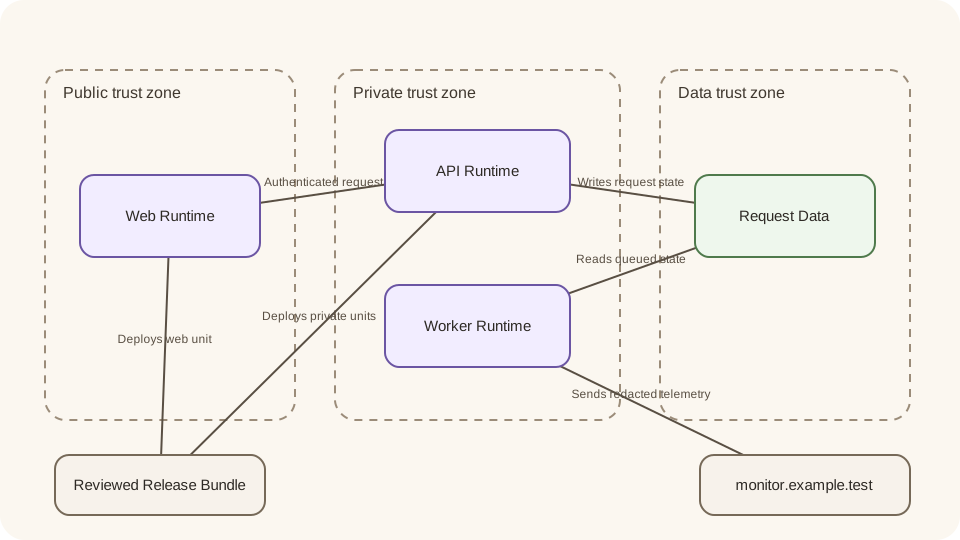
Deployment and trust
Runtime placement, trust zones, and boundary crossings
Three architecture views in the pack
Each template answers a different review question. Keep the views separate enough to read, then connect them with stable names and IDs instead of forcing every concern into one diagram.
System context template
Use when: Reviewers need to agree on people, the system of interest, and external systems.
The fictional request-hub view shows an example visitor, browser, request service, data store, external status page, and the system ownership boundary.
Structure
- One named system boundary with internal and external nodes
- Inbound, within-boundary, and outbound relationships
- Audience, review date, legend, stable IDs, title, and equivalent description
Watch for: A context diagram identifies visible relationships. It does not approve requirements or explain the full technical rationale behind the system boundary.
Sources: [iso-42010], [c4-model], [wcag-non-text]
Container and dependency template
Use when: Engineers need to review separately running applications, stores, and dependency direction.
The view separates a web client, request API, queue, worker, request store, and fictional external relay so runtime responsibilities and outgoing dependencies stay visible.
Structure
- Runnable containers and data stores inside one owned boundary
- Labeled request, dependency, and data-flow edges
- Editable Mermaid source derived from the same model as the SVG preview
Watch for: Container labels are not interface contracts. Link to reviewed API documentation and the SDD rather than treating one arrow as complete protocol behavior.
Sources: [c4-model], [mermaid-flowchart], [json-schema-2020-12]
Deployment and trust-boundary template
Use when: Operations and security reviewers need to inspect runtime placement and boundary crossings.
The view places web, API, worker, and data runtimes in public, private, and data zones, then labels deployment inputs and telemetry outputs.
Structure
- Three named trust zones with runtime membership
- Inbound deployment, outbound telemetry, and cross-boundary data flows
- Machine-checked boundary direction derived from edge endpoints
Watch for: Drawing a trust boundary does not verify a deployed network or certify its controls. Confirm the current environment with operational and security evidence.
Sources: [iso-42010], [c4-model], [wcag-non-text]
Rules for a reviewable architecture diagram
Use these checks before calling a view reviewed. The goal is a bounded, traceable conversation surface, not a visually complete claim about the system.
The audience or review question is unclear
Choose: Choose one viewpoint and name the concern before adding more nodes or another level of detail.
Tradeoff: A narrower view omits information by design, but reviewers can understand why each included relationship matters.
A node, edge, or boundary has no stable ID or legend type
Choose: Add the identifier and use an allowlisted type before review so source, model, render, and comments can reference the same element.
Tradeoff: Stable identifiers add maintenance work but make drift and ambiguous review comments easier to detect.
An edge crosses a boundary without a direction label
Choose: Classify it as inbound, outbound, or cross-boundary from its endpoints and state what moves across it.
Tradeoff: Explicit direction can expose unresolved ownership or trust assumptions that need a separate decision record.
The text description cannot stand without the image
Choose: Rewrite it to name the view, main elements, boundary, and meaningful relationships, then review it with the visual.
Tradeoff: Equivalent descriptions take more care than generic alt text but preserve the diagram information for more readers.
The diagram begins carrying requirements, field definitions, or design rationale
Choose: Move that authority to the SRS, data dictionary, or software design document and link the records.
Tradeoff: Several linked artifacts require coordination, but their owners and approval boundaries remain explicit.
Editable resource
Start with three bounded views
Download the diagram pack, replace the fictional model, and validate the Mermaid and SVG projections before review.
Download the diagram packPassing validation proves model parity and structural checks, not architecture correctness or live-system alignment.
Record the full rationale in the SDD templateThese diagrams own visual views. The software design document owns the broader technical decisions, alternatives, contracts, data, operations, and review status.
Limits of the diagram templates
A deterministic diagram pack can prevent representational drift. It cannot establish that the selected view is correct, complete, authorized, or consistent with a running environment.
- The source map is a synthesis of primary guidance, not a claim that any source mandates this exact model or notation.
- The fictional request hub omits organization-specific privacy, safety, legal, compliance, recovery, and operational concerns.
- The validator checks structure, references, direction, reachability, safety patterns, and render parity, not architecture quality.
- The pack does not discover a live architecture, inspect cloud resources, verify security controls, or certify a deployment.
- The diagrams do not replace the SDD, SRS, API contract, data dictionary, threat model, or production authorization.
- Review the current authoritative sources and the real system again when a boundary, dependency, runtime, or audience changes.
Authoritative source map
These primary sources were checked on August 1, 2026. Each entry states the limited fact it supports; none endorses this template or Playcode.
[iso-42010] International Organization for Standardization:ISO/IEC/IEEE 42010:2022
Checked August 1, 2026. Supports: The standard specifies requirements for architecture descriptions, architecture viewpoints, and model kinds without prescribing a particular notation, tool, format, or medium.
[c4-model] C4 model:C4 model diagrams
Checked August 1, 2026. Supports: The C4 model distinguishes system context, container, component, and code views, with deployment and dynamic diagrams used when they answer additional questions.
[mermaid-flowchart] Mermaid:Mermaid flowchart syntax
Checked August 1, 2026. Supports: Mermaid flowcharts define nodes, edges, labels, directions, and subgraphs in editable text syntax.
[wcag-non-text] World Wide Web Consortium:WCAG 2.2 Success Criterion 1.1.1: Non-text Content
Checked August 1, 2026. Supports: WCAG requires non-text content to have a text alternative that serves the equivalent purpose, subject to its stated exceptions.
[json-schema-2020-12] JSON Schema:JSON Schema Draft 2020-12
Checked August 1, 2026. Supports: Draft 2020-12 publishes the metaschema and vocabularies used by the closed machine-readable diagram model.
System architecture diagram template questions
What is the difference between a context diagram and a container diagram?
A context diagram shows people, the system of interest, and external systems. A container diagram looks inside the system boundary at separately running applications and data stores, then labels the dependencies between them. Use both only when their audiences need both levels.
What belongs in a deployment and trust-boundary diagram?
Show the runtime units, the environments or trust zones that contain them, and the meaningful deployment, request, or data-flow edges that cross those boundaries. Name the direction and purpose of each crossing without claiming the diagram verifies the deployed environment.
Does this template replace a software design document?
No. This pack owns editable visual architecture views. A software design document owns the broader rationale, alternatives, interfaces, data, deployment decisions, operations, and review status. Link the diagrams to that record instead of duplicating its authority.
Why does every diagram need a text description?
A diagram conveys non-text information. An equivalent description helps readers who cannot fully perceive the visual and gives reviewers a searchable summary of the view, main elements, boundaries, and relationships. Review the text and image together because presence alone does not prove equivalence.
Can the validator prove that the architecture is secure or current?
No. It checks the model shape, allowlisted types, identifiers, references, reachability, boundary direction, safety patterns, and exact Mermaid and SVG parity. It cannot inspect a live system, verify controls, certify security, or decide whether the architecture is appropriate.
Can I edit the Mermaid files directly?
You can, but the combined JSON file is the source model for this release. Edit the model and run npm run render to keep Mermaid and SVG synchronized. If you use another visual editor, preserve stable IDs, legends, boundary direction, and an equivalent text description.
Does this article or download include AI credits?
No. This is an informational article with a downloadable template pack. It does not grant signup AI credits; product eligibility and plan limits are separate.
After architecture review
Turn the reviewed boundaries into a working app
Use Playcode after the architecture view, requirements, and implementation authority are clear, then verify the result against the owning records.
Build the reviewed architectureThis informational article does not grant signup AI credits. Product eligibility and plan limits are separate.