For operators, founders, and small teams

Build a Web App Around One Real Workflow

Start with the people, records, rules, and result. Playcode AI builds the browser interface and server logic, and Playcode Cloud can run the database-backed app on one published link.

No credit card required · No coding needed

Quick answer

What does a web app builder create?

A web app builder turns a defined workflow into browser-based software people can use. With Playcode, describe the screens, records, rules, and roles; Playcode AI builds the interface and server logic, while Playcode Cloud can run the database-backed app with HTTPS, previews, and recovery under current plan limits.

1.1M+users
26M+projects
Since 2016

Used by people at

Counts registered accounts using corporate email domains from the companies above. Playcode is a self-serve product, not a contracted vendor to these brands.

From Workflow Brief to a Web App People Can Operate

Use one service-request loop to make the first release concrete

01

Define the Request Record and Its Owners

Start with one record: a service request with a server-generated ID, title, description, priority, status, requester, assignee, and timestamps. Name the allowed status changes and which role can make each one.

One bounded record keeps the first build testable. Comments, notifications, dashboards, and integrations can follow after the save and ownership rules work.

Preview
AI Chat
Publish
I'm a realtor in Miami. I need a website to show my listings and get buyer leads.
4 Questions
2 / 4
What's the main style for your real estate site?
AModern & minimal with clean lines
BLuxury feel with large property photos
CProfessional & corporate
DI'll describe my own style below
Or type your own answer...
Skip
Next
Describe what you want to change...
Economy
Build Progress
4/6
Site layout & navigation
3s
Hero section with CTA
5s
Property listings grid
8s
Building contact form...
About page & bio
Footer & SEO meta
miami-homes.playcode.io
Miami Dream Homes
Your trusted partner in Miami real estate
Search by neighborhood...
Featured Listings
NEW
$1,250,000
Coral Gables Villa
4 bd|3 ba|2,400 sqft
OPEN
$890,000
Brickell Condo
2 bd|2 ba|1,200 sqft
Get in Touch
02

Build Every State, Not Only the Happy Screen

Ask for the request form, queue, detail view, and status action together. Add fast browser feedback, authoritative server validation, loading, empty, saved, and retryable-error states, plus one idempotency key for repeated submissions.

Apply requester and agent permissions on the server. Hiding a button or guessing an unlisted URL is not an access-control test.

03

Test as Separate Users, Then Publish

Create a request in a private session, reopen it after refresh, and sign in as a second account. Confirm the requester sees only their records while the permitted agent can operate the queue.

Publish over HTTPS, repeat the core flow, inspect safe logs for failures, and record the recovery and data-export boundary before inviting real users.

Your website is live!

https://
miami-homes.playcode.io
Site is secure - SSL certificate active
Or connect your domainmiami-dream-homes.com
Miami Dream Homes
Your trusted partner
Miami Dream Homes
Your trusted partner
Start with the workflow

Replace a Chain of Hand-Offs with One Traceable Record

The useful unit is not a screen. It is a request that survives every step.

A workflow spread across tools

  • Requests arrive through forms, email, and chat with different fields
  • Nobody can tell which version or status is current
  • Repeated clicks and retries create duplicate work
  • Private details are forwarded to people who do not need them
  • A failed notification looks like a lost request

One bounded web app

  • Each request has a stable ID, owner, status, and timestamp
  • The server controls validation and allowed status changes
  • One idempotency rule makes technical retries safe
  • Server-side access checks protect list, detail, and update paths
  • Notifications, exports, and recovery have separate visible states
What a complete first release includes

The Interface, Rules, and Operational Boundaries

Ask for the whole request lifecycle, then verify each boundary before expanding it

01

A named record contract

Define IDs, fields, statuses, timestamps, ownership, and allowed transitions before designing the queue and detail screens.

02

Browser and server validation

Use browser checks for immediate feedback, then repeat every important rule on the server before accepting or changing a record.

03

Loading, empty, error, and retry states

Show what is happening while data loads, when no records match, when a request fails, and whether retrying is safe.

04

Role and ownership checks

Protect every list, detail, and update path on the server so a requester cannot read or modify another account's record.

05

Retry-safe writes

Give one logical submission a stable idempotency key and enforce it at the save boundary so double-clicks and interrupted responses do not create another request.

06

Recovery and export decisions

Use saved recovery points for risky releases, and define runtime-data export separately. Exportable code does not automatically mean every live record is included.

Picture the bounded workflow

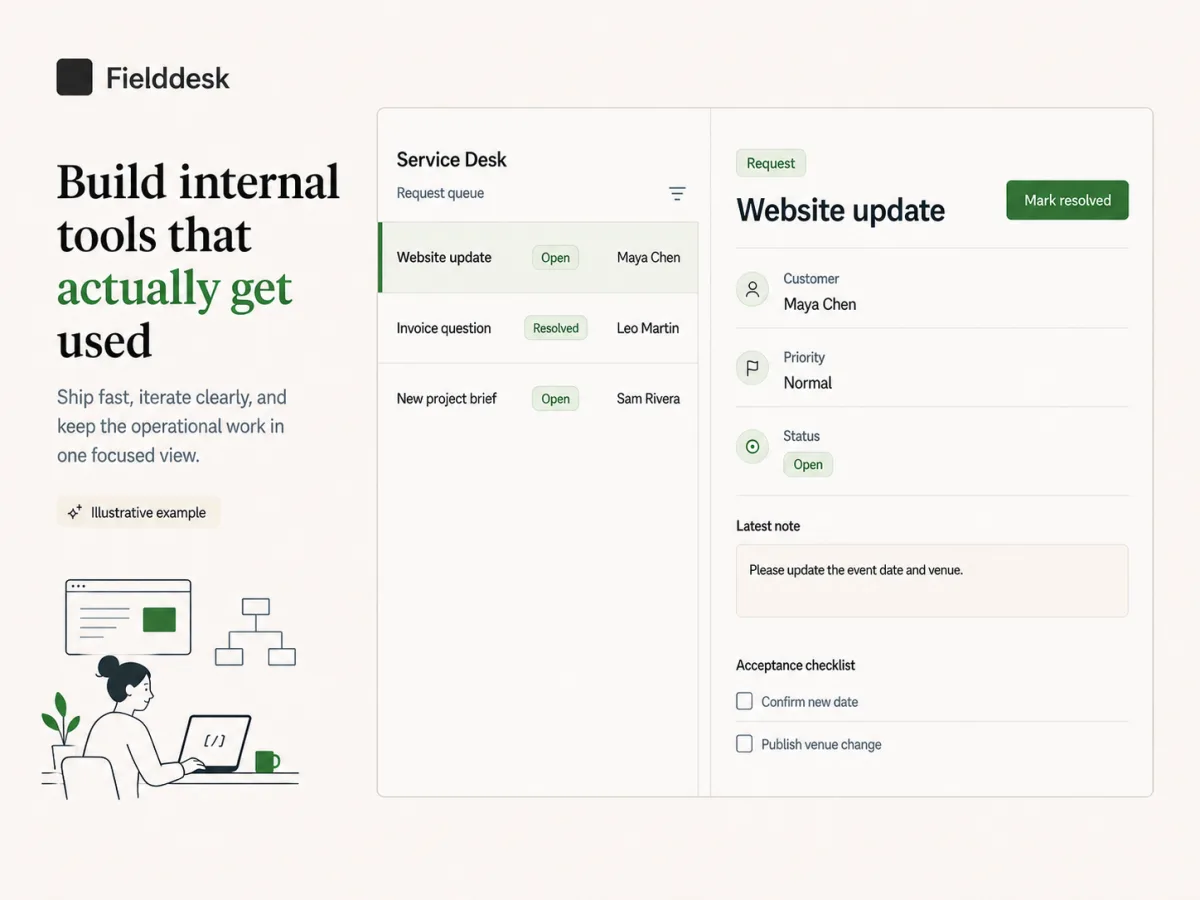
A Service Desk with Queue, Status, and Record Detail

One coherent example makes the record, role, and status decisions easier to discuss before building

Illustrative service desk web app with a request queue, request statuses, and selected record detail
Illustrative conceptThis is an illustrative service-desk concept, not a Playcode product screenshot. The actual result depends on your brief, data model, roles, and visual direction.
A practical web-app implementation guide

Build and Verify One Service-Request Loop

Make the database record authoritative, keep permissions on the server, and decide how retries, releases, recovery, and exports behave.

Before you build

Prerequisites

  • One bounded workflow and record

    A first release needs a clear actor, action, durable record, and visible result. A broad list of screens does not define what the app must preserve.

    Ready when: You can trace one invented service request from creation through assignment and resolution, including every field and allowed status transition.

  • A role and ownership matrix

    Requester, agent, and admin access must be decided before list, detail, update, export, and monitoring routes are built.

    Ready when: For each route and action, you can name who may use it, which records they may access, and what the server returns when access is denied.

  • A recovery and data-handoff decision

    Source-code export, runtime-record export, and restoring the whole app to a saved point solve different problems and can preserve different states.

    Ready when: You know which records must be exportable, who may export them, how personal data is protected, and what could be lost when restoring an older saved point.

Implementation sequence

Do, observe, verify
  1. 01
    Playcode AI prompt and app data model

    Write the request schema and lifecycle

    Define a request ID, public reference, title, description, priority, status, requester ID, optional assignee ID, created timestamp, updated timestamp, and version. Name the permitted transitions from new to in progress to resolved, and which role controls each transition.

    Expected result

    The form, queue, detail view, and server actions share one record contract with explicit ownership and lifecycle rules.

    Verify

    Map every visible field and action to the schema, then reject any screen element that has no persisted meaning or authorized server action.

  2. 02
    Public request form, queue, and detail views

    Build the interface with complete states

    Add fast browser checks, loading placeholders, an empty queue message, field-specific errors, a saved state with the stable reference, and a retry action only where repeating the request is safe. Keep the last confirmed data visible during a recoverable read error when appropriate.

    Expected result

    Users can tell whether the app is loading, empty, saved, rejected, or temporarily unavailable without guessing whether an action completed.

    Verify

    Throttle the connection, return an empty result, and force one safe read and write failure; confirm each state is distinct and the retry label matches the real behavior.

  3. 03
    Server request and status actions

    Make server validation and persistence authoritative

    Repeat required, length, enum, and transition checks on the server. Generate authoritative IDs and timestamps there, reject unexpected fields, save the request before returning success, and keep routine logs free of descriptions or other private payloads.

    Expected result

    Bypassed browser checks cannot create malformed state, and a visible success always points to one durable request.

    Verify

    Send a valid request plus missing, oversized, unexpected, and invalid-transition payloads directly to the server action, then inspect the resulting records and safe responses.

  4. 04
    Browser action and database write boundary

    Make creation and updates retry-safe

    Create one idempotency key per logical request attempt and enforce its uniqueness with the saved record. Reuse that key after a slow or interrupted response. For status updates, include the last seen version and reject a stale change instead of silently overwriting newer work.

    Expected result

    Double-clicks and network retries return one request, while two agents editing an old version receive a visible conflict instead of losing a newer update.

    Verify

    Submit the same key concurrently, retry after dropping the first response, and attempt two status changes from the same starting version; confirm one record and one explicit conflict.

  5. 05
    Request list, detail, update, and export actions

    Apply ownership and role checks on every server path

    Filter requester reads by requester ID, restrict agent queues and updates to the intended workspace or team, and reserve administrative export for the named role. Return a safe denial without revealing whether another account's record exists.

    Expected result

    A user can operate only the records and actions their role permits, even when they change a URL, record ID, or browser request manually.

    Verify

    Repeat list, detail, update, and export requests signed out, as a second requester, and as the permitted agent; compare both status codes and returned fields.

  6. 06
    Published Playcode app and operations notes

    Publish, observe, and record the recovery boundary

    Publish over HTTPS, run the core flow in a private mobile-width browser, and inspect bounded error and request logs using IDs rather than private descriptions. Create a saved recovery point before a risky release. Document that restoring it also returns database state to that point, and define any separate authorized record export needed before recovery.

    Expected result

    The live app has a reproducible smoke test, privacy-safe diagnostics, and a recovery decision that does not confuse code export, record export, or whole-app restore.

    Verify

    Complete one requester-to-agent flow, confirm the request by its reference in safe logs, test a second account, locate the saved point, and verify an authorized sample export contains the documented fields only.

Decisions that change the build

Where should status transitions be enforced?

  • Browser controls only
  • Server-controlled transition rules

Choose: Use browser controls for guidance and enforce the same allowed transitions on the server for every update path.

Tradeoff: Server rules add explicit lifecycle code, but they prevent hidden requests, old screens, or unauthorized clients from skipping directly to an impossible state.

When should the interface update before the server replies?

  • Optimistic reversible update
  • Wait for server confirmation

Choose: Use optimistic updates only for changes that are easy to reverse and show a pending state. Wait for server confirmation before presenting record creation or a sensitive status change as complete.

Tradeoff: Optimistic UI feels faster but needs rollback and conflict handling. Confirmed UI is simpler and safer for consequential writes, but must show progress clearly.

When should you restore the whole app?

  • Restore to a saved point
  • Repair or reconcile individual records

Choose: Use a whole-app restore for a release that damaged code and state broadly. Reconcile individual records when only a small known set is wrong, and inspect or export authorized post-checkpoint records before any restore when the situation allows it.

Tradeoff: A restore returns code, files, and database together to an earlier point, so later legitimate records can also move backward. Record-level repair preserves newer state but takes more careful diagnosis.

Before you share it

Test checklist

  • Happy path

    A requester creates valid invented data, refreshes, and an authorized agent assigns and resolves the request through allowed transitions.

    Expected: One durable record keeps its reference and ownership, and both roles see only the actions and current state intended for them.

  • Invalid input

    Send missing and oversized fields, an unknown priority, an impossible transition, and list/detail/update requests from a second requester account.

    Expected: The server rejects every invalid or unauthorized action without saving partial state or revealing another account's record.

  • Duplicate or retry

    Send the same creation key twice after an interrupted response, then submit two updates from the same last-seen version.

    Expected: Creation resolves to one request and the stale update returns a visible conflict instead of silently overwriting the newer state.

  • Published smoke test

    Open the published HTTPS app in a private mobile-width browser, create one invented request, and operate it from a separate permitted account.

    Expected: The complete live flow persists across refresh, denied accounts remain denied, safe logs identify failures by reference, and the documented export fields are available only to the authorized role.

If something goes wrong

Common failure cases

The screen says saved, but the request disappears after refresh

Likely cause
The interface declared success from local state before the database write completed or before the server returned the stable request reference.
Check
Trace the displayed reference through the server response and database, then compare when the success state was rendered.
Fix
Show completion only after the durable write returns the authoritative ID, and show a retryable error without inventing a saved state when it fails.

A double-click or slow connection creates two requests

Likely cause
The client generated a new idempotency key for the retry or the server did not enforce uniqueness at the write boundary.
Check
Compare keys, timestamps, and request payload hashes for the two invented test records.
Fix
Reuse one key for the logical attempt, enforce it in the database operation, and return the existing request for a safe retry.

One requester can open another requester's record

Likely cause
The detail route accepts a record ID without checking the signed-in actor's ownership or permitted team role on the server.
Check
Request the same record as the owner, a second requester, a permitted agent, and while signed out.
Fix
Apply the access rule to list, detail, update, and export server paths, return a non-revealing denial, and repeat the cross-account matrix.

A loading or server failure leaves a blank screen or unsafe retry button

Likely cause
Only the successful data state was designed, or the retry action repeats a write without preserving its original idempotency key.
Check
Throttle the network and force read and write failures while recording which state and action the interface presents.
Fix
Add distinct loading, empty, read-error, and write-error states, and expose retry only when it reuses the safe request identity or repeats a read.

Recent legitimate records are missing after recovery

Likely cause
The selected saved point predates those records because whole-app recovery also returned the database to its earlier state.
Check
Compare the saved-point time with record timestamps and any authorized pre-recovery export or audit evidence.
Fix
Choose the least destructive recovery path, reconcile individual records when appropriate, and restore authorized post-checkpoint records only through a reviewed import or repair process.
Choose one workflow first

Web Apps Built Around Records People Act On

The interface changes, but every useful first release has a named record and owner

Service Request Desk

Owned requests and visible status

Let customers submit an issue and let permitted agents assign, update, and resolve it. Keep notification delivery separate from the durable request record.

Approval Workflow

A traceable decision path

Capture one request, route it to the right reviewer, record the decision and reason, and prevent a stale page from overwriting a newer review.

Client Portal

Private records by account

Show each client their own documents, requests, or milestones while the team works from an authorized shared view with server-side access checks.

Inventory Exception Queue

Fewer missed follow-ups

Store adjustments and exceptions as records with an owner and resolution state. Add a dashboard only after the underlying counts and transitions are verified.

A concrete definition of working

Set the Acceptance Contract Before You Add Features

This page uses a service-request loop because it exposes the data, role, retry, and operational decisions a real web app needs

1 loop
from request creation to an authorized resolution
1 record
with a stable ID, owner, lifecycle, and version
4 tests
for valid, invalid, repeated, and published behavior
Choose the right amount of software

Shared Spreadsheet or Purpose-Built Web App?

A spreadsheet may be enough. Build an app when rules, roles, and repeated operation matter.

Workflow needShared spreadsheet and formsPlaycode-built web app
A small trusted team updates simple rowsUsually the simpler starting pointUseful only when a custom workflow removes real friction
Different requester and operator viewsOften requires separate sheets, forms, or manual sharingBuild role-specific screens over one record model
Validation and allowed state changesConventions and formulas can driftApply the authoritative rules in server actions
Retries and concurrent editsHandled manually after the conflictDefine idempotency and stale-update behavior explicitly
Recovery and handoffUse provider history and export optionsUse project recovery plus separately defined code and data export paths
The engine

A software team in one agent

Playcode AI runs the same frontier models that power ChatGPT and Claude - and orchestrates them like a team: it plans the work, delegates to sub-agents, runs long jobs in the background, and reviews its own changes.

Every frontier model

The latest models from every major lab, in one picker. Switch anytime.

ClaudeGPTGeminiGrok

Sub-agents

Big jobs split across specialists - one explores your code, one writes, one audits - working in parallel.

Background tasks

Long builds and migrations keep running while you keep talking. They report back when done.

migration - running

It sees your designs

Have a design in Figma? Paste a screenshot - or a page you like, or a bug - and it builds from what it sees.

Tuned by years of iteration to write production software - structured, typed, maintainable - not throwaway prototypes.

Production code

Real code you can open, read, and edit

Under every project is a codebase the agent keeps production-grade. And you are never locked out of it: open the file explorer and edit any file yourself - server included. No AI required.

Quality is the default

Complete states, secure boundaries, structured code - the bar is what a professional agency would ship.

Every file is yours to open

Browse the whole project - frontend, backend, configuration - and edit directly in the built-in editor.

Developers are welcome

Invite your developer with the right role, or export the project code and files. Nothing is trapped in Playcode.

For teams and organizations

Share it like you share a doc

Playcode is built for organizations, not just solo builders. Workspaces hold your projects, people, and billing; roles and teams decide exactly who sees what.

Workspaces with their own billing

Create a workspace per company, client, or department - each with its own members, projects, and subscription.

Three clear roles

Admins manage, editors build, viewers watch. Set roles on the whole workspace, on a team, or on a single project.

Teams that scope access

Group people into teams and give each team its own projects - or a whole folder of them. Private projects stay private, even inside a shared workspace.

Share outside the workspace

Send a project to any email - a client, a contractor - with exactly the access you choose. No extra seat needed.

Share "Inventory tracker"
Acme Ops workspace
Private
client@partner.co
Editor Invite
Operations team
8 people
Editor
MK
Maya Kowalski
maya@acme.co
ADMIN
JR
Jon Reyes
jon@acme.co
EDITOR
LS
Lena Sato
lena@acme.co
VIEWER
Restricted - only people invited can open it
Real-time

Multiplayer by default

Work on one project together. Write in the same AI chat together. Every message, edit, and setting is fully synchronized - live, for everyone, on every device.

acme-launch · Playcode
MKJR
Maya's laptop
Maya
Add a 'Book a call' button to the hero
Jon
And link it to our calendar, please
Playcode AIDone - button added to the hero and linked to your calendar.Preview updated
Describe the next change...
Jon's phone
Maya
Add a 'Book a call' button to the hero
Jon
And link it to our calendar, please
Playcode AIDone - button added to the hero and linked to your calendar.
Message...
Already there. No refresh.

Same project, same moment

Everyone works in the project at the same time - even in the code editor - without lock-outs or "who has the latest version".

Every device

Start on the laptop, check from your phone: the same live state follows you everywhere you sign in.

Nothing to refresh

Changes arrive over a live connection the instant they happen. Reloading the page is a habit you can drop.

Feels instant

It never makes you wait

Instant

Every click applies immediately on your device. Syncing happens behind you, not in front of you.

Offline

Connection dropped? Your changes queue locally and replay the moment you are back.

Reload-proof

The queue survives closing the tab. Nothing you did is lost while you are away.

Real People. Real Websites Built with AI.

"I built my entire portfolio site in 20 minutes. My clients think I hired a designer. Already got 3 new inquiries this month."
Marcus T. · Freelance Graphic Designer, Austin TX
"We switched from Wix to Playcode. The AI actually understands what we need instead of giving us cookie-cutter templates. Saved us thousands."
Sarah Chen · Owner, Bloom & Petal Floristry
"I update my property listings from my phone while showing apartments. Clients are impressed when I tell them I built the site myself."
David Morales · Real Estate Agent, Miami FL

Simple Pricing

Start small. Upgrade when you're ready.

Starter

$0to start

Try the AI website builder and see results

  • AI credits included to start
  • Publish your site instantly
  • Subdomain included
  • Website hosting included
  • No credit card required
Get Started

Pro

Most Popular
$21/month

Everything you need to build

  • 100 AI credits/month
  • All AI models (12+)
  • Visual editing
  • Custom domains
  • Website hosting included
  • Export your code anytime
  • Private projects
  • Unlimited collaborators

Cancel anytime. No hidden fees.

How credits work

Credits are used when AI helps you. Simple edits cost less, complex features cost more.

  • "Change button color" ~0.3-0.5 credits
  • "Add a contact page" ~2-3 credits
  • "Build full landing page" ~5-10 credits

Most users never run out. 100 credits = lots of building.

Questions to Ask Before Choosing a Web App Builder

Playcode can build browser-based apps such as service desks, approval flows, client portals, trackers, dashboards, CRMs, and small SaaS products. Start with one bounded workflow and expand only after its records, rules, and roles work end to end.

Yes. Playcode Cloud apps can have server logic and database-backed state under current plan limits. Define the record contract and server validation explicitly so the interface is not mistaken for proof that data is durable or safe.

Yes. Build the app around named roles and ownership rules, then enforce those rules on every server list, detail, update, and export path. Test signed out, with a second account, and with the intended operator role before launch.

Use one idempotency key for the same logical attempt and enforce it at the database write boundary. Keep this separate from human duplicate matching, which needs an explicit business rule before two apparently similar records are combined.

Test the happy path, invalid and unauthorized input, a duplicate or interrupted retry, and the published HTTPS flow in a private browser. Also force loading, empty, read-error, write-error, and cross-account cases so the interface explains what actually happened.

Playcode projects are real code and can be exported. Treat runtime data as a separate requirement: define the records, fields, access rules, and format that an authorized user needs to export. Do not assume code export automatically includes every live record.

Use previews and a saved recovery point before risky changes. Playcode Cloud can restore code, files, and database together to that point on the supported path. Because newer records may move backward too, compare recovery with record-level repair and any authorized export before acting.

Still have questions? Contact us

Start with one workflow your team can verify.

Describe the records, roles, rules, and result. Build the complete loop before the roadmap.

A service desk where customers submit requests and agents update status...Start Building My Web App

No credit card required. AI credits included.