A reliable booking website is not just a calendar-shaped form. It needs one availability source of truth, an explicit request-versus-confirmation rule, time-zone-safe records, server validation, retry handling, protected staff actions, production tests, and a recovery path when another system fails.
This guide shows how to specify and build that workflow in Playcode. If you first want the commercial overview, see the booking website builder page. The article below stays focused on the record model, operating decisions, integration boundaries, and exact checks.
QUICK ANSWER
How do you create a booking website?
Choose one system to own availability, decide whether the form creates a pending request or a confirmed appointment, and model that record before styling the page. Build server validation, retry-safe saving, protected staff actions, and time-zone handling. Test simultaneous requests and provider failures, then publish and complete one labeled production booking from a phone.
Decide the operating rules before building the page
The user interface can be changed quickly. The availability owner, status model, time rules, access controls, and partial-failure policy are much more expensive to improvise after real requests arrive.
- One availability source of truth: Name the app database, staff-managed calendar, or scheduling provider that decides whether a slot is actually available. Other views may collect preferences or display a copy, but they must not independently confirm the same slot.
- A request-versus-confirmation policy: Write the allowed statuses and transitions. For a manual workflow, a customer submits a pending request and staff confirms, declines, or proposes another time. Instant confirmation requires one authoritative reservation transaction that rejects conflicts.
- Service and time rules: List service and resource IDs, duration, buffers, lead time, cancellation or rescheduling rules, served locations, staff eligibility, supported time zones, and any daylight-saving markets that need boundary tests. If checkout uses temporary holds, name the hold duration, expiry clock, release triggers, and cleanup owner.
- Access, privacy, and retention: Choose which staff roles may list, open, confirm, decline, export, or delete requests. Minimize customer contact and intake data, name a retention owner, and set an archive or deletion date before collecting real records.
- A partial-failure policy: Define what staff do when a notification fails after the request saves, when a provider confirms but the local update fails, or when payment succeeds but booking confirmation does not. Never solve ambiguity by charging or confirming twice.
Credentials and access
| Credential | Minimum access | Storage and rotation |
|---|---|---|
| Scheduling provider API key Conditional server credential for an API-based availability or reservation path | Only the read-availability and create, update, or cancel reservation scopes the chosen flow actually uses. | Keep it in Playcode server-side configuration. Never put it in browser code, generated images, URLs, source control, or general logs. Document the provider console path to revoke and replace it, then retest availability reads and one redacted test reservation after rotation. |
| Webhook signing secret Conditional server secret for authenticating provider events | Use the endpoint-specific signing secret. It should authenticate events, not grant broader account access. | Keep it server-side and verify the signature against the raw request body before parsing or applying a status change. Support the provider's overlap process when available, update server configuration, reject the retired secret, and replay only approved test events. |
| Payment provider secret key Conditional server credential for deposits or paid reservations | Use the narrowest supported test and production access for the exact payment operations. Keep test and production environments separate. | Store the secret server-side and log only redacted request, booking, and payment IDs needed for reconciliation. Revoke and replace it through the provider console, then verify a test payment and webhook before taking another live deposit. |
Choose the source of truth and confirmation model
These options can produce similar-looking pages, but they carry different promises, hold semantics, credentials, failure modes, and operating costs. Pick one primary model before asking Playcode to generate the implementation.
| Approach | Best for | Tradeoff |
|---|---|---|
| Pending request in the app database | Consultants, studios, repair services, tutors, clinics, and other businesses that already confirm availability manually. | It avoids false instant-confirmation promises and works with existing processes, but staff must review and reply to each request promptly. |
| Provider-hosted link or embed | Businesses that already trust a scheduling provider and do not need a fully custom slot-selection interface. | The provider owns availability and confirmation with less integration code, but controls more of the customer experience, plan limits, branding, and data flow. |
| Custom API and webhook reservation | A tailored experience where the provider or transactional app database can reserve slots atomically and expose reliable event updates. | It gives more control, but adds credentials, signatures, rate limits, retries, simultaneous-write conflicts, expiring-hold cleanup, provider drift, monitoring, and reconciliation. |
Recommended:Start with a pending-request workflow unless customers truly need immediate confirmation and you have reproduced a single authoritative reservation path under simultaneous submissions, network retries, webhook duplication, time-zone boundaries, and provider outages. Add a temporary hold only when that source can claim one service resource and time range atomically, give it a server-owned expiry, convert it once, and release or expire it without calling it confirmed. A provider link or embed is usually safer than a custom API when its existing experience is acceptable.
Create a reliable booking website step by step
Turn service and availability rules into a public website, durable request model, protected staff workflow, tested provider boundaries, published smoke test, and recoverable operating process.
STEP 01
Write the customer journey and status promise
Describe what the customer requests, what the business checks, and the exact moment the appointment becomes confirmed.
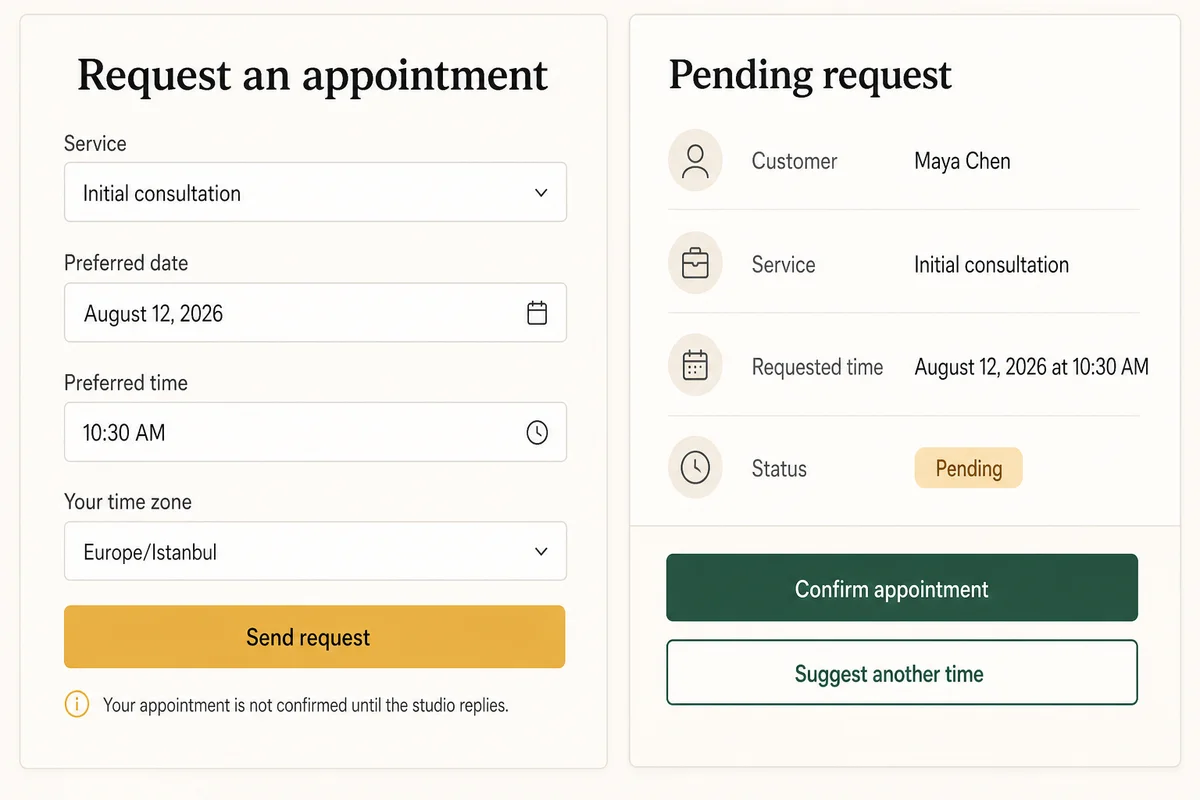
Use verbs that match reality. “Send request” leads to “Pending until the studio replies.” Use “Confirm appointment” only after the authoritative system has reserved the slot.
List the normal path and difficult cases: unavailable preference, staff change, customer retry, cancellation, reschedule, daylight-saving shift, an abandoned temporary hold, and a second customer choosing the same time.
Expected result: The brief has one unambiguous status model, one confirmation owner, and customer messages for every allowed outcome.
Verify it: Give the brief to another staff member and ask whether a customer should travel to the appointment after each state. If two answers are possible, refine the labels and transitions.
STEP 02
Model the request, time, and provider identifiers
Define the durable record before building the form so validation, conflicts, retries, and reconciliation share one vocabulary.
Store the appointment instant in UTC when it is resolved, plus the submitted IANA time-zone name and original local value. Keep the request status, reservation-provider status, notification status, and payment status separate.
Use a stable request ID and one idempotency key for the same submit attempt. Model a temporary availability hold separately with a stable ID, resource and time range, server-owned expiry, lifecycle, version, and optional request link. Save provider reservation, event, and payment IDs only when those systems exist. Do not treat normalized email as proof that two business requests are the same.
type BookingRequest = {
  id: string
  idempotencyKey: string
  serviceId: string
  customerId?: string
  contactEmail: string
  requestedLocalTime: string
  requestedTimeZone: string
  requestedAtUtc?: string
  status: 'pending' | 'confirmed' | 'declined' | 'reschedule-requested' | 'cancelled'
  statusReason?: string
  providerReservationId?: string
  providerStatus?: string
  paymentId?: string
  paymentStatus?: 'not-required' | 'pending' | 'paid' | 'refund-required' | 'refunded'
  createdAt: string
  updatedAt: string
}

type AvailabilityHold = {
  id: string
  idempotencyKey: string
  resourceId: string
  serviceId: string
  startsAtUtc: string
  endsAtUtc: string
  expiresAtUtc: string
  status: 'active' | 'converted' | 'released' | 'expired'
  bookingRequestId?: string
  version: number
}
Expected result: Every customer action maps to one identifiable request, while an optional hold remains a separate expiring claim. Time, booking, provider, notification, payment, and hold states can be reconciled independently.
Verify it: Write sample records for a pending manual request, an active then expired hold, a hold converted to one provider-confirmed appointment, and a paid-but-unconfirmed failure. Confirm that no field must lie to represent any of them.
STEP 03
Build the service website and request form
Make the service, duration, location, time-zone context, and primary action understandable on a phone before adding decorative sections.
Ask Playcode to build service pages that explain what is included, who provides it, approximate duration, location or delivery mode, preparation needs, and what the next status will mean.
The form should use stable service IDs rather than trusting display labels, show permitted preferences, keep entered values after recoverable errors, and state whether the result is pending or confirmed before the customer submits.
Expected result: A customer can choose the right service and understand the next step without calling the business or assuming a pending request is confirmed.
Verify it: Open the page at 360 pixels, navigate with a keyboard, select each service, trigger field errors, and confirm the action and post-submit wording match the actual workflow.
STEP 04
Validate and save the request on the server
Treat browser validation as feedback and server validation as the authority that protects records and status transitions.
Validate service ID, permitted request window, IANA time zone, local-time format, contact fields, staff or location eligibility, field lengths, status transition, and any capacity or lead-time rule on the server.
Create or return the request under the idempotency key in one durable operation. Return success only after the record exists. Send email, SMS, CRM, or provider notifications after that boundary so a delivery outage does not erase or duplicate the request.
If an instant-booking or payment path needs a temporary hold, claim the service resource and UTC time range inside the authoritative availability transaction. Derive expiry on the server, return the same hold for an exact retry, convert only an active hold once, and release it on cancellation or the written payment-failure path. An expired hold cannot confirm a booking.
Expected result: A valid submission creates one durable pending request or one active temporary hold under the chosen model; invalid input creates neither; retrying the same network attempt returns the same safe result.
Verify it: Send a valid request, bypass the browser with an unknown service and invalid zone, then repeat the valid request under the same key. Where holds exist, race two claims for the same resource and time, advance past expiry, and reject a late conversion. Inspect record count, status, IDs, expiry, and server responses.
STEP 05
Add a protected staff queue and conflict check
Give authorized staff the information needed to confirm, decline, or propose another time without exposing customer records publicly.
Protect every list, detail, confirm, decline, reschedule, export, and delete path on the server. Show the original request time zone, computed local staff time, current status, service duration, conflict result, and change history.
For a request workflow, staff checks the authoritative calendar before confirming. For an app-owned instant-booking workflow, reserve under a database uniqueness or locking boundary so two simultaneous confirmations cannot both succeed. Active, expired, released, and converted holds must be distinguishable, and availability must ignore expired or released holds.
Expected result: Authorized staff can make one auditable decision, while signed-out visitors and unrelated accounts cannot retrieve or mutate any request.
Verify it: Try every staff action in a private session and from a second test account. Then send two simultaneous requests or reservations for the same time and confirm the chosen conflict rule is observable.
STEP 06
Define the scheduling and payment provider boundaries
Connect another system only after deciding which side owns availability, booking status, money movement, retries, and customer communication.
A link or embed means the provider owns slot selection, any temporary hold, and confirmation. An API path requires a supported account and plan, documented hold and reservation operations, server-side least-privilege key, webhook signing secret, signature verification, rate-limit handling, provider IDs, event-id deduplication, and a reconciliation queue.
If deposits are added, link the request ID, hold ID, provider reservation ID, and payment ID. When payment succeeds after the hold expires or booking confirmation otherwise fails, stop automated retries, mark private review, reconcile the payment first, and then confirm only if availability is claimed again, refund, or contact the customer according to policy.
Expected result: Each external call has a defined owner, success boundary, retry rule, and manual recovery path; browser code and logs contain no secret.
Verify it: With redacted test credentials, exercise one success, one rejected signature, one rate-limit or timeout, one repeated event, and one paid-but-unconfirmed state. Confirm the local record remains single and diagnosable.
STEP 07
Test time zones, conflicts, retries, access, and partial failure
Run the cases most likely to produce an apparently successful page with a wrong appointment or lost customer record.
Test a valid request, invalid service, invalid time zone, time in the past, request outside lead-time rules, duplicate submit, simultaneous slot conflict, unauthorized staff read, and provider event delivered twice. Where holds exist, test one atomic claim, exact retry, competing claim, explicit release, expiry, late conversion, and conversion-versus-expiry race.
For every served market that observes daylight saving, test one time before, during, and after the transition. If payment exists, test payment succeeded after hold expiry, payment succeeded but booking failed, and booking succeeded but notification failed as separate states.
Expected result: Invalid or unauthorized actions change no protected data, retries stay single, conflicts produce one winner or two pending requests according to policy, expired holds stop blocking availability, late conversion fails, and displayed times remain correct.
Verify it: Record request, confirmed-appointment, payment, and provider-event counts before and after every case. Compare the customer view, staff view, database record, and sanitized logs.
STEP 08
Publish and complete one production booking smoke test
Treat the final HTTPS URL, domain, server configuration, and provider environment as a new system that needs one harmless end-to-end check.
Publish the project, verify HTTPS and custom-domain or DNS setup where used, then submit a clearly labeled fictional request from a phone on mobile data. Complete the real staff or provider confirmation boundary exactly once.
Check the customer status, staff record, local and UTC times, access controls, provider IDs, notification result, monitoring signal, and recovery notes. If holds are enabled, verify one converts or releases exactly once and no expired test hold keeps the slot unavailable. Remove or archive the test record under the retention policy.
Expected result: One labeled production request travels through the intended workflow exactly once with correct status and time, while private data and credentials stay out of public output.
Verify it: Save the request ID, timestamps, and final status; refresh both views; repeat one safe network request; inspect current logs and alerts; and confirm recovery ownership before inviting real customers.
STEP 09
Monitor stuck states and make reconciliation routine
Measure whether requests are saved and resolved, not whether the page merely loads or a notification was attempted.
Monitor save success and failure, validation errors by field, requests pending beyond the service-level target, active holds past expiry, hold conversion or release conflicts, provider rate limits and signature failures, repeated events, conflict rejects, notification failures, and paid-but-unconfirmed records. Use IDs and timestamps, not customer details, in routine diagnostics.
Document who reviews ambiguous matches, provider drift, stale pending requests, reschedules, cancellations, refunds, and customer corrections. Before a risky data-model change, create the supported recovery point and decide how requests received after it would be reconciled.
Expected result: Staff can find stuck or conflicting records, correct them with an audit trail, and recover the workflow without losing later customer actions.
Verify it: Create one fictional stale request and one paid-but-unconfirmed record, run the documented review process, and confirm final booking, payment, notification, and audit states agree.
What the result can look like
Minimum booking website test matrix
Run these against the same server and database path you plan to publish. When a provider or payment system exists, use its test environment and redacted IDs without assuming that a mocked success proves production behavior.
| Test | Scenario | Expected result |
|---|---|---|
| happy path | A customer requests an allowed service and time, or receives one temporary hold where the instant-booking model uses it, then the authoritative system confirms the booking once. | One durable request follows the allowed statuses, any hold converts exactly once with no active hold left behind, the displayed time remains consistent, and the customer never sees confirmation before the authoritative action. |
| invalid input | A direct request sends an unknown service, invalid IANA time zone, time outside allowed rules, overlong note, unauthorized staff action, or attempts to confirm an expired or released hold. | The server rejects the action, stores no partial or protected change, does not revive or convert the hold, and returns specific guidance without exposing internals or customer data. |
| retry | The customer retries the same timed-out submit or temporary-hold claim, and a provider or payment webhook delivers the same event twice. | The idempotency key and event ID keep one request, at most one active hold, one reservation side effect, and one payment decision with an observable final state. |
| production smoke | A labeled fictional request is submitted from the published phone view, then completed through the actual staff or provider boundary. | The final HTTPS path creates one correct record, staff access stays protected, monitoring sees the workflow, any test hold converts or releases without blocking the slot, and the record can be removed or archived safely. |
Common booking failures and exact checks
Start with the visible symptom, then compare the request ID, authoritative availability system, UTC and original time values, provider events, payment state, and status history. Do not guess from the button label.
| Symptom | Likely cause | Check | Fix |
|---|---|---|---|
| Two customers are confirmed for the same staff member and time | Availability was checked and written in separate operations, or more than one system can confirm the slot. | Compare confirmation timestamps, status actors, provider reservation IDs, and the authoritative schedule around both writes. | Choose one source of truth and reserve within its atomic conflict boundary. Make every other submission pending or wait-listed. |
| A slot stays unavailable after the customer leaves checkout | The availability query treats an expired hold as active, the expiry uses a browser clock, or cancellation and payment failure never release the hold. | Find the hold ID and compare its resource and UTC range, server-issued expiry, lifecycle, version, request or payment link, release attempt, and the availability query time. | Derive expiry on the server, transition active holds idempotently to released, expired, or converted, make availability ignore non-active holds, and run a bounded cleanup scan for active rows past expiry. |
| The customer sees success but staff cannot find a request | The browser showed confirmation before the database write completed, or a notification result was mistaken for persistence. | Trace the returned request ID and submission timestamp through the server save result, database, and later notification attempt. | Show success only after durable save. Retry notification separately without recreating the request. |
| The same request or provider event appears twice | Retries use new idempotency keys, the database has no uniqueness boundary, or provider event IDs are not recorded before side effects. | Compare idempotency keys, provider event IDs, normalized customer fields, record timestamps, and side-effect history. | Reuse one key for the same submit attempt, enforce the intended uniqueness rule, and record external event IDs before applying their effects. |
| The customer and staff see different appointment times | The app stored only local clock text, trusted a browser offset, discarded the original time zone, or converted across daylight saving inconsistently. | Compare submitted local time, IANA zone, stored UTC instant, and current display conversion in both views. | Validate the zone server-side, store UTC plus original context, and add the relevant daylight-saving boundary to automated tests. |
| Payment succeeded but the appointment is not confirmed | Payment and reservation completed independently, and the confirmation step failed, timed out, found an expired hold, or was rejected as a conflict. | Find the request ID, hold ID and expiry, payment ID, reservation ID, webhook history, money status, and last successful transition in every system. | Stop automated retries, mark private review, reconcile the payment first, and then confirm, refund, or contact the customer under the written policy. Never charge again automatically. |
| Provider confirmations stop updating the staff view | The webhook secret changed, signature verification uses a parsed body, the endpoint is unreachable, or rate limits and retries are unhandled. | Inspect sanitized delivery status, signature failures, endpoint health, event IDs, retry schedule, and the last accepted provider event. | Restore raw-body signature verification, rotate the secret through the documented path, make event processing idempotent, and replay only approved missed events. |
Publish and operate the booking website
Deploy
Publish to a Playcode HTTPS URL, verify the production request path, then connect a custom domain according to current plan limits and DNS setup. Keep provider test and production credentials separate, and re-check the final callback or webhook URL after the domain changes.
Before enabling real deposits or instant confirmation, complete one harmless production smoke test, verify current provider terms and limits, assign a reconciliation owner, and make customer support instructions visible.
Monitor
Monitor successful and failed saves, validation failures by field, pending age, active holds past expiry, hold conversion or release conflicts, conflict rejects, provider latency and rate limits, signature failures, repeated events, notification failures, and payment-booking mismatches. Routine logs should contain request, hold, and provider IDs, status, and timestamps, not customer notes or credentials.
Alert on a rise in save failures, no requests after known traffic, pending requests beyond the promised reply window, an active hold past its expiry, a provider event backlog, or any paid-but-unconfirmed record. A page-availability check alone cannot detect these failures.
Recover
For a failed save, preserve the customer inputs and idempotency key and offer a safe retry. For an orphaned or overdue hold, re-read the authoritative clock and booking state, then expire or release it once without confirming anything. For a failed notification after save, retry only the notification. For a provider disagreement, freeze automatic status changes and reconcile from the authoritative system with an audit note.
Before changing the request model or provider contract, create the supported project recovery point and plan how to reconcile records created after it. Restoring code and data to a saved point does not remove the need to replay or manually reconcile later external bookings and payments.
Booking privacy and security checklist
Booking records combine identity, contact details, schedules, service choices, intake notes, and sometimes payment references. Treat every public input and staff action as a server-side security boundary.
- Authorize every staff list, detail, confirm, decline, reschedule, export, and delete operation on the server. Hidden URLs and browser-only role checks are not access control.
- Validate service and resource IDs, allowed transitions, time zones, field lengths, capacity rules, hold expiry, and hold conversion on the server. Never trust a browser-supplied expiry or status. Rate-limit public saves and hold claims, and add abuse protection when the form attracts automated requests.
- Keep provider API keys, webhook signing secrets, and payment secrets in server-side configuration. Never place them in source, browser code, URLs, screenshots, analytics, or routine logs.
- Verify provider signatures against the required raw request form, deduplicate event IDs, and apply least-privilege scopes. Document how credentials are rotated and revoked.
- Minimize contact and intake fields, avoid collecting regulated or sensitive data without separate legal, security, and compliance review, and keep customer content out of analytics and error traces.
- Assign retention and deletion owners, restrict exports, audit manual status changes, and use fictional identities and test-provider records in development and screenshots.
Booking website implementation questions
Should the website create a request or a confirmed appointment?
Use a pending request when staff must check a calendar or approve the customer. Confirm instantly only when one authoritative database or scheduling-provider transaction actually reserves the slot and rejects simultaneous conflicts. The button, success message, email, and staff view must all use the same status meaning.
What should be the availability source of truth?
Choose exactly one: the app database, a named staff calendar, or a scheduling provider. If staff still manage a calendar manually, the website should collect preferences as pending requests. If a provider owns availability, link, embed, or integrate it without creating a second independently editable schedule.
How should a temporary booking hold work?
Use a hold only when the authoritative database or provider can claim one resource and UTC time range atomically. Give it a stable ID, server-owned expiry, lifecycle, version, and idempotency scope. A hold is not confirmation. Convert an active hold once after the booking succeeds; release it on cancellation or the written failure path; expire it automatically; and reject payment or confirmation attempts that arrive after expiry until availability is claimed again.
How should booking times be stored?
Store resolved appointment instants in UTC and retain the original IANA time-zone name and local value. This supports comparison, staff display, customer communication, audit, travel, and daylight-saving changes. Test actual transition dates in the markets you serve.
How do I prevent duplicate submissions and double bookings?
Use one idempotency key for retries of the same customer attempt and record external provider event IDs before side effects. For confirmed slots, enforce the conflict rule inside the authoritative database or provider reservation transaction. Normalized email can help review, but is not proof that two separate requests are duplicates.
Can I connect a scheduling provider, calendar, or reminders?
Only through a path the provider actually supports. A link or embed delegates the experience. API and webhook integrations require the right account and plan, least-privilege server credentials, signature checks, rate-limit and retry handling, status ownership, and monitoring. This guide does not claim any specific provider integration was tested.
Can I collect deposits or full payment?
A payment-provider flow can be built when its API path and credentials exist. Keep payment and booking states separate, link their IDs, and define what staff do when money moves but confirmation fails. Reconcile payment first and never charge again automatically because a booking status is ambiguous.
What should happen if a notification fails?
The booking request should remain safely stored. Mark notification failure separately and retry only that delivery with the same request ID. Do not recreate the request or show the customer a failed booking merely because email, SMS, CRM, or another provider was unavailable.
How do I test the booking website before customers use it?
Run valid, invalid, duplicate, simultaneous, unauthorized, daylight-saving, provider-retry, and partial-failure cases. Then publish and submit one labeled fictional request from a phone, complete the real confirmation boundary, inspect monitoring and access controls, and archive or delete the test record under the retention policy.
Build the public page and the operating workflow
Create a Booking Website With an Honest Status Boundary
Describe your services, availability source, request record, staff actions, and provider boundaries. Playcode can build the first version so you can inspect and test every state before inviting customers.
Build My Booking WebsiteNo credit card required. AI credits included to start.