The internet is full of tools that promise to turn your website into an app in minutes. What most of them produce is a wrapper: a phone-shaped window with your website inside it. That is a real thing you can build, and it is also the single most common reason an app submission gets refused, because Apple asks for something that goes beyond a repackaged website and Google asks for the basic utility of a mobile app.
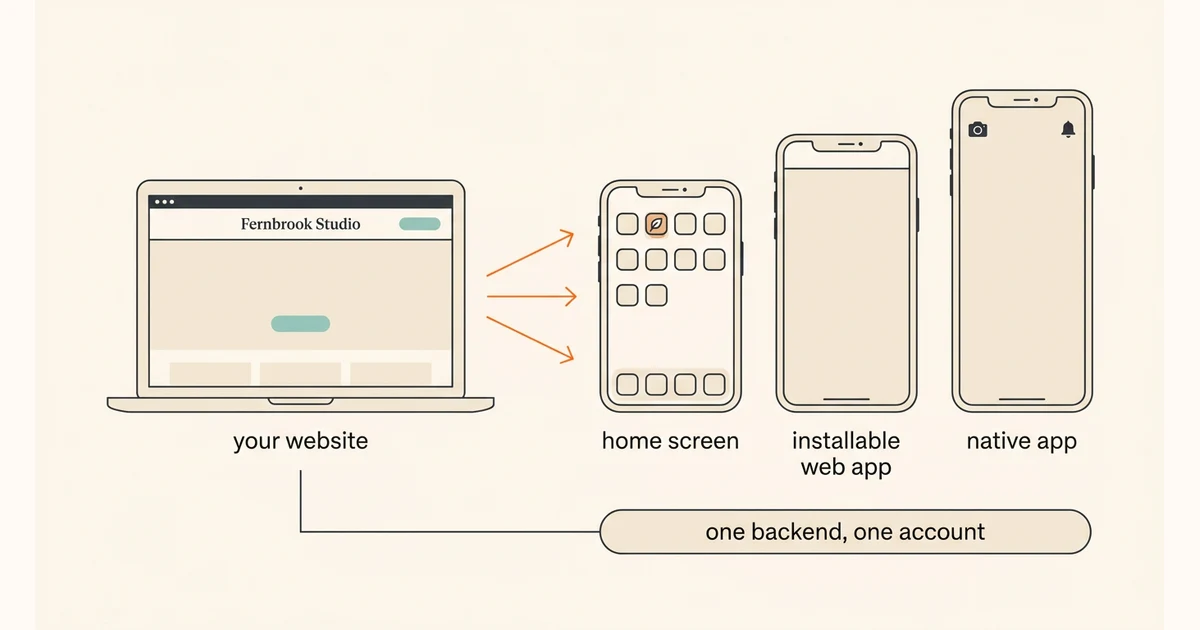
So the honest answer is not one route, it is three, and they cost very different amounts of work: put the site on a home screen, make it a proper installable web app, or build a native app that shares the website’s backend and does something on the device. This guide walks all three, says what each one can and cannot do with dated per-platform sources, and shows how to pick. It does not repeat the manifest and service-worker implementation detail or the store release checklists; those have their own guides and are linked where the decision comes up.
QUICK ANSWER
How do you turn a website into an app?
There are three honest routes, not one. Add the site to a phone home screen for one-tap access, ship an installable web app so it opens without browser chrome and works offline, or build a native app that shares the website’s backend and accounts. Apple rejects apps that only repackage a website, so the native route has to do something on the device.
Answer these before you pick a route
The three routes differ by what the app has to do on the device, not by how modern they sound. These four answers decide which rung is enough, and getting them wrong is what turns a two-day change into a three-month project.
- The three things people already do on your site: Look at what visitors actually do, not what the site offers: check a schedule, place a repeat order, look up a booking. An app should make one of those faster. If nothing on the list is repeated, an app is not the problem you have.
- What the app must do that a browser tab cannot: Write it as a list: notify a closed phone, work with no signal, use the camera, be found by browsing a store. This is the list an app reviewer effectively asks for. An empty list is a real answer and it points at the installable web app, not at the store.
- Where accounts and data live today: If the site already has customer accounts, an app should sign into the same ones. Two account systems is the most expensive mistake in this whole guide, because you find out about it after customers have made accounts in both.
- Who will keep it alive: A website is published once; a store app has developer accounts to renew, platform requirements that change, and updates that wait for review. Name the person who owns that before you take the third rung, not after the first requirement email arrives.
Three rungs, and the trap between rung two and rung three
Think of it as a ladder, not a switch. Each rung costs more and buys a specific capability, and you can stop at any of them. The trap is jumping to rung three by wrapping the site in a shell app: it looks like the top rung and it has none of the capability, which is exactly what the store reviewers test for. If you are choosing between web and native from scratch rather than upgrading an existing site, the web app versus mobile app guide is the better starting point.
| Approach | Best for | Tradeoff |
|---|---|---|
| Rung one: add it to the home screen | A site people return to weekly that just needs to stop being a bookmark. Costs an icon, a title, and a mobile layout that already works. | It is a shortcut, not an app. No store listing, no notifications on its own, and nothing new offline. Users add it themselves; you cannot install it for them. |
| Rung two: a real installable web app | A site that should open full screen with its own icon, keep working on a bad connection, and on supported platforms send notifications. Still one address, still no review. | Install rules differ by browser and operating system and have to be checked per platform. Offline behavior is code you write, not a setting you switch on. |
| Rung three: a native app on the same backend | When the app genuinely needs the device or the store: reliable notifications to a closed phone, camera and sensors, sustained offline work, discovery by browsing a store. | Developer accounts you pay for and maintain, a signed build, listings, and a review that can refuse you. Worth it only when you can name what the app does that the browser cannot. |
Recommended:Start at rung one this week; it is nearly free and it tells you whether anybody wants an icon at all. Move to rung two when people come back often enough that browser chrome and a cold start are worth removing - the progressive web app guide covers the manifest, service worker, and offline work in detail. Take rung three when the capability list is not empty, and build it as an app that shares the website’s backend and accounts rather than a shell around the site. That distinction is the whole article.
Turn a website into an app in seven steps, one rung at a time
Move a live website up three rungs - home screen, installable web app, native app on the same backend - and stop at the one your capability list justifies.
STEP 01
Decide which rung the capability list actually justifies
Match each capability to the rung that can deliver it, and write down where you are stopping.
Go through the capability list line by line and mark the lowest rung that covers it. "One-tap access" is rung one. "Opens full screen and shows cached content with no signal" is rung two. "Notifies a phone that is switched off and in a pocket" and "found by browsing the store" are rung three.
If every line is covered by rung one or two, write that down and stop reading at step four. Most sites that want to be an app want an icon and speed, and those are the cheapest rungs.
If you land on rung three, write the sentence you would say to a reviewer: what does the app do that the website cannot? If you cannot finish the sentence, you are about to build a wrapper and it will be refused.
Expected result: One chosen rung, a written reason, and a finished reviewer sentence if the answer was rung three.
Verify it: Read the reviewer sentence to somebody who has not seen the site. If their reaction is "that is just your website", the sentence is not finished.
STEP 02
Rung one: make the site worth keeping on a home screen
Give it a proper icon and title, make it fast on a phone, and tell people how to add it.
The mechanics are small: a square icon at a decent size, a short name that fits under an icon, and a mobile layout that does not need pinching. What actually decides whether the icon survives is speed and whether the first screen shows the thing the person came for.
On iPhone and iPad this is user-driven: the person taps the Share button and then "Add to Home Screen". As of iOS 26 and iPadOS 26, every website added this way opens as a web app by default, and the user can turn that off with an "Open as Web App" toggle if they would rather have a bookmark. WebKit puts it plainly: there are now zero requirements for installability in Safari. Read the Safari 26 announcement (read 2026-08-16).
Because it is user-driven on every platform, the highest-leverage work is telling people it is possible. One short line at the top of the mobile site, shown to repeat visitors, does more than any amount of icon polish.
Expected result: A named, correctly sized icon on a phone home screen that opens the site at the page people want, not the marketing home page.
Verify it: Add it on a real iPhone and a real Android phone, close every browser, and open it from the icon. Check the icon is not a blurry screenshot and the name is not truncated to nonsense.
STEP 03
Rung two: make it an installable web app, browser by browser
Add the manifest and offline behavior, then verify install separately on each browser and platform.
Chromium-based browsers - Chrome, Edge, Samsung Internet - promote installation only when the manifest carries specific members: a name or short_name, icons including a 192px and a 512px icon, a start_url, a display and/or display_override, and prefer_related_applications either false or absent. The site must also be served over HTTPS. MDN lists the current requirements (read 2026-08-16).
Safari on iOS and iPadOS does not use those rules, per the Safari 26 source above, so "it installs in Chrome" proves nothing about the iPhone and the reverse is also true. Treat desktop Chrome, Android Chrome, and iOS Safari as three separate checks with three separate results, and do not let one green result become a claim about all of them.
Offline behavior is code you write, not a manifest setting: a service worker decides what a cached visit returns, and structured data belongs in local storage designed for it. Notifications are a separate capability again - on iOS and iPadOS, Web Push works for a web app that has been added to the Home Screen and permission must be requested from direct user interaction, per WebKit (read 2026-08-16). The PWA guide and the web push guide carry the implementation detail this step summarises.
Expected result: The site can be installed from its own address on each supported browser, opens without browser chrome, and returns something useful with the connection switched off.
Verify it: Install it from Chrome on Android and add it from Safari on iPhone, then turn on airplane mode and open both. Record which platform did what, rather than collapsing three different results into one claim.
STEP 04
Rung three: build the app on the same backend, not around the site
A real app calls the same backend and signs into the same accounts, and adds something the browser cannot do.
The difference between an app and a wrapper is where the screens come from. A wrapper loads your web pages inside a phone-shaped window; an app has its own screens that call the same backend your website already calls, so a customer who signed up on the site signs in on the phone with the same account and sees the same data.
That is also the cheapest way to build it, because the expensive half already exists. You are not rebuilding accounts, records, or business rules; you are adding a phone client to the backend you already run. In Playcode this is literal: the agent can add a React Native app to the same project as the website, wired to the same backend and the same accounts, and it can add it to an older project that does not have one yet.
Then add the capability from your list, because that is what makes it an app rather than a copy. One real device capability, built into the main flow, is worth more to a reviewer and to a user than five screens ported from the website. You preview the app on your phone while it is being built, so you see the result rather than a rendering of it.
What is not shared and must not be duplicated: business rules. Adding a rule to the app instead of the backend is how the app and the website start disagreeing about the same booking, and it is very hard to unpick later.
Expected result: An app whose screens read and write the same records as the website, where an existing customer signs in with their existing account, and which does at least one thing on the device the site cannot.
Verify it: Create a record on the website as a fictional customer, then open the app signed in as that same customer and find the record. Then change it in the app and confirm the website shows the change.
STEP 05
Test each rung on real phones, not on a resized desktop window
Install, sign-in, offline, and cross-account checks run per platform, and a desktop browser cannot stand in for a phone.
Use a real iPhone and a real Android phone. A narrow desktop window does not reproduce home-screen installation, operating-system launch, notification permission, or how the app behaves when the network drops in a lift. There is no stand-in for a real device here; the check is a phone in your hand.
Run four things on each platform: add or install it and launch from the icon; sign in with an account created on the website; go offline and open it; and open another customer’s record by its direct link while signed in as the wrong account. That last one is the check nobody runs and the one that turns into an incident.
Record the result per platform with the device and version. "Installs on Android, adds to Home Screen on iPhone, offline returns cached schedule on both, cross-account link refused on both" is a result. "Works on mobile" is not.
Expected result: A short table with one row per platform covering install, sign-in with an existing website account, offline behavior, and the refused cross-account link.
Verify it: Every row is filled in from a device you held, including the rows where the answer is "not supported on this platform".
STEP 06
Publish the web rungs first, then submit the app under your own accounts
Rungs one and two go live the moment you publish; rung three adds accounts, a build, listings, and a review.
Rungs one and two need nothing but a publish: the icon, the manifest, and the offline behavior ship with the site over HTTPS on your own domain, and there is no review and no waiting. Take a restore point before the change so you can go back in place if the service worker misbehaves.
For rung three, read the bar first. Apple App Store Review Guideline 4.2, Minimum Functionality, read on 2026-08-16, asks for "features, content, and UI that elevate it beyond a repackaged website", and 4.2.2 rules out web clippings and collections of links. Guideline 4.2.6 also says apps created through an app generation service are rejected unless submitted directly by the provider of the content, which is why the accounts have to be yours. Read the current guidelines.
Google Play is stricter than its reputation but more accommodating of web content than Apple. Its Functionality, Content, and User Experience policy, read on 2026-08-16, refuses apps that lack "the basic degree of adequate utility as mobile apps", per the Play policy page. Android does document a supported way to open your own web app from your own Android app, a Trusted Web Activity, verified with Digital Asset Links so the app and the site are proven to come from the same developer - and its own documentation says the web content should be accessible and useful in the browser first. Read the Trusted Web Activity overview (read 2026-08-16).
Both stores need your own developer account, both charge for it, and both run identity, two-factor, and tax or banking checks that are not instant, so start enrolment early and check the current cost on their own pages rather than trusting a figure from an article. In Playcode the agent can drive the cloud build and the submission and draft the listing and screenshots; the accounts stay in your name and you click the final submit yourself. Nobody can promise how long review takes or that it passes.
Expected result: The upgraded site live on its own HTTPS domain, and, if you took rung three, a build uploaded to a listing in your own developer account with the submission sent by you.
Verify it: Open the public address from a phone that has never seen it and complete one real task, then confirm the store record and build both sit under your own account rather than anyone else’s.
STEP 07
Watch which rung people actually use, and let it decide the next one
Measure launches from the icon against launches from the browser before you fund the next rung.
Count how many sessions start from an installed or home-screen launch versus a normal browser visit, and whether the installed group comes back more often. If nobody adds the icon, rung three will not fix that; the problem is that the site is not something people return to.
Watch the offline and error paths in production, not only in testing: cached pages that went stale, sign-ins that failed after a token expired, notifications that were granted and never arrived. Each of those is invisible unless you look for it, because the person just stops using it.
Keep the website the source of truth while the app finds its audience. Business rules stay in the backend, both clients read the same records, and you can retire a rung that nobody uses without unpicking your data.
Expected result: A weekly split of installed versus browser sessions, a return-rate comparison between them, and a short list of production failures per platform.
Verify it: Point at the numbers and say whether the icon changed behavior. If the installed group behaves like the browser group, the next rung is not the investment to make.
Four tests that separate an app from a wrapper
Run each of these on a real iPhone and a real Android phone, and write the platform and version next to the result. A pass on one platform is a pass on one platform.
| Test | Scenario | Expected result |
|---|---|---|
| happy path | Add or install the app from its own address, launch it from the icon, sign in with an account that was created on the website, and complete the task people actually come for. | It opens without browser chrome where the platform supports that, the existing account is accepted, and the task completes against the same records the website uses. |
| invalid input | Sign in with the wrong password, submit the main form with a required field empty, and open a record belonging to a different customer by its direct link. | Each failure is explained rather than silent, nothing is saved, and the cross-account link is refused by the backend instead of rendering somebody else’s data. |
| retry | Go offline mid-task, reopen the app, and complete the same task once the connection returns; then submit the same thing twice on a weak signal. | The app says plainly that it is offline instead of showing a blank screen, and the completed task produces exactly one record rather than a duplicate. |
| production smoke | From a phone that has never opened it, on mobile data, install or add it from the public HTTPS address, launch it, and complete the task while signed in as a fictional customer. | Install or add works from the real public address, the task completes, the record is visible on the website afterwards, and the fictional customer can be removed cleanly. |
What goes wrong on the way up the ladder
Start every diagnosis with the platform, the operating-system version, the exact address, and which account was signed in. Most website-to-app problems are one of these five, and four of them are decided before any code is written.
| Symptom | Likely cause | Check | Fix |
|---|---|---|---|
| The store refuses the app for minimum functionality | The app is a wrapper: the screens are the website, and there is nothing on the device it depends on. This is the exact case Apple guideline 4.2 describes. | Write the sentence naming what the app does that a browser tab cannot. An empty answer is the diagnosis, and it is the same one the reviewer reached. | Either build the app around one real device capability and give it its own screens on the shared backend, or stop at the installable web app, which needs no review at all. |
| Customers end up with two accounts, one on the site and one in the app | The app was built with its own sign-up instead of calling the backend the website already uses for accounts. | Create an account on the website and try to sign in with it in the app. If it is rejected, the app is talking to a different account system. | Point the app at the website’s existing backend for sign-in and sign-up, then work out a merge for anyone who already registered twice. This gets more expensive every week it is deferred. |
| The install prompt appears on Android and never on iPhone | Nothing is broken. Chromium promotes installation from manifest criteria; Safari uses a user-driven Add to Home Screen instead, so there is no prompt to wait for. | Check the manifest against the Chromium requirements for the Android result, then check the iPhone by adding it manually from the Share menu. | Keep the manifest correct for Chromium and show iPhone visitors a short instruction for the Share menu. Never write copy that promises an install button on every platform. |
| Notifications were granted but nothing arrives on iPhone | On iOS and iPadOS, Web Push is for a web app that has been added to the Home Screen and the permission request must come from a direct user action, so a plain browser tab is the wrong context. | Confirm the person opened it from the Home Screen icon rather than the browser, and that the permission request was triggered by a tap rather than on page load. | Ask for permission only after a deliberate tap inside the added web app, and keep the main task working for people who never grant it. If reliable notification to a closed phone is essential, that is the rung-three case. |
| The app shows stale content after the website was updated | A cached response is being served and the update path was never designed, so an old release is still in charge on devices that have it installed. | Compare what the website returns with what the installed app shows for the same record, and check whether the device has an older cached version. | Version the cached files, expose an update path that people can accept, and keep the backend answers compatible with the older release while devices catch up. |
Run the rungs together without splitting the product
Deploy
Publish the upgraded site over HTTPS on your own domain, and take a named restore point before shipping offline behavior. A misbehaving cached release is the one change that keeps serving itself to devices after you have fixed it.
Ship a rung at a time. Adding the manifest and the offline layer in the same release as a redesign makes it impossible to tell which change caused a report.
For rung three, keep the app release and the backend release compatible. Phones update on their own schedule and a store update waits for review, so the backend must keep answering older app versions for a while.
Monitor
Split sessions by launch source: browser visit, home-screen or installed launch, and app. That one split answers whether the icon changed behavior and whether the next rung is worth funding.
Watch failures per platform rather than in aggregate. An iOS-only sign-in failure disappears completely inside a combined number.
Track offline usage, stale-content reports, and notification permission outcomes separately. Granted permission is not delivery, and delivery is not somebody reading it.
Recover
If a cached release is serving broken pages, restore the previous saved point and ship a version that clears its own old cache. Do not ask people to reinstall as a first response.
Keep the website working on its own throughout. As long as the backend is the source of truth, you can retire a rung nobody uses without touching customer data.
Keep the code exported and the developer accounts, domain, and listings in your own name, so a bad release is a rollback rather than a negotiation.
What changes about security when a website becomes an app
A phone client is another door into the same building. The rules that were implicit on the website become explicit here, because the app can be inspected on a device you do not control.
- Enforce every access rule on the backend, not in the app. An app on somebody’s phone can be inspected and modified; only the server decides who reads a record.
- Serve the site, the manifest, and every backend call over HTTPS. Install eligibility on Chromium requires it, and a phone on public Wi-Fi is exactly the threat it protects against.
- Keep the sign-in token in the device’s secure storage and give it an expiry. A stolen phone should not mean a permanent session.
- Never put API keys or provider secrets in the app. Anything shipped to a device is readable; keys belong in the backend environment where they can be rotated.
- Ask for device permissions only when the feature is used, and keep the main task working when they are refused. Both stores ask you to declare what you collect, and a short honest list is easier to defend than a broad one.
Questions people ask about turning a website into an app
How do I make my website an app on my iPhone?
Open the site in Safari, tap the Share button, and choose "Add to Home Screen". On iOS 26 and iPadOS 26, WebKit says every website added that way opens as a web app by default, with an "Open as Web App" toggle the person can turn off, and there are now zero installability requirements in Safari. You cannot do this for your visitors; they add it themselves, so the useful work is telling them it is possible.
Will Apple approve an app that is just my website?
Very likely not. App Store Review Guideline 4.2, read on 2026-08-16, asks for features, content, and UI that elevate the app beyond a repackaged website, and 4.2.2 rules out web clippings and collections of links. If you cannot name something the app does that a browser tab cannot, build the installable web app instead: it needs no review, no developer account, and no waiting.
Can I put my website in Google Play?
Android documents a supported route: a Trusted Web Activity opens your own web app from your own Android app, verified with Digital Asset Links so the app and the site are proven to be yours. Its own documentation says the web content should be accessible and useful in the browser first, and Play still refuses apps that lack the basic utility of a mobile app. So it is a real path, not a loophole.
Is a website-to-app converter worth using?
It depends what you want. If you want an icon and a full-screen window, the installable web app gets you that from your own site with no third party in the middle. If you want a store listing, a converter usually produces exactly the wrapper the review guidelines describe. The middle case, where a converter genuinely helps, is narrower than the marketing suggests.
Do my customers keep their accounts in the app?
They should, and that is the whole design decision. If the app calls the same backend the website uses, someone who signed up on the site signs in on the phone with the same details and sees the same data. If the app ships its own sign-up, you have two account systems and a merge problem that gets worse every week.
Can a web app send push notifications?
On some platforms, with conditions, and it has to be checked per platform. On iOS and iPadOS, WebKit documents that Web Push works for a web app added to the Home Screen and that permission must be requested from a direct user interaction. Chromium browsers handle it differently. Never assume that a notification working in one browser proves it works everywhere.
How much of my website can the app reuse?
The valuable half. Accounts, records, business rules, and the database stay in the backend and are shared, which is why the app is far cheaper than the website was. What is not reused is the screens: an app that reuses the pages is a wrapper. Build phone screens against the same backend and keep the rules in one place.
Can Playcode turn my website into an app?
It can build the app in the same project as the site, sharing one backend and one set of accounts, and it can add that to an existing project that does not have one yet. That is the opposite of a wrapper: real screens on the data you already have. It can also drive the build and prepare the submission, but the developer accounts stay in your name and the final submit is yours to click.
Which rung should most businesses stop at?
Rung two, honestly. Most sites that want to be an app want a one-tap icon, a fast start, and something useful on a bad connection, and none of that needs a store, a developer account, or a review. Go to rung three when you can name the device capability the app is built around, and go there after the web version has real repeat users.
Same backend, new client
Add the app to the project your website already lives in
Bring the capability list and the site you already run. Playcode AI can build the phone app against the same backend and the same accounts, so customers keep their logins and you keep one source of truth.
Build My AppNo credit card required. Store distribution needs your own Apple and Google developer accounts, and the final submit is yours to click.