QUICK ANSWER
What should a website sitemap include?
A planning sitemap should give every page a stable ID, parent, label, path, audience, indexability decision, and primary action. It should also show how a visitor and crawler can reach important public pages through ordinary links. Keep private application screens explicit, but do not treat noindex or a hidden navigation item as access control.
A website sitemap is most useful before it becomes an XML file. As a planning model, it names each page, its parent, audience, path, public or private boundary, and primary action so a team can find duplicate jobs, orphan pages, and unclear navigation before implementation.
The six original examples below cover service, ecommerce, SaaS, directory, client-portal, and editorial content sites. The downloadable ZIP contains paired CSV and Mermaid source for every model, plus a deterministic verifier. It does not copy any live website structure.
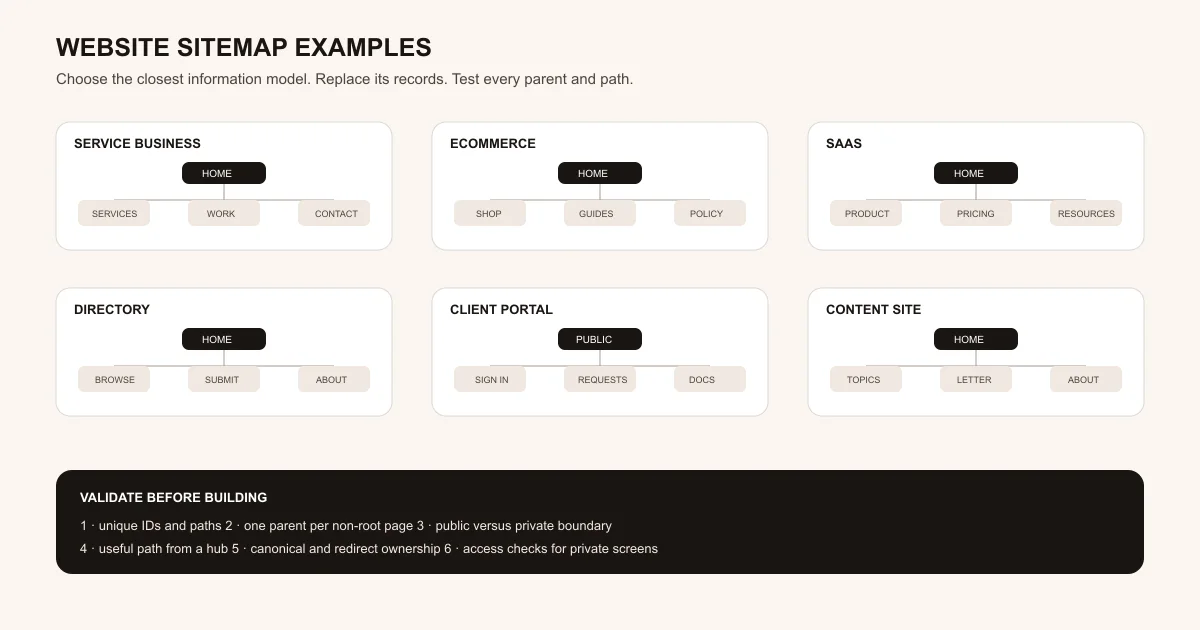
How these sitemap examples were built
The models combine an editorial planning ledger with primary Google documentation about crawlable links, logical structure, and XML sitemap boundaries. The six taxonomies and all example records are original fictional fixtures.
Inventory page jobs before drawing the tree
Give every intended page one stable ID, audience, primary action, and distinct job. Merge duplicate jobs before assigning paths, then choose a parent that makes sense to a visitor rather than treating URL nesting as the hierarchy by itself.
Sources: [google-sitelinks]
Connect important public pages with crawlable links
Plan ordinary anchor links from menus, hubs, categories, and related content. A page discovered only through search, JavaScript behavior, or a generated sitemap has not yet received a useful navigation path in the information architecture.
Sources: [google-crawlable-links], [google-sitemap-overview]
Separate planning maps, navigation, and XML sitemaps
Use the CSV and Mermaid files to review audience, ownership, indexability, and parent relationships. Build navigation from approved paths, then generate an XML sitemap from canonical public URLs as a separate technical artifact.
Sources: [google-sitemap-overview], [google-sitelinks]
What the downloadable sitemap template covers
These examples focus on page inventory and hierarchy. They deliberately separate the editorial planning job from XML generation, search performance, and private application authorization.
Included
- Six original site types with seven to ten page records each
- CSV fields for ID, parent, label, path, audience, indexability, and action
- Matching Mermaid diagrams for visual hierarchy review
- A deterministic validator for duplicates, parents, edges, orphans, and cycles
Not included
- A generated XML sitemap, robots policy, redirects, canonicals, or Search Console submission
- A native AI sitemap generator or automatic production crawl
- Authentication and authorization for private portal or account paths
- Ranking, sitelink, crawl-frequency, indexation, or conversion guarantees
DOWNLOADABLE RESOURCE
Download six website sitemap templates
Start with the closest business model, edit the CSV as the source of truth, and update the matching Mermaid file during review. The verifier fails when a page loses its parent, duplicates a path, or drifts from the diagram.
Website sitemap examples
Six rights-safe fictional information architectures for a service business, ecommerce store, SaaS site, public directory, client portal, and editorial content site.
Format: ZIP containing six CSV files, six Mermaid files, SVG, Markdown, JSON, and JavaScript verification
Locally reproduced August 1, 2026. SHA-256: ce0e16c43a36482902dc3ff47f29879189c3832e1f61b1fd2a0ca92b0c42103d
Included
- Six CSV page inventories with explicit audience and indexability fields
- Six matching Mermaid flowcharts with one root and reviewed parent edges
- An original 1200 by 630 SVG overview of all six site types
- A Node.js verifier for duplicate IDs, paths, missing parents, drift, orphans, and cycles
Verification boundary
Local checks passed for six models and matching CSV/Mermaid inventories. The public artifact URL, live navigation, HTTP status, canonical tags, noindex behavior, access checks, XML sitemap, and crawler discovery remain unverified until tested in an authorized target environment.
Six website sitemap examples
Choose by content and access model. Each example is a bounded starting inventory, not a rule that every site of that type needs the same pages or labels.
Service business sitemap
Use when: The main job is helping a prospect understand services, inspect evidence, qualify fit, and send a bounded request.
Home routes visitors to a service hub, individual service pages, selected work, company context, contact, and privacy information without creating a page for every minor variation.
Structure
- Home → Services → individual qualified service pages
- Home → Selected work, About, Contact, and Privacy
- Contextual links from evidence and guides back to the relevant service owner
Watch for: Do not split near-identical location, audience, or service modifiers into separate pages without a distinct user job and substantial local value.
Sources: [google-sitelinks], [google-crawlable-links]
Ecommerce sitemap
Use when: Shoppers browse collections, compare products, read buying guidance, and review delivery policies.
Home links to the shop hub, shop links to collection pages, and collections link to product pages. Buying guides and shipping policy remain separate supporting paths.
Structure
- Home → Shop → Collections → Products
- Home → Buying guides and Shipping and returns
- Account or support paths classified separately from public product discovery
Watch for: Filters and search results can create many URLs. Decide which category and facet pages are canonical and useful before exposing them to crawlers.
Sources: [google-crawlable-links], [google-sitemap-overview]
SaaS marketing-site sitemap
Use when: A buyer needs product, use-case, pricing, security, and evaluation resources before opening the application.
The marketing tree separates product explanation, buyer decisions, trust review, and resources from the signed-in application path.
Structure
- Home → Product → Features and Use cases
- Home → Pricing, Security, and Resources
- Resources → Blog and Documentation; Sign in remains a separate non-editorial path
Watch for: Avoid creating feature and use-case pages that repeat one generic answer under different titles. Each public owner needs a distinct decision job.
Sources: [google-sitelinks], [google-crawlable-links]
Public directory sitemap
Use when: Visitors browse categories and individual listings while contributors follow a separate submission process.
The browsing hierarchy moves from hub to category to listing, while submission guidelines, editorial policy, and member account paths stay explicit.
Structure
- Home → Browse → Category → Listing
- Home → Submit → Listing guidelines
- Home → About and Account with different public/private expectations
Watch for: Search boxes do not replace crawlable category and listing links, and user-submitted pages still require quality, rights, and moderation rules.
Sources: [google-crawlable-links], [google-sitemap-overview]
Client portal sitemap
Use when: A public explanation leads invited clients into authenticated requests, documents, messages, and settings.
The model records both the public entry and private application hierarchy so the team can review ownership without pretending private screens are public SEO pages.
Structure
- Public overview → Sign in → authenticated Dashboard
- Dashboard → Requests, Documents, Messages, and Settings
- Public Privacy page kept outside the private application tree
Watch for: Noindex and hidden navigation are not access control. Every private list, detail, file, and action needs server-side authorization.
Sources: [google-sitemap-overview]
Editorial content-site sitemap
Use when: Readers move from broad topics to focused hubs and articles, with publication standards available for review.
Home links to topic hubs, hubs link to articles, and the publication keeps newsletter, about, and editorial-policy paths distinct from signed-in reader tools.
Structure
- Home → Topics → focused Topic hub → Article
- Home → Newsletter and About → Editorial policy
- Reader account classified separately from the public editorial graph
Watch for: Do not create empty topic hubs or duplicate articles solely to fill a taxonomy. Each hub should help readers choose among substantial pages.
Sources: [google-sitelinks], [google-crawlable-links]
Choose and adapt the right sitemap model
The right starting tree reflects how people discover and use the site. Apply these rules before changing labels or nesting paths.
Visitors compare a small set of services
Choose: Use the service-business tree with one service hub and only distinct service pages.
Tradeoff: A tighter inventory gives up keyword-shaped variants that cannot support a different visitor job.
Visitors browse a repeated item catalog
Choose: Use the ecommerce or directory tree with explicit hub, category, and item relationships.
Tradeoff: Categories and facets need maintenance, canonical rules, and quality thresholds as the catalog changes.
The site mixes public marketing and private software
Choose: Use the SaaS or portal tree and mark every private screen explicitly before implementation.
Tradeoff: One planning map becomes more detailed, but it prevents private application screens from being mistaken for public content owners.
Publishing is organized around durable subjects
Choose: Use the content-site tree with useful topic hubs and contextual article links.
Tradeoff: Weak or empty categories should be merged instead of preserved for symmetry.
TURN THE TREE INTO PAGE BRIEFS
Give every approved page a job and owner
Replace the fictional inventory with your real audience, paths, actions, indexability, and parent links. Then ask Playcode to build the approved pages and navigation.
Start BuildingThe resource plans information architecture. It does not claim a native AI sitemap generator or Search Console connection.
Review the website wireframe examplesUse a page-level wireframe after the site-wide owner and hierarchy decisions are settled.
What this sitemap resource cannot prove
A clean planning tree makes ownership and hierarchy reviewable, but every technical and operational boundary still needs implementation evidence.
- The CSV and Mermaid files are not an XML sitemap and are not submitted to a search engine.
- A generated XML sitemap helps discovery but does not replace useful internal links or guarantee crawling and indexation.
- Marking a path private or noindex in the planning ledger does not implement authentication or authorization.
- The examples do not establish canonical tags, redirects, locale rules, navigation rendering, or public HTTP status.
- The exact ZIP is locally verified but not publicly verified until an authorized environment serves it successfully.
Primary Google references
These sources support the crawlable-link, logical-structure, and XML-sitemap boundaries. The six example inventories, diagrams, checks, and adaptation rules are original Playcode editorial work.
[google-crawlable-links] Google Search Central:SEO Link Best Practices for Google
Checked August 1, 2026. Supports: Using crawlable anchor elements and descriptive anchor text so Google can find and understand linked pages.
[google-sitemap-overview] Google Search Central:What Is a Sitemap
Checked August 1, 2026. Supports: Treating an XML sitemap as a file that helps search engines crawl important URLs while still maintaining proper navigation links.
[google-sitelinks] Google Search Central:Sitelinks
Checked August 1, 2026. Supports: Using a logical, navigable site structure, informative labels, and relevant internal links to important pages.
Website sitemap questions
What is a website sitemap?
In planning, a website sitemap is an inventory and hierarchy of pages. In technical SEO, an XML sitemap is a separate machine-readable file listing canonical URLs you want search engines to know about.
What fields should a sitemap template include?
A practical planning template includes a stable page ID, parent ID, label, path, audience, indexability decision, and primary action. Larger reviews can add owner, status, canonical, redirect, and evidence fields.
How many levels should a website sitemap have?
Use as many levels as the content and visitor path genuinely require, while keeping important pages reachable through useful navigation and contextual links. Do not add nesting merely to make the diagram symmetrical.
Does an XML sitemap replace internal links?
No. Google describes sitemaps as a crawl aid and separately recommends proper linking so important pages are reachable through navigation or links placed on pages.
Should private portal pages appear in the planning sitemap?
They can appear in an internal planning map so the product hierarchy and ownership are explicit. They should not automatically become public SEO pages or XML sitemap entries, and access still requires server-side authorization.
Are these maps copied from real websites?
No. All six examples are original fictional planning fixtures. They use generic labels and reserved examples, and they do not reproduce a client, competitor, or third-party site.
FROM PAGE INVENTORY TO A WORKING SITE
Build the approved hierarchy, then test every path
Give Playcode the real page inventory, audience, links, public or private boundary, and content brief. Review the navigation, access rules, and published pages before release.
Create With PlaycodeNo credit card required. AI credits included to start.