QUICK ANSWER
What should a website wireframe show?
A website wireframe should show the page job, content hierarchy, primary action, decision proof, major regions, and mobile reading order without committing to final colors or imagery. Each region should have a reason to exist and an observable acceptance check, so reviewers can change the structure before visual styling makes weak decisions expensive to notice.
A useful wireframe is a decision record, not a grayscale decoration. It shows what the visitor must understand first, which action matters, what proof supports that action, and how the reading order changes on a narrow screen before typography or imagery distracts the review.
The six original examples below cover a homepage, service detail, pricing page, article, contact or intake page, and mobile landing page. The downloadable package includes editable HTML, SVG, and a CSV review ledger. It contains no client work or third-party screenshots.
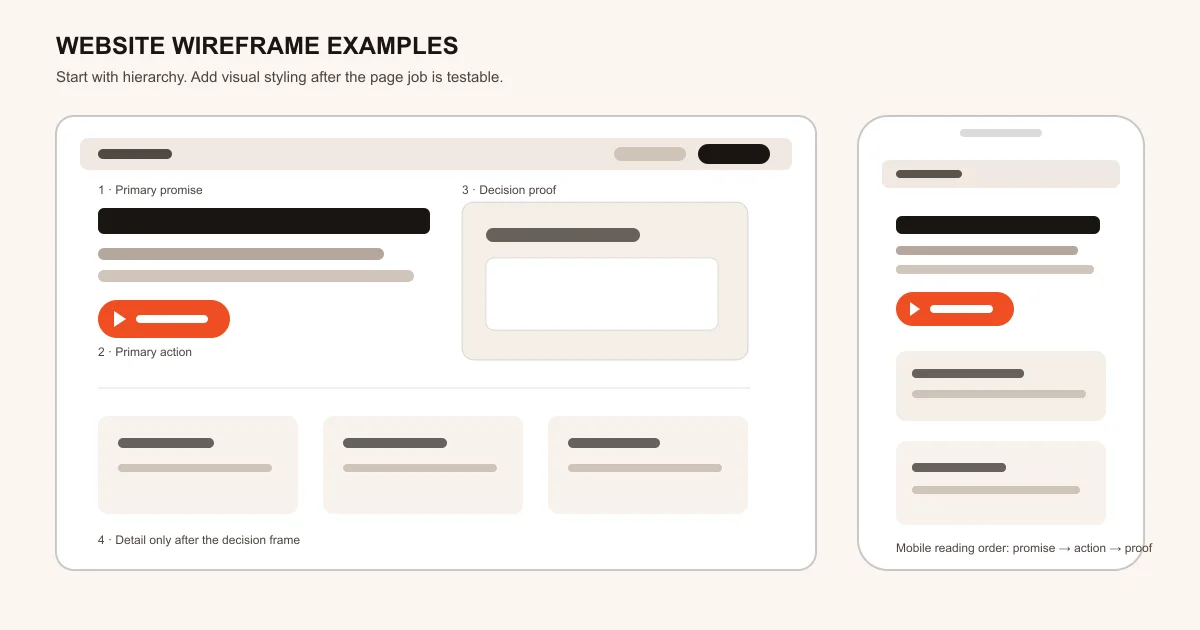
How these wireframes were designed
Every example starts with the visitor decision and ends with an acceptance check. The sources establish page-structure, reflow, and focus-order constraints; the specific compositions and planning rules are original editorial models.
Name the page job before drawing regions
Write one sentence describing what a qualified visitor should understand or do. Then assign the primary promise, supporting proof, action, detail, and navigation to distinct regions with logical headings instead of starting from a favorite visual layout.
Sources: [w3c-page-structure]
Write the narrow-screen order separately
Decide which desktop columns become first, second, and third on a narrow screen. Keep ordinary text and controls inside one readable flow, while reserving two-dimensional scrolling only for content that truly needs it.
Sources: [w3c-reflow], [w3c-focus-order]
Review structure with observable checks
Ask a reviewer to identify the page promise, next action, proof, exclusions, and mobile sequence without explaining the design. Record each miss in the CSV ledger and change hierarchy before adding visual style.
Sources: [w3c-page-structure], [w3c-focus-order]
What these examples cover
The package stays deliberately low fidelity. It helps a team review content priority and responsive order without pretending to replace research, copy, interaction design, or implementation.
Included
- Six original page-job examples with labeled regions
- An annotated desktop and mobile SVG overview
- Editable static HTML and CSS with no JavaScript or network requests
- A CSV ledger with one mobile rule and acceptance check per example
Not included
- Final visual identity, typography, photography, or production components
- A native Figma import, AI wireframe generator, or Playcode product screenshot
- Customer results, usability findings, conversion evidence, or accessibility certification
- Submission handlers, analytics, authentication, data storage, and deployment
DOWNLOADABLE RESOURCE
Download the editable wireframe package
Use the HTML as a browser-openable review board, edit the SVG in a vector tool, and keep the CSV beside the brief so every region has a page job and testable review note.
Website wireframe examples
Six rights-safe low-fidelity page examples, one annotated desktop/mobile sheet, and a deterministic review ledger that can be adapted without copying a third-party design.
Format: ZIP containing HTML, SVG, CSV, Markdown, JSON, and JavaScript verification
Locally reproduced August 1, 2026. SHA-256: b709d6dc8eecd07d6eaecb69e6a461c1a975561af207df9e3c27298a8cd96612
Included
- Homepage, service, pricing, article, contact, and mobile examples
- Editable wireframes.html with responsive CSS and no scripts
- Editable wireframe-sheet.svg at 1200 by 630 pixels
- wireframe-notes.csv with page job, mobile rule, and acceptance check
Verification boundary
Local checks passed for six unique examples, required desktop/mobile annotations, no scripts, forms, external requests, or embedded images, and one exact five-column CSV row with non-empty review fields per example. The public artifact URL remains unverified until its authorized target returns HTTP 200 with ZIP content.
Six website wireframe examples and when to use them
Choose by visitor job, not by visual resemblance. The structure lists are starting constraints; replace every placeholder with real content and remove any region that cannot justify its place in the decision path.
Homepage orientation wireframe
Use when: Most visitors arrive without knowing exactly what the company does or which path fits them.
Lead with one plain-language promise and one primary action, then use a compact proof region to support the decision before exposing the broader product or service range.
Structure
- Header with concise navigation and one primary action
- Promise, supporting sentence, and primary action in the hero
- Outcome, proof, and boundary cards below the first decision frame
- Detailed routes only after the visitor understands the offer
Watch for: Do not turn the first screen into a menu of every audience, capability, announcement, and secondary action.
Sources: [w3c-page-structure], [w3c-reflow]
Service detail qualification wireframe
Use when: A prospect needs to decide whether one defined service fits before contacting the team.
Pair the intended outcome with scope and exclusions, then show process and evidence before asking for a bounded request rather than implying an automatic booking or quote.
Structure
- Outcome and qualification statement
- For-you and not-for-you boundary
- Process, evidence, exclusions, and request action
Watch for: A contact action should state what is submitted and what still requires human review or confirmation.
Sources: [w3c-page-structure]
Pricing decision wireframe
Use when: A buyer must compare plans, recurring meters, or service levels using material constraints.
Start with the decision dimensions, keep plan names beside their limits, and put the recommended fit after the comparison rather than using decorative cards as a substitute for scope.
Structure
- Decision frame and pricing boundary
- Comparable plan rows with included limits and recurring meters
- Recommendation, tradeoff, and one decision action
Watch for: Never hide a material recurring meter or exclusion below the action that commits the buyer.
Sources: [w3c-page-structure], [w3c-reflow]
Question-first article wireframe
Use when: The visitor arrives with a specific informational question and expects a useful answer before promotion.
Place the direct answer and reading map first, follow with evidence, procedure, examples, and checks, and keep the product handoff distinct from the article answer.
Structure
- Question, direct answer, and scope boundary
- Logical heading hierarchy for evidence and examples
- Contextual action after the instructional value is established
Watch for: Do not delay the answer with brand history, generic benefits, or a product CTA that owns a different search job.
Sources: [w3c-page-structure]
Contact and intake wireframe
Use when: A visitor is ready to send a request but the business still needs to review fit, timing, or scope.
Explain the response boundary beside the minimum necessary fields, keep consent and alternatives visible, and show success only as a received request rather than a confirmed outcome.
Structure
- Response expectation and escalation alternative
- Minimum necessary fields with labels and help text
- Consent, submit action, and received-request state
Watch for: Do not present a request as a confirmed appointment, quote, approval, or provider-delivery result.
Sources: [w3c-page-structure], [w3c-focus-order]
Mobile landing-page wireframe
Use when: Desktop columns need an explicit single-column reading and focus order.
Keep promise, action, proof, and detail in a deliberate sequence, preserve meaningful controls, and prevent ordinary content from requiring horizontal scrolling.
Structure
- Compact header followed by promise and primary action
- Decision proof before secondary detail
- One-column reading order aligned with keyboard focus order
Watch for: A visually reordered layout can become confusing when DOM and focus order tell a different story.
Sources: [w3c-reflow], [w3c-focus-order]
Choose a wireframe from the visitor decision
The closest-looking frame is not always the right one. Use these rules to select a starting point, then rewrite its hierarchy instead of preserving the placeholder composition.
The visitor does not yet understand the offer
Choose: Start with the homepage orientation frame and one clear next action.
Tradeoff: The first screen cannot also explain every product, audience, or company detail.
The visitor is comparing a bounded service or plan
Choose: Use the service or pricing frame and expose scope, limits, and exclusions early.
Tradeoff: More explicit boundaries may reduce unqualified inquiries while improving decision clarity.
The visitor arrives with a question
Choose: Use the article frame and answer the question before the promotional handoff.
Tradeoff: The page carries less immediate sales copy because instructional intent comes first.
The desktop design relies on columns
Choose: Write the mobile reading and focus order before styling either viewport.
Tradeoff: Some desktop decoration or repetition may need to disappear to keep a coherent narrow flow.
TURN THE FRAME INTO A BRIEF
Replace every placeholder with a real decision
Name the visitor, promise, action, proof, exclusion, and mobile order. Then give Playcode the structure and ask it to build the page around your actual content.
Start BuildingThe package is a planning resource, not a native wireframe generator or product screenshot.
Read how to build a website with AIUse the guide after the page structure and content hierarchy are settled.
What a wireframe cannot prove
Low-fidelity structure makes early decisions easier to inspect, but it does not validate the finished experience by itself.
- A wireframe does not prove that the copy is clear, accurate, or persuasive to the intended audience.
- It does not establish accessibility conformance; semantic implementation, keyboard use, zoom, contrast, forms, and assistive-technology behavior still need review.
- It does not test performance, analytics, data storage, authorization, provider delivery, or production recovery.
- The original examples are editorial starting points, not evidence that one layout improves conversion.
- The downloadable URL is locally packaged but not publicly verified until the target environment serves the exact ZIP.
Primary references
These sources support the page-structure, reflow, and focus-order constraints. The six wireframes, selection rules, copy, and artifact are original Playcode editorial work.
[w3c-page-structure] W3C Web Accessibility Initiative:Page Structure Tutorial
Checked August 1, 2026. Supports: Using meaningful regions, headings, labels, and content structure to improve navigation and orientation.
[w3c-reflow] W3C Web Accessibility Initiative:Understanding Success Criterion 1.4.10: Reflow
Checked August 1, 2026. Supports: Keeping ordinary content available without loss or two-dimensional scrolling at the defined narrow equivalent, with explicit exceptions for content that requires two-dimensional layout.
[w3c-focus-order] W3C Web Accessibility Initiative:Understanding Success Criterion 2.4.3: Focus Order
Checked August 1, 2026. Supports: Keeping sequential keyboard focus in an order that preserves meaning and operation when content order changes.
Website wireframe questions
What is a website wireframe?
A website wireframe is a low-fidelity plan for page regions, content priority, actions, and responsive order. It helps a team review structure before final visual design and implementation.
Should a wireframe include real copy?
Use real or near-final headings, labels, evidence types, and actions whenever possible. Generic lorem ipsum hides hierarchy problems because reviewers cannot judge whether the actual message fits or appears in the right order.
How detailed should a wireframe be?
Include enough detail to test the page job, major regions, proof, action, exclusions, and mobile order. Leave color, imagery, polished spacing, and component styling for the visual-design stage.
Do I need separate desktop and mobile wireframes?
At minimum, write the mobile reading and focus order separately. A desktop grid can collapse into several plausible sequences, and the browser should not decide that priority accidentally.
Are these wireframes Playcode product screenshots?
No. They are original illustrative editorial diagrams and editable static files. They show planning patterns, not the Playcode interface, a generated customer site, or a tested product workflow.
Can Playcode build a page from a wireframe?
You can describe the structure or attach a design screenshot and ask Playcode to build it. The result still depends on the brief, content, chosen model, and review, and this guide does not claim a native Figma import.
FROM STRUCTURE TO A WORKING PAGE
Build the page around your real content
Give Playcode the page job, selected wireframe, message hierarchy, proof, action, and mobile order. Review the result in a real browser before you publish.
Create With PlaycodeNo credit card required. AI credits included to start.