For independent podcasters and production teams

Podcast Website Builder That Respects Your Feed

Describe your show, episode structure, source feed, artwork rights, transcripts, and the actions listeners should take. Playcode builds the editorial website and can add a controlled feed-import and inquiry workflow without pretending to replace your podcast host or directories.

No credit card required · No coding needed

Quick answer

What should a podcast website builder create?

A podcast website builder should create a fast show home, an episode archive with stable identities, accessible notes or transcripts, verified listen and subscribe links, and a clear contact path. With Playcode, the site can read an owned RSS source while your podcast host remains responsible for audio delivery, distribution, and host-side listening data.

1.1M+users
26M+projects
Since 2016

Used by people at

Counts registered accounts using corporate email domains from the companies above. Playcode is a self-serve product, not a contracted vendor to these brands.

From Podcast Feed to an Editorial Website

Keep one episode source of truth and make every external boundary visible

01

Audit the Feed, Rights, and Destinations

Name the podcast host, confirm the feed URL you control, inspect episode GUIDs and enclosure links, and list the artwork, audio, music, transcript, and guest materials you are allowed to publish. Verify each listen or subscribe destination instead of copying an old directory badge.

The website should reflect an authoritative source, not become a second manually maintained catalog that drifts from the show.

Preview
AI Chat
Publish
I'm a realtor in Miami. I need a website to show my listings and get buyer leads.
4 Questions
2 / 4
What's the main style for your real estate site?
AModern & minimal with clean lines
BLuxury feel with large property photos
CProfessional & corporate
DI'll describe my own style below
Or type your own answer...
Skip
Next
Describe what you want to change...
Economy
Build Progress
4/6
Site layout & navigation
3s
Hero section with CTA
5s
Property listings grid
8s
Building contact form...
About page & bio
Footer & SEO meta
miami-homes.playcode.io
Miami Dream Homes
Your trusted partner in Miami real estate
Search by neighborhood...
Featured Listings
NEW
$1,250,000
Coral Gables Villa
4 bd|3 ba|2,400 sqft
OPEN
$890,000
Brickell Condo
2 bd|2 ba|1,200 sqft
Get in Touch
02

Build the Show Home and Episode Model

Ask Playcode to create the show home, episode list, detail pages, accessible player or provider links, show notes, transcript sections, and topic collections. Store the feed source plus episode GUID as identity, with publish time, update time, and last successful refresh kept separately.

Sanitize feed markup, preserve the last known-good catalog during an outage, and show freshness without presenting a fetch timestamp as proof that every provider state is current.

03

Publish, Test, and Operate the Boundaries

Test new and updated episodes, duplicate imports, malformed feed data, broken provider links, private staff access, inquiry retries, and a fresh mobile visit over HTTPS. Keep site events separate from podcast-host download or listening reports.

When a host or directory is unavailable, keep the episode page readable, label stale source data, and offer a verified fallback destination rather than inventing a successful stream.

Your website is live!

https://
miami-homes.playcode.io
Site is secure - SSL certificate active
Or connect your domainmiami-dream-homes.com
Miami Dream Homes
Your trusted partner
Miami Dream Homes
Your trusted partner
One catalog, clearer ownership

Turn a Fragile Link List Into a Show Website You Can Operate

Let the feed own episode facts while the website adds context and discovery

A show scattered across providers

  • Episode titles and dates disagree between the site and feed
  • Audio files, cover art, and transcripts have no recorded rights owner
  • Directory buttons lead to stale or unverified destinations
  • A feed retry creates duplicate episode pages with different URLs
  • Site page views are presented as podcast downloads or audience reach

One bounded publishing workflow

  • Source feed plus episode GUID provides stable episode identity
  • Rights and publication owners are checked before media is exposed
  • External destinations are named, verified, and monitored separately
  • Idempotent refreshes update the same record and preserve last-good data
  • Website events and host-side listening analytics remain distinct
A modern editorial direction

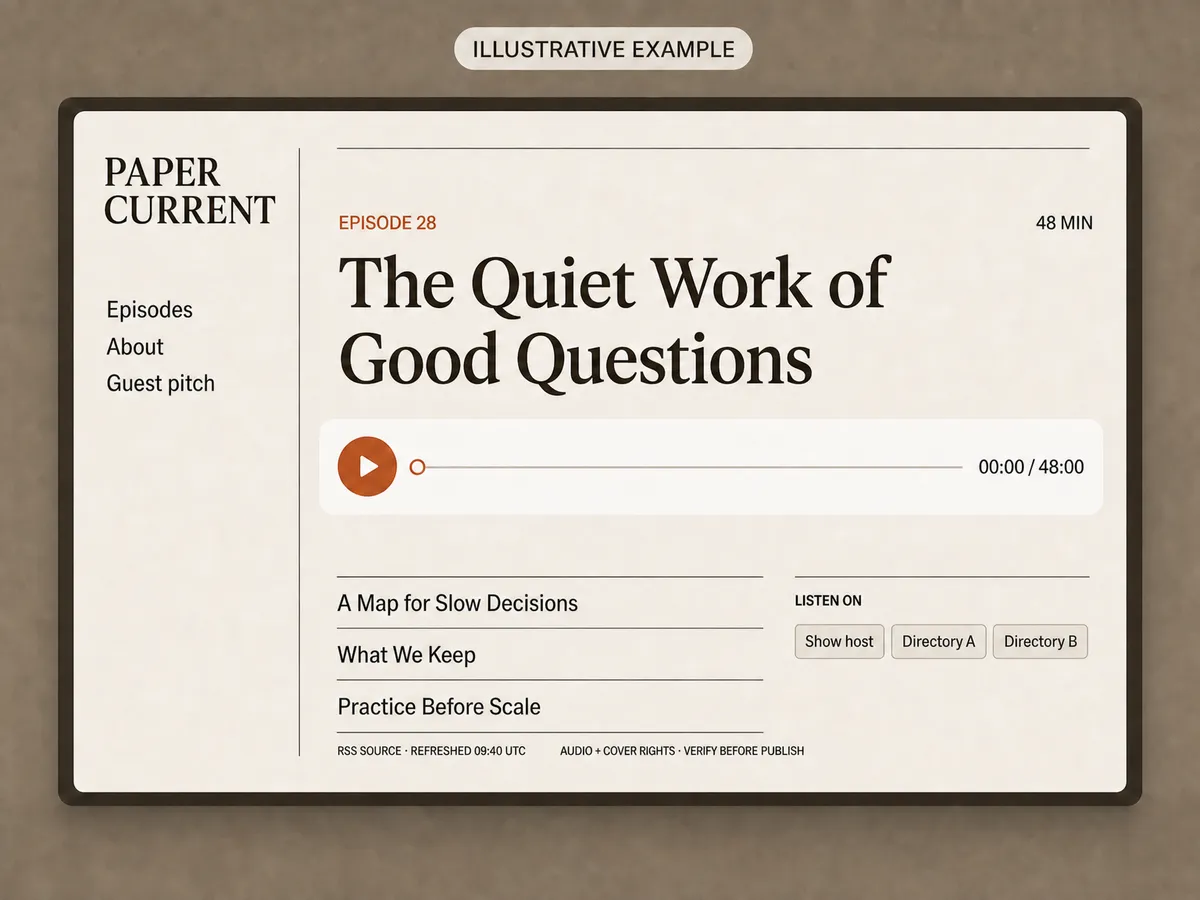
Picture the Episode Before You Build the Archive

A restrained show page can make the current episode, related listening, source freshness, rights check, and provider destinations legible without a dashboard full of invented metrics.

Illustrative Paper Current website with a paused 48-minute episode player, three episode titles, feed freshness, a rights-check reminder, and neutral external listening buttons.
Illustrative conceptThis is an illustrative concept for the fictional Paper Current show, not a product screenshot from Playcode. The actual result depends on your brief. The visible feed time, rights-check reminder, episode state, and external destinations are fictional examples that must be verified against your real feed and provider accounts before publication.
A useful first release

What Your Podcast Website Can Include

Start with a reliable episode library, then add the workflow your show can support

01

RSS-aware episode library

Map the feed source and episode GUID to stable pages, then track published, updated, fetched, and last-successful times separately.

02

Accessible episode pages

Present titles, summaries, credits, chapters, show notes, transcript sections, and keyboard-friendly audio or provider links where rights allow.

03

Verified listen and subscribe paths

Link to the show host and selected directories with plain labels, current URLs, and a fallback when a destination is unavailable.

04

Rights-aware media handling

Record who may publish cover art, audio, music, guest images, and transcripts instead of assuming feed availability grants reuse rights.

05

Privacy-safe guest inquiries

Save a minimal inquiry record before sending notifications, protect the staff view on the server, and define retention and deletion ownership.

06

Freshness, retries, and recovery

Keep a last known-good catalog, retry bounded provider failures, avoid duplicate GUID imports, and repair one episode without rewinding unrelated records.

Podcast website operating guide

Import Episodes Without Becoming a Second Podcast Host

Use the feed for episode identity, the website for editorial context, and provider links for external delivery

Before you build

Prerequisites

  • An owned or authorized RSS source

    The importer needs one authoritative catalog and a feed owner who can fix identity, enclosure, and metadata problems at the source.

    Ready when: The feed URL resolves over HTTPS, the owner is named, and several entries expose stable GUIDs, publication times, and usable enclosure references.

  • A media and transcript rights register

    A public feed can expose media without granting every website, archive, edit, or transcript use you plan to publish.

    Ready when: Every cover, episode image, audio file, music cue, guest asset, and transcript has an owner, allowed use, and removal contact before launch.

  • Verified listening and inquiry boundaries

    Directories, podcast hosts, email services, and form notifications have separate accounts, policies, analytics, and outage behavior.

    Ready when: Each external URL opens the intended show, and the team has written the minimal inquiry fields, staff access rule, retention period, and notification fallback.

Implementation sequence

Do, observe, verify
  1. 01
    Playcode AI prompt and project data model

    Define the feed and episode contract

    Define a feed-source record and an episode record keyed by source ID plus feed GUID. Keep title, summary, publish time, update time, enclosure reference, explicit flag, artwork reference, source hash, last-seen time, and record version as separate fields.

    Expected result

    The first build has one authoritative episode identity and can distinguish a new episode, an edited episode, and a temporary missing item.

    Verify

    Map three controlled feed entries by hand, refresh them twice, and confirm that the same GUID updates the same episode URL without changing unrelated records.

  2. 02
    Playcode project server and refresh job

    Build a safe, retryable feed refresh

    Fetch the configured HTTPS feed with bounded timeouts, conditional request headers when supported, size limits, XML parsing limits, sanitized text fields, and an idempotent upsert. Record a source-level success time only after the batch is valid and durably saved.

    Expected result

    A valid refresh updates the catalog once; a malformed or unavailable source leaves the previous public catalog readable and visibly stale.

    Verify

    Exercise an unchanged response, a changed episode, a duplicate delivery, malformed XML, an oversized response, a timeout, and a later successful recovery.

  3. 03
    Playcode page preview and published routes

    Render the public show and provider handoffs

    Render the show home, stable episode routes, notes, rights-approved images or transcript excerpts, and plain external listen or subscribe links. Use provider-hosted audio or an approved embed only when its terms and URL are verified.

    Expected result

    Listeners can discover and understand an episode while audio delivery and directory actions remain clearly owned by their external providers.

    Verify

    Open each episode with scripts and images loaded normally, keyboard through the player or links, inspect a missing transcript state, and verify every external destination in a new tab.

  4. 04
    Playcode server action and protected staff view

    Add inquiry storage and operate failures separately

    Save a minimal guest or contact inquiry with a stable ID, form version, timestamp, status, consent context, and idempotency key before asking an email provider to notify staff. Authorize every staff list, detail, export, update, and delete action on the server.

    Expected result

    A valid inquiry remains reviewable even when notification fails, and a repeated submit does not create another private record.

    Verify

    Test signed out, two unrelated accounts, an authorized staff account, a duplicate retry, provider outage, notification-only replay, export, deletion, and privacy-safe logs.

Decisions that change the build

Should episodes come from RSS or a separate website editor?

  • RSS as the episode source of truth
  • Website-managed episode catalog

Choose: Use the owned RSS feed as the source of truth when it already drives distribution. Add local editorial fields for introductions, collections, or approved transcript excerpts without changing feed-owned identity.

Tradeoff: RSS reduces catalog drift but inherits provider metadata limits and outages. A website-managed catalog offers control, but it creates another publishing path the team must reconcile deliberately.

Should the website embed audio or send listeners to providers?

  • Verified host player or approved audio embed
  • External listen and subscribe links

Choose: Start with verified external destinations and add an embed only after the host terms, media rights, accessibility, privacy behavior, and failure fallback are understood.

Tradeoff: An embed keeps listening on the page but adds provider code and outage behavior. External links are simpler, though the listener leaves the website and provider analytics remain outside your site.

Before you share it

Test checklist

  • Happy path

    A controlled feed adds a new rights-approved episode with a unique GUID and valid provider destination.

    Expected: One stable episode page appears with accurate metadata, an accessible listening path, and the new last-successful refresh time.

  • Invalid input

    The source returns malformed XML, an unsafe markup fragment, missing episode identity, or an unauthorized staff request.

    Expected: The importer or server action rejects the input, exposes no private data, and keeps the last known-good public state.

  • Duplicate or retry

    The same feed payload and the same inquiry submission are delivered again after an interrupted response.

    Expected: The existing episode and inquiry results are returned without duplicate public pages, notifications, or private records.

  • Published smoke test

    A fresh mobile browser opens the published show, an episode, every external listening link, and the inquiry flow over HTTPS.

    Expected: The pages render without overflow, the source freshness is visible, provider handoffs open correctly, and the inquiry receipt appears only after a durable save.

If something goes wrong

Common failure cases

The episode archive stops changing but the previous pages still load

Likely cause
The feed moved, provider access failed, conditional headers became stale, or the newest batch was rejected before the success boundary.
Check
Compare the feed URL, HTTP status, response size, source hash, last attempt, last successful refresh, and bounded parser error for the same source ID.
Fix
Correct the feed configuration or parser limit, run one controlled refresh, and advance freshness only after the valid batch is saved.

One episode appears under two website URLs

Likely cause
Identity was based on a mutable title or enclosure URL, or the same GUID was imported without its feed-source namespace.
Check
Compare source IDs, GUID values, record versions, and import fingerprints for both episode rows.
Fix
Restore the source-ID plus GUID uniqueness rule, merge only after an authorized review, and redirect the duplicate URL to the retained record.

The page loads but the player or listen destination fails

Likely cause
The podcast host changed the enclosure, embed policy, directory URL, or availability while the website retained an old handoff.
Check
Open the host-owned episode and each stored destination directly, then compare them with the current feed and provider account.
Fix
Update the verified destination, remove an unapproved embed, and keep a plain fallback link while provider delivery is unavailable.

A guest inquiry exists but the production team never receives a notice

Likely cause
The durable inquiry save succeeded and the separate email or messaging provider attempt failed.
Check
Look up the inquiry ID, notification attempt, bounded provider response, and retry state without opening the private message in routine logs.
Fix
Keep the inquiry unchanged, retry only the notification, and use the protected staff queue as the outage fallback.
Podcast sites with different jobs

Build Around the Way Your Show Is Published

The episode model stays stable while the editorial experience changes

Interview Show Archive

Searchable guest and topic pages

Organize episodes by guest, topic, and season, then publish approved bios, credits, notes, and transcript sections without exposing private booking details.

Narrative Series

A coherent listening order

Guide listeners through a fixed sequence with trailers, chapter notes, content guidance, music credits, and clearly owned episode media.

Business or Research Podcast

Useful context beyond audio

Pair each episode with sources, key ideas, downloadable assets you have rights to share, newsletter context, and measured site actions.

Guest and Sponsor Intake

A reviewable private workflow

Collect a minimal pitch, route it to a protected review queue, and keep notification delivery separate from the saved inquiry record.

Know which system owns what

Podcast Provider and Website Responsibilities

A clear boundary prevents false analytics, duplicate media, and broken recovery plans

ResponsibilityPodcast host or directoryYour Playcode-built website
Episode identity and distributionPublishes the authoritative feed and distributes it according to the provider account.Maps the owned source and GUID to stable editorial pages without claiming distribution.
Audio deliveryStores or serves audio under the provider plan, terms, and availability.Uses a verified provider link or approved embed and keeps a readable fallback state.
Listening analyticsDefines provider-side downloads, plays, listeners, and reporting boundaries.Measures website events only and does not relabel page views as podcast audience metrics.
Editorial context and inquiriesMay expose limited show and episode metadata.Adds approved notes, collections, transcripts, and a protected inquiry workflow.
Failure and recoveryOwns feed, enclosure, directory, and account incidents.Preserves the last-good catalog, shows stale source state, and repairs bounded website records.
The engine

A software team in one agent

Playcode AI runs the same frontier models that power ChatGPT and Claude - and orchestrates them like a team: it plans the work, delegates to sub-agents, runs long jobs in the background, and reviews its own changes.

Every frontier model

The latest models from every major lab, in one picker. Switch anytime.

ClaudeGPTGeminiGrok

Sub-agents

Big jobs split across specialists - one explores your code, one writes, one audits - working in parallel.

Background tasks

Long builds and migrations keep running while you keep talking. They report back when done.

migration - running

It sees your designs

Have a design in Figma? Paste a screenshot - or a page you like, or a bug - and it builds from what it sees.

Tuned by years of iteration to write production software - structured, typed, maintainable - not throwaway prototypes.

Production code

Real code you can open, read, and edit

Under every project is a codebase the agent keeps production-grade. And you are never locked out of it: open the file explorer and edit any file yourself - server included. No AI required.

Quality is the default

Complete states, secure boundaries, structured code - the bar is what a professional agency would ship.

Every file is yours to open

Browse the whole project - frontend, backend, configuration - and edit directly in the built-in editor.

Developers are welcome

Invite your developer with the right role, or export the project code and files. Nothing is trapped in Playcode.

For teams and organizations

Share it like you share a doc

Playcode is built for organizations, not just solo builders. Workspaces hold your projects, people, and billing; roles and teams decide exactly who sees what.

Workspaces with their own billing

Create a workspace per company, client, or department - each with its own members, projects, and subscription.

Three clear roles

Admins manage, editors build, viewers watch. Set roles on the whole workspace, on a team, or on a single project.

Teams that scope access

Group people into teams and give each team its own projects - or a whole folder of them. Private projects stay private, even inside a shared workspace.

Share outside the workspace

Send a project to any email - a client, a contractor - with exactly the access you choose. No extra seat needed.

Share "Inventory tracker"
Acme Ops workspace
Private
client@partner.co
Editor Invite
Operations team
8 people
Editor
MK
Maya Kowalski
maya@acme.co
ADMIN
JR
Jon Reyes
jon@acme.co
EDITOR
LS
Lena Sato
lena@acme.co
VIEWER
Restricted - only people invited can open it
Real-time

Multiplayer by default

Work on one project together. Write in the same AI chat together. Every message, edit, and setting is fully synchronized - live, for everyone, on every device.

acme-launch · Playcode
MKJR
Maya's laptop
Maya
Add a 'Book a call' button to the hero
Jon
And link it to our calendar, please
Playcode AIDone - button added to the hero and linked to your calendar.Preview updated
Describe the next change...
Jon's phone
Maya
Add a 'Book a call' button to the hero
Jon
And link it to our calendar, please
Playcode AIDone - button added to the hero and linked to your calendar.
Message...
Already there. No refresh.

Same project, same moment

Everyone works in the project at the same time - even in the code editor - without lock-outs or "who has the latest version".

Every device

Start on the laptop, check from your phone: the same live state follows you everywhere you sign in.

Nothing to refresh

Changes arrive over a live connection the instant they happen. Reloading the page is a habit you can drop.

Feels instant

It never makes you wait

Instant

Every click applies immediately on your device. Syncing happens behind you, not in front of you.

Offline

Connection dropped? Your changes queue locally and replay the moment you are back.

Reload-proof

The queue survives closing the tab. Nothing you did is lost while you are away.

Real People. Real Websites Built with AI.

"I built my entire portfolio site in 20 minutes. My clients think I hired a designer. Already got 3 new inquiries this month."
Marcus T. · Freelance Graphic Designer, Austin TX
"We switched from Wix to Playcode. The AI actually understands what we need instead of giving us cookie-cutter templates. Saved us thousands."
Sarah Chen · Owner, Bloom & Petal Floristry
"I update my property listings from my phone while showing apartments. Clients are impressed when I tell them I built the site myself."
David Morales · Real Estate Agent, Miami FL

Simple Pricing

Start small. Upgrade when you're ready.

Starter

$0to start

Try the AI website builder and see results

  • AI credits included to start
  • Publish your site instantly
  • Subdomain included
  • Website hosting included
  • No credit card required
Get Started

Pro

Most Popular
$21/month

Everything you need to build

  • 100 AI credits/month
  • All AI models (12+)
  • Visual editing
  • Custom domains
  • Website hosting included
  • Export your code anytime
  • Private projects
  • Unlimited collaborators

Cancel anytime. No hidden fees.

How credits work

Credits are used when AI helps you. Simple edits cost less, complex features cost more.

  • "Change button color" ~0.3-0.5 credits
  • "Add a contact page" ~2-3 credits
  • "Build full landing page" ~5-10 credits

Most users never run out. 100 credits = lots of building.

Questions Podcast Teams Ask Before Building

Not by default. Your chosen podcast host remains responsible for the feed, audio delivery, distribution, plan, and provider-side reporting. Playcode can build the public website and a custom importer or workflow around supported URLs and APIs, but that does not turn it into a podcast host or directory.

Yes, a Playcode-built app can fetch and map an authorized RSS source when the feed is publicly or credential-accessible and the implementation handles timeouts, parsing limits, retries, identity, and stale state. Use the feed source plus stable episode GUID as the default identity, not a mutable title.

Usually start with the podcast host’s verified player, enclosure path, or external listen link. Copy audio only when your rights, host terms, storage plan, delivery behavior, and analytics contract allow it. Feed availability alone does not prove that a second public copy is authorized.

Publish them only when you have the required rights and a correction or removal owner. Record transcript source and review state, check guest releases and image licenses, avoid exposing private production notes, and provide an accessible alternative when a transcript is missing or still under review.

The website can measure its own page and interaction events when configured, but those are not automatically podcast downloads, verified listeners, or directory rankings. Keep definitions and sources visible. Use the podcast host or another reproduced provider path for host-side listening metrics, with its own account and limits.

Collect only the fields the team will review, validate and save one durable inquiry before sending a notification, protect every staff action on the server, define retention and deletion ownership, and keep private message text out of routine logs. A notification outage should not erase or duplicate the inquiry.

Keep the last known-good episode catalog readable, show when the source was last successfully refreshed, retry with bounded backoff, and avoid advancing freshness after a failed batch. If playback or a directory is unavailable, keep episode notes visible and offer another verified destination instead of claiming success.

Still have questions? Contact us

Give your podcast a home you control.

Describe the show, feed, episode model, and listener path. Build the editorial website around the providers you already use.

An interview podcast site with seasons, transcripts, guest pages, and verified listen links...Build My Podcast Website

No credit card required. AI credits included.