Portable website output

HTML Website Builder You Can Inspect and Export

Describe a complete site, inspect the standalone HTML and CSS, preview mobile and desktop, then publish or export the bundle. For a snippet or an existing file, use the focused HTML editor or HTML runner instead.

No credit card required · No coding needed

Quick answer

What does an HTML website builder create?

An HTML website builder creates a complete responsive site and keeps the result understandable as standalone HTML, CSS, and local assets. With Playcode, describe the site, inspect and edit the source, preview each breakpoint, publish it, and export the files. Use /html for editing code and /html-runner for running a snippet.

1.1M+users
26M+projects
Since 2016

Used by people at

Counts registered accounts using corporate email domains from the companies above. Playcode is a self-serve product, not a contracted vendor to these brands.

From Site Brief to Portable HTML

Build the whole website, then verify the files as carefully as the preview

01

Describe the Site and Its Output

Name the audience, pages, navigation, sections, metadata, and visual direction. Ask for standalone HTML and CSS with local asset paths rather than a hidden proprietary document.

Decide up front whether the first release is a static site or needs a real backend. A contact form that saves data is not static HTML alone.

Preview
AI Chat
Publish
I'm a realtor in Miami. I need a website to show my listings and get buyer leads.
4 Questions
2 / 4
What's the main style for your real estate site?
AModern & minimal with clean lines
BLuxury feel with large property photos
CProfessional & corporate
DI'll describe my own style below
Or type your own answer...
Skip
Next
Describe what you want to change...
Economy
Build Progress
4/6
Site layout & navigation
3s
Hero section with CTA
5s
Property listings grid
8s
Building contact form...
About page & bio
Footer & SEO meta
miami-homes.playcode.io
Miami Dream Homes
Your trusted partner in Miami real estate
Search by neighborhood...
Featured Listings
NEW
$1,250,000
Coral Gables Villa
4 bd|3 ba|2,400 sqft
OPEN
$890,000
Brickell Condo
2 bd|2 ba|1,200 sqft
Get in Touch
02

Inspect the Files While You Edit

Open index.html, styles.css, and the asset directory. Check landmarks, headings, link destinations, alt text, and the exact relationship between the selected source and the visible preview.

Make changes by describing them or editing the files directly. Keep user-provided text escaped and treat imported scripts or markup as untrusted.

03

Preview the Real Failure Boundaries

Exercise desktop and mobile widths, keyboard navigation, missing assets, long text, invalid links, and any optional form endpoint. The preview should show errors instead of inventing a successful submission.

A Content Security Policy helps limit what a page may load. Response-only controls such as frame restrictions still belong in the deployment headers, not only in HTML metadata.

Your website is live!

https://
miami-homes.playcode.io
Site is secure - SSL certificate active
Or connect your domainmiami-dream-homes.com
Miami Dream Homes
Your trusted partner
Miami Dream Homes
Your trusted partner
Same-release runnable reference

A Portable HTML Site, Not a Decorative Mockup

The packaged reference creates and edits a versioned project, renders a responsive preview, validates local assets and unsafe input, publishes a static bundle, and verifies the export in a clean directory. Local reproduction does not replace the required target-environment smoke test.

5
Create, edit, preview, publish, and export gates
0
Runtime package dependencies in the exported site
1
Versioned, hash-recorded portable bundle

Open the runnable HTML reference site

What HTML-first means

Files You Can Read, Test, and Move

The output stays useful after the first preview because the source, assets, metadata, and release boundary remain visible.

01

Understandable standalone source

Open the document structure and stylesheet directly. The HTML-output path is distinct from a proprietary canvas or a preview with no inspectable files.

02

Responsive behavior you can exercise

Test narrow and wide viewports, long content, keyboard focus, landmark order, and image dimensions before publishing.

03

Local, validated asset paths

Keep images and other files in a deliberate asset directory. Reject traversal paths and verify that a clean export contains every referenced byte.

04

Metadata tied to the visible site

Review the title, description, language, viewport, heading order, link labels, and alternative text instead of treating metadata as an afterthought.

05

Honest form and script boundaries

Static markup can render a form, but saving or sending requires a real server or provider endpoint. Imported HTML and scripts need separate trust and CSP review.

06

Publish and export as separate checks

Verify the HTTPS target and the downloaded files independently. Source export does not imply that external providers, secrets, or live runtime data travel with it.

Choose the right HTML surface

A Website Builder Is More Than an Editor or Runner

Use the focused tools for existing code. Use this builder job when you need a complete site, release checks, and portable output.

Job to completeEditor or runner onlyHTML website builder
Starting pointAn existing HTML file or snippetA site brief, page map, and output requirements
Visible resultRender or edit the current codeBuild a complete responsive website with named files and assets
ValidationSyntax and immediate renderingMetadata, accessibility, breakpoints, paths, failures, and release smoke
ReleaseShare or keep working on the snippetPublish an HTTPS target and export a clean portable bundle
Best fit/html for editing; /html-runner for executionA full HTML-first site you intend to launch and own
Implementation and release guide

Build the Site, Then Prove the Output Travels

Define the static-versus-backend boundary, keep source and assets reviewable, and exercise both the hosted target and the export.

Before you build

Prerequisites

  • A page map and one release target

    The builder needs to know which pages, navigation, title, description, language, and responsive behavior make the first release complete.

    Ready when: Every page has one purpose and URL, and you can name the exact HTTPS target or preview environment you will smoke-test.

  • Rights-cleared local assets with an owner

    Images, fonts, and downloads must be licensed, named predictably, and present in the exported bundle rather than pulled from a private machine path.

    Ready when: Each referenced file has an approved source, a local relative path, useful dimensions or format, and a person responsible for replacement or removal.

  • A decision for every form or dynamic action

    HTML can show a form, but it cannot durably save, email, authorize, or protect a submission without a real backend or provider path.

    Ready when: Each submit-like control is either disabled and labeled as a prototype or names a tested endpoint, validation rule, privacy owner, retry policy, and failure state.

Implementation sequence

Do, observe, verify
  1. 01
    Playcode AI prompt and project brief

    Specify the portable output contract

    Describe the audience, pages, sections, visual direction, title and description, local assets, accessibility expectations, and whether JavaScript or a real form endpoint is allowed. Request standalone HTML and CSS you can inspect.

    Expected result

    The project starts with a finite file map and an explicit static-versus-backend boundary instead of an ambiguous visual mockup.

    Verify

    Open the project tree and match every required page, stylesheet, asset, and dynamic dependency to the brief before polishing.

  2. 02
    Playcode file explorer and preview

    Edit one versioned source of truth

    Review and edit the actual HTML and CSS. Keep semantic landmarks and one H1, escape user-provided text, validate URL schemes and local asset paths, and reject stale edits instead of silently overwriting a newer revision.

    Expected result

    The selected file, preview, and current revision describe the same site, and unsafe markup or paths fail with a specific error.

    Verify

    Change a visible heading, refresh the preview, then attempt the prior revision number and confirm the stale write is rejected without changing the current output.

  3. 03
    Preview at desktop and 390 px plus keyboard-only navigation

    Exercise responsive, accessible, and failure states

    Check heading order, landmarks, focus visibility, contrast, alt text, long copy, missing assets, broken links, and the no-backend form state. Review third-party code separately, keep the CSP as narrow as the actual files allow, and reserve response-header-only frame restrictions for deployment.

    Expected result

    The site remains readable and navigable without horizontal document overflow, and a broken dependency produces an actionable failure rather than a false success.

    Verify

    Complete keyboard navigation, compare both viewport widths, deliberately remove one test asset, and confirm the validator names the missing path before publication.

  4. 04
    Playcode publish flow and a clean export directory

    Publish, export, and smoke both copies

    Publish the reviewed revision, record its target and hash, download the bundle, and open the exported index.html with only the packaged files available. Check every asset, link, title, responsive width, and intended form boundary.

    Expected result

    The HTTPS target and the portable export render the same approved revision without depending on an unpublished local file, provider credential, or unclaimed runtime data export.

    Verify

    Fetch the exact public URL and assets for 200 responses, inspect the response CSP and other deployment headers, then run the exported bundle from a documented clean environment and compare its manifest hash.

Decisions that change the build

Should the first release stay static HTML or become a backend app?

  • Static HTML, CSS, and local assets
  • HTML frontend with a server or provider-backed action

Choose: Stay static when the site publishes information and links people to an existing contact or checkout path. Add a backend only when the site must save, authorize, send, or reconcile data.

Tradeoff: Static output is easier to inspect, export, cache, and move. A backend enables real records and protected actions but adds credentials, validation, privacy, retries, monitoring, and data-export responsibilities.
Should styles and images be embedded or kept as local files?

  • Separate local stylesheet and asset directory
  • Inline styles or data URLs

Choose: Prefer named local files for a multi-section website so paths, caching, replacement, CSP, and export contents stay reviewable.

Tradeoff: Inlining can simplify a tiny single-file artifact, but it increases document weight and makes content, policy, and asset changes harder to inspect independently.

Before you share it

Test checklist

  • Happy path

    Create the reference project, apply a versioned heading edit, render its preview, publish the reviewed revision, and export the same files.

    Expected: The heading, metadata, local stylesheet, image, revision, and manifest agree in the preview, published directory, and clean export.

  • Invalid input

    Try visitor text containing markup, a javascript: link, an inline event handler, a traversal asset path, and a form without an approved endpoint.

    Expected: Text is escaped or the unsupported value is rejected before files are emitted; no executable injection, escaped asset path, or fake successful form appears.

  • Duplicate or retry

    Repeat the same edit request, reuse its identity with different content, and submit an edit from a stale expected revision.

    Expected: An exact retry returns the existing result, changed reuse is a conflict, and the stale edit cannot overwrite the current site.

  • Published smoke test

    Open the exact published target in a fresh private browser, then fetch its CSS, image, and download bundle directly.

    Expected: The target and assets return 200, the page has the intended title and responsive layout, security headers match the deployment policy, and the exported bundle opens cleanly. This remains manual until reproduced in the target environment.

If something goes wrong

Common failure cases

The preview looks correct, but exported images or styles are missing

Likely cause
The source references an absolute workstation path, a parent traversal, or a file that was never included in the export manifest.
Check
List every src and href, resolve it from the exported index.html, and compare the result with the exact manifest file list.
Fix
Move the file under the local asset directory, update the relative path, rebuild the manifest, and repeat the clean-directory test.

A form shows success but no submission exists

Likely cause
Static UI was styled as a completed workflow without a tested server or provider endpoint and durable response.
Check
Inspect the form action and network request, then look for a stable server-side record or provider response rather than a browser-only message.
Fix
Disable and label the control until a validated endpoint exists, or add the backend/provider path with server validation, privacy ownership, retry handling, and an error state.

The hosted page is blank or blocked while the local preview works

Likely cause
A deployed URL, MIME type, CSP directive, case-sensitive filename, or base path differs from the local preview.
Check
Open the target network and console output, fetch the failing asset directly, and compare response headers and exact filename case with the manifest.
Fix
Correct the path or MIME, narrow or extend the CSP only for the required origin, republish the same revision, and rerun the fresh-browser smoke.

A later edit unexpectedly disappears

Likely cause
An older browser or retried request wrote against stale state without an expected-revision check.
Check
Compare the request identity, expected revision, current revision, and edit ledger before rebuilding the output.
Fix
Reject stale writes, return the current revision for reconciliation, and retry only after the editor reviews the newer source.

The page renders but has the wrong title, language, or keyboard order

Likely cause
Visual review passed while metadata, semantic landmarks, focus order, or accessibility checks were omitted from the release gate.
Check
Inspect the document head and accessibility tree, then tab through every control at desktop and mobile widths.
Fix
Correct the metadata and semantic source, rebuild from the versioned project, and rerun both the preview and exported-site audit.
A possible editing workspace

Source, Preview, and Release State in One View

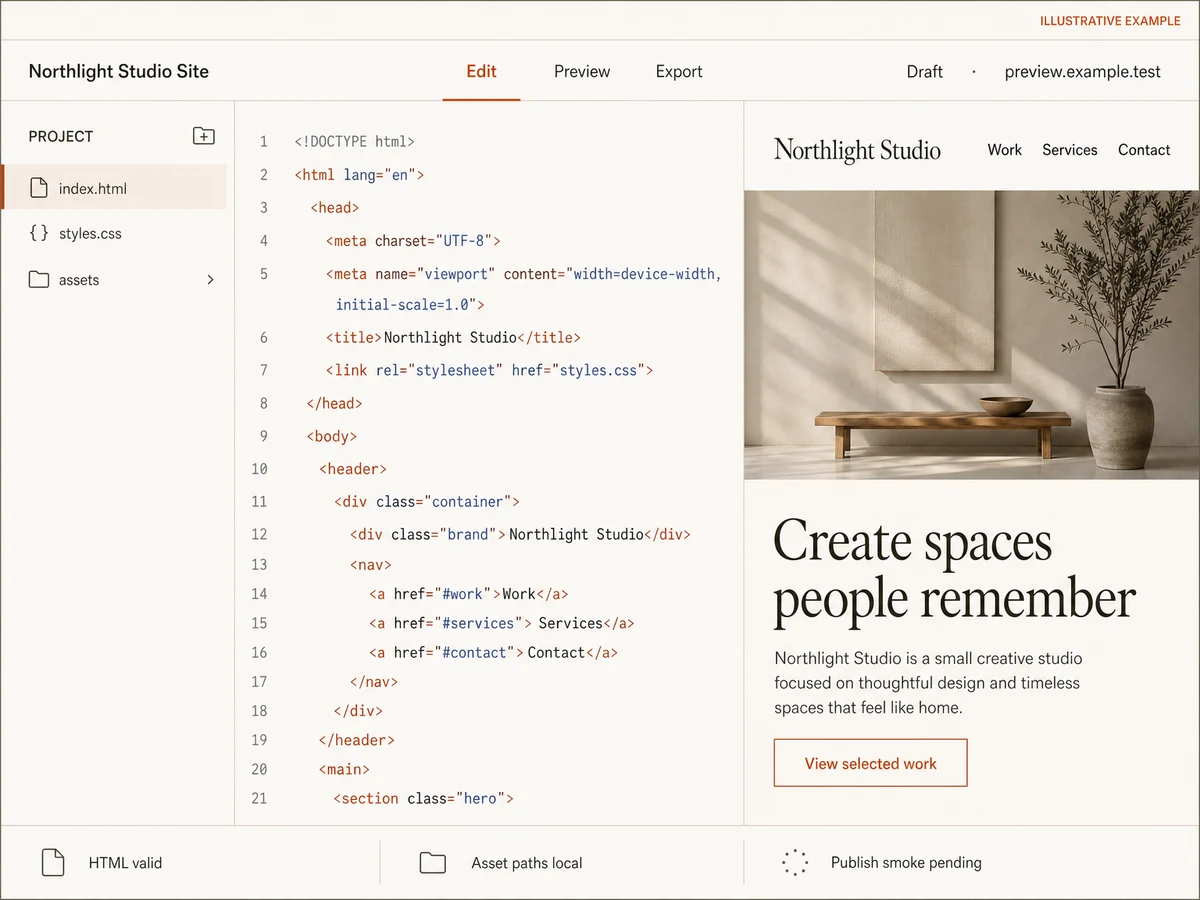
The fictional Northlight Studio concept keeps the file tree, selected HTML, live preview, draft state, local-asset check, and still-pending publish smoke consistent.

Illustrative HTML website builder studio for fictional Northlight Studio showing index.html, styles.css, local assets, a matching responsive preview, Draft state, and Publish smoke pending.
Illustrative conceptThis is an illustrative concept, not a product screenshot. Northlight Studio is fictional; every file, validation label, control, and status shown is illustrative, and the actual result depends on your brief. preview.example.test is a reserved example target, and the shown publish smoke remains pending; the image is not proof of a published customer site.
Where portable HTML fits

Sites That Benefit From a Clear File Boundary

Choose the format because the project needs inspectable static output, not because every website should avoid a backend or framework.

Small business brochure site

Portable public pages

Publish services, locations, trust details, and contact links in a fast static site. Add a real form endpoint only when the business is ready to own its privacy and response workflow.

Campaign microsite

Bounded release artifact

Keep one campaign brief, asset directory, metadata set, and release target reviewable. Export the final bundle for an approved host or archive.

Portfolio or press kit

Inspectable media site

Pair rights-cleared local media with semantic case studies, accessible captions, and a contact boundary without introducing a database the content does not need.

Documentation or project page

Simple long-lived source

Create readable navigation and durable content in standalone files. Introduce search, authentication, or dynamic records only when those jobs become real requirements.

The engine

A software team in one agent

Playcode AI runs the same frontier models that power ChatGPT and Claude - and orchestrates them like a team: it plans the work, delegates to sub-agents, runs long jobs in the background, and reviews its own changes.

Every frontier model

The latest models from every major lab, in one picker. Switch anytime.

ClaudeGPTGeminiGrok

Sub-agents

Big jobs split across specialists - one explores your code, one writes, one audits - working in parallel.

Background tasks

Long builds and migrations keep running while you keep talking. They report back when done.

migration - running

It sees your designs

Have a design in Figma? Paste a screenshot - or a page you like, or a bug - and it builds from what it sees.

Tuned by years of iteration to write production software - structured, typed, maintainable - not throwaway prototypes.

Production code

Real code you can open, read, and edit

Under every project is a codebase the agent keeps production-grade. And you are never locked out of it: open the file explorer and edit any file yourself - server included. No AI required.

Quality is the default

Complete states, secure boundaries, structured code - the bar is what a professional agency would ship.

Every file is yours to open

Browse the whole project - frontend, backend, configuration - and edit directly in the built-in editor.

Developers are welcome

Invite your developer with the right role, or export the project code and files. Nothing is trapped in Playcode.

For teams and organizations

Share it like you share a doc

Playcode is built for organizations, not just solo builders. Workspaces hold your projects, people, and billing; roles and teams decide exactly who sees what.

Workspaces with their own billing

Create a workspace per company, client, or department - each with its own members, projects, and subscription.

Three clear roles

Admins manage, editors build, viewers watch. Set roles on the whole workspace, on a team, or on a single project.

Teams that scope access

Group people into teams and give each team its own projects - or a whole folder of them. Private projects stay private, even inside a shared workspace.

Share outside the workspace

Send a project to any email - a client, a contractor - with exactly the access you choose. No extra seat needed.

Share "Inventory tracker"
Acme Ops workspace
Private
client@partner.co
Editor Invite
Operations team
8 people
Editor
MK
Maya Kowalski
maya@acme.co
ADMIN
JR
Jon Reyes
jon@acme.co
EDITOR
LS
Lena Sato
lena@acme.co
VIEWER
Restricted - only people invited can open it
Real-time

Multiplayer by default

Work on one project together. Write in the same AI chat together. Every message, edit, and setting is fully synchronized - live, for everyone, on every device.

acme-launch · Playcode
MKJR
Maya's laptop
Maya
Add a 'Book a call' button to the hero
Jon
And link it to our calendar, please
Playcode AIDone - button added to the hero and linked to your calendar.Preview updated
Describe the next change...
Jon's phone
Maya
Add a 'Book a call' button to the hero
Jon
And link it to our calendar, please
Playcode AIDone - button added to the hero and linked to your calendar.
Message...
Already there. No refresh.

Same project, same moment

Everyone works in the project at the same time - even in the code editor - without lock-outs or "who has the latest version".

Every device

Start on the laptop, check from your phone: the same live state follows you everywhere you sign in.

Nothing to refresh

Changes arrive over a live connection the instant they happen. Reloading the page is a habit you can drop.

Feels instant

It never makes you wait

Instant

Every click applies immediately on your device. Syncing happens behind you, not in front of you.

Offline

Connection dropped? Your changes queue locally and replay the moment you are back.

Reload-proof

The queue survives closing the tab. Nothing you did is lost while you are away.

Real People. Real Websites Built with AI.

"I built my entire portfolio site in 20 minutes. My clients think I hired a designer. Already got 3 new inquiries this month."
Marcus T. · Freelance Graphic Designer, Austin TX
"We switched from Wix to Playcode. The AI actually understands what we need instead of giving us cookie-cutter templates. Saved us thousands."
Sarah Chen · Owner, Bloom & Petal Floristry
"I update my property listings from my phone while showing apartments. Clients are impressed when I tell them I built the site myself."
David Morales · Real Estate Agent, Miami FL

Simple Pricing

Start small. Upgrade when you're ready.

Starter

$0to start

Try the AI website builder and see results

  • AI credits included to start
  • Publish your site instantly
  • Subdomain included
  • Website hosting included
  • No credit card required
Get Started

Pro

Most Popular
$21/month

Everything you need to build

  • 100 AI credits/month
  • All AI models (12+)
  • Visual editing
  • Custom domains
  • Website hosting included
  • Export your code anytime
  • Private projects
  • Unlimited collaborators

Cancel anytime. No hidden fees.

How credits work

Credits are used when AI helps you. Simple edits cost less, complex features cost more.

  • "Change button color" ~0.3-0.5 credits
  • "Add a contact page" ~2-3 credits
  • "Build full landing page" ~5-10 credits

Most users never run out. 100 credits = lots of building.

HTML Website Builder Questions

The HTML editor at /html is for opening, writing, and previewing code directly. This page owns the complete website-builder job: start from a site brief, produce named HTML, CSS, and asset files, exercise release failures, publish an HTTPS target, and verify a portable export.

The HTML runner at /html-runner is focused on executing and checking an existing snippet or document. A website-builder workflow also defines pages, navigation, metadata, responsive behavior, assets, accessibility, publication, and export.

That is the output contract for this page. Ask for standalone HTML, CSS, and local assets, inspect them in the file explorer, and verify the exact export in a clean environment. If a project later becomes a full-stack app, document which server and data pieces are outside the static bundle.

Yes, when the behavior requires it and the script is part of the reviewed export. Keep dependencies deliberate, validate untrusted data, avoid inline handlers, and make the CSP match the actual script sources. A static script still cannot safely replace server-side authorization or secret handling.

Not by markup alone. Saving, emailing, or routing a submission requires a real server or form-provider endpoint with validation, privacy ownership, credentials where needed, retry behavior, and a visible failure state. Until that path is tested, keep the control disabled or label it as a prototype.

Use approved files under a local asset directory and reference them with relative paths. Validate every path, reject parent traversal, preserve useful dimensions and alternative text, and compare the exported manifest with every src and href. Then open the bundle without access to your original workstation files.

No. Treat imported markup and scripts as untrusted, escape content that should be text, validate URL schemes, and review executable code. A narrow CSP reduces the impact of mistakes, but response-only directives such as frame restrictions must be set by the deployed server and do not replace sanitization or authorization.

Yes. Publish the reviewed project on Playcode with HTTPS according to current plan limits, then export the real source. Verify the hosted target and the downloaded files separately. Custom domains require the appropriate plan and DNS setup, and source export does not automatically include provider credentials or runtime data.

Check the title and description, one H1, language, landmarks, keyboard order, contrast, mobile width, long content, all links and local assets, invalid input, stale edits, the honest form state, hosted response headers, and a clean exported copy. Record the release revision and bundle hash.

Still have questions? Contact us

Build the Site. Keep the Files.

Describe the complete website, inspect the HTML and CSS, prove the responsive release, then publish or export the exact revision.

A three-page architecture studio site with local images...Build My HTML Website

No credit card required - AI credits included