A useful portfolio is more than a gallery. It helps one audience understand what you did, what the team did, which evidence supports the result, and what to do next. That requires a content model, publication rights, accessible media, an honest contact path, production checks, and a plan for updating or retiring old work.
This guide turns those decisions into a practical Playcode workflow. If you are comparing the product first, see the portfolio website builder. The article below stays focused on choosing evidence, structuring case studies, testing the site, publishing it, and keeping every public claim current.
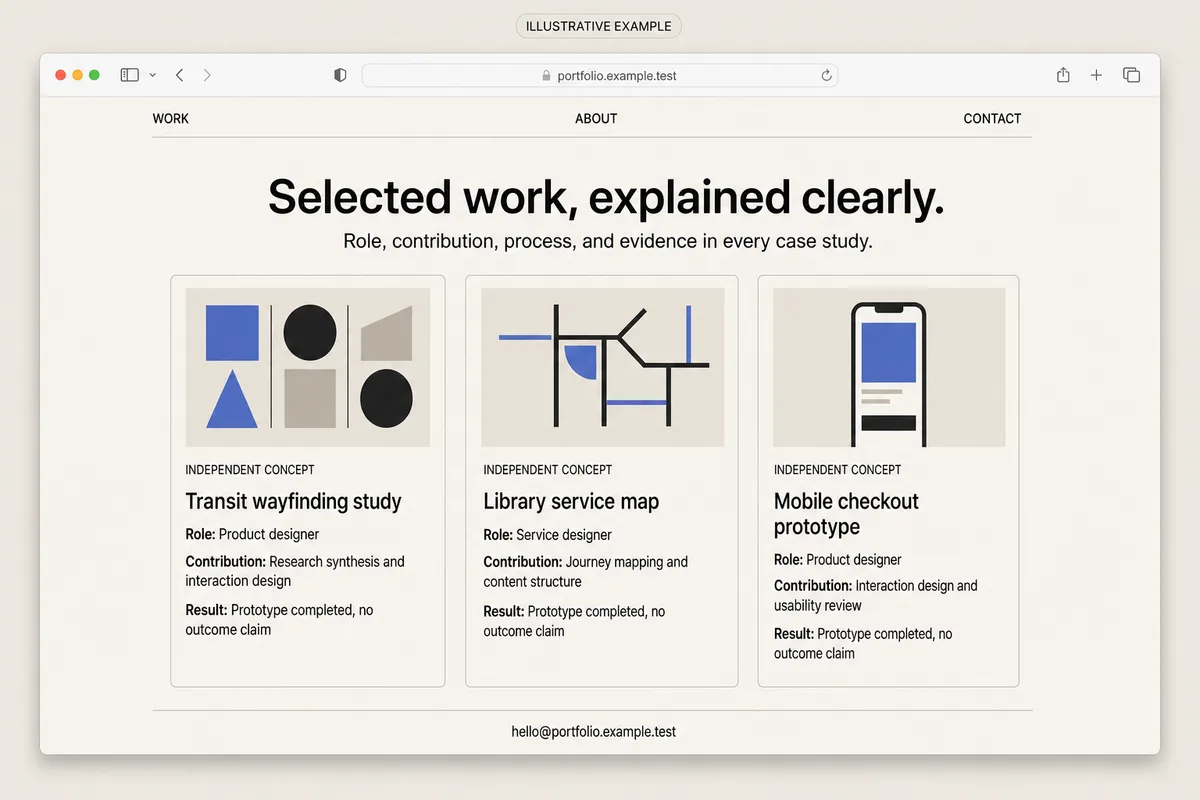
QUICK ANSWER
How do you create a portfolio website?
Choose one audience and one action, then select only work you may publish. Give every project a stable record for context, role, individual contribution, team outcome, evidence, credits, media rights, and review status. Build a simple work-to-contact path, test it on phones and keyboards, publish with HTTPS and correct metadata, and schedule regular evidence and rights reviews.
Decide what the portfolio is allowed to prove
Start with audience, evidence, permission, and maintenance. A polished layout cannot repair a portfolio that targets everyone, hides the author’s contribution, publishes restricted work, or leaves old claims online indefinitely.
- One primary audience and action: Choose the reviewer you need to help first: a hiring manager, recruiter, prospective client, collaborator, curator, or admissions reviewer. Give that person one primary next action, such as opening a case study, downloading an approved resume, or sending a bounded inquiry.
- A rights-cleared shortlist: For each project, confirm ownership, client or employer permission, confidentiality limits, collaborator attribution, screenshot rights, font and image licenses, dates, link status, and which results may be stated publicly. Keep private metrics, personal data, drafts, and unreleased work out of the prompt and public media folder.
- Evidence for role and result: Separate the team outcome from your individual contribution. Keep an approved source for every public client name, role, deliverable, metric, award, quotation, and outcome. If the result cannot be substantiated, describe the artifact or learning without inventing impact.
- A contact and privacy policy: Decide the minimum contact fields, who may read submissions, how long records are kept, how a sender can request deletion, what the receipt promises, which provider sends notifications, and what visitors can do if that provider is unavailable.
- A review and retirement owner: Name the person who will recheck rights, claims, media, links, domain settings, contact delivery, analytics, and project relevance. Define when a case study becomes draft, archived, redirected, or deleted instead of leaving stale evidence public.
Choose a portfolio structure you can maintain
The page layout should follow the evidence you have, not the number of sections a template provides. These three structures solve different review tasks and create different maintenance costs.
| Approach | Best for | Tradeoff |
|---|---|---|
| Single-page selected work | A new portfolio with two or three concise projects, one clear role, and a simple email or external contact action. | It is fast to scan and maintain, but complex projects can become shallow and individual pages are harder to share with a specific reviewer. |
| Project index plus case-study pages | Designers, developers, researchers, writers, and studios with three to six projects that need context, contribution, artifacts, evidence, and reflection. | It provides the clearest evaluation path, but every project needs complete records, stable media, link checks, and a repeatable review process. |
| Filterable archive | A large, rights-cleared body of work where visitors genuinely need to browse by discipline, year, format, service, or topic. | Filters add taxonomy, empty-state, URL, keyboard, and maintenance work. They can hide the strongest evidence when a smaller curated sequence would be clearer. |
Recommended:Start with a project index and three to five complete case studies. Lead with the work most relevant to the chosen audience, keep About and Contact concise, and add filters only when a real archive makes browsing difficult. One complete evidence trail is more credible than forty unexplained thumbnails.
Create a portfolio website step by step
Turn a rights-cleared work shortlist into structured case studies, a clear reading path, a tested contact boundary, a published site, and an ongoing review process.
STEP 01
Choose the audience, promise, and primary action
Write the decision the portfolio should help one visitor make before choosing projects or visual style.
Name the primary audience, the role or service they are evaluating, the evidence they need, and the one next action you want them to take. A hiring portfolio might prioritize role scope and a resume; a client portfolio might prioritize comparable work, boundaries, and an inquiry.
Write a plain-language positioning statement that says what you do and for whom. Remove unsupported superlatives, vague claims, and unrelated skills that make the strongest work harder to identify.
Expected result: The brief names one primary reviewer, one decision, one evidence hierarchy, and one next action without trying to serve every possible visitor equally.
Verify it: Ask another person to read only the positioning statement and project titles. They should be able to name the intended audience, the kind of work, and the next action without guessing.
STEP 02
Audit every project, claim, and publication right
Create a source record before a client name, screenshot, metric, quotation, or collaborator credit becomes public content.
For each candidate, record the work owner, your role, individual contribution, collaborators, dates, confidentiality status, allowed facts, approved media, attribution, license, result evidence, external links, expiry or review date, and removal contact.
Exclude work whose rights are unclear. Redact secrets and personal data from screenshots. Do not recreate a restricted client interface with AI and present it as original evidence. If only the process is publishable, write a generalized retrospective that clearly omits confidential details.
Expected result: Every selected project has a traceable permission and evidence row, and every excluded project has a clear reason rather than a silent assumption.
Verify it: Review the shortlist with the rights or project owner. Confirm that each public fact, image, logo, quotation, metric, and attribution maps to an approved source and a named review date.
STEP 03
Model projects before generating the pages
Use one durable record so cards, case studies, structured data, links, and retirement status cannot contradict each other.
Ask Playcode to create a project collection with stable IDs and slugs. Keep team outcome and individual contribution in separate fields, and keep result evidence separate from the public summary so unsupported language is easier to detect.
Treat draft, published, archived, and removed as explicit states. A removed project should not remain reachable through a stale card, search result, social preview, or generated sitemap entry.
type PortfolioProject = {
  id: string
  slug: string
  title: string
  audience: string
  context: string
  constraints: string[]
  teamOutcome?: string
  role: string
  individualContribution: string[]
  process: string[]
  deliverables: string[]
  publicResult?: string
  resultEvidence?: { source: string; approvedAt: string }
  collaborators: { name: string; credit: string; approved: boolean }[]
  media: { src: string; alt: string; rightsSource: string; expiresAt?: string }[]
  status: 'draft' | 'published' | 'archived' | 'removed'
  lastReviewedAt: string
  removalOwner: string
}
Expected result: Each project can render a concise card and a complete case study from the same reviewed record, while draft, archived, or removed work stays out of public output.
Verify it: Create one complete project, one confidential draft, and one removed fixture. Confirm that only the published project appears publicly and that its card, case study, credits, media, and result agree.
STEP 04
Write case studies that separate contribution from outcome
Make the reasoning assessable without implying that one person caused every team result or that a visual artifact proves business impact.
Use a repeatable sequence: context, problem, constraints, team, your role, your contribution, process, deliverables, verified result, and reflection. Label independent concepts, coursework, speculative redesigns, and client work accurately.
Prefer concrete verbs and artifacts over vague ownership language. “Synthesized eight approved interview notes and designed the tested navigation prototype” is clearer than “led the transformation.” State a metric only when its definition, time window, source, attribution, and publication approval are available.
Expected result: A reviewer can distinguish the project context, team responsibility, individual contribution, delivered artifact, and supported result without filling gaps with assumptions.
Verify it: Have a collaborator compare the page with the source record. Ask them to mark any sentence that overstates ownership, hides another contributor, lacks evidence, or makes an outcome sound causal without support.
STEP 05
Build the navigation, responsive media, and contact boundary
Create a short path from positioning to selected work to a contact action that remains usable without hover, animation, or a fast connection.
Use a concise Home or Work, About, and Contact structure. Keep project titles descriptive, show focus states, preserve heading order, support keyboard navigation and reduced motion, and give meaningful alt text to informative media. Use empty alt text only for genuinely decorative images.
Export responsive image sizes with explicit dimensions, deliberate crops, and modern formats. Lazy-load below-fold media, add captions or transcripts where needed, and provide a useful fallback when a video or embed fails. A contact form should collect the minimum data, validate on the server, create one retry-safe pending record, and avoid promising a reply time you cannot meet.
Expected result: A visitor can understand the portfolio and reach the primary action on a phone, desktop, keyboard, screen reader, reduced-motion setting, or constrained connection.
Verify it: Test at 360 pixels and a wide desktop, tab through every control, inspect the heading outline, disable animation, throttle the network, open every media fallback, and submit the contact path twice under one retry key.
STEP 06
Test evidence, privacy, accessibility, performance, and failures
Test the claims and operating boundaries as carefully as the visual layout before real reviewers receive the link.
Use fictional `.test` records. Try a complete project, missing alt text, broken media, an unpublished or confidential record, an expired right, an oversized contact message, a duplicate submission, a notification outage, and access from a signed-out or unrelated account.
Check page titles, descriptions, canonical URL, social preview, structured data, broken links, contrast, zoom, focus, keyboard order, reduced motion, responsive image requests, layout shift, and lab performance. A passing automated check supports review but is not an accessibility certification or a guarantee of field performance.
Expected result: Only authorized evidence is public, invalid states fail safely, contact retries do not create duplicates, and the portfolio remains readable and recoverable when media or a provider fails.
Verify it: Save a release checklist with the fixture, viewport, account state, expected result, observed result, and evidence for every test. Block publication when a rights, privacy, access, contact, or canonical check fails.
STEP 07
Publish the domain with a rollback path
Treat DNS, HTTPS, metadata, redirects, and one public smoke test as part of the portfolio rather than as hosting trivia.
Preview the exact release, connect or verify the domain, confirm DNS and HTTPS, set one canonical URL, check robots and sitemap behavior, verify title and social metadata, map old project URLs, and keep the last known-good release available for rollback.
After publishing, use a private mobile browser to open the canonical, move through every selected project, verify external links, inspect one responsive image, submit and delete one labeled contact record, and confirm the fallback contact still works. Do not send a real inquiry to a third party as a smoke test.
Expected result: The intended HTTPS canonical serves the reviewed release, old URLs behave deliberately, private drafts remain private, and one controlled public journey completes without stale or duplicated state.
Verify it: Record the release identifier, domain, response status, canonical, certificate, redirect checks, structured-data result, smoke-test record ID, cleanup result, and rollback target in the release evidence.
STEP 08
Monitor, update, archive, and retire the work
Keep the public evidence accurate after the launch date instead of treating the portfolio as a permanent snapshot.
Monitor availability, broken links, contact receipt and notification delivery, failed media, performance regressions, analytics consent, and unusual submission volume. Keep personal data out of URLs and routine logs, and investigate by opaque record ID.
Review project relevance, rights, claims, credits, links, and results on a schedule and whenever a collaborator or rights owner requests a change. Archive work that is still useful but no longer featured. Remove work that should not remain public, then use a relevant redirect or a clear gone state instead of silently serving misleading content.
Expected result: The portfolio has a named owner, current evidence, working contact and media paths, documented removals, and a known recovery route when a release or provider regresses.
Verify it: Complete a scheduled review from the rights register through the public page, contact path, analytics boundary, redirects, and backup. Date the review and assign every correction rather than relying on memory.
Portfolio release test matrix
A visual review catches only one class of failure. Use controlled fixtures and account states to prove that evidence, access, contact, publishing, and recovery boundaries behave as written.
| Test | Scenario | Expected result |
|---|---|---|
| happy path | A private mobile visitor opens the canonical, reads a published case study, follows the main navigation, and submits one fictional contact request. | The approved evidence and responsive media load, the reading order is clear, one pending record is created, the receipt is honest, and the test record can be deleted. |
| invalid input | A project is confidential or missing rights, alt text, role, contribution, review date, or result evidence; a contact payload is oversized or malformed. | The project stays unpublished and the contact request is rejected without exposing private details, changing public state, or losing the visitor’s recoverable input. |
| retry | The visitor retries the same contact submission after a slow response while notification delivery is unavailable. | One durable pending record exists under the idempotency key, the visitor sees one truthful result, and notification can be retried without creating another inquiry. |
| production smoke | After release, a private mobile browser checks HTTPS, canonical metadata, navigation, one case study, responsive media, the fallback contact, and a labeled test submission. | The reviewed release is public at the intended domain, private work is absent, all tested links and media resolve, and the labeled record is received once and removed. |
Failure modes to plan before sharing the link
Portfolio failures often look harmless because the page still renders. Treat inaccurate evidence, broken contact delivery, stale rights, and misleading attribution as production incidents.
| Symptom | Likely cause | Check | Fix |
|---|---|---|---|
| A client, employer, or collaborator asks for a project or image to be removed | Permission was assumed, an expiry was missed, the public detail exceeded approval, or the source record had no named rights owner. | Unpublish the project first, preserve the request and relevant evidence privately, then compare every public asset and claim with the rights register and approval record. | Remove or replace the disputed material, correct attribution, document the decision, update cached or social assets where possible, and add a relevant redirect or gone response if the page must retire. |
| A reviewer cannot tell what you personally contributed or what the result means | The case study merges team outcome, individual role, artifacts, and metrics into one promotional narrative without sources or boundaries. | Highlight every role, action, deliverable, and result sentence, then map it to the project record, collaborator review, and approved evidence. | Rewrite the study into separate context, team, role, contribution, deliverable, evidence, and reflection fields. Remove any result that cannot be supported. |
| Images are cropped badly, slow, missing, or unreadable on phones | One oversized export, missing intrinsic dimensions, fragile embed, incorrect crop, expired source, or absent fallback controls the experience. | Inspect requested image sizes, status codes, layout shift, alt text, crop behavior, embed errors, and the original rights record at narrow and wide viewports. | Publish responsive derivatives, set dimensions and deliberate focal crops, repair the source or rights record, add a poster or text fallback, and retest on a constrained connection. |
| A contact form appears successful but no one sees the message, or retries create duplicates | The interface equates notification delivery with durable saving, lacks idempotency, or has no provider-outage and fallback-contact policy. | Trace one opaque inquiry ID through server validation, durable record creation, receipt, notification attempt, retry count, staff access, and deletion without logging the message body. | Save one pending record before notification, return the same result for the same retry key, alert on delivery failure, expose a monitored fallback contact, and reconcile any duplicates safely. |
| The custom domain, HTTPS, canonical, or an old project URL points at the wrong release | DNS changed without a full check, a certificate is stale, canonical metadata drifted, or a retired slug lacks a deliberate redirect. | Compare DNS, certificate, response status, redirect chain, canonical, sitemap, social metadata, and current deployment identifier with the release record. | Restore the last known-good release or configuration, correct the domain and metadata, add a relevant redirect or gone state, purge stale previews where possible, and repeat the public smoke test. |
| Analytics or logs contain contact details, private project data, or consented events before consent | Form values were copied into URLs or event properties, routine logs captured bodies, or analytics initialized without the required regional consent rule. | Stop the affected collection, inspect only authorized samples, identify event and log destinations, document retention, and determine which records require deletion or notification. | Use opaque IDs, redact routine logs, minimize fields, gate analytics as required, delete improper records under the written policy, and verify the corrected flow with fictional `.test` data. |
Publish and maintain the portfolio as a real system
Deploy
Release from an approved preview. Verify the domain, DNS, HTTPS, canonical, title, description, social image, structured data, robots behavior, sitemap behavior, redirects, mobile layout, external links, private project exclusion, and last known-good rollback target.
Complete one labeled public smoke test from a private mobile browser. Use fictional `.test` data, confirm one retry-safe pending contact record and its cleanup, and keep a monitored fallback contact if a notification provider is unavailable.
Monitor
Monitor page availability, certificate health, broken project and external links, image and embed failures, contact record creation, notification delivery, unusual submission volume, performance regressions, and analytics or consent drift. Investigate with opaque IDs, not personal content.
Schedule rights, evidence, attribution, project relevance, review-date, domain, redirect, contact, privacy, retention, and deletion checks. A low-traffic portfolio still needs these reviews because permissions and public facts can change without a traffic spike.
Recover
Keep the last known-good release, domain configuration, project records, optimized media sources, rights register, redirect map, and contact reconciliation procedure. Restore availability first, then replay only safe operations under the original idempotency key.
If a public claim or asset is disputed, unpublish it before debating presentation. Preserve the private evidence, correct or remove the material, document the decision, update affected previews and redirects, and verify the public result without exposing the dispute record.
Protect work, visitors, and collaborators
A public portfolio should expose approved evidence and a minimal contact path, not private drafts, client systems, personal data, unrestricted files, or staff review tools.
- Authorize every draft, preview, media source, inquiry list, export, update, archive, and delete path on the server. A hidden URL is not access control.
- Keep client secrets, unreleased work, private metrics, source files, access tokens, contact details, and provider credentials out of prompts, public assets, browser code, URLs, analytics, and routine logs.
- Validate contact fields and file types, lengths, counts, and content on the server. Add rate controls and retry-safe keys without treating IP address or email alone as identity.
- Collect the minimum contact data, state its purpose and receipt honestly, restrict staff access, set retention and deletion rules, and document the analytics or cookie consent boundary that applies to the audience.
- Record media ownership, license, attribution, confidentiality, expiry, review date, and removal owner. Unpublish first when a right is disputed or expires.
- Treat accessibility checks as an ongoing practice, not a certification claim. Review semantic headings, names, focus, keyboard order, contrast, zoom, reduced motion, alt text, captions, transcripts, and failure states with representative users where possible.
Portfolio website questions
How many projects should a portfolio website include?
Start with three to five complete, relevant projects. Each should explain context, role, individual contribution, process, deliverables, supported result, credits, and rights. Add more only when the additional work helps the primary audience make a different decision. A smaller set of complete case studies is usually more useful than a broad gallery of unexplained thumbnails.
Can I publish client or employer work in my portfolio?
Only when you have the right to publish the specific facts and media. Check contracts, confidentiality, client or employer approval, collaborator attribution, image and font licenses, personal data, metrics, and release timing. If permission is unclear, keep the project private or publish a genuinely generalized process note that does not recreate restricted material.
What should every portfolio case study contain?
Use a stable structure: project context, problem, constraints, team, your role, your individual contribution, process, deliverables, verified result, reflection, credits, media rights, links, status, and last review date. Keep team outcome and personal contribution separate so a reviewer does not have to infer ownership.
Do I need a contact form on a portfolio website?
No. A monitored email link or another bounded contact destination can be enough. If you add a form, collect minimal data, validate and save on the server, protect the review view, make retries idempotent, state that the message is pending, set retention and deletion rules, and provide a fallback when notification delivery fails.
Should a portfolio website use animations and large images?
Only when they help explain the work and remain usable. Provide meaningful structure without motion or hover, respect reduced-motion preferences, preserve focus and keyboard access, use responsive derivatives and explicit dimensions, and provide captions, transcripts, poster frames, or text fallbacks. Measure representative pages instead of assuming visual polish equals performance.
How often should I update or remove portfolio projects?
Review the portfolio on a written schedule and whenever rights, roles, results, links, collaborators, services, or goals change. Archive projects that remain accurate but are no longer featured. Remove projects that should not stay public, then use a relevant redirect or clear gone state and update cards, sitemap entries, social previews, and external links where possible.
Will a portfolio website guarantee a job, clients, or inquiries?
No. A portfolio can make relevant evidence, contribution, and contact paths easier to evaluate, but it cannot guarantee employment, clients, rankings, traffic, inquiries, revenue, or another person’s decision. Keep claims accurate, test the real journey, measure observed behavior, and improve the evidence rather than promising an outcome the website cannot control.
Is this article the same as the portfolio website builder page?
No. This article owns the informational question of how to plan, structure, test, publish, and maintain a portfolio. The portfolio website builder page is the commercial product overview for visitors comparing a tool. Designer, freelancer, author, photography, and artist pages address their narrower audiences and operating details.
From approved evidence to a working site
Build Your Portfolio Around the Work That Matters
Describe your audience, selected projects, case-study fields, visual direction, rights boundaries, and contact path. Playcode can generate the site while you review the evidence, design, behavior, and release.
Open the Portfolio Website BuilderThe builder page includes the shared 60-second product video. Generated portfolio examples are illustrative; your result depends on your brief, approved work, evidence, and revisions.