QUICK ANSWER
What should a meeting minutes template include?
A meeting minutes template should include a stable meeting ID, purpose, date and time, role-based attendance labels, agenda-item summaries, decisions stated, proposed action handoffs, unresolved questions, evidence links, a clarity reviewer, distribution time, and correction window. Keep it concise: the minutes are not a transcript, legal record, durable decision log, action tracker, or proof of attendance or authority.
Useful meeting minutes preserve a concise, reviewable account of one operational conversation. They connect the meeting context to each agenda item, summarize relevant notes, capture decisions stated in the room, route proposed work, preserve open questions and sources, and tell readers when the record was reviewed and distributed.
The downloadable pack includes a blank Markdown template and a completed fictional team-meeting example, matching JSON, a closed Draft 2020-12 schema, three CSV projections, a dependency-free validator, seventy-nine mutation and security tests, and a deterministic ZIP. It is deliberately not a statutory or corporate-board record, legal-sufficiency checklist, transcript, durable decision log, or action-status tracker.
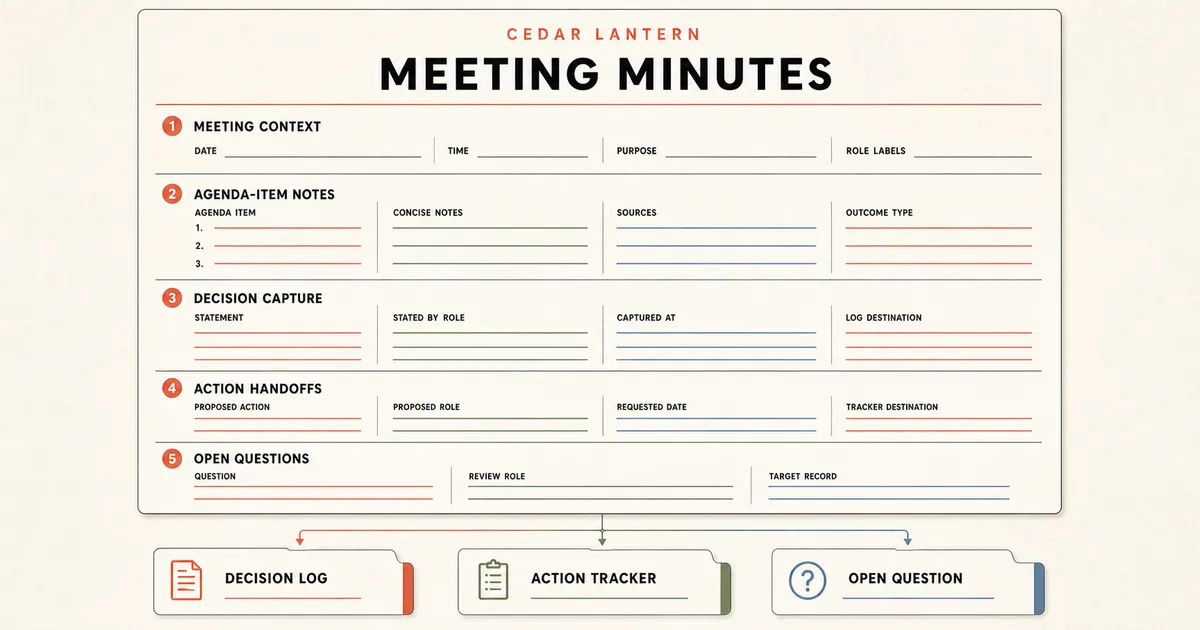
Capture one meeting from agenda to correction window
Prepare the record from the published agenda, write concise summaries during or immediately after the conversation, and move authority and execution into the records that actually own them.
Anchor the record to one meeting and agenda
Assign a stable meeting ID and revision, then record the purpose, date, start, end, time-zone context, recorder role, clarity-review role, and published agenda. Microsoft supports adding agendas and notes before, during, and after a Teams meeting. Google can create meeting notes from a Calendar event with event details and a link back to the event. The pack keeps those relationships explicit without claiming provider integration.
Sources: [minutes-pack], [microsoft-meeting-notes], [google-calendar-notes]
Group concise notes under the agenda items they explain
Preserve the agenda order. Give each item a stable ID, owner role, short outcome label, evidence references, and a bounded summary of the relevant context. Microsoft distinguishes meeting notes from transcripts in recap. The pack rejects transcript claims and dialogue-like speaker lines so a summary cannot quietly become a word-for-word record.
Sources: [minutes-pack], [microsoft-meeting-notes]
Capture role labels without treating them as identity proof
Use role-based labels for facilitator, recorder, participants, and observers, and distinguish present from absent in the captured record. Google warns that Calendar event changes and the linked meeting-notes document do not automatically stay synchronized. Verify the real record with authorized participants; a row in the template does not prove identity or attendance.
Sources: [minutes-pack], [google-calendar-notes]
Route decisions and proposed actions to their real owners
Record the choice stated in the room, when it was captured, and where it should enter the decision log. For proposed work, record the description, proposed role, requested due date, and action-tracker destination. Microsoft explains that a task list can begin in meeting notes while richer execution details live in Planner. The minutes therefore keep authority, acceptance, progress, and completion false.
Sources: [minutes-pack], [microsoft-planner-handoff]
Review capture clarity, distribute, and invite corrections
After the meeting ends, ask the named reviewer to check that summaries and cross-references are clear, not to approve the underlying choices. Record distribution only after that review, name the audience roles, and set a correction window. Use descriptive section headings and labels so readers can understand and navigate the record structure.
Sources: [minutes-pack], [google-calendar-notes], [wcag-headings-labels]
Validate structure without overstating truth
Run the dependency-free validator and mutation tests after adapting the JSON, then check the Markdown and CSV projections. The closed Draft 2020-12 schema rejects unknown fields, while the runtime validator checks IDs, references, chronology, reserved URLs, boundaries, and unsafe text. Passing proves representation consistency only.
Sources: [minutes-pack], [json-schema-2020-12]
What this meeting minutes template owns
Use the pack for the concise operational record of one ordinary team meeting. It owns capture and handoff structure, not formal governance, authority, or execution.
Included
- Stable meeting identity, revision, purpose, timing, agenda link, recorder and clarity-review roles, role-based attendance labels, review, distribution, and correction window
- Five fictional agenda-item summaries with ordered IDs, owner roles, outcome labels, and four evidence references
- One decision stated in the meeting, two proposed action handoffs, and one unresolved question with destinations in separate authorized records
- Blank and completed Markdown, matching fictional JSON, closed Draft 2020-12 schema, three CSV projections, dependency-free validator, seventy-nine mutation and security tests, and deterministic ZIP
Not included
- Statutory, corporate-board, shareholder, committee, legal, regulatory, parliamentary, motion, vote, resolution, quorum, signature, or legal-sufficiency requirements
- Verbatim transcript, recording, speaker attribution proof, consent record, identity verification, or proof that a listed role attended or contributed
- Durable decision context, alternatives, rationale, authority, consequences, review, status, reversal, or supersession, which belong in the decision log
- Action acceptance, assignment authority, changing due dates, execution status, progress, completion, evidence, or reminders, which belong in the action tracker
- Calendar, conferencing, note-taking, transcription, distribution-delivery, notification, task-provider, or AI-summary integration claims
- Proof that the meeting, minutes, decisions, handoffs, or later work were accurate, authorized, delivered, effective, or successful
DOWNLOADABLE RESOURCE
Download the meeting minutes template pack
The ZIP contains the editable template, completed fictional example, machine-readable contract, portable registers, validator, and tests. Adapt it only inside an authorized workspace and keep sensitive content out of public fixtures.
Meeting minutes template pack
A provider-neutral capture pack for agenda-linked operational minutes, decisions stated, proposed action handoffs, open questions, sources, clarity review, distribution, and corrections.
Format: Markdown, JSON, JSON Schema, CSV, and dependency-free Node.js validator/tests in one ZIP
Locally reproduced August 1, 2026. SHA-256: 9e3b37099297ef31abccd9c9336d06a23ebf9009cc57401f18b0fbb51470dbd8
Included
- Blank Markdown template and completed Cedar Lantern weekly operations review with five fictional roles and five agenda-item summaries
- Matching fictional JSON plus agenda-item, decision-and-action-handoff, and source CSV projections
- Closed Draft 2020-12 schema, strict dependency-free validator, seventy-nine mutation and security tests, README, and deterministic allowlisted ZIP
Verification boundary
The ten allowlisted files were rebuilt in multiple time zones, extracted, byte-compared, scanned, and validated with fixed UTC archive metadata. This proves deterministic structure and internal parity, not public availability before deployment, legal sufficiency, record truth, attendance, authority, action execution, delivery, or outcome.
Four operational meeting-minutes formats
Keep the same identity, agenda-item, evidence, handoff, review, and boundary fields while changing the density to fit the ordinary team meeting.
Weekly team operations minutes
Use when: A recurring team review needs a compact record of material changes, decisions stated, proposed follow-up, and unresolved questions.
The completed Cedar Lantern example records five agenda items, one decision capture, two action handoffs, one open question, four sources, and a correction window for a fictional launch rehearsal.
Structure
- Stable meeting context and role labels followed by concise notes in published agenda order
- Separate destinations for a durable decision record, accepted work, and the unresolved review question
Watch for: Do not copy routine status reporting into the minutes or mark a proposed owner as having accepted the work.
Sources: [minutes-pack], [microsoft-meeting-notes], [microsoft-planner-handoff]
Project checkpoint minutes
Use when: A project team reviews evidence and needs a concise snapshot of what changed, what was stated, and what still needs another record.
Use one agenda-item section per checkpoint topic and link the exact source reviewed. Capture only the decision statement or proposed handoff needed to route the result after the meeting.
Structure
- Purpose, timing, project-role labels, agenda-source link, item-level evidence references, and short summaries
- Open questions with review roles and destination records rather than speculative answers inside the minutes
Watch for: The minutes do not replace the project plan, risk register, change approval, decision log, or task tracker.
Sources: [minutes-pack], [google-calendar-notes]
Cross-functional decision-capture minutes
Use when: Several functions compare evidence and a choice is stated during the meeting, but a separate authorized owner maintains the durable decision.
Record the agenda item, concise statement, stated-by role, capture time, evidence sources, and destination URL. Keep authority and lifecycle flags false until the decision log establishes them.
Structure
- Agenda-linked summary and decision statement without dialogue, vote language, or implied approval
- Explicit handoff to a decision log that owns rationale, alternatives, consequences, review, and supersession
Watch for: A decision stated in a meeting is not automatically authorized, approved, durable, or safe to implement.
Sources: [minutes-pack], [json-schema-2020-12]
Accessible distributed meeting notes
Use when: Readers need to scan the record after the meeting and understand where each section, source, and follow-up belongs.
Use descriptive headings for meeting context, agenda-item notes, decisions, action handoffs, open questions, sources, review, and distribution. Preserve a correction window instead of silently rewriting the record.
Structure
- Descriptive section headings and labels that communicate each region’s topic or purpose
- Named distribution audience roles, review time, distribution time, and correction-window end
Watch for: Readable structure does not establish accessibility conformance, successful delivery, or agreement with the contents.
Sources: [minutes-pack], [wcag-headings-labels], [google-calendar-notes]
Decide what belongs in the minutes
Keep the record useful by distinguishing concise meeting capture from formal governance, transcripts, durable decisions, and managed work.
A sentence explains relevant context or an outcome under one agenda item without reproducing dialogue.
Choose: Keep it as a concise agenda-item summary and attach the evidence source IDs that support the capture.
Tradeoff: Readers get less conversational detail, but the record is easier to scan, correct, and separate from a transcript.
The group states a choice that needs authority, rationale, consequences, review, or supersession after the meeting.
Choose: Capture the statement and destination in the minutes, then move the durable record into the decision log.
Tradeoff: The team maintains two linked records, but meeting capture cannot silently become decision authority or lifecycle governance.
A next step has a proposed owner or requested date but no authorized acceptance and maintained execution record.
Choose: Label it an action handoff and route it to the action tracker. Keep acceptance and execution-status flags false in the minutes.
Tradeoff: The minutes avoid a convenient completed-looking checklist, but the real owner and tracker remain authoritative.
The meeting involves board, statutory, legal, regulatory, parliamentary, vote, motion, quorum, signature, or formal-governance requirements.
Choose: Do not adapt this operational pack. Use organization-approved counsel, policy, procedure, and record systems for that meeting type.
Tradeoff: A specialist process takes more preparation, but an ordinary team template cannot create legal sufficiency.
DOWNLOAD THE RECORD
Start with the tested meeting minutes pack
Use the blank Markdown template, completed fictional example, matching JSON, three CSV registers, closed schema, validator, and seventy-nine tests.
Download the template packThe pack validates structure only. Keep real identities, private discussion, authority, decisions, accepted tasks, and execution status in authorized systems.
Prepare the meeting agenda firstUse the agenda to establish purpose, preparation, topic ownership, participation, and timeboxes before capturing minutes.
What this template cannot prove
The validator can inspect the fictional representation and its internal relationships. It cannot observe the meeting, the people, or the organization’s authority systems.
- Cedar Lantern Studio, its roles, meeting, agenda items, evidence, decision, handoffs, question, review, distribution, and reserved URLs are fictional demonstration data.
- A present or absent label does not prove identity, invitation, access, attendance, consent, contribution, or agreement.
- A concise summary cannot prove that it is complete, unbiased, accurate, accepted by participants, or legally sufficient.
- A captured decision does not establish authority, approval, rationale, consequences, implementation permission, review, or supersession.
- An action handoff does not establish acceptance, assignment authority, progress, completion, evidence, or a maintained due date.
- A review and distribution timestamp does not prove approval, delivery, receipt, correction, retention, or meeting effectiveness.
- This ordinary informational article and its download do not grant AI signup credits. Eligibility, if any, belongs to separately qualified commercial entry pages.
Sources and verification record
The same-release pack is the direct source for the fictional example and tests. Current official product guidance supports agenda-linked notes, meeting-note distribution, and the handoff from notes to managed tasks. W3C and JSON Schema support the document and data structure.
[minutes-pack] Playcode:Meeting minutes template pack
Checked August 1, 2026. Supports: The locally reviewed fictional meeting, five role records, five agenda items, one decision capture, two action handoffs, one open question, four sources, clarity review, distribution, correction window, false boundaries, seventy-nine tests, and exact artifact hash. Public availability remains unverified until deployment.
[microsoft-meeting-notes] Microsoft Support:Take meeting notes in Microsoft Teams
Checked August 1, 2026. Supports: Current first-party guidance for adding agendas, notes, and tasks before or during a meeting, viewing and editing notes after it, and treating notes and transcripts as distinct recap surfaces. Product access and synchronization behavior is not generalized to this pack.
[microsoft-planner-handoff] Microsoft Support:Add a task list to meeting notes
Checked August 1, 2026. Supports: Current first-party evidence that task titles, assignees, and due dates can begin in meeting notes while richer task execution details live in Planner. The pack uses that distinction only to support a provider-neutral handoff boundary.
[google-calendar-notes] Google Docs Editors Help:Add meeting notes to Google Calendar events
Checked August 1, 2026. Supports: Current first-party guidance for creating notes from Calendar event details, attaching the document to the event, sharing it with guests, and the warning that event and document changes do not automatically synchronize. No Google integration is claimed.
[wcag-headings-labels] W3C Web Accessibility Initiative:Understanding Success Criterion 2.4.6: Headings and Labels
Checked August 1, 2026. Supports: Current W3C guidance that headings and labels should describe topic or purpose so people can identify and navigate content. It does not prove that this downloadable document conforms to WCAG.
[json-schema-2020-12] JSON Schema:JSON Schema Draft 2020-12
Checked August 1, 2026. Supports: The official Draft 2020-12 specification family and metaschema identifier used by the closed downloadable schema. Schema validation checks representation, not record truth, authority, or legal sufficiency.
Meeting minutes template questions
What should meeting minutes include?
Include a stable meeting ID and revision, purpose, date and timing, agenda link, role-based attendance labels, concise notes under each agenda item, decisions stated, proposed action handoffs, unresolved questions, evidence references, clarity review, distribution time, and correction window. Adapt the fields to your organization’s authorized record policy.
What is the difference between meeting minutes and meeting notes?
Teams often use the terms interchangeably. This template uses meeting minutes for a consistent operational summary tied to agenda items, while still excluding formal board or statutory requirements. If your organization assigns a legal or governance meaning to either term, follow its approved terminology and process instead.
Should meeting minutes be a word-for-word transcript?
No for this operational template. Record concise summaries, decisions stated, handoffs, open questions, and sources. A transcript is a separate record with different consent, accuracy, access, retention, and correction concerns. The included validator rejects transcript claims and dialogue-like speaker lines.
How should decisions appear in meeting minutes?
Capture the choice stated, agenda item, stated-by role, capture time, and decision-log destination. Do not let the minutes imply authority, approval, rationale, review, status, or supersession. The linked decision log should own that durable lifecycle.
How should action items appear in meeting minutes?
Treat them as proposed handoffs: description, agenda item, proposed owner role, requested due date, and action-tracker destination. Ownership acceptance, changing dates, execution status, progress, completion, and evidence belong in the authorized tracker rather than the minutes.
Can this template be used for board or statutory meeting minutes?
No. It deliberately excludes board, statutory, shareholder, committee, motion, vote, quorum, signature, legal, and regulatory requirements. Use organization-approved counsel, policy, procedure, and systems for formal-governance records.
How do I verify the downloadable meeting minutes example?
With Node.js 20 or newer, run the validator against the JSON and run the dependency-free test file. The seventy-nine tests cover exact keys, IDs, references, chronology, outcome handoffs, reserved URLs, unsafe text, distribution, and false boundaries. Passing does not prove the real meeting record is true or authorized.
Does this meeting minutes template grant Playcode AI credits?
No. This is an ordinary informational article with a downloadable resource pack, so it is intentionally AI-credit-ineligible. Any signup-credit eligibility is limited to separately qualified commercial entry pages under the current policy.
PRESS PLAY
Build the workflow behind your meeting records
Describe how your team prepares meetings, captures minutes, routes decisions, accepts work, invites corrections, and controls access. Playcode can build the internal workflow while named humans retain authority.
Build an internal toolThis informational page does not grant AI signup credits. No generated workflow replaces your record policy, access controls, decision authority, legal review, or accountable owners.