QUICK ANSWER
What should a usability testing template include?
A usability testing template should name one research question, the exact interface version, relevant participant criteria, consent and privacy boundaries, realistic non-leading tasks, the moderated or unmoderated script, observation and metric evidence, findings with severity and confidence, recommendations, limitations, and a separate human decision owner. It should never turn task help into unassisted success or claim population proof from a small qualitative round.
A usability test is useful when a specific interface version, realistic participants, believable tasks, and observable evidence stay connected. It becomes unreliable when the facilitator teaches the path, consent is reduced to a checkbox, raw notes are rewritten as findings, or a small study is presented as proof for every user.
This downloadable packet keeps moderated and unmoderated studies explicit while sharing one traceable evidence model. It includes participant criteria, consent and privacy boundaries, tasks, scripts, sessions, observations, local success metrics, findings, recommendations, and a separate decision-owner record. The included example is fictional and uses only pseudonymous participant codes and reserved domains.
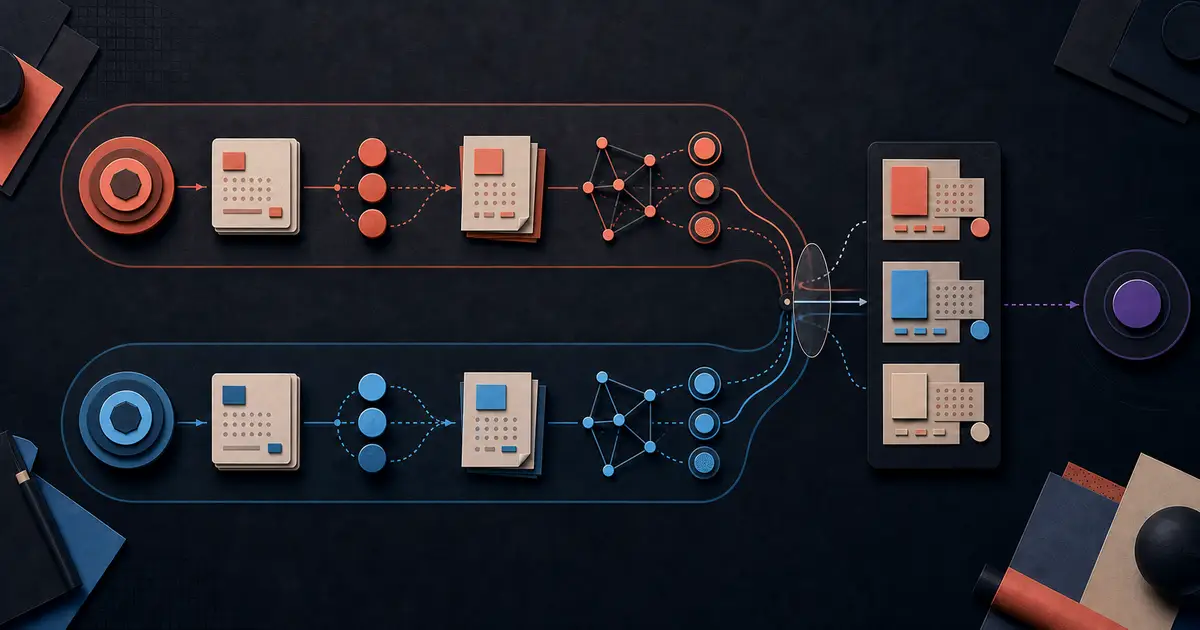
How to run a traceable usability study
Use the packet as a dated study record, not a universal research recipe. Freeze the question and target, branch the script by mode, preserve raw observations, and keep synthesis and human decisions separate.
Freeze one research question and target version
State the decision the study should inform, the specific research question, the prototype or service URL, its version, the study mode, and the named study and decision owners. Changing the interface or question changes the evidence boundary and should open a new version rather than silently extending the old result.
Sources: [usability-pack], [govuk-moderated], [nist-iusr]
Define relevant participant criteria and consent boundaries
Recruit actual or likely users against inclusion, exclusion, balance, experience, situation, and access-method criteria that follow from the question. Explain purpose, activities, recording, observers, use, sharing, retention, withdrawal, and responsible organization through approved materials. Store only a pseudonymous code and safe consent evidence reference in this packet.
Sources: [govuk-participants], [govuk-consent], [doe-ux-templates]
Write believable tasks and branch the script by mode
Give each task a realistic scenario, goal, start state, success signal, metric link, and hint policy without revealing the interface path. A moderator can listen and use neutral prompts; an unmoderated study needs complete written instructions and a support boundary because no facilitator is present to recover ambiguity.
Sources: [usability-pack], [govuk-moderated], [doe-ux-templates]
Capture behavior before interpretation
Record one observation with session, task, time, behavior or statement, assistance level, task outcome, and safe evidence references. Keep task help visible and never count it as clean success. Define local effectiveness, efficiency, or satisfaction measures before analysis and preserve participant-level results instead of manufacturing a population claim.
Sources: [usability-pack], [govuk-analysis], [nist-iusr]
Synthesize evidence into bounded findings
Link every finding back to observations and metric results. Record severity for the usability impact observed in this study and confidence for the strength of the evidence, with a rationale and limitations. Participant self-confidence is a separate measure, and a small qualitative round is not a statistical confidence interval.
Sources: [usability-pack], [govuk-analysis], [w3c-involving-users]
Separate recommendations from the human decision
Researchers propose evidence-linked actions; a named product authority accepts, declines, or leaves them proposed. Date that decision after the sessions, link only accepted recommendations, and state the iteration boundary. Implementation, verification, release acceptance, technical QA, and launch authorization remain separate records.
Sources: [usability-pack], [govuk-analysis]
The usability-testing boundary
This page owns one versioned, evaluative study in which intended users attempt realistic tasks against a specific interface snapshot. Adjacent owners answer different questions and must retain their own evidence and authority.
Included
- Research question, exact target version, moderated or unmoderated mode, study owner, decision owner, and status
- Participant inclusion, exclusion, balance, experience, situation, and access-method criteria without contact data
- Approved-consent evidence references, privacy boundary, recording state, voluntary participation, withdrawal, and data-use notes
- Non-leading scenarios, tasks, success signals, hint policy, moderated prompts, unmoderated instructions, and support boundary
- Pseudonymous sessions, observations, evidence references, assistance level, outcomes, local metrics, findings, severity, confidence, recommendations, limitations, and a human iteration decision
Not included
- Business acceptance criteria, pass or fail release readiness, and stakeholder sign-off; use the user acceptance testing plan owner
- Technical QA strategy, environments, requirements traceability, deterministic test cases, expected results, defects, and run evidence; use the test plan and test case owners
- WCAG conformance evaluation, accessibility audit evidence, or legal accessibility claims; use the website accessibility checklist and qualified review
- Questionnaire-scale self-reported opinions and product sentiment; use the product feedback survey owner
- A method-agnostic research roadmap spanning discovery interviews, field studies, diary studies, surveys, and multiple rounds; use the general user research plan owner
- Participant identity, contact details, signatures, recordings, transcripts, production data, universal consent language, legal advice, statistical significance, release approval, or proof that all users can complete the workflow
DOWNLOADABLE RESOURCE
Download the usability testing template pack
Start with the blank Markdown packet for planning. Use canonical JSON and the closed schema when stable identifiers and reference checks matter. The generated Markdown and CSV files provide readable review and spreadsheet projections from the same fictional source.
Usability testing template pack
A fictional four-session mixed-mode study with participant criteria, consent references, three tasks, two script branches, twelve observations, three local metrics, findings, recommendations, and a separate iteration decision.
Format: Markdown, CSV, JSON, JSON Schema, and dependency-free Node.js validation in one ZIP archive
Locally reproduced August 1, 2026. SHA-256: d1ef839cc7e4805462e1de48fa4e94773b243d2297d54704ed4f85d9d9222874
Included
- Editable blank Markdown study packet plus a generated human-readable fictional example
- Canonical closed-schema JSON with moderated and unmoderated sessions, pseudonymous participant codes, evidence references, metrics, findings, and decisions
- Observation and finding CSV projections with spreadsheet-safe cells and JSON byte-level parity checks
- Closed Draft 2020-12 JSON Schema, dependency-free semantic validator, 44 positive and negative tests, deterministic builder, README, and allowlisted ZIP
Verification boundary
The archive allowlist, deterministic bytes across time zones, clean extraction, closed object shapes, stable IDs, reserved URLs, UTC chronology, participant and metric references, consent states, mode-specific scripts, assistance outcomes, observation-to-finding-to-recommendation traceability, separate decision authority, privacy checks, and CSV parity were checked locally. Public HTTP and content-type verification remain pending deployment.
Three ways to use the packet without blurring evidence
The files support one moderated round, one unmoderated round, or a deliberately mixed packet. Each mode needs an explicit script and evidence boundary, and none turns a small study into universal proof.
Moderated task-based study
Use when: A facilitator needs to observe behavior, hear the participant think aloud, and ask neutral follow-up questions about one interface version.
Use the moderated introduction, disclose observers and recording, confirm the consent evidence reference, present one scenario at a time, and distinguish silence, neutral prompts, and task help in every observation.
Structure
- Specific research question, intended-user criteria, exact target version, and facilitator-owned script
- Timestamped observation records with assistance, outcome, evidence references, and later synthesis
Watch for: The facilitator must not coach, sell, defend, or explain the interface. Task help remains visible and cannot become unassisted success.
Sources: [usability-pack], [govuk-moderated]
Unmoderated study packet
Use when: Participants can complete bounded tasks independently and the written setup can disclose data use, explain support, and recover technical problems without revealing the path.
Use the separate unmoderated introduction, complete task instructions, support boundary, platform-event references, and post-task measure. Do not reuse moderator-only prompts as if someone will be present.
Structure
- Self-contained consent, task, support, recording, withdrawal, and closing language approved for the study
- Platform evidence mapped to pseudonymous sessions, tasks, outcomes, metrics, findings, and limitations
Watch for: Missing context, technical failure, uncontrolled conditions, and platform telemetry can affect interpretation. Record invalid or withdrawn sessions instead of forcing a result.
Sources: [usability-pack], [doe-ux-templates], [nist-iusr]
Study including disabled participants
Use when: The research question needs realistic access methods and participant experience that includes disabled users.
Add relevant access-method criteria and participant needs, make the study materials usable, record observed barriers, and route accessibility claims to a separate WCAG conformance evaluation.
Structure
- Relevant, inclusive recruitment criteria plus approved accommodations and data-minimization boundaries
- Observed task evidence that informs design while remaining separate from conformance scope and audit evidence
Watch for: User evaluation can reveal real barriers but cannot by itself establish accessibility or WCAG conformance, and a small study should not be generalized to all disabled users.
Sources: [govuk-participants], [govuk-consent], [w3c-involving-users]
Decide what the study needs next
Use these checks to protect the evidence chain and route adjacent work. They do not approve a release, select a design automatically, or replace organizational consent and privacy review.
The research question, target build, task, or study mode changed during fieldwork
Choose: Stop combining the evidence, open a new version, freeze the new boundary, and document which sessions belong to each version.
Tradeoff: The sample becomes smaller per version, but findings no longer mix different interfaces or study conditions.
Consent is missing, withdrawn, or does not cover observers, recording, sharing, or retention
Choose: Pause collection or exclude the affected session under the approved process; consult the organization responsible for privacy, ethics, or legal review.
Tradeoff: Evidence may be lost, but the packet does not invent consent or preserve data outside the participant-approved boundary.
A participant required task help or the environment failed
Choose: Record the assistance or invalid state explicitly and keep it separate from unassisted completion and comparable clean timing.
Tradeoff: The metric may remain incomplete, but the study does not turn intervention or technical failure into favorable evidence.
A finding lacks observation or metric-result references
Choose: Return to the raw session records, add reviewable evidence, or remove the unsupported finding from the decision packet.
Tradeoff: Synthesis takes longer, but recommendations remain inspectable instead of relying on memory or authority.
The team needs release sign-off, technical pass or fail evidence, or WCAG conformance
Choose: Hand off to the user acceptance testing plan, technical test plan and test cases, or website accessibility evaluation while linking this study as contextual evidence only.
Tradeoff: Several records remain separate, but each keeps the right question, method, proof standard, and accountable owner.
Turn the next finding into a prototype
Build the smallest testable change with Playcode
Translate one accepted recommendation into a bounded web prototype, preserve the target version, and bring the revised interface back to a new usability round.
Open the AI app builderThe study packet informs iteration; it does not approve a release or prove an outcome.
Keep release sign-off in the user acceptance testing planUAT owns business acceptance and readiness. This page owns observed task behavior and iteration evidence.
What this usability testing template cannot prove
Traceability makes the study reviewable. It cannot make a weak question strong, create informed consent, make participants representative, or turn local observations into universal truth.
- The validator cannot verify consent, participant identity, recruitment quality, truthful notes, source authenticity, observer neutrality, or whether a scenario unintentionally primes behavior.
- Severity and evidence confidence are study judgments. Participant confidence is a separate self-report, and neither field is automatically a statistical confidence interval.
- A small qualitative round can identify problems and inform the next decision, but it does not estimate population prevalence or prove that all users can complete a workflow.
- Including disabled participants can reveal barriers but does not establish WCAG conformance, accessibility certification, or legal compliance.
- A real program still needs approved recruitment and consent materials, secure identity and recording storage, access control, retention and deletion, withdrawal handling, incident response, researcher training, and independent governance.
- This study informs iteration only. UAT sign-off, technical QA, test cases, product-feedback surveys, broader research planning, implementation, verification, release authorization, and outcomes remain separate.
- This ordinary informational article does not grant AI signup credits. Linked commercial pages follow their own current eligibility rules.
Sources and verification record
The same-release fictional pack is the source for its fields, examples, references, and tests. Government and standards sources support the broader study, consent, recruitment, analysis, reporting, and accessibility boundaries.
[usability-pack] Playcode:Usability testing fictional example
Checked August 1, 2026. Supports: The locally reviewed research question, target version, criteria, scripts, pseudonymous sessions, consent references, observations, metrics, findings, recommendations, decision, CSV projections, schema, and deterministic tests. Public availability remains unverified until deployment.
[govuk-moderated] Government Digital Service:Using moderated usability testing
Checked August 1, 2026. Supports: Agreeing research questions and intended users, writing clear and non-leading task goals, using a discussion guide, explaining that the service is being tested, neutral facilitation, observers, recordings, and secure research data handling.
[govuk-participants] Government Digital Service:Finding participants for user research
Checked August 1, 2026. Supports: Recruiting actual or likely users through relevant experience, situation, access-method, inclusion, exclusion, and balance criteria while reducing bias and unnecessary personal-data collection.
[govuk-consent] Government Digital Service:Getting informed consent for user research
Checked August 1, 2026. Supports: Explaining who is responsible, purpose, activities, collected data, use, sharing, observers, recording, voluntary participation, withdrawal, retention, rights, and understandable consent materials. It does not provide universal legal advice.
[govuk-analysis] Government Digital Service:Analyse a research session
Checked August 1, 2026. Supports: Separating session evidence and observations from synthesized findings, then connecting findings to actions and team decisions.
[nist-iusr] National Institute of Standards and Technology:Industry Usability Reporting project
Checked August 1, 2026. Supports: Reporting the tested product and version, goals, participant selection criteria, tasks, study design, interventions, data collection, and numerical results across effectiveness, efficiency, and satisfaction. This pack does not claim CIF or ISO conformance.
[doe-ux-templates] U.S. Department of Energy:User Experience Research Templates and Examples
Checked August 1, 2026. Supports: Using distinct planning, recruitment, consent, facilitation, note-taking, analysis, and final-report artifacts as parts of a complete research workflow.
[w3c-involving-users] World Wide Web Consortium:Involving users in evaluating web accessibility
Checked August 1, 2026. Supports: Including disabled people in evaluation while recognizing that user evaluation alone cannot determine accessibility conformance and small studies cannot be generalized to all users.
Usability testing template FAQ
What is the difference between moderated and unmoderated usability testing?
A moderated study has a facilitator who introduces the session, observes, and can use neutral prompts. An unmoderated study delivers written tasks without a live facilitator. Use separate scripts and record the mode for every session because support, context, and evidence conditions differ.
How is usability testing different from user acceptance testing?
Usability testing observes intended users attempting realistic tasks to identify problems and inform iteration. User acceptance testing checks accepted business criteria and supports a readiness or sign-off decision for an exact release. A usability finding is not a UAT pass, failure, or approval.
Is a usability task the same as a software test case?
No. A usability task is a believable goal that avoids revealing the interface path so researchers can observe behavior. A software test case specifies preconditions, inputs, expected results, execution evidence, and pass or fail logic for technical quality assurance.
Does testing with disabled participants prove WCAG conformance?
No. It can reveal important real-world barriers and should inform design, but user evaluation alone cannot establish WCAG conformance. Keep a separate, versioned accessibility evaluation with the required technical and human evidence.
Can this template replace a product feedback survey?
No. A product feedback survey primarily collects self-reported attitudes and opinions through questionnaire responses. Usability testing primarily observes behavior during realistic tasks, although it may include a clearly labeled post-task rating.
How many participants does a usability study need?
There is no universal number. Choose participants and rounds based on the research question, user variation, study mode, risk, and the next decision. Report the exact numerator and denominator for this study, and do not describe a small qualitative sample as population-level statistical proof.
Prototype from evidence
Turn an accepted recommendation into something users can try
Use Playcode to create the next bounded interface version, then run a new study against that exact build instead of mixing evidence across revisions.
Build an app with AIThis ordinary informational article does not grant AI signup credits.