A missing search result is not one problem. Google may not have discovered the URL, may have discovered but not crawled it, may have crawled but not indexed it, or may have indexed it without showing it for the query you tried. Each state needs different evidence and a different fix.
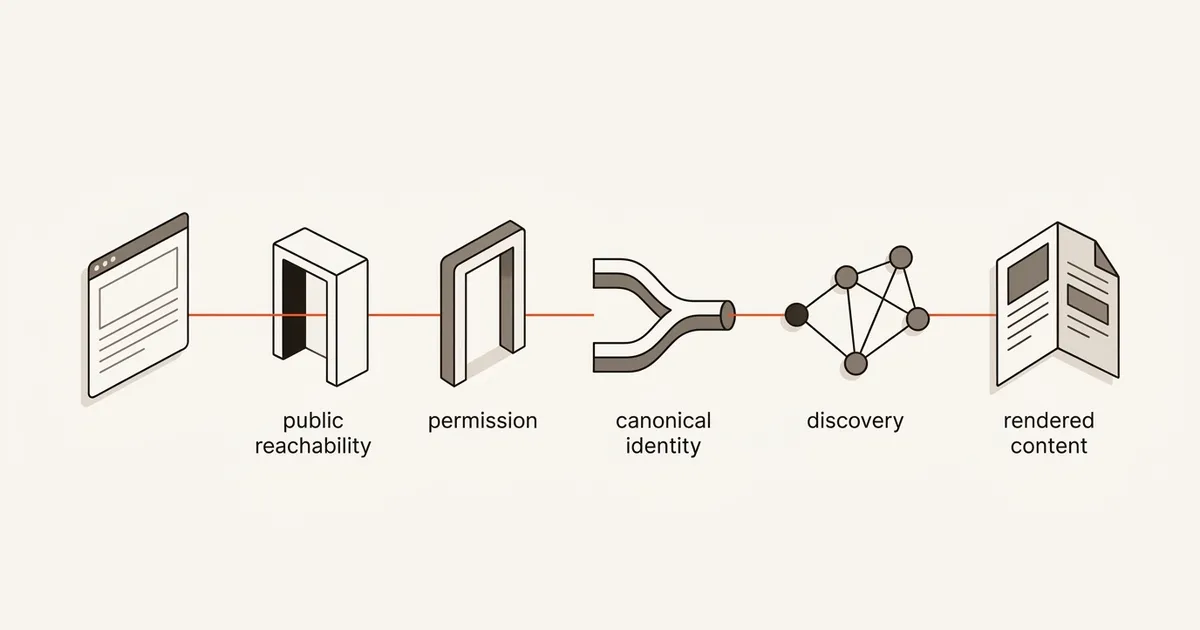
This guide gives you a public-only diagnostic that works without a Google account, then an optional Search Console path for property owners. You will check the exact production URL, access rules, canonical identity, internal discovery, rendered content, and sitewide warnings before asking Google to crawl the page again.
QUICK ANSWER
Why is my website not showing up on Google?
First confirm that the exact public URL returns a normal page without login, 404, or server errors. Then check noindex, robots.txt, redirects, canonical tags, crawlable internal links, sitemap consistency, and rendered content. If you have Search Console access, compare the indexed and live URL tests, then review Page Indexing, Manual Actions, and Security Issues. Fix the conflict, publish, request one recrawl, and monitor.
Start with the exact production URL and a dated observation
Do not debug an editor preview, a vague domain name, or a remembered search result. Capture a small evidence packet so every check refers to the same URL and moment. Promotion cannot repair a blocked or conflicting canonical, but after eligibility is sound you can use the website promotion guide to plan measured acquisition experiments.
- The exact URL you want Google to show: Copy the final HTTPS production URL from a private browser window. Preserve its path, capitalization, trailing slash, query string, and redirects. Decide whether this exact URL is the preferred version or whether another URL should be canonical.
- Access to the current public deployment: You need permission to publish or inspect the live page, headers, links, and metadata. If the site is on Playcode, confirm the current public release with Publish a website and confirm domain setup with . An editor preview can work while the public route still returns a login, old release, redirect, 404, or server error.
- The approximate publish or change date: Record when the URL first became public and when its redirect, robots, noindex, canonical, internal link, sitemap, or rendered content last changed. Google reports and search results can lag behind a deployment, so a timestamp prevents you from comparing different states.
- Optional verified Search Console property: Search Console is not required for the public checks. If you control a verified property, URL Inspection can show Google-indexed and live-test evidence for the exact URL, while Page Indexing, Manual Actions, and Security Issues can reveal broader problems. The data can lag and the live test does not predict the selected canonical or guarantee indexing.
Use the public path first, then add private Google evidence if available
The two paths answer different questions. Public checks show what any crawler can fetch now. Search Console can add Google-specific evidence for a verified property, but it does not replace inspecting the deployed URL.
| Approach | Best for | Tradeoff |
|---|---|---|
| Public-only fast path | Anyone who can open the production URL and inspect its response, source, rendered page, links, robots rules, canonical tag, and sitemap. | It can expose most deployment and eligibility conflicts without an account, but it cannot reveal the Google-selected canonical, the indexed snapshot, a Google-specific exclusion reason, or whether the URL is in the index. |
| Search Console-assisted path | A verified property owner who needs URL Inspection evidence plus sitewide Page Indexing, Manual Actions, and Security Issues context. | It provides Google-specific evidence, but access is restricted, report data can lag, live testing is not a ranking or indexing prediction, and the tool still cannot promise inclusion or timing. |
Recommended:Run the public path first because it catches errors you control and creates a reproducible baseline. Then use Search Console, if available, to compare Google-indexed and live evidence and to check sitewide warnings. Keep conclusions separate: technically eligible, discovered, crawled, indexed, and visible for a query are not synonyms.
Diagnose why a website is not showing up on Google
Classify the missing-result state, inspect the exact public URL, align indexing and canonical signals, test discovery and rendering, add optional Search Console evidence, then publish and monitor one controlled fix.
STEP 01
Classify what “not showing up” means
Separate discovery, crawling, indexing, and query visibility before changing the page.
Write the exact URL, exact query, country, language, device, date, and whether the page ever appeared. A new URL that has never been found is a different case from an indexed URL that stopped appearing after a migration.
Google explains Search as crawl, index, and serve stages. Use these as separate states: not discovered, discovered but not crawled, crawled but not indexed, or indexed but not visible for this query. Ranking work belongs only to the last state.
A site: query is only a rough discovery check. Google says search operators are limited by retrieval and indexing limits, so an absent or incomplete result is not proof that a URL is unindexed. If you own the property, URL Inspection is the more precise Google-specific source.
Expected result: The diagnostic record names one exact URL and one evidence state instead of the generic conclusion “Google cannot find my website.”
Verify it: A second person can tell whether the next check concerns discovery, crawling, indexing, or query visibility without repeating the search.
STEP 02
Confirm the final URL is publicly reachable
Test the production route without your editor session and follow every redirect to the final response.
Open the exact URL in a private browser window. It must not depend on your login, local storage, preview token, VPN, cookie, or a link that only exists inside an editor. Check on another network or with a simple HTTP client when possible.
Record the redirect chain, final URL, and final HTTP status. The intended page should normally finish at a stable public 200 response. Fix redirect loops, login walls, DNS or TLS failures, 404/410 responses, and intermittent 5xx errors before investigating content quality.
Google lists public availability and successful HTTP responses among common access requirements. If a Playcode single-page route works only after client navigation, review SPA mode and verify that direct requests to the exact path return the intended application shell rather than a hosting 404.
curl -sSIL https://example.com/exact-page
# Record every HTTP status and Location header.
# Then inspect the final response without authentication:
curl -sSI https://example.com/exact-page
Expected result: The exact preferred public URL resolves consistently without authentication and returns the intended page with a successful final response.
Verify it: Repeat the request in a private browser and an HTTP client. Confirm both reach the same final HTTPS URL and neither receives a login, 4xx, 5xx, or different page.
STEP 03
Check robots rules and every noindex source
Distinguish permission to crawl from permission to index, including response headers.
Inspect robots.txt for the final host and path. Google describes robots.txt as a crawler access rule, not access control, a privacy mechanism, or a guaranteed removal method. A blocked URL can still be known from links, and blocking crawl can prevent Google from seeing a page-level noindex directive.
Inspect the final HTML for a robots meta tag and the final response headers for X-Robots-Tag. Google documents noindex in either location. Check templates, reverse proxies, CDNs, preview environments, framework middleware, and deployment headers because the editor UI may not show the directive actually served.
Choose an intentional state. A public production page intended for Search should not inherit staging noindex rules. A private, confidential, or authenticated page should use real authorization rather than relying on robots.txt. Never expose private data merely to make it crawlable.
Expected result: The diagnostic identifies the effective robots.txt rule, robots meta value, and X-Robots-Tag for the final response, and those signals match the intended environment.
Verify it: Fetch robots.txt and the exact final URL outside the editor. Search the response headers and HTML independently for noindex, none, or conflicting robot directives.
STEP 04
Align redirects, canonical, links, and sitemap
Make every discovery and identity signal point to one preferred HTTPS URL.
Inspect the rendered canonical link and verify it resolves to the preferred public URL. Google treats redirects, rel=canonical, and sitemap inclusion as canonicalization signals, not commands. A self-referencing canonical can clarify identity, while a canonical to another page tells Google that the other URL is preferred.
Add at least one contextual, crawlable internal link using a real <a href> to the preferred URL. Google says links are generally crawlable when they are anchor elements with href attributes. A JavaScript click handler, inaccessible menu state, or orphan sitemap entry is weaker discovery evidence than a normal relevant link.
Include only the preferred canonical URL in the sitemap and keep it current. Google states that sitemaps help discovery but do not guarantee crawling or indexing. Remove old protocol, hostname, duplicate parameter, and redirected variants rather than asking search systems to reconcile contradictory choices.
Expected result: Redirects, canonical tag, contextual internal links, and sitemap all identify the same preferred public HTTPS URL.
Verify it: Create a four-row record for redirect destination, canonical href, inbound anchor href, and sitemap loc. All four values should normalize to the intended URL with no redirecting variant left in the sitemap.
STEP 05
Compare source, rendered content, and resource access
Verify that the meaningful page survives direct loading and JavaScript rendering.
Load the exact URL directly with cache disabled. Compare the initial HTML, the rendered DOM, and the visible page. Confirm that the unique title, primary heading, main explanatory copy, canonical tag, and internal links belong to this route rather than a generic application shell.
Google can process JavaScript, but its documentation describes crawling, rendering, and indexing as separate phases. Rendering can be queued, and blocked scripts, styles, API calls, consent gates, client errors, or unsupported navigation can leave less useful content than a logged-in browser shows.
Use developer tools to reload from a clean session. Record failed resources, console errors, long-running requests, content that appears only after interaction, and differences between mobile and desktop. Fix required resource access and direct-route errors before adding more keywords.
Expected result: A clean direct request produces route-specific, readable content and crawlable navigation without requiring a click, account, or failed private API.
Verify it: Disable cache, reload the exact URL, inspect source and rendered DOM, and confirm the unique heading, meaningful copy, canonical, and internal anchor remain available while required resources return successfully.
STEP 06
Add Search Console evidence if you own the property
Use URL-specific and sitewide reports without treating a live test as a promise.
Inspect the exact canonical candidate with the URL Inspection tool. Compare the indexed result with the live test, including crawl permission, page fetch, indexing permission, user-declared canonical, and Google-selected canonical when available. The live test checks the current retrievable version; it does not prove the URL is indexed or predict the selected canonical.
Review the Page Indexing report for patterns affecting groups of URLs. Then check Manual Actions and Security Issues when visibility loss is sitewide, sudden, or accompanied by warnings. A clean URL test does not rule out a property-level action or compromised content.
Do not paste Search Console credentials, OAuth tokens, account identifiers, or unredacted private screenshots into an AI prompt, support ticket, or shared document. Record only the minimum URL state, reason, date, and redacted evidence needed for diagnosis.
Expected result: The record separates Google-indexed evidence, current live-test evidence, sitewide report patterns, and property warnings without converting any one result into a guarantee.
Verify it: Confirm the inspected URL matches the preferred production URL exactly, note the inspection date, and write separate conclusions for indexed state, live eligibility, canonical selection, and sitewide warnings.
STEP 07
Publish one coherent fix, request one recrawl, and monitor
Remove conflicting signals, deploy, verify the live response, and allow the recrawl workflow to run.
Fix the earliest evidence-backed conflict instead of changing the URL, title, content, canonical, sitemap, and navigation all at once. Publish the production release, then repeat the public checks against the final response. Keep the before and after evidence with deployment time.
For a small number of URLs, Google documents requesting indexing through URL Inspection; for many URLs, submit or update a sitemap. Google says recrawling can take from days to weeks, repeated requests do not make it faster, and a request does not guarantee inclusion.
If the page becomes indexed but still does not appear for the intended query, move to relevance and quality evidence. Google recommends people-first, helpful content and publishes spam policies. Do not repeat keywords, generate doorway variations, or create unsupported claims in an attempt to force visibility.
Expected result: The deployed page has aligned public eligibility signals, one dated recrawl action if appropriate, and a monitoring record. This is not a claim that Google indexed or ranked it.
Verify it: After deployment, repeat the exact URL, status, robots, noindex, canonical, inbound link, sitemap, and rendering checks. Reinspect later at a recorded interval rather than submitting repeated requests.
Test the diagnosis without confusing eligibility with indexing
On 2026-07-19, we exercised the public checklist against a controlled pair. https://playcode.io/ai-seo returned 200, declared its production canonical, appeared in the production sitemap, and had a crawlable homepage link. https://playcode.cc/ai-seo returned 200 with X-Robots-Tag: noindex, nofollow and the production canonical. These observations prove only the served signals, not either URL's Google index state.
| Test | Scenario | Expected result |
|---|---|---|
| happy path | The intended production URL returns 200, is publicly readable, has no noindex directive, identifies itself as canonical, has a crawlable inbound link, appears as the same preferred URL in the sitemap, and renders meaningful content. | Record “eligibility signals aligned” and, if you own the property, add URL Inspection evidence. Do not record “indexed” until Google-specific evidence supports it, and do not record “ranking fixed.” |
| invalid input | The supplied URL is an editor preview, authenticated route, staging hostname, redirecting duplicate, 404, 5xx response, or a page with noindex or a canonical pointing elsewhere. | Stop the search diagnosis and correct the input or intentional deployment signal. Never remove privacy or access controls merely to pass the checklist. |
| retry | A coherent fix is live and one recrawl request or sitemap update has already been submitted, but the search result has not changed immediately. | Verify that the live response remains correct, preserve the submission date, and wait for a later inspection. Do not send repeated requests because Google says they do not accelerate recrawling. |
| production smoke | After every deployment, request the exact production URL from a clean session and recheck status, redirect destination, headers, meta robots, canonical, inbound link, sitemap, and rendered route content. | The observed signals still match the intended public state. If any signal regresses, roll back or correct that release before requesting another crawl. |
Common failure patterns and what they actually mean
The visible symptom is often one layer away from the cause. Diagnose the final public response and the preferred URL as a system, not as isolated metadata fields.
| Symptom | Likely cause | Check | Fix |
|---|---|---|---|
| The page works in the editor but a private browser gets a login, 404, or 5xx. | You tested an authenticated preview, unpublished release, missing direct route, failed deployment, or unstable server instead of the public production URL. | Follow redirects from a clean session, record the final status and body, and compare the deployed route with the editor URL. | Publish the correct release, repair the direct route or server, and retest the exact public URL without authentication. |
| robots.txt allows the path, but the page is still excluded from indexing. | The final HTML or response header contains noindex, the canonical points elsewhere, or another indexing decision applies. robots.txt permission alone is not an indexing instruction. | Inspect the final response headers, robots meta tag, canonical, and optional URL Inspection result rather than reading robots.txt alone. | Align the page-level and header directives with the intended environment, then redeploy and verify the final response. |
| The URL is in the sitemap but appears undiscovered or receives little crawl attention. | The page is orphaned, the sitemap contains a redirecting or noncanonical variant, or the site provides weak navigation context. Sitemap submission is a hint, not a guarantee. | Find crawlable internal anchors to the exact preferred URL and compare each anchor, sitemap loc, redirect destination, and canonical. | Add relevant contextual links and keep only the preferred canonical URL in the current sitemap. |
| The preferred page is public, but Google reports or serves another URL as canonical. | Redirects, canonical tags, duplicate content, internal links, or sitemap entries disagree about which URL represents the content. | Map every duplicate and compare declared canonical, redirect targets, internal anchor destinations, sitemap URLs, and Search Console canonical evidence if available. | Choose one preferred URL and align strong signals. Remember that rel=canonical is a signal, so the final choice remains Google's. |
| The browser shows content, but source or a clean render contains only a shell or failed loading state. | Important content depends on blocked resources, private APIs, client errors, interaction, storage, or navigation from another route. | Reload the exact path with cache disabled, inspect initial and rendered DOM, and record failed scripts, API calls, and console errors. | Make route-specific content and navigation available on direct load and ensure required public resources can be fetched reliably. |
| Many pages lose visibility suddenly even though one inspected URL looks technically valid. | The problem may be sitewide, including a template deployment, domain change, Manual Action, Security Issue, or widespread canonical or robots regression. | Compare affected URL groups and dates, review Page Indexing patterns, and check Manual Actions and Security Issues in a verified property. | Address the sitewide root cause, preserve evidence, and verify representative URLs before rolling the repair across the site. |
Operate the page as a dated evidence trail
Deploy
Deploy one evidence-backed change at a time when practical. Immediately verify the public URL outside the editor, then record the deployment time, response status, robots and noindex state, canonical, internal link, sitemap entry, and rendered result.
Treat dev, preview, and staging noindex headers as environment controls. Confirm that production does not inherit them, and confirm that nonproduction does not accidentally become an indexable duplicate.
Monitor
Recheck the public smoke test after routing, domain, framework, proxy, template, or navigation changes. Search Console can add URL and sitewide evidence for a verified owner, but Playcode does not currently connect to Search Console or monitor indexation automatically.
Track separately: public eligibility, Google crawl date, Google indexed state, selected canonical, impressions, and query position. A movement in one metric does not prove movement in the others.
Recover
If a release adds noindex, changes the canonical, removes internal discovery, or breaks direct rendering, restore the last known-good public signals and verify them before requesting a recrawl.
If a private or staging page was exposed, restore access control first. Robots directives are not a privacy boundary. Remove sensitive content from public access and follow the appropriate removal and security process rather than relying on a crawl rule.
Protect access and diagnostic evidence
Search visibility work should never weaken authentication or expose account data. Share only the evidence required to reproduce the public behavior.
- Never paste Search Console passwords, session cookies, OAuth tokens, verification files, account identifiers, or private property access into an AI prompt, public issue, or shared screenshot.
- Redact property names, account details, email addresses, query data, and URLs that reveal private paths before sharing Search Console evidence outside the authorized team.
- Do not make a confidential, paid, personal, or staging page public just to make a crawl test pass. Use real authentication and authorization for private material.
- Do not treat robots.txt as access control, privacy protection, or guaranteed removal. A URL can be discovered from links even when crawling is blocked.
- Inspect deployed headers as well as HTML. A CDN, proxy, framework, or preview environment can add X-Robots-Tag without changing the page source.
- If Search Console reports a Security Issue or you find injected content, preserve evidence, restrict access, rotate affected credentials, repair the compromise, and follow the review process before resuming ordinary SEO changes.
Google indexing questions
How long can Google take to show a new or changed page?
Google says recrawling can take from days to weeks. That range is not a deadline or promise. First verify that the final public URL is eligible and internally discoverable, submit one appropriate request or sitemap update, record the date, and monitor later rather than changing signals repeatedly.
Does putting a URL in a sitemap guarantee Google will index it?
No. Google describes a sitemap as a discovery hint and says it does not guarantee crawling or indexing. Keep the sitemap consistent with the preferred canonical URL and support it with useful crawlable internal links, a successful public response, and meaningful content.
Can robots.txt keep a page out of Google?
Not reliably. robots.txt controls crawler access; it is not access control or a guaranteed removal method. A blocked URL can still be known from links, and blocking crawl can prevent Google from seeing a noindex directive. Protect private pages with authentication and authorization.
What is the difference between indexed and ranking?
Indexed means Google has stored a page as a candidate for Search. Ranking or query visibility means an indexed page is selected and positioned for a particular query, context, language, location, and time. A page can be indexed without appearing for the phrase you search.
Is Google Search Console required for this diagnosis?
No. Anyone can inspect public status, redirects, headers, robots.txt, robots meta, canonical, internal links, sitemap consistency, and rendered content. A verified Search Console property adds Google-specific indexed, live, canonical, sitewide, manual-action, and security evidence that public checks cannot provide.
Can Google ignore my rel=canonical tag?
Yes. Google documents rel=canonical as a signal rather than a rule. Redirects, sitemap entries, internal links, duplicates, and other signals can influence the selected canonical. Align all of them on one preferred URL and use URL Inspection for Google-specific evidence when available.
Should I request indexing repeatedly until the page appears?
No. Google says repeated recrawl requests do not make crawling faster. Fix and verify the public signals, request once through URL Inspection for a small set of URLs or update the sitemap for many URLs, record the date, and inspect again later.
Improve the page after the technical diagnosis
Research and improve SEO with Playcode AI
Use Playcode AI SEO for on-demand keyword research, competitor and backlink research, live SERP checks, PageSpeed and Lighthouse analysis, and metadata or content edits. It does not connect to Search Console, request indexing, read private coverage data, or monitor Google indexation automatically.
Explore AI SEOGoogle decides crawling, indexing, canonical selection, and ranking. No tool can guarantee inclusion or a position.