A website is ready to launch when the people responsible for content, visitor journeys, search controls, access, providers, domain changes, monitoring, and rollback can prove their part works. A polished preview is useful, but it does not prove that a form delivers, a retired URL redirects, consent survives navigation, or the previous release can be restored.
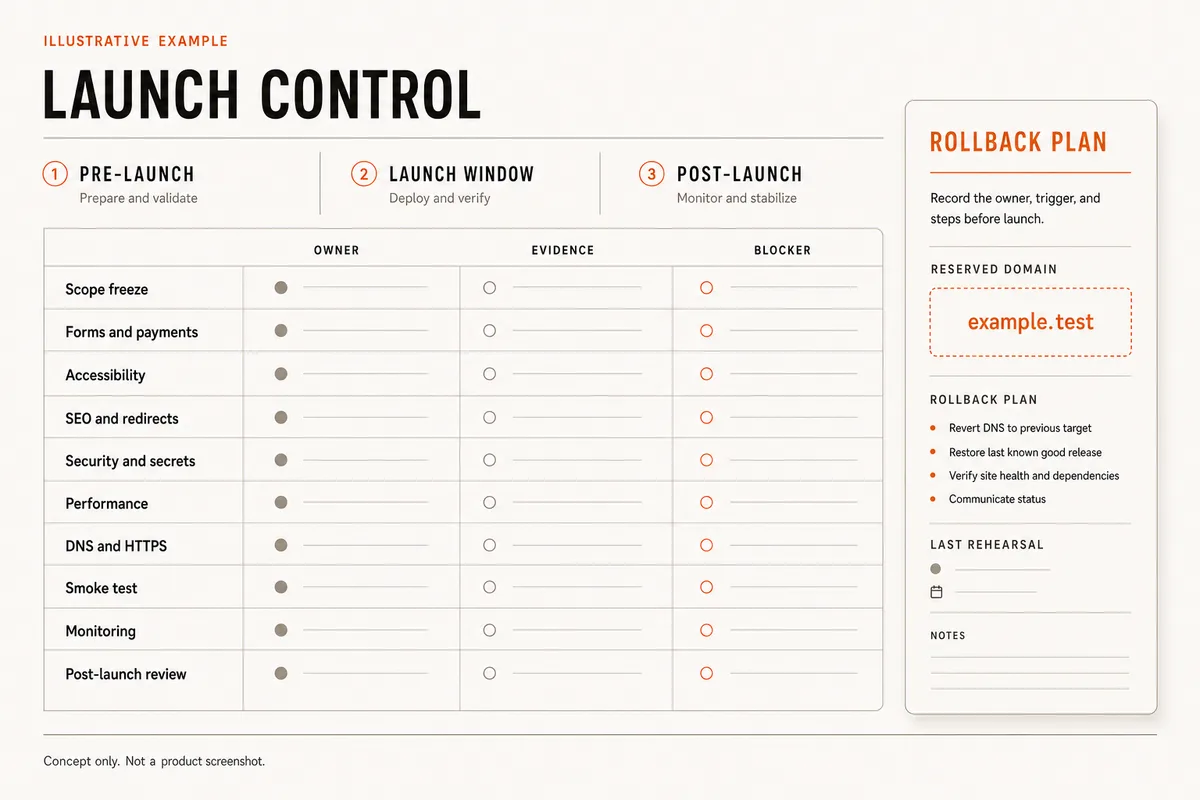
This checklist turns launch into a supervised release with three phases: pre-launch, the launch window, and post-launch stabilization. Every check has an owner, evidence, a verification method, and a failure rule. Copy the worksheet, scale it to the site risk, and do not open traffic while a launch blocker is unresolved.
QUICK ANSWER
What should a website launch checklist include?
Include a frozen release scope, approved content, tested visitor journeys, responsive and keyboard checks, metadata and crawl controls, redirects, HTTPS, consent and analytics, performance evidence, least-privilege access, backups, rollback, DNS ownership, production smoke tests, monitoring, and a post-launch review. Use the website audit template to record evidence, ownership, fixes, and retests. Give every launch check a pass condition and a failure that blocks launch.
Prepare the release record before the launch window
Create one release record that names the exact candidate, the decisions already approved, the evidence location, and the person allowed to launch or stop. Include the consent, evidence, and retirement status for every testimonial on the website. Pair the technical release checks with a user acceptance testing plan that assigns business scenarios and sign-off. If the team cannot identify the release, it cannot safely compare a failure with the last known good state.
- One immutable release candidate: Record the checkpoint, commit, build, or deployment identifier. Stop feature changes while it is under final review. Any code, content, environment, redirect, or provider change creates a new candidate and invalidates affected evidence.
- Named launch authority and owners: Assign one person who can approve, pause, or roll back. Name separate owners for content, visitor journeys, deployment, DNS, search controls, analytics and consent, privacy, providers, monitoring, and communication. Avoid shared ownership with no accountable person.
- Critical-journey inventory: List the few outcomes that justify the website: contact, quote, booking request, checkout, signup, download, account access, or another durable result. Include the destination record or provider event and the failure path, not only the visible button.
- URL and dependency inventory: Export current public URLs, redirects, canonical targets, indexed pages, important inbound links, forms, tags, scripts, fonts, storage, payment or booking providers, email delivery, maps, and embeds. Mark anything retired, replaced, or intentionally unchanged.
- Recovery evidence: Identify the last known good release, the records and files that need a separate backup, the rollback trigger, the person with access, and the smoke test that proves recovery. A backup that has never been restored is an assumption, not launch evidence.
Credentials and access
| Credential | Minimum access | Storage and rotation |
|---|---|---|
| Deployment access Named account that can publish and restore the website | Grant only the project and environment permissions needed for release and rollback. | Keep passwords, recovery codes, and deployment tokens in an approved password manager or secret store, never in the checklist, source, screenshot, or browser URL. Review collaborators before launch and document how an unavailable or compromised owner is replaced. |
| Domain and DNS access Registrar or authoritative DNS account with multi-factor authentication | Use a named role limited to the affected zone when the provider supports it. | Protect account recovery separately from the deployment account and record renewal ownership without copying credentials. Audit access and recovery contacts after the launch window and whenever ownership changes. |
| Production service credentials Analytics, email, booking, payment, storage, API, webhook, or monitoring secrets | Use production-scoped, least-privilege credentials for the exact operation and environment. | Keep secrets server-side or in the provider secret store. Public identifiers may appear in browser code only when the provider explicitly designs them as public. Record the owner, expiry or review date, revocation path, and a safe rotation test. |
Choose a launch process that matches the blast radius
A five-page information site and an account-based application do not need the same ceremony. Use the lightest release process that still catches the failures the site can create.
| Approach | Best for | Tradeoff |
|---|---|---|
| Single-owner release | A small information site with no private records, payments, bookings, or complex migration and one accountable operator. | Fast and clear, but the owner must still preserve a known-good release, test the final domain, and arrange backup access. |
| Functional sign-off matrix | A business site with forms, analytics, multiple content owners, external services, paid traffic, or meaningful search equity. | Better evidence and accountability, but it needs a cutoff time and one launch authority so sign-off does not become endless consensus. |
| Staged or progressive release | A migrated site, authenticated workflow, transaction path, large audience, risky provider change, or release with hard-to-reverse data effects. | Reduces exposure and improves rollback evidence, but requires separate environments, traffic control, monitoring, and a rehearsed data strategy. |
Recommended:Use a single-owner release only when the site is genuinely low risk. Add functional owners when one visitor action crosses a server or provider boundary. Use staged traffic or a controlled cutover when a failure can lose records, money, access, search equity, or a large amount of traffic.
Website launch checklist: pre-launch, launch window, and post-launch
Create the release record, prove the candidate, open traffic under supervision, and keep the previous state recoverable until post-launch evidence is stable.
STEP 01
Pre-launch: create the owner, evidence, and blocker matrix
Turn a list of intentions into one copyable release record that can stop the launch when proof is missing.
For every row, record one accountable owner, a link or identifier for the evidence, the exact pass condition, and the failure disposition. “Looks good” is not evidence; a named release, screenshot, response code, test record, provider event, or restore log is.
Classify each failure as launch blocker, accepted risk with a named approver, or deferred item outside the release. A blocker remains open until the same candidate is retested. Do not silently convert a failed check into a post-launch task because the window has started.
Record the decision time, launch authority, last known good release, rollback trigger, communication path, and review time. Keep sensitive evidence in its proper system and link a redacted reference from the checklist.
RELEASE
Candidate:
Launch authority:
Window:
Last known good release:
Rollback trigger:
Evidence folder:

PRE-LAUNCH
- [ ] Scope and content freeze | Owner: | Evidence: | Pass: approved inventory | Block: unresolved required fact or untracked change
- [ ] Rights and policy review | Owner: | Evidence: | Pass: approved sources and notices | Block: unlicensed asset or missing required policy
- [ ] Links and critical journeys | Owner: | Evidence: | Pass: recorded end-to-end results | Block: broken primary action or false success
- [ ] Responsive and accessibility | Owner: | Evidence: | Pass: keyboard/mobile matrix | Block: unreachable content, action, or error
- [ ] Metadata, canonical, robots, sitemap | Owner: | Evidence: | Pass: URL audit | Block: conflicting owner or unintended noindex
- [ ] Redirect map | Owner: | Evidence: | Pass: every retired URL reaches the closest replacement | Block: loop, chain, wrong target, or lost query path
- [ ] Analytics and consent | Owner: | Evidence: | Pass: expected events under each consent state | Block: prohibited tag behavior or missing critical event
- [ ] Privacy, security, and secrets | Owner: | Evidence: | Pass: least privilege and no exposed secret | Block: public secret, unauthorized data, or open admin path
- [ ] Performance and assets | Owner: | Evidence: | Pass: production-like lab run and budget | Block: agreed critical budget exceeded
- [ ] Backup and rollback rehearsal | Owner: | Evidence: | Pass: known-good restore and smoke | Block: no viable recovery path

LAUNCH WINDOW
- [ ] Publish exact candidate | Owner: | Evidence: | Pass: release ID matches | Block: different build or environment
- [ ] DNS and HTTPS | Owner: | Evidence: | Pass: canonical host and valid secure assets | Block: wrong origin, certificate, or mixed content
- [ ] Production smoke | Owner: | Evidence: | Pass: critical journeys and SEO controls | Block: visitor-impacting failure
- [ ] Monitoring and alert ownership | Owner: | Evidence: | Pass: signals visible and routed | Block: release cannot be observed

POST-LAUNCH
- [ ] Stabilization review | Owner: | Evidence: | Pass: errors, outcomes, crawl, and provider health reviewed | Block: unresolved regression
- [ ] Old origin and temporary access cleanup | Owner: | Evidence: | Pass: traffic drained and access removed safely | Block: active dependency or recovery still needed
- [ ] Retrospective and next review | Owner: | Evidence: | Pass: decisions and follow-ups recorded | Block: none; schedule and own follow-ups
Expected result: The team has one copyable launch record with an immutable candidate, owners, evidence, pass conditions, blockers, rollback authority, and a dated decision window.
Verify it: Choose three rows at random. A person outside the build should be able to locate the evidence, reproduce the check, name who can resolve a failure, and explain whether it blocks launch.
STEP 02
Pre-launch: freeze content, rights, URLs, and policies
Approve what the public will read and which URLs will own it before technical sign-off begins.
Review names, contact details, prices, locations, hours, dates, policies, disclaimers, testimonials, claims, image alternatives, and the right to publish every logo, photograph, quote, and customer example. Search for placeholders and invented proof in source and rendered pages.
Give every public page a purpose, descriptive path, title, H1, summary, canonical owner, internal entry path, and next action. Mark pages public and indexable, public but noindex, authenticated, redirected, or intentionally gone. Authentication protects private material; a hidden link or robots rule does not.
Google explains that robots.txt manages crawler access rather than reliable deindexing or privacy. Keep a noindex page crawlable so the directive can be read, and use real access control for private content.
Expected result: Every launch page and retired URL has an approved owner, content source, publication state, internal path, and policy decision with no unresolved required facts or rights questions.
Verify it: Export or crawl the candidate and reconcile it with the approved inventory. Search for placeholder patterns, compare contact and policy facts with their source, and have the content owner sign the exact candidate.
STEP 03
Pre-launch: prove links, forms, payments, bookings, and provider outcomes
Test the durable result behind each primary action, including validation, duplicates, timeouts, and provider refusal.
Check navigation, calls, email links, maps, downloads, external destinations, and not-found behavior. For forms, use visible programmatic labels, instructions, field-level errors, server validation, bounded input, an accountable destination, and a retention rule. The W3C
accessibility development tips cover labels, semantic structure, reading order, understandable errors, responsive layouts, and keyboard operation. They are a practical starting point, not an accessibility certification.
For payments, bookings, email, storage, or another provider, distinguish a request from provider acceptance. Exercise approved, rejected, delayed, duplicate, and webhook or callback paths. Match the browser result with the server record and provider event before declaring success.
Use labeled, non-sensitive test data and document cleanup. Preserve safe visitor input after a recoverable error. Do not place form contents, secrets, card data, or unnecessary personal data in routine logs or screenshots.
Expected result: Every primary action reaches its intended record or provider result, rejects invalid or unauthorized requests, handles retry according to policy, and gives the visitor an accurate success or recovery state.
Verify it: Complete one valid case, one invalid server-side case, one duplicate, and one forced provider or network failure for each critical journey. Reconcile browser, server, provider, and destination evidence.
STEP 04
Pre-launch: test responsive layout, keyboard use, semantics, and compatibility
Make the release candidate usable with real content at narrow, wide, zoomed, keyboard-only, and failure states.
Test representative phone, tablet, laptop, and wide desktop viewports with long labels, translated or expanded copy where applicable, slow images, browser zoom, and the on-screen keyboard. Inspect the widest element instead of hiding horizontal overflow globally.
Use one descriptive H1, ordered headings, semantic regions, page language, meaningful link text, image alternatives, visible focus, programmatic form labels, announced errors, and logical keyboard order. Automated tools help find patterns; manual task completion is still required.
Check the supported browser matrix and one assistive-technology path appropriate to the audience. A short checklist cannot prove full WCAG conformance, so record the tested criteria and remaining audit boundary instead of claiming certification.
Expected result: A visitor can understand and complete each critical journey at the supported sizes and input modes without hidden content, ambiguous controls, trapped focus, or an error that cannot be corrected.
Verify it: Have a tester who did not build the page complete each critical journey on a phone and desktop using only the keyboard for one pass. Record viewport, browser, result, defect owner, and retest.
STEP 05
Pre-launch: align metadata, canonical signals, redirects, sitemap, and crawl controls
Make one intended URL discoverable and consistent across HTML, internal links, redirects, and the sitemap.
Google describes redirects and rel=canonical as strong canonical signals and sitemap inclusion as a weaker signal. Use an absolute self-canonical on the chosen page, link internally to that URL, include the same preferred URL in the sitemap, and avoid conflicting declarations. Google can still select another canonical, so declarations are evidence of intent rather than a guarantee.
If the published URL still does not appear, diagnose why a website is not showing up on Google before requesting a recrawl.
Map every retired or changed URL to the closest useful replacement. Prefer direct server-side permanent redirects for permanent moves, preserve relevant query behavior deliberately, and reject loops, long chains, blanket home-page redirects, HTTP downgrade, and redirect targets that return errors.
Fetch titles, descriptions, canonical tags, robots directives, structured data, share metadata, sitemap entries, internal anchors, status codes, and not-found responses from the rendered production candidate. Confirm staging controls will be removed only from pages intended for indexing.
Expected result: Each indexable page has one intended absolute canonical supported by internal links and sitemap ownership; retired URLs reach the right replacement directly; private and noindex states match the approved inventory.
Verify it: Crawl the candidate and compare URL, status, title, H1, canonical, robots, sitemap, redirect, inbound-link, and structured-data results with the signed inventory. Block launch on a conflicting canonical owner or unintended noindex.
STEP 06
Pre-launch: verify consent, analytics, security, HTTPS, and performance
Test the measurement and security boundaries under production-like content without turning tool scores into guarantees.
For Google tags, the current consent-mode guide requires a default state before user choice and an update after interaction. Test grant, denial, later revocation, persistence, and navigation. Consent Mode changes Google-tag behavior; it does not obtain legally sufficient consent and is not legal advice. Use the consent interface or CMP appropriate to the jurisdictions and data use.
Trigger critical analytics events and observe them in Realtime or DebugView. Normal processed reports can take 24 to 48 hours, so an empty standard report immediately after launch is not enough to diagnose a broken tag. Keep personal data and secrets out of event names, URLs, and routine parameters.
Run PageSpeed Insights and save lab diagnostics for mobile and desktop using production-like assets. Lab and field data answer different questions; a new or low-traffic URL may have no URL-level CrUX data, and field data covers a trailing 28-day period. Do not call one lab run a field Core Web Vitals pass.
Serve every page and subresource over HTTPS and check mixed content. Redirect HTTP to the equivalent HTTPS resource. Stage HSTS separately and verify every affected subdomain before includeSubDomains or preload, because an incomplete HTTPS boundary can make a subdomain unreachable.
Expected result: The production-like candidate uses intended consent states and events, exposes no secret, limits production access, loads securely without mixed content, and has a recorded performance result with honest lab and field boundaries.
Verify it: Inspect the network and rendered source under each consent state, trigger named events, scan the client bundle and logs for secrets or personal data, run HTTPS and mixed-content checks, and attach mobile and desktop lab results to the release.
STEP 07
Launch window: publish the exact candidate and connect the correct domain path
Separate publication from traffic cutover so the hosted release can be smoked before DNS sends visitors to it.
The Playcode publishing guide notes that Publish uses the checkpoint currently open. Record that checkpoint, publish it to the hosted URL, and compare the returned page with the release record before touching DNS.
Use the current custom-domain instructions for the actual project type. Static Playcode Pages and full-stack Playcode Cloud apps have different DNS paths. Copy the exact target, remove conflicting records deliberately, and wait for the intended certificate rather than guessing from an old setup.
For a hosting migration with unchanged URLs, Google recommends testing the destination before DNS, preserving Search Console verification, lowering TTL in advance when appropriate, watching old and new origins, and retaining the old origin until traffic drains. A net-new domain does not need every migration step, but it still needs authoritative DNS ownership and a rollback decision.
Expected result: The release identifier matches the approved candidate, works at the hosted URL, and reaches the intended origin over valid HTTPS at one canonical domain with a recoverable previous target.
Verify it: Resolve authoritative DNS and open HTTP, HTTPS, apex, and www variants from more than one network. Confirm the canonical host, certificate, redirect behavior, assets, and release marker before announcing launch.
STEP 08
Launch window: run the production smoke and watch the rollback signals
Repeat the few checks that prove visitors, search crawlers, and providers see the intended production release.
From a fresh browser and real mobile connection, load the canonical URL, navigate from a real inbound page, complete each critical journey with labeled test data, verify the destination, exercise a known redirect and 404, and confirm consent and analytics behavior. Remove test data under the documented rule.
Fetch the public status, title, H1, meta description, absolute self-canonical, robots directive, structured data, sitemap entry, and critical assets. Confirm temporary staging blocks are absent only where intended. Check old URLs and host variants against the approved redirect map.
Keep the launch operator watching user outcomes, server or provider errors, uptime, certificate and DNS state, and old/new origin traffic. Google SRE recommends progressive releases proportional to risk and rolling back before diagnosis when unexpected impact appears. A small site may have no traffic controls, but it still needs one observer, a stop rule, and a known-good release.
Expected result: The final domain serves the approved release, critical journeys create the intended outcomes, search and redirect controls match the inventory, and the operator can see the signals that trigger rollback.
Verify it: Execute the signed smoke script without reusing an authenticated builder session. Attach the production URLs, timestamps, test identifiers, observed outcomes, and monitoring screenshots to the release record.
STEP 09
Post-launch: stabilize, review real signals, and retire temporary access safely
Keep the launch open until outcome, error, crawl, DNS, provider, and recovery evidence is stable enough to close the window.
During the first hours and days, review uptime, client and server errors, form or provider acceptance, payment or booking exceptions, slow endpoints, consent and event coverage, DNS and certificate state, top 404s, redirect misses, crawler access, canonical selection, and unexpected traffic shifts.
The Google SRE launch checklist covers monitoring, alerts, security, backup and restore, repeatable releases, capacity, and dependencies. It comes from a Google-scale process, so apply the principles without inventing infrastructure the website does not need.
Keep the previous origin, temporary accounts, elevated access, and rollback path only as long as the recovery plan requires. Confirm traffic and dependencies have drained before retiring them. Then remove temporary privileges, archive evidence, assign unresolved non-blockers, and schedule content, access, domain, provider, recovery, performance, and search reviews.
After enough traffic exists, compare real-user performance with the saved lab baseline. Review processed analytics after its normal delay, inspect Search Console for crawl and canonical behavior, and diagnose discrepancies instead of treating a declaration or launch-day score as binding.
Expected result: The website has stable critical outcomes, observable errors, owned follow-ups, reduced temporary access, preserved recovery evidence, and dated operational and content review schedules.
Verify it: Hold a stabilization review with the release record, dashboards, provider results, DNS state, search evidence, and incident notes. Close the launch only when each blocker is resolved or the release has been rolled back.
Minimum release test matrix
Run these tests against the exact release candidate and repeat the production smoke after the domain is connected. Add risk-specific cases for authenticated data, regulated content, transactions, or migrations.
| Test | Scenario | Expected result |
|---|---|---|
| happy path | A first-time mobile visitor arrives through a real internal link, understands the page, accepts or denies consent, and completes the primary journey with valid labeled data. | The intended page, event state, durable record or provider result, confirmation, redirect, and cleanup path all match the release record. |
| invalid input | A required or constrained field fails in the browser and an invalid request separately bypasses browser validation. | The control has a useful label, the error is understandable and reachable, safe values remain for correction, server validation rejects the bad request, and no partial outcome is created. |
| retry | The visitor retries after a timeout or double-activates the primary action while the first request or provider call is unresolved. | The documented duplicate rule produces one intended result or a reviewable ambiguity, never a false success or silent loss. |
| production smoke | A fresh browser on the final HTTPS domain follows the canonical path, one retired redirect, the 404 route, consent choice, critical journey, and provider destination. | The approved release, secure assets, metadata, canonical, robots state, sitemap ownership, redirect, analytics event, provider result, and monitoring signal all agree. |
Launch failures and the first diagnostic
Start from the failed evidence row and its owner. Preserve timestamps and identifiers, stop unrelated changes, and restore a known-good release when visitor impact crosses the rollback trigger.
| Symptom | Likely cause | Check | Fix |
|---|---|---|---|
| The final site is a different build from the approved candidate | The wrong checkpoint, branch, environment, or mutable build was published after sign-off. | Compare the public release marker and rendered change with the identifier in the launch record. | Publish the exact approved candidate or restart sign-off for the new candidate; do not reuse stale evidence. |
| A page remains noindex or blocked after launch | A staging meta directive, response header, authentication rule, or crawler block traveled into production. | Fetch the public HTML and headers, inspect robots.txt separately, and compare the URL with the approved publication state. | Remove the unintended control from the correct layer, keep private content authenticated, republish, and re-fetch before requesting recrawl. |
| The form says success but no accepted outcome exists | The client announced success before the server or provider accepted the request, or production credentials, recipients, quotas, or callbacks are wrong. | Trace the labeled test ID through browser response, server result, provider event, and final destination. | Return success only after acceptance, correct the boundary, preserve safe retry data, reconcile duplicates, and alert on future delivery failure. |
| Some visitors reach the old origin or an invalid certificate | Authoritative DNS, caches, proxy mode, apex/www records, or certificate validation do not agree. | Resolve the authoritative records and open host variants from multiple networks while observing old and new origin traffic. | Correct the exact conflicting record or proxy setting, keep the previous origin available, and repeat HTTPS and smoke checks after propagation. |
| Analytics is empty or duplicates critical events | The tag is absent, fires before the intended consent state, runs twice, sends the wrong event, or the team is reading delayed processed reports. | Use the browser network, tag debugger, Realtime, and DebugView under granted and denied states with a labeled test. | Correct tag and consent order, deduplicate the trigger, verify the live event, and wait for the documented processing window before judging normal reports. |
| A release creates unexpected visitor or data impact | A critical dependency, data effect, traffic assumption, or provider failure escaped the candidate tests. | Compare live monitoring and outcome records with the rollback threshold; preserve the release and request identifiers. | Roll back to the known-good release first when the threshold is crossed, then diagnose and retest a new candidate without exposing more visitors. |
Operate the release after the checklist is signed
Deploy
Publish the immutable candidate to its hosted URL, run the pre-DNS smoke, connect the domain through the current instructions for the actual project type, and keep a named operator on the release until production evidence passes.
Use staged traffic, a maintenance window, or a controlled write freeze when the website risk warrants it. Preserve the last known good release and external data recovery path until the stabilization review closes.
Monitor
Monitor both availability and the outcome behind the primary action: accepted leads, bookings, checkouts, signups, downloads, or authenticated work. Pair counts with bounded error, latency, provider, certificate, DNS, consent, and event signals.
Review crawler access, canonical selection, sitemap coverage, redirect misses, top 404s, real-user performance when data exists, content accuracy, domain renewal, access lists, expiring credentials, and provider policy changes on a named schedule.
Recover
When a rollback threshold is crossed, pause further rollout, preserve the failing identifiers, restore or republish the last known good release, reverse traffic or DNS only through the rehearsed path, and rerun the original production smoke before declaring recovery.
Keep code or checkpoint recovery separate from database records, uploaded files, provider data, analytics history, DNS configuration, secrets, and legal records. Each boundary needs its own owner, retention, backup, restore, and deletion decision.
Security and privacy launch boundaries
A public page can be simple while its accounts, forms, tags, providers, and deployment path carry real risk. Launch evidence must cover authorization and data handling, not only an automated scan.
- Remove debug routes, sample credentials, default accounts, source maps or diagnostics that expose sensitive implementation, temporary public storage, and unnecessary production access.
- Keep secrets out of source, prompts, browser bundles, HTML, URLs, analytics, screenshots, logs, and the checklist. Use least-privilege production credentials with named ownership, revocation, and rotation.
- Validate and authorize every protected read and write on the server. A hidden navigation item, unpublished link, robots rule, or browser-only role check does not protect private records.
- Collect only data needed for the stated purpose. Record the notice, lawful and consent basis where applicable, access, provider transfer, retention, deletion, export, and incident owner before accepting personal information.
- Serve every page and subresource over HTTPS, test mixed content and host redirects, and do not enable HSTS includeSubDomains or preload until every affected subdomain is ready for permanent HTTPS enforcement.
- Back up and restore the data that matters, rate-limit abuse-prone actions, protect admin and registrar accounts with multi-factor authentication, and route security failures to an owner during the launch window.
Website launch checklist questions
What is the difference between a pre-launch checklist and a launch checklist?
Pre-launch work proves the candidate before traffic changes: content, journeys, responsive and accessibility checks, search controls, providers, security, performance, backups, and rollback. The launch-window checklist publishes the exact candidate, connects or changes traffic, runs production smoke tests, and watches rollback signals. Post-launch work stabilizes the release and closes temporary access safely.
Who should approve a website launch?
Use one launch authority who can approve, pause, or roll back, supported by named functional owners. A small low-risk site may have one person in several roles. A site with transactions, private records, regulated content, migration risk, or multiple providers should require evidence from the relevant content, technical, privacy, and operational owners.
What failures should block a website launch?
Block when the release candidate is unknown, a required fact or right is unresolved, a primary journey fails or lies about success, private data is exposed, production secrets are public, intended pages are accidentally noindex, redirects or DNS reach the wrong origin, HTTPS is invalid, critical monitoring is absent, or no viable rollback exists.
Does a robots.txt disallow keep a page out of Google?
Not reliably. Google documents robots.txt as a crawler-access control, not a privacy or dependable deindexing mechanism. A disallowed URL can still appear in results. Use authentication for private material. For an intended noindex, Google must be able to crawl the page and read the directive; do not block that same page in robots.txt.
Does a good Lighthouse score mean Core Web Vitals passed?
No. Lighthouse provides a reproducible lab diagnostic for one run and is valuable before launch. Core Web Vitals field assessment uses real-user CrUX data at the 75th percentile over a trailing 28-day period. A new or low-traffic URL may have no URL-level field data, and lab and field results can legitimately differ.
Should I change DNS before testing the website?
Publish and test the hosted candidate first. Then use the domain instructions for the actual site type and verify the authoritative records. For a hosting migration, preserve the old origin, lower TTL in advance when appropriate, and monitor both targets while traffic drains. A net-new domain needs fewer migration steps but still needs ownership, HTTPS, smoke tests, and rollback.
How long should post-launch monitoring continue?
Continue until the critical outcomes, errors, providers, DNS, certificate, redirects, crawl behavior, and rollback signals are stable across the traffic patterns that matter. That may be hours for a small information site or longer for a migration, transaction flow, campaign, or low-volume journey. Keep ongoing uptime, outcome, access, content, domain, and recovery reviews scheduled afterward.
Does completing the checklist guarantee rankings, traffic, or sales?
No. It reduces avoidable release failures and makes the website easier to observe and recover. Search engines still choose what to crawl, index, canonicalize, and rank, while visitors and markets determine business outcomes. Monitor crawl and canonical evidence, completed visitor journeys, and real performance, then improve from measured results without presenting publication as a guarantee.
BUILD A RELEASE CANDIDATE
Create the site, then prove the launch
Give Playcode the audience, content, pages, visitor journeys, providers, constraints, and definition of done. Publish only after the release candidate passes its owner and evidence matrix.
Build My WebsiteNo credit card required. AI credits included to start.