A website migration is a controlled transfer of identities and responsibilities, not a file-copy task. Every public URL, page purpose, canonical, redirect, asset, form, provider, consent rule, domain setting, analytics event, and operational owner must either move, change deliberately, or retire with evidence.
This checklist gives each migration item an owner, status, blocking condition, evidence link, verification, and rollback action. It covers the work before staging, during a domain or platform cutover, and after launch. It does not promise zero ranking movement or automatic migration from every content system, database, or provider.
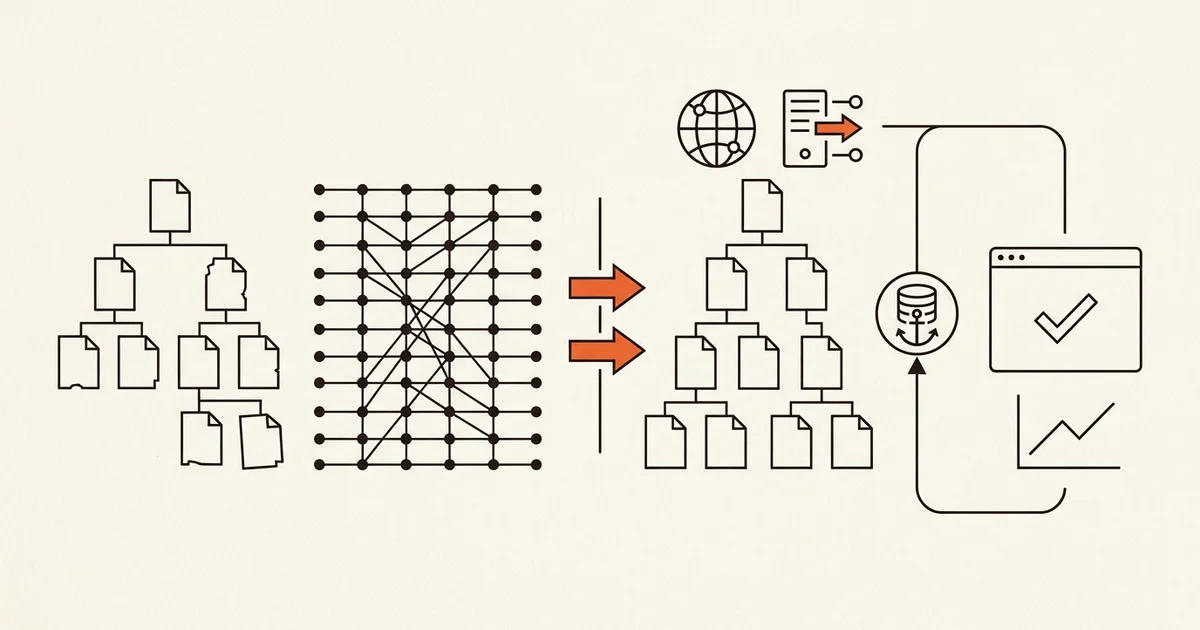
QUICK ANSWER
What should a website migration checklist include?
A website migration checklist should inventory the current site, record baseline evidence, secure access and backups, map every old URL to a verified destination, rebuild content and workflows in staging, align redirects and canonical signals, rehearse the cutover, test production, monitor search and business outcomes, and preserve a proven rollback path. Every item needs an owner, status, evidence, and acceptance check.
Do not schedule cutover until these inputs have owners
The migration becomes reviewable when the team can identify the source of truth, the person allowed to change it, the evidence that proves readiness, and the condition that stops the release.
- One migration owner and one release authority: Name the person accountable for the complete migration ledger and the person authorized to approve cutover or rollback. Content, SEO, analytics, infrastructure, legal, support, and provider owners can verify their areas, but one release authority resolves conflicting signals during the window.
- Current-site access and evidence: Confirm access to the current CMS or source, hosting, repository, content exports, database exports where applicable, domain registrar, DNS, Search Console, analytics, consent manager, forms, email or CRM destinations, media storage, payment or booking providers, and production logs. Read-only access is enough for inventory; cutover requires separately authorized write access.
- A complete source inventory: Collect crawlable URLs, indexed URLs, sitemap entries, top landing pages, links, redirect rules, canonicals, hreflang where used, metadata, structured data, assets, forms, downloads, scripts, data records, users and roles, provider callbacks, analytics events, consent behavior, and known error pages. Reconcile sources rather than trusting one crawler.
- Backups, exports, and a reproduced restore path: Create or identify a recoverable checkpoint for the current site and migration inputs. Record its scope, timestamp, owner, retention, encryption and access boundary, restore procedure, and a recent controlled restore result. A backup that nobody has restored is evidence of a file, not evidence of recoverability.
- A migration ledger with blocking rules: Use one ledger for URLs, content, assets, data, workflows, providers, DNS, search, analytics, privacy, accessibility, security, tests, and rollback. Each row needs an owner, status, blocking condition, evidence, verification result, and rollback action. Chat messages and launch-day memory are not the release record.
Choose the smallest migration topology that solves the problem
A platform change, URL change, domain change, content rewrite, data migration, and provider replacement are separate risk dimensions. Google Search Central site-move guidance treats URL mapping, permanent redirects, new canonicals, internal links, sitemaps, Search Console ownership, and post-move monitoring as explicit work. Keep unrelated change dimensions out of the same cutover when they do not need to move together.
| Approach | Best for | Tradeoff |
|---|---|---|
| In-place redesign with stable URLs and domain | A site whose information architecture and public addresses still work, but whose design, implementation, performance, accessibility, or editing experience needs replacement. | It minimizes identity changes and redirect work, but old URL decisions and content structure remain unless they are deliberately corrected. |
| Platform move with a one-to-one URL map | A new CMS, builder, or hosting path where most page purposes remain and every important old address has one equivalent new destination. | The public experience can improve without a full information-architecture rewrite, but path, encoding, trailing-slash, case, locale, query, asset, and provider differences still need exhaustive mapping and testing. |
| URL or domain migration with consolidation | A rebrand, domain move, multilingual restructure, merger, or content cleanup where public identities must change and some pages genuinely combine or retire. | It can produce a cleaner destination, but every consolidation needs a relevance decision, search signals can fluctuate, external links may lag, and rollback is harder after users and crawlers begin adopting the new addresses. |
| Staged section migration | A large site where one bounded section can move, reconcile, and stabilize before the next section changes. | Failures affect fewer URLs at once, but the organization temporarily operates two systems, cross-system navigation and analytics become harder, and shared templates or taxonomies can drift. |
Recommended:Preserve the domain and public URLs when they still express the correct page purpose. If URLs must change, map old to genuinely equivalent new destinations and use direct permanent server-side redirects. Avoid combining a domain move, platform replacement, information-architecture rewrite, provider swap, and full copy rewrite merely because the team has one launch window.
Run a website migration with an owned checklist
Inventory the current site, map identities and workflows, build and test the destination, rehearse cutover and rollback, publish the controlled release, and reconcile production evidence.
STEP 01
Classify the migration and freeze its release boundary
Separate what must change from improvements that can ship after the move, then assign decision and verification owners.
State whether the release changes platform, host, rendering model, URLs, domain, locale structure, content model, database, authentication, forms, analytics, consent, or external providers. Each checked dimension adds a separate source of truth and failure path.
Write the must-preserve behavior, intended changes, explicit non-goals, blocking conditions, maintenance window, support owner, rollback threshold, and the last safe decision point. Freeze unrelated redesign requests and experiments unless they are required to make the destination correct.
Open one migration ledger and assign every area to a person who can provide evidence, not merely a team name. Mark a row blocked when access, ownership, legal approval, source data, a provider sandbox, or a working rollback path is missing.
Required columns
ID | Area | Item | Source | Target | Disposition | Owner | Status | Blocking condition | Evidence | Verification | Rollback action

Allowed status values
inventory-needed | mapped | building | blocked | ready | verified | retired

Fictional example rows
URL-014 | URL | Service page | /old-support | /support | 301 direct | Morgan | ready | target must return 200 | staging response capture | old URL -> one 301 -> target 200; target self-canonical | restore previous redirect rules
FORM-003 | Workflow | Contact request | legacy form | new request endpoint | replace | Imani | blocked | destination and consent text unapproved | provider sandbox receipt pending | one fictional request saved once and delivered once | restore legacy form route
DNS-001 | Domain | apex record | old host | new host | cut over | Riley | mapped | certificate and rollback TTL unverified | registrar export | HTTPS, canonical host, old host still reachable by rollback path | restore previous DNS values
SEARCH-006 | Search | XML sitemap | old canonical URLs | new canonical URLs | replace | Chen | building | URL map has unresolved rows | generated sitemap draft | only intended absolute canonical URLs return 200 | restore prior sitemap while destination is corrected
Expected result: The team can name every change dimension, non-goal, blocker, decision owner, verification owner, cutover rule, and rollback trigger without relying on an informal launch conversation.
Verify it: Filter the ledger for blank owner, blank evidence, ambiguous status, or missing rollback action. Do not schedule the cutover while any required release row is unresolved.
STEP 02
Inventory production and record a comparison baseline
Build a reconciled picture of what exists, what people and crawlers use, and which business paths must survive.
Collect URLs from the current crawl, XML sitemaps, CMS or database exports, Search Console landing pages, analytics landing pages, server logs, internal links, backlink exports, paid campaigns, profiles, support bookmarks, and provider callbacks. Normalize scheme, host, case, trailing slash, encoding, locale, query, fragment, and duplicate variants before counting.
For each indexable page, record response status, canonical, robots directives, title, description, H1, structured-data types, internal inlinks, outbound links, media, language annotations, content owner, update date, search clicks and impressions where available, and the user action the page supports.
Baseline the primary business paths with fictional data: form submission, account entry, download, checkout or booking handoff, search, login, unsubscribe, consent choice, and operator review. Record stable IDs and bounded screenshots or logs without copying personal payloads into the evidence store.
Measure representative mobile and desktop performance and accessibility, but keep raw results and conditions. A later score is useful only when it is comparable to the same page type, device profile, network assumptions, and user path.
Expected result: The source inventory reconciles across discovery systems, and each important URL and workflow has baseline behavior that the destination can preserve or deliberately replace.
Verify it: Compare counts and set differences across crawler, sitemap, CMS, Search Console, analytics, logs, and provider inventories. Resolve every high-value URL or business path found in one source but absent from the migration ledger.
STEP 03
Prove access, backup, export, and restore before changing production
Make the source and destination recoverable, then test the authority needed for cutover without exposing secrets.
Export source content, media manifests, redirect rules, DNS records, analytics configuration, consent configuration, provider settings, database records where applicable, user and role mappings, and the identified application release. Record hashes or immutable references for critical files and the time each export represents.
Create destination checkpoints using the mechanisms the platform actually supports. For a Playcode destination, use previews and the available code export, snapshots, and rollback paths within current plan limits. Do not describe a code export as a complete export of database or provider state.
Test a restore in a safe environment. Verify pages, assets, data counts, access rules, forms, integrations, and version identity after restore. Record the observed recovery result and duration as local evidence, not a universal promise.
Use least-privilege accounts for migration work. Store DNS, CMS, database, analytics, and provider credentials only in their approved secret stores. Decide who may access production, how emergency access is granted, and when temporary access will be revoked or rotated.
Expected result: The team has recoverable source inputs, an identified destination release, tested restore evidence, authorized cutover access, and a credential-revocation plan.
Verify it: Restore the controlled checkpoint and reconcile its manifest. Have the release authority confirm they can reach the registrar, DNS, source host, destination host, and provider consoles through approved access paths without sharing a secret in the ledger.
STEP 04
Map every old URL to one explicit disposition
Preserve useful identities, redirect changed identities directly, and retire pages without inventing irrelevant destinations.
Give every discovered old URL one disposition: preserve at the same address, redirect permanently to one genuinely equivalent destination, consolidate into a broader but still relevant destination, retire with an appropriate not-found response, or hold for an owner decision. Never leave blank rows to be caught after launch.
For permanent moves, Google recommends server-side permanent redirects when possible. Its redirect guidance treats 301 and 308 responses as permanent signals. Point each source directly to the final destination, avoid chains and loops, and do not send unrelated retired pages to the homepage merely to avoid a 404.
Preserve query behavior only when the parameters have real meaning. Map locale and device variants, PDFs and downloads, image URLs with external demand, canonical variants, legacy uppercase paths, encoded characters, and trailing-slash forms. Make redirect generation deterministic from the reviewed map.
Flag one-to-many, many-to-one, and conflicting target rows for human review. A redirect file that loads successfully can still erase page intent, create a loop, expose an internal host, or send many sources into a soft-not-found destination.
Expected result: Every old public address has one reviewed disposition, every changed identity reaches one relevant final destination, and unresolved mapping conflicts block release.
Verify it: Run the full source list against staging redirect rules. Assert expected status, one-hop final URL, final 200 or intentional not-found result, canonical target, absence of loops, and semantic relevance for every consolidation sample.
STEP 05
Rebuild content, assets, data, forms, and providers in staging
Move the visible site and the workflows behind it as separate, reconcilable contracts.
Migrate structured content before presentation where possible. Preserve stable IDs that external links, records, or provider events depend on. Validate required fields, formats, rights, ownership, locale, publication state, and timestamps before import, then reconcile accepted, rejected, transformed, and omitted counts.
Create an asset manifest with source, target, owner, rights, checksum where useful, dimensions, media type, alternative text, and page consumers. Download owned assets rather than hotlinking a source host that will disappear. Detect broken references, wrong orientation, oversized media, duplicate filenames, and private objects exposed by copied URLs.
Treat every form and provider as a workflow: browser validation, authoritative server validation, one durable record, retry or idempotency rule, consent, minimal data, protected operator access, notification or provider delivery, failure state, monitoring, retention, deletion, and recovery. A thank-you page does not prove a request was saved or delivered.
Move analytics, consent, search verification, pixels, feeds, callbacks, scheduled jobs, and transactional providers from a documented configuration. Keep sandbox and production identities separate. Never copy live secrets or real personal data into a public or broadly shared staging site.
Build complete loading, empty, invalid, denied, unavailable, stale, retry, and success states for required interactions. Keep the source live until the destination passes the migration acceptance matrix.
Expected result: Staging contains reconciled content and assets, production-shaped workflows with fictional data, explicit provider states, protected access, and no hidden dependency on the old host.
Verify it: Compare source and destination counts and hashes where appropriate, crawl assets from a clean browser, submit each form once and as a retry, inspect durable records and delivery attempts, deny unauthorized access, and disconnect one test dependency to confirm the visible failure path.
STEP 06
Align canonicals, crawl controls, internal links, and sitemaps
Make the destination state one coherent graph instead of a mixture of old and new search signals.
Give each indexable destination page one absolute self-referencing canonical and make redirects, canonicals, internal links, hreflang where used, and sitemap entries agree. Google describes redirects and canonical annotations as strong signals, while sitemap inclusion is a weaker canonical signal. Do not point these systems at different preferred URLs.
Replace internal old-site links with final destination URLs so visitors and crawlers do not pay a redirect on every click. Update navigation, breadcrumbs, structured data, language alternates, pagination, feeds, emails, PDFs, profiles, campaigns, and provider callbacks that embed public addresses.
Use robots.txt for crawl management, not canonicalization. If staging uses authentication or noindex, record the exact production change that removes the staging restriction. Check page-level robots metadata and X-Robots-Tag headers on HTML and non-HTML resources.
Generate a destination sitemap containing only intended absolute canonical URLs that return the expected response. Google notes that sitemap submission is a hint, not an indexing guarantee. Use its sitemap guidance to validate location, format, URL choice, and submission.
Expected result: The destination has one consistent set of indexable identities across responses, canonicals, internal anchors, language annotations, structured data, feeds, and sitemaps.
Verify it: Parse rendered HTML and headers for every page type. Compare canonical targets, internal-link targets, sitemap URLs, robots rules, hreflang pairs, and redirect destinations as sets; fail the release on old-host leakage or contradictory signals.
STEP 07
Rehearse the release with production-shaped traffic and failures
Test the migration as a whole system before the domain or public routes point at it.
Freeze a release candidate and run the full old-URL list, new canonical list, primary visitor journeys, operator journeys, forms, authentication, search, downloads, consent choices, analytics events, provider handoffs, not-found behavior, and recovery procedure against it.
Use representative mobile and desktop browsers, keyboard-only navigation, long content, missing content, invalid input, duplicate submission, expired session, wrong role, dependency timeout, file failure, and cache variation. Compare the result with the baseline rather than reviewing only the new visual design.
Combine automated accessibility checks with knowledgeable human review. W3C WAI accessibility evaluation guidance explicitly notes that tools alone cannot determine whether a site is accessible.
Rehearse cutover and rollback from a written runbook. Simulate the point where a health signal crosses the rollback threshold. Verify who decides, which change is reversed, how new production records are handled, and how the restored state is tested before traffic returns.
Expected result: The identified release passes the complete migration matrix, controlled failures produce bounded states, and the team has reproduced both cutover and rollback responsibilities.
Verify it: Have a reviewer who did not build the destination run the release checklist from a clean environment. Reconcile automated results, manual results, durable records, provider receipts, accessibility review, and the migration ledger before the release authority signs off.
STEP 08
Prepare DNS, HTTPS, analytics, Search Console, and support cutover
Make each public identity and operational signal change explicit before the launch clock starts.
Export current DNS values and confirm registrar, authoritative DNS, old hosting, destination hosting, certificate, email, verification, and rollback access. If TTL changes are part of the plan, make them early enough to take effect and restore them after stabilization. Never delete the old host before the rollback window closes.
Pre-provision or verify the destination certificate and canonical host. Test both apex and www behavior, HTTP-to-HTTPS behavior, IPv4 and IPv6 records where used, subdomains, wildcard assumptions, email records, and any callbacks or allowlists tied to the old origin.
Document analytics property and stream identity, consent modes, tag triggers, referral exclusions, campaign URLs, conversion definitions, server events, dashboards, and alert owners. Decide how to detect missing events and duplicates without comparing private payloads.
Verify old and new Search Console properties and preserve the verification method. For a domain move, prepare the official Change of Address process after redirects and destination checks; do not use it for an ordinary host change with the same domain.
Prepare customer support, status messaging, internal escalation, provider contacts, and a decision channel. The cutover owner should not be the only person who knows how to reach the registrar or restore the old release.
Expected result: The runbook identifies every public configuration change, owner, prerequisite, observation, rollback value, support path, and decision threshold in execution order.
Verify it: Conduct a read-only access drill across registrar, DNS, source, destination, certificate, analytics, consent, Search Console, and provider consoles. Review the runbook line by line and resolve any step whose executor, evidence, or rollback value is ambiguous.
STEP 09
Cut over the identified release and run production smoke
Change only the reviewed public identities, then prove the live system before announcing the move.
Create the final source checkpoint and record the destination release identity. Enable the reviewed redirects, publish the destination, connect the intended domain and HTTPS path, remove staging-only noindex rules or access blocks, and confirm new canonicals and internal links.
From clean mobile and desktop browsers and an external network, verify the canonical host, TLS certificate, home page, top landing pages, every page type, representative old redirects, navigation, assets, forms with fictional data, authentication and authorization where applicable, consent, analytics, providers, not-found behavior, logs, alerts, and recovery access.
For a domain move, submit the Search Console Change of Address after the required properties, redirects, and destination are correct. Submit the new sitemap and record the response. Do not interpret submission as a guarantee of crawling, indexing, ranking, or completion.
Reconcile the smoke record with the migration ledger. Stop rollout or invoke the approved rollback when a blocking condition is met; do not continue because most pages look correct.
Expected result: The intended domain serves the identified release, old addresses resolve according to the map, critical business paths work once, observability sees the controlled events, and the rollback path remains available.
Verify it: Save timestamped response, browser, record-ID, provider, analytics, and monitoring evidence for the production smoke. Remove fictional records according to policy and obtain release-authority approval before the public announcement.
STEP 10
Monitor old and new identities, reconcile outcomes, and close access
Treat launch as the beginning of a measured transfer, not proof that every crawler, user, and provider has moved.
Monitor destination reachability, certificates, DNS, 4xx and 5xx responses, redirect loops and chains, crawler activity, indexing, old-versus-new sitemap counts, canonical selection, search queries, landing-page clicks and impressions, analytics events, primary business outcomes, provider failures, performance, accessibility reports, and support contacts.
Expect some search fluctuation, but investigate technical evidence rather than labeling every loss normal. Segment by page type, old URL, new URL, device, country, query, and business path. Compare like-for-like windows while noting seasonality, campaigns, outages, and content changes.
Keep permanent redirects for the supported transfer period. Google currently recommends keeping site-move redirects generally for at least one year and notes that users may benefit from keeping them longer. Update important external links, profiles, campaigns, and owned documents to reduce ongoing redirects.
Reconcile every blocked, failed, deferred, or manually corrected ledger row. Revoke temporary access, rotate credentials that were exposed to migration personnel or tools according to policy, restore normal DNS TTL where planned, archive evidence, schedule content and provider reviews, and keep the rollback record until the defined stabilization exit criteria pass.
Expected result: The organization can show how identities and outcomes transferred, diagnose exceptions by evidence, maintain redirects and providers, close temporary access, and declare stabilization against written criteria.
Verify it: At each planned checkpoint, compare the old and new URL sets, indexing, search, analytics, workflow records, provider results, errors, support reports, and access list. Close the migration only when required ledger rows are verified or intentionally deferred with owners and dates.
Four migration tests that must survive the real release
A green home page proves almost nothing. Test identity transfer, invalid mapping, repeatable migration actions, and a clean production journey with the same ledger that controls the release.
| Test | Scenario | Expected result |
|---|---|---|
| happy path | A high-value old service URL maps one-to-one to a complete destination page with the same intent, updated content, owned assets, working request flow, and reviewed canonical. | The old URL returns one permanent redirect to the final 200 destination; the destination self-canonicalizes, appears in navigation and the sitemap, loads its assets, saves one fictional request, delivers one provider attempt, and records the expected analytics event. |
| invalid input | The mapping contains two conflicting targets, a redirect to an irrelevant home page, a destination canonical pointing at staging, and an unresolved content owner. | Validation identifies the conflict, relevance failure, non-production canonical, and missing owner; the affected rows remain blocked and no production redirect set is released. |
| retry | A content or redirect batch stops after a partial response, then the operator reruns the same identified batch while some destination records already exist. | The rerun uses stable identities and returns the existing accepted result or updates the intended version without duplicate pages, redirect rules, media, form records, analytics tags, or provider actions; source and destination counts still reconcile. |
| production smoke | A clean mobile and desktop browser follows a representative old link through the public domain, completes the primary action with fictional data, and checks the resulting operator and monitoring evidence. | HTTPS, final URL, canonical, responsive layout, accessibility basics, consent, durable record, authorization, provider attempt, analytics event, logs, alerts, and cleanup all match the identified release and migration ledger. |
Failure diagnostics for the first hours and weeks
Diagnose by URL, release, record, provider event, and timestamp. Avoid broad guesses such as “DNS is slow” or “rankings always drop” when the system can provide specific evidence.
| Symptom | Likely cause | Check | Fix |
|---|---|---|---|
| Many old pages land on the new home page or appear as soft not found | The redirect generator used a catch-all destination instead of the reviewed one-to-one and consolidation map. | Sample affected source URLs, compare their old page purposes with final targets, count many-to-one rows, and inspect the generated redirect rule order. | Restore the reviewed direct mappings, return an appropriate not-found response when no relevant destination exists, and rerun the complete source-list test before release. |
| New pages load for users but do not appear eligible for indexing | A staging noindex rule, robots restriction, X-Robots-Tag, authentication layer, old canonical, or non-production sitemap survived cutover. | Inspect the live response headers and rendered head, crawl as an unauthenticated client, compare canonical and sitemap targets, and use Search Console URL inspection for representative pages. | Remove only the unintended production restriction, align canonical and sitemap signals, preserve protection for private routes, and verify every page type again. |
| Forms show success but staff receives no usable request | The browser success state is disconnected from durable storage, provider credentials, consent, destination routing, or protected operator access. | Trace the fictional request ID through server validation, durable record, provider attempt, provider response, operator authorization, logs, and alert state without exposing the payload. | Save the request before optional delivery, separate delivery retries from record creation, correct provider or access configuration, and retest success, failure, retry, and operator paths. |
| Some images, downloads, or fonts fail only after the old host is disabled | Destination pages still hotlink source assets, use private object URLs, depend on old CORS rules, or reference case-sensitive paths that staging did not expose. | Crawl asset requests from a clean origin, compare them with the manifest, inspect response status and headers, and temporarily isolate the old host in a controlled test. | Move authorized assets to the owned destination, correct paths and access headers, update every consumer, reconcile the manifest, and repeat the old-host isolation test. |
| Analytics or conversions drop to zero or suddenly double | Tags are missing, duplicated between old and new containers, blocked by a changed consent state, attached to the wrong stream, or fired on both browser and server without deduplication. | Use one controlled event ID, inspect consent and tag triggers, compare browser and server requests, provider or analytics debug views, and production records, then segment by page type and device. | Restore the reviewed measurement contract, remove duplicate emitters, preserve consent choices, implement the intended event identity rule, and annotate the affected reporting window. |
| Users reach different releases or certificates depending on network | DNS records, IPv4 and IPv6, CDN or proxy caches, certificate coverage, apex and www behavior, or local resolvers disagree during cutover. | Query authoritative and representative public resolvers, inspect A, AAAA, CNAME and certificate results, bypass caches where controlled, and compare response release markers by host and network. | Apply the reviewed DNS and certificate values, correct both host variants and address families, preserve email and verification records, purge only the intended caches, or execute the documented DNS rollback. |
| Search traffic declines for one section after the move | Possible causes include missing redirects, changed intent, thin or absent content, canonical conflict, internal-link loss, blocked crawling, slow or failing pages, seasonal demand, or normal transfer fluctuation. | Compare old and new URL mappings, responses, canonicals, content, internal inlinks, sitemap and index state, queries, devices, countries, server logs, performance, timing, and external factors for the affected section. | Correct the evidenced technical or content break, request recrawl only after the live state is correct, preserve useful redirects and links, and avoid a full-site rollback for an isolated issue unless the approved threshold is met. |
Operate the migration as a reversible release
Deploy
Deploy an identified destination release after the migration ledger, source checkpoint, redirect set, canonical graph, workflows, provider settings, DNS values, monitoring, support path, and rollback runbook pass review.
Choose a window based on real traffic and staffing, not a generic best time. Keep the source host, registrar, DNS, and rollback authority available while the destination stabilizes.
Record every production change, executor, timestamp, observed result, evidence link, and decision. Stop when a blocking condition appears rather than hiding it under a launch-day exception.
Monitor
Watch availability, TLS, DNS, 4xx and 5xx responses, redirect loops and chains, crawler traffic, indexing, canonicals, sitemaps, search queries and landing pages, internal links, assets, forms, provider events, analytics, consent, performance, accessibility reports, and support contacts.
Use stable URL, release, record, event, and provider identifiers in logs and dashboards. Redact or omit personal payloads and secrets so investigation does not create a second data exposure.
Define day-one, short-term, and stabilization checkpoints with owners and thresholds. Compare old and new identity sets and outcomes; do not declare success from an unchanged aggregate traffic number.
Recover
Rollback when a written blocking threshold is met: critical paths unavailable, data loss or corruption, unauthorized access, broad redirect failure, certificate or domain failure, unrecoverable provider state, or another release-specific condition.
Restore the identified old release or reviewed DNS and redirect values, then verify the restored production state. Decide how records created after cutover will be reconciled before switching traffic; never discard them silently.
For isolated failures, repair the smallest bounded surface and keep verified migration work intact. Preserve evidence from the failed state, rerun the affected tests, and require a new release decision before attempting cutover again.
Protect real data while the site exists in two places
A migration temporarily multiplies environments, exports, access paths, and provider credentials. Minimize that exposure and give every temporary copy or permission an owner and deletion date.
- Classify source data before export. Copy only the fields needed for the approved migration, encrypt transfers and stored exports, restrict access, record retention, and verify deletion after reconciliation.
- Use fictional or redacted data in staging by default. When a production-shaped dataset is necessary, obtain authorization, minimize it, isolate the environment, block public access, and preserve the same access controls and incident ownership as production.
- Keep registrar, DNS, CMS, database, analytics, consent, email, payment, booking, storage, and other provider secrets in approved server-side secret stores. Never embed them in browser code, screenshots, tickets, or the migration ledger.
- Apply least privilege and separate read, build, cutover, and emergency authority. Review temporary accounts, tokens, allowlists, callbacks, and service users after stabilization; revoke or rotate them according to policy.
- Re-test server authorization for operator lists, detail views, updates, exports, uploads, and administrative routes. A hidden URL, old session, or private-looking hostname is not an access control.
- Validate and constrain forms, uploads, redirects, imports, and provider callbacks on the server. Set size and rate limits, verify signed events where providers support them, and make retry behavior idempotent.
- Preserve consent choices and current privacy disclosures across analytics and form changes. Record new processors, purposes, fields, retention, deletion, and data destinations for qualified privacy or legal review where required.
- Keep backups and rollback material protected from the same credentials and failure path as production where the platform supports it. Test restoration and incident access without weakening ordinary production controls.
Website migration checklist questions
What is the difference between a website redesign and a website migration?
A redesign changes presentation, content, or interaction. A migration changes where or how the site runs, and may also change URLs, domain, content system, data, providers, or analytics. A redesign can preserve every public address; a migration can preserve the visual design. Treat each changed dimension as separate work even when one release includes both.
Will a website migration hurt SEO rankings?
Search visibility can fluctuate during a move, and no tool can guarantee zero loss. Risk is lower when useful URLs and content remain stable, changed URLs use relevant direct permanent redirects, canonicals and internal links agree, crawl controls are correct, the destination performs reliably, and the team monitors old and new identities. Investigate evidence instead of assuming every decline is normal.
Should I keep the same URLs during a redesign?
Keep a URL when it still represents the same useful page purpose. Changing addresses without a user or information-architecture reason creates redirect, link, analytics, and search-transfer work. When a page purpose truly changes or several pages consolidate, document the decision and map each old address to the most relevant destination.
How long should website migration redirects stay in place?
Google currently recommends keeping site-move redirects generally for at least one year so its systems can transfer signals, and notes that users may benefit from longer retention. Your operational policy may keep important redirects indefinitely. Monitor use, update owned links, and do not remove rules merely because launch week ended.
Do I need a new sitemap after a website migration?
If canonical URLs change, generate and submit a sitemap containing the intended new absolute canonical URLs. Validate that those URLs return the expected response and agree with page canonicals and internal links. A sitemap helps discovery and monitoring, but Google describes submission as a hint, not a guarantee of crawling, indexing, or ranking.
When should I use Search Console Change of Address?
Use it for a qualifying domain move after both properties are verified, redirects are active, and the destination is correct. Do not use it for an ordinary hosting or platform change that keeps the same domain. Follow the current Search Console instructions at cutover because property and eligibility details can change.
Can Playcode migrate any website automatically?
Do not assume a universal automatic migration. Playcode can help rebuild and run a destination website and provides preview, publishing, custom-domain, code-export, and recovery capabilities under current limits. The owner still needs to inventory URLs and content, verify rights, map redirects, configure providers and DNS, migrate data where applicable, test production, and monitor the result.
What should block a website migration launch?
Block cutover when important URLs have no disposition, ownership or access is missing, restore has not been reproduced, source and destination counts do not reconcile, critical workflows fail, redirects or canonicals conflict, production secrets or personal data are exposed, DNS or certificate rollback is unknown, monitoring is absent, or no authorized person can decide rollback.
Build the destination
Rebuild the site without pretending the migration is automatic
Use Playcode to build, preview, publish, and keep changing the destination site. Bring the approved content, URL map, provider boundaries, tests, and rollback plan that make the move operable.
Redesign My WebsiteNo credit card required. Verify redirects, data, providers, DNS, and search behavior for your own migration.