A useful website plan is not a wish list of pages or a mood board. It is a decision record that names the audience, the job the website must support, the content and proof available, the primary action, the required workflows, the launch boundary, and the person who can approve tradeoffs.
This guide helps you produce that record before design or implementation begins. You will create a page and navigation map, content inventory, repeated-page model, requirement list, decision gates, deferred list, acceptance criteria, and a completed fictional brief. It stops at an approved build handoff, keeping timeline estimation and implementation as separate jobs.
QUICK ANSWER
How do you plan a website before building it?
Start by naming one audience, one job, and one primary action. Map the shortest journey to that action, then define pages, navigation, content owners, repeated patterns, functional requirements, accessibility and privacy needs, domain and hosting constraints, a must-ship boundary, a deferred list, and observable acceptance checks. Approve that brief before design or implementation begins.
Gather evidence and decision authority first
Planning stalls when nobody owns the decision or when the team treats missing content as a future writing task. Review website wireframe examples and website sitemap examples, then assemble the inputs below before drawing your own structure. Confirm the website domain cost and establish evidence and consent rules for any testimonials on the website. Use a website content plan to assign each page message, proof item, owner, and approval state.
- One decision owner and named contributors: Choose the person who can approve scope, claims, navigation, and launch tradeoffs. List contributors for content, brand, legal or policy review, accessibility, analytics, domain access, and technical implementation. Consultation can be broad, but final decisions need one owner.
- Audience evidence and the website job: Bring customer questions, support conversations, sales objections, search queries, interview notes, or observed tasks. Separate evidence from assumptions. The website job should describe what a specific visitor needs to understand or do, not what the organization wants to announce.
- Content, proof, and rights inventory: Collect current service or product facts, pricing rules, policies, team information, case evidence, testimonials with permission, images with usage rights, brand assets, contact details, and legal copy. Mark every item ready, adaptable, missing, expired, or awaiting approval.
- Workflow and provider inventory: List forms, scheduling, payments, email delivery, maps, analytics, consent, CRM handoff, search, accounts, downloads, or multilingual behavior. For each external service, name the account owner, plan, API or embed path, data sent, failure fallback, and setup status without placing credentials in the plan.
- Domain, hosting, privacy, and accessibility constraints: Confirm registrar and DNS access, the intended hosting path, old URLs that may need redirects, personal data collected, retention owner, consent needs, and the accessibility target. W3C WAI planning guidance recommends defining accessibility goals, scope, responsibilities, resources, evaluation, and monitoring early rather than leaving them to final testing.
Choose the planning model before choosing pages
A sitemap-first exercise often produces familiar pages without proving that a visitor can complete the important job. Use the visitor journey as the primary model, then create only the pages and repeated content patterns that support it.
| Approach | Best for | Tradeoff |
|---|---|---|
| Page-list first | A tiny brochure site whose content, audience, navigation, and primary action are already understood and stable. | It is quick to discuss, but pages can become containers for internal departments rather than steps in a visitor journey. Requirements and missing content also remain hidden. |
| Journey and task first | Business, campaign, portfolio, service, or product sites where visitors arrive with different questions but one or two important actions. | It requires evidence and decisions before visual design, but it connects every page, proof item, and interaction to a reason for existing. |
| Content-model first | Sites with many repeated services, locations, products, resources, team members, events, or articles that need consistent fields and templates. | It improves consistency and maintenance, but the model can become overbuilt if the team has not first bounded the visitor journeys and launch content. |
Recommended:Start with the journey and primary action. Add a content model when three or more items repeat the same structure, and use a simple page list only after the journey, content, and acceptance checks are explicit. This order prevents navigation from becoming an organization chart.
Plan a website step by step
Turn audience evidence into an approved website brief with a primary action, page structure, content model, requirements, launch gate, acceptance checks, and build handoff.
STEP 01
Name the audience, job, and evidence
Replace “everyone” and “look professional” with one specific visitor and one observable need.
Write a primary audience as a situation, not only a demographic: “a local operations manager comparing weekend training for a new team” is more useful than “businesses.” Add secondary audiences only when they need meaningfully different information or actions.
Complete this sentence: “When this person arrives, they need to understand or do ___ so they can ___.” Then list the evidence supporting that job and the assumptions that still need validation.
Record the top questions, objections, anxieties, proof needs, and words the audience already uses. Do not invent testimonials, outcomes, certifications, or customer language to make the brief feel complete.
Expected result: The brief names one primary audience, one website job, supporting evidence, and open assumptions.
Verify it: Give only the audience and job statement to someone outside the project. They should be able to describe the visitor situation and desired outcome without seeing a page list.
STEP 02
Choose one primary action and its success check
Define what the website should help the visitor do and what evidence proves the path worked.
Choose one primary action such as request information, book a consultation, compare plans, start a trial, visit a location, download a resource, or buy. Secondary actions may support visitors who are not ready, but they should not compete equally on every screen.
Define the durable result. A form is successful after the accepted submission is stored and the user receives a stable result, not merely when a button changes color. Provider email or CRM delivery should have a separate status and retry path.
Write the success check in observable terms: the intended visitor can find the action, understands what happens next, completes valid input, receives the promised state, and an authorized operator can find the resulting record.
Expected result: The plan has one primary action, a clear next-step promise, a durable success boundary, and one verification statement.
Verify it: List every homepage call to action. If equally prominent buttons point to unrelated goals, choose the priority or define a visitor rule that resolves the conflict.
STEP 03
Inventory content, proof, status, and rights
Turn “we will add the content later” into owned, reviewable records.
Create one row per headline, service fact, price or range, policy, image, video, logo, biography, testimonial, case example, download, legal notice, and translation. Add source, owner, status, approval date, rights or permission, destination, and replacement rule.
Separate claims from proof. A claim such as “same-day response” needs an operational owner and evidence; a testimonial needs permission and exact attribution; a portfolio image needs the right to publish it. Draft copy cannot create those facts.
Mark sensitive, regulated, or jurisdiction-dependent content for separate legal, security, compliance, or licensed review. A website builder does not replace that accountability.
Expected result: Every launch content item has a status, source, owner, rights decision, destination, and review path.
Verify it: Filter for missing owner, missing source, uncertain rights, expired fact, or unapproved claim. Any unresolved must-ship item becomes a blocker or moves to the deferred list.
STEP 04
Map the shortest visitor journeys
Sequence questions and actions before drawing navigation or screens.
For each primary audience, write entry context, first question, proof needed, decision, primary action, confirmation, and next step. Include direct arrivals from search or shared links, not only visitors who begin on the homepage.
Add failure and hesitation branches: incomplete information, invalid form input, no availability, provider delay, missing permission, or a visitor who is not the right fit. State what the website should explain or offer instead.
Keep the first release focused. If one journey needs accounts, payment, complex eligibility, scheduling, or private records, decide whether it belongs in the website launch or a later application workflow.
Expected result: The plan shows the shortest complete path for the primary audience plus the important hesitation and failure branches.
Verify it: Walk each journey using only the written sequence. Every step should answer one visitor question or cause one observable state change; remove steps that exist only because another site has them.
STEP 05
Turn journeys into pages and navigation
Give each page a job, entry path, required content, primary action, and next destination.
Create a row for every proposed page with purpose, primary audience, entry path, key question, proof, content owner, primary action, next page, and launch status. Merge pages that repeat the same job, and split pages that serve incompatible intent.
Design navigation around visitor language and information scent. Keep labels descriptive and concise, and make important destinations ordinary HTML links with real href values.
Google Search Central explains that crawlable anchor links and descriptive anchor text help people and Google understand and find linked pages. Use the official link guidance as a technical reference, not as a promise of ranking.
Expected result: The website has a page map and navigation proposal where every page supports a named journey and every label sets a clear expectation.
Verify it: Read only the navigation labels and primary page actions. A new reviewer should predict the destination and identify the shortest route to the primary action.
STEP 06
Define repeated page and content patterns
Model repeated content before designing dozens of similar pages by hand.
Look for three or more services, locations, products, people, events, case studies, or resources with the same job. Define their common fields, required and optional content, URL pattern, owner, sort order, lifecycle state, and empty behavior.
Separate the record from the page layout. A service record may include title, summary, audience, proof, price note, image, FAQ, status, and review date, while one shared template decides how those fields appear.
Define draft, review, published, archived, and redirected states when content changes over time. State who can publish and what happens to existing URLs when an item is removed.
Expected result: Repeated content has one field model, one page pattern, explicit lifecycle states, and named ownership.
Verify it: Add one realistic item and one incomplete item to the proposed model. The complete item should render without custom fields, and the incomplete item should produce a deliberate empty or blocked state.
STEP 07
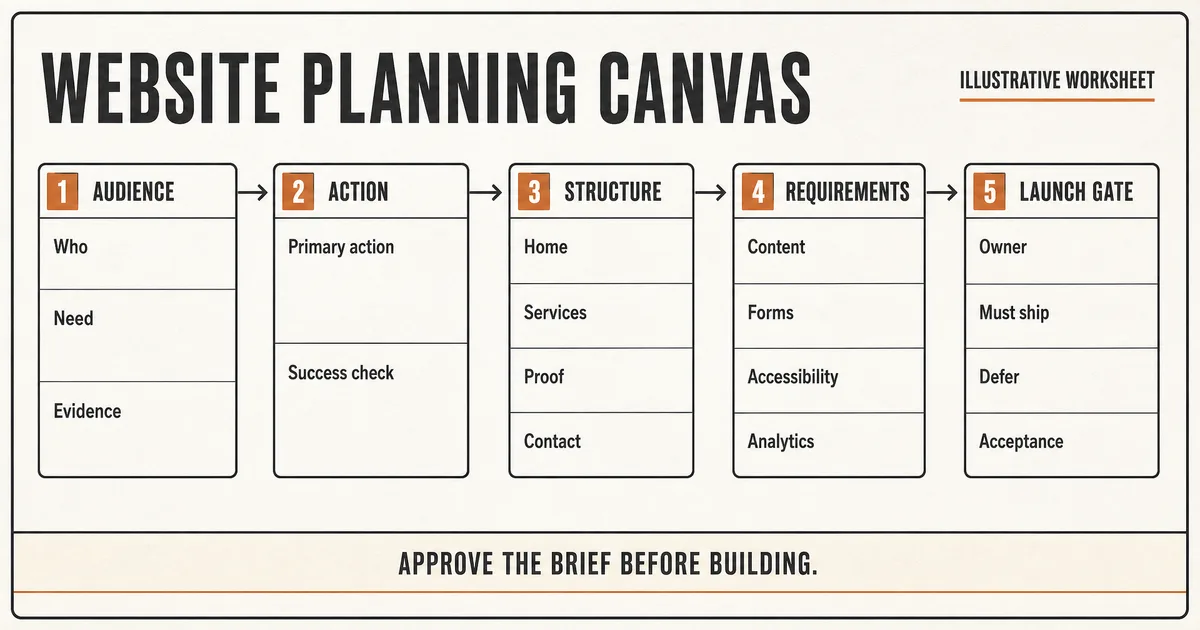
Complete the website planning worksheet
Consolidate the decisions into one brief that a builder and reviewer can use without hidden context.
Use the blank worksheet below as the current source of truth. Link out to content inventories or diagrams rather than copying conflicting versions into several documents.
The fictional Copper Comet Workshops example demonstrates the level of specificity. It does not represent a real business, result, provider setup, or completed Playcode website.
BLANK WEBSITE PLAN
Project:
Decision owner:
Primary audience:
Audience evidence:
Website job:
Primary action:
Durable success check:

PAGES AND NAVIGATION
Page | job | entry | proof | owner | action | next | launch/defer

CONTENT AND RIGHTS
Item | source | owner | status | rights | review date | destination

REPEATED PATTERNS
Record | fields | URL | lifecycle | empty state | publisher

REQUIREMENTS
Functional:
Providers and fallback:
Accessibility target and owner:
Privacy, consent, retention, deletion:
Analytics question and owner:
Domain, DNS, hosting, redirects:

RELEASE GATE
Must ship:
Deferred:
Acceptance checks:
Open risks:
Approver and approval date:
Reopen this plan when:

COMPLETED FICTIONAL EXAMPLE
Project: Copper Comet Workshops website
Decision owner: Studio operator
Primary audience: Local adult beginners comparing a first weekend craft workshop
Audience evidence: Repeated questions about experience level, materials, timing, and accessibility
Website job: Help a beginner choose a suitable workshop and send an inquiry
Primary action: Send workshop inquiry
Durable success check: One stored inquiry ID, clear next-step message, operator can find the record
Pages: Home, Workshops, Workshop detail pattern, About, FAQ, Contact
Repeated pattern: Workshop title, level, duration, materials, access notes, dates note, inquiry action, status
Must ship: Three approved workshop records, real studio photos with rights, inquiry flow, privacy notice, keyboard review, mobile check
Deferred: Payment, account login, confirmed booking, gift cards, automated email sequence
Acceptance: Visitor finds beginner workshop, understands inquiry is not confirmation, submits valid details, receives a stable reference
Open risk: Workshop dates and response-time claim require operator approval
Reopen when: Payment or confirmed scheduling enters scope
Expected result: The project has one completed, versioned brief plus a fictional example that makes the required specificity clear.
Verify it: Ask a builder to list the first screen, data records, primary action, blocked states, must-ship content, and deferred work using only the brief. Missing answers expose planning gaps.
STEP 08
Set requirement and decision gates
Decide which unknowns block design, build, content population, or launch.
Classify each requirement as must ship, should ship, deferred, rejected, or unresolved. Add an owner, decision date, acceptance check, privacy or security impact, provider dependency, and what work may proceed while it remains open.
Create four explicit gates: brief approved before build; representative page pattern approved before repetition; release candidate accepted before domain switch; production smoke passed before announcement.
For analytics, start with business questions and only then choose events. For personal data, define purpose, minimum fields, access, retention, deletion, export, and incident owner before implementation.
Expected result: Every material requirement has a priority, owner, decision state, verification check, and gate effect.
Verify it: Filter unresolved requirements. None should silently pass through a gate; each must block, receive a dated exception, or move to the deferred list.
STEP 09
Challenge the plan before approving it
Use realistic content, edge cases, and adversarial review to expose contradictions before they become rework.
Run a five-minute content test with long titles, missing images, an expired claim, an unavailable repeated item, and a direct arrival on an inner page. Check whether the plan defines owners and behavior.
Run role and privacy questions: who can see each form record, export it, correct it, delete it, or change content? A hidden route or admin button is not authorization.
Ask one reviewer to argue for a smaller release and another to act as the primary visitor. Consolidate decisions through the owner rather than adding every suggestion to scope.
Expected result: The brief survives realistic content, edge-case, access, and scope challenges, or records the exact decisions needed before approval.
Verify it: Every discovered problem has one of four dispositions: fix in brief, validate with evidence, defer explicitly, or reject with a reason. “Handle later” is not a disposition.
STEP 10
Plan the publication and handoff path
Make domain, hosting, redirects, measurement, ownership, and live acceptance part of the brief.
Record the intended hostname, registrar and DNS owner, hosting path, environment sequence, old URLs and redirects, form recipient, analytics and consent decision, privacy notice, accessibility check, rollback owner, and production smoke checklist.
Playcode can build and host a website, provide a project URL, support a custom-domain path under current plan limits, and let you export project code. Confirm current plan and domain requirements before launch. Code export, live data handoff, provider migration, and whole-app recovery remain separate contracts when the website grows into an app.
Define the handoff package: approved brief version, content inventory, rights records, provider owners, domain access owner, acceptance matrix, deferred list, open risks, and decision log. Do not include live credentials in the planning document.
Expected result: The approved plan names how the site will be published, verified, operated, reversed, and handed to the builder without exposing secrets.
Verify it: A release owner should be able to rehearse the launch checklist and identify every external account or permission still missing before any domain change.
STEP 11
Approve the brief and control later changes
Freeze a version for the build while keeping a deliberate path for new evidence and requirements.
Record the approved brief version, approver, date, unresolved exceptions, and the conditions that reopen planning. Link every build decision back to the current version rather than editing several copies.
When a new requirement appears, record its visitor value, evidence, owner, content, data, provider, accessibility, privacy, test, and maintenance effects. Change scope, capacity, or the target instead of pretending the addition is free.
After launch, review whether the primary audience completes the intended action, which questions remain unanswered, which content becomes stale, and whether deferred work is still valuable. Planning continues as controlled maintenance, not endless pre-launch ideation.
Expected result: The builder receives one approved version, and later changes have an accountable decision and visible effect on scope or acceptance.
Verify it: Propose a new ecommerce feature after approval. The process should create a change decision with effects and a disposition, not silently add pages and integrations to the active build.
Test the plan as a contract
These tests evaluate whether the plan can guide a build and live acceptance. They do not claim the website itself exists yet.
| Test | Scenario | Expected result |
|---|---|---|
| happy path | A new reviewer uses the approved brief to trace the primary audience from a direct page arrival to the primary action, durable result, operator follow-up, and next step. | The journey, required page content, access boundary, owners, and acceptance checks are complete without relying on unwritten context. |
| invalid input | A stakeholder proposes an unsupported outcome claim, an image without publication rights, and a form field with no purpose or retention owner. | The claim and image remain blocked pending evidence or permission, and the unnecessary field is removed or receives an explicit reviewed purpose and policy. |
| retry | The same feedback is submitted twice while another reviewer edits an older brief version and proposes the same page under a different name. | One decision record owns the requirement, duplicate feedback does not create duplicate scope, and the stale edit must reconcile with the current approved version. |
| production smoke | Use the plan against the eventual canonical HTTPS release in a fresh mobile and desktop browser, then complete the primary action and inspect the operator result. | The intended domain, navigation, content, accessibility checks, primary workflow, confirmation, metadata, redirects, provider state, and rollback reference match the approved acceptance matrix. |
Common website-planning failures
The symptom usually appears in design or development, but the cause is often a missing decision in the brief.
| Symptom | Likely cause | Check | Fix |
|---|---|---|---|
| The sitemap grows every time someone reviews it | Pages were proposed by department or preference without a primary audience, journey, page job, or decision owner. | Ask each page which visitor question it answers, what evidence it contains, what action follows, and what happens if it is deferred. | Return to the journey, merge duplicate page jobs, and route unresolved suggestions through the launch or deferred decision gate. |
| Design is blocked by placeholder copy and missing images | Content was treated as something the layout would define, while sources, rights, approval, and owners were never inventoried. | Filter the content inventory for missing source, status, owner, permission, destination, or review date. | Assign or defer each item, use realistic approved draft content for the representative pattern, and block claims or media without evidence or rights. |
| Review feedback conflicts and decisions reopen repeatedly | Contributors can comment, but no final decision owner, version, review window, or acceptance matrix exists. | Compare the latest feedback with the approved brief version and identify who has authority to change each disputed requirement. | Consolidate feedback, record one decision and rationale, update the version, and state the scope or acceptance effect. |
| A form says success but operators cannot find the inquiry | The plan defined a visual confirmation but not the durable record, authorization, provider delivery boundary, or support path. | Trace submission ID, accepted server record, operator access, email or CRM delivery status, and the visitor reference separately. | Make durable save the success boundary, define protected operator access, and retry provider delivery without recreating the submission. |
| The site launches but an old URL, domain, or owner is missing | Publication was treated as a final button rather than a requirement set with DNS, redirects, analytics, form routing, rollback, and ownership. | Compare the live environment with the domain, redirect, provider, acceptance, and recovery rows in the approved brief. | Assign the missing account or route, restore or redirect deliberately, repeat the production smoke, and update the operating owner. |
Plan for publication and maintenance
Deploy
Choose the intended hosting and hostname before implementation, but confirm current provider plan, domain, DNS, and certificate requirements at launch. Inventory existing URLs and redirect decisions before replacing a site.
Define a release sequence, rollback owner, canonical and metadata checks, form or primary-action smoke, analytics and consent check, accessibility review, and mobile and desktop verification. A preview URL is not the production acceptance test.
Monitor
Assign owners for availability, form or workflow failures, unanswered inquiries, stale facts, expiring proof or permissions, accessibility reports, analytics questions, and provider status. Keep routine logs bounded and free of secrets or unnecessary personal data.
Measure the visitor job and primary action rather than collecting every possible event. Define each measure, exclusions, consent basis, retention, review cadence, and decision it can change.
Recover
Keep approved brief versions, content sources, rights records, exported project code, domain ownership, provider configuration ownership, and deployment references in controlled locations. Test the recovery path appropriate to the actual stack.
Treat a content correction, provider-event replay, source-code export, runtime-data export, DNS rollback, and whole-app restore as different operations. Choose the smallest recovery action that preserves valid work created after the problem.
Privacy, access, and content safety belong in the plan
The brief should expose data and permission decisions before the website collects real information or publishes claims.
- Collect only fields with a named purpose, owner, access rule, retention period, deletion path, and user-facing explanation. Separate optional marketing consent from the primary request.
- Protect form records, private content, drafts, exports, and status changes on the server. Hidden buttons, secret URLs, and browser-only validation are not authorization.
- Keep API keys, SMTP credentials, signing secrets, analytics secrets, registrar access, and provider tokens out of the planning document, client code, URLs, screenshots, and routine logs.
- Record sources, permissions, review dates, and owners for testimonials, logos, case results, images, video, downloads, and factual claims. Do not let generated copy invent proof.
- Name the accessibility target, responsibility, evaluation stages, and feedback path. Automated checks help, but they do not replace keyboard review, content review, and appropriate user or expert evaluation.
Website Planning Questions
What should a website plan include?
Include the primary audience and job, evidence, primary action and success boundary, visitor journeys, page and navigation map, content and rights inventory, repeated patterns, functional and provider requirements, accessibility and privacy decisions, domain and hosting constraints, owners, must-ship and deferred lists, acceptance checks, open risks, and approval record.
Should I start with a sitemap or a wireframe?
Start with the visitor journey and primary action. Turn those into a page map, then use wireframes to test hierarchy and flow. A sitemap without page jobs can mirror internal departments, while a wireframe without content and requirements can hide missing decisions behind boxes.
How many pages should a new website have?
There is no universal count. Use the fewest pages that let the primary audiences answer their important questions, evaluate proof, and complete the intended action. Repeated services or resources may justify structured detail pages; weak or duplicate page jobs should be merged or deferred.
Do I need all final content before building?
You need enough realistic content to approve the representative page pattern and expose long-copy, media, proof, rights, and empty-state problems. Every missing must-ship item still needs a source, owner, status, review path, and date. Clearly marked draft content is different from invented facts or unlicensed media.
How do I plan a website for SEO?
Map real audience questions and distinct search intent to pages with clear jobs, descriptive navigation, crawlable internal links, useful content, factual metadata, stable URLs, canonicals, redirects, and ownership. A sitemap supports inventory, but ordinary links from relevant pages help discovery. Planning does not guarantee rankings.
When should accessibility be planned?
At the beginning. Define goals, scope, roles, content responsibilities, evaluation stages, budget or expertise, and a feedback path before design choices harden. Continue testing through content, components, representative pages, the release candidate, and maintenance rather than relying on one automated launch audit.
Can AI plan and build the whole website for me?
AI can help organize inputs, ask questions, draft structure and content, generate a working site, and support revisions. The owner still needs to verify audience evidence, factual claims, media rights, accessibility, privacy, provider setup, legal or regulated content, domain access, acceptance checks, and the final publication decision.
How is website planning different from the development process?
Planning defines what should be built and why: audience, journey, structure, content, requirements, launch boundary, owners, and acceptance. The development process begins from that approved brief and covers design, implementation, review, testing, deployment, and maintenance. Keep the handoff explicit so discovery does not continue invisibly during production.
What should be deferred from the first website release?
Defer work that is not required for the primary journey, lacks evidence or content, introduces an unowned provider or data boundary, or cannot be tested safely before launch. Record why it was deferred, what would reopen it, and whether the current structure should preserve a later path without building it now.
Your plan is the starting input
Turn the approved website brief into a working first version
Describe the audience, primary action, pages, content, and constraints to Playcode. Review the generated result against your acceptance checks before publishing.
Build with PlaycodeNo credit card required. AI credits included.