QUICK ANSWER
Should you choose Wix or WordPress?
Choose Wix when one managed editor, site plan, hosting path, and app ecosystem fit the job. Choose WordPress.com when you want managed WordPress hosting and its plan boundaries. Choose self-hosted WordPress.org when host choice, portable installation, themes, and plugins justify owning or buying the maintenance and recovery work. Prototype the real site and rehearse the exit before deciding.
Wix is a managed website platform. “WordPress” can mean WordPress.com, which packages the WordPress software with managed hosting and plans, or WordPress.org, the open-source software installed on a host you choose. Treating those two WordPress tracks as one product produces a misleading price, maintenance, security, and migration comparison.
This bilateral owner covers both “Wix vs WordPress” and “WordPress vs Wix.” It compares the same business-website job through authoring, production limits, hosting, extensions, ownership, export, recovery, and migration. The evidence is current first-party documentation checked September 6, 2026. We did not run a controlled hands-on build, performance, support, security, or migration benchmark.
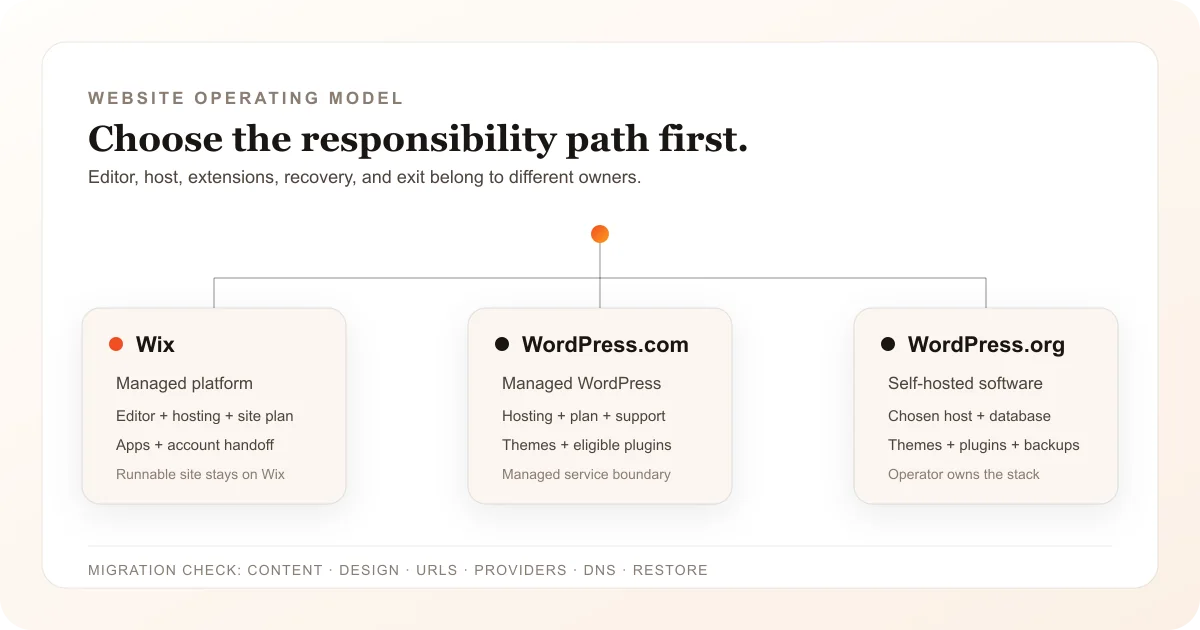
Run One Website Through All Three Operating Models
Hold the pages, content, contributors, domain, forms, store sample, integrations, and recovery target constant. Then compare Wix, WordPress.com, and self-hosted WordPress.org without pretending the two WordPress tracks have one production contract.
Name the WordPress track before pricing anything
Write “WordPress.com managed hosting” or “self-hosted WordPress.org” on the comparison sheet. For WordPress.com, capture the current plan and included hosting. For WordPress.org, name the host, server plan, database, support, update, backup, and recovery owners. Do not combine the WordPress.org software license with a fictional universal hosting price.
Sources: [wordpress-com-vs-org], [wordpress-com-pricing], [wordpress-org-requirements]
Freeze a migration inventory before touching DNS
Inventory URLs, page types, posts, media, menus, forms, products, orders, customers, users, SEO metadata, redirects, analytics, scripts, domain, email, payment accounts, apps or plugins, licenses, and provider credentials. Record which items have an export path and which require a rebuild or separate provider handoff.
Sources: [wix-export-hosting], [wix-product-export], [wordpress-com-export], [wordpress-org-export]
Build the representative page and risky workflow
Create the same homepage, one content template, one form, and one high-risk commerce or integration flow in each shortlisted track. Verify mobile layout, roles, storage, plugin or app requirements, regional payment availability, and the current account checkout. Documentation does not replace this buyer-run proof.
Sources: [wix-ai-site], [wix-plan-features], [wix-payments], [wix-apps], [wordpress-com-plugins], [wordpress-org-features]
Rebuild design and behavior, then map every old URL
Import supported content into a non-production destination, select or build the new theme, recreate excluded layouts and behavior, copy media under the correct rights, and map old URLs to final canonical URLs. WordPress.com states that its Wix importer does not recreate the exact Wix design and that some content needs manual setup.
Sources: [wordpress-com-import-wix], [wix-export-hosting], [wordpress-com-export]
Rehearse launch, rollback, and full-state recovery
Keep the original site live while testing routes, redirects, forms, checkout, account emails, analytics, search directives, HTTPS, domain records, and provider callbacks. For self-hosted WordPress, restore both files and database in a clean environment. Change DNS only after the replacement passes and keep a timed rollback plan.
Sources: [wix-hosting], [wix-site-transfer], [wordpress-com-import-wix], [wordpress-org-backups], [wordpress-org-security]
What This Wix vs WordPress Owner Includes
The comparison answers a direct platform-selection query in either word order while reserving cost, alternative, hosting, and AI-builder queries for their existing owners.
Included
- Wix compared separately with WordPress.com managed hosting and self-hosted WordPress.org software
- Editor, site plan, hosting, extensions, commerce, ownership, export, maintenance, recovery, and migration boundaries
- A practical Wix-to-WordPress migration checklist that keeps the original site online through verification
- Current first-party sources with a dated review boundary and no invented revision dates
Not included
- A universal winner, numeric score, rating, affiliate ranking, observed performance result, support-quality judgment, or security conclusion
- A claim that WordPress.com and WordPress.org are the same purchase, host, maintenance contract, price, or migration path
- Wix replacement intent, WordPress cost modeling, AI website builder vs WordPress, Webflow vs WordPress, or generic best-builder intent
- A claim that an export recreates the original design, plugins, apps, checkout, hosted behavior, provider accounts, or full recoverable site automatically
- A claim that either platform was built, load-tested, security-tested, or migrated hands-on for this article
Nine Boundaries to Compare Before You Commit
Apply every row to Wix, WordPress.com, and self-hosted WordPress.org. A favorable editor demo cannot settle the hosting, supplier, maintenance, or exit decision.
WordPress track
WordPress.com managed hosting and self-hosted WordPress.org software are different purchases with different operating owners.
Authoring workflow
The editor, theme, reusable-content model, and day-to-day publishing path determine who can safely change the site.
Plan and production meter
A useful budget follows the live constraint: site plan and allowances, or host, traffic, storage, plugins, and operator time.
Hosting and operations
Hosting, HTTPS, software updates, monitoring, and support belong to different parties in a managed platform and a self-hosted stack.
Commerce and integrations
Payment eligibility, apps or plugins, external services, fees, and regional availability can change the real production boundary.
Ownership and handoff
The site, account, host, domain, billing, payment account, licenses, and provider credentials do not transfer as one object.
Portability and export
Content export, product CSV, media, theme, plugins, database, files, and runnable site code preserve different parts of a website.
Maintenance and recovery
A website is recoverable only when the owner can restore the state that failed, not merely download one content file.
Migration work
Moving between unlike systems requires a content inventory, design rebuild, redirect map, provider handoff, smoke test, and rollback window.
Wix and WordPress Across the Website Lifecycle
The WordPress column reports two tracks explicitly. Confirm the selected track, account, plan, host, theme, extensions, and region before purchase.
Wix
Best for: Teams that want a managed visual or AI-assisted website workflow, Wix hosting, packaged business features, and an app ecosystem under site-level plan limits.
Wix combines site creation, editing, hosting, plans, business features, apps, transfer controls, and provider-specific payment paths in one managed platform. One Premium plan applies to one production site. The buyer still needs to inventory domains, mailboxes, apps, payment accounts, billing, exports, and external services separately.
| Criterion | Finding |
|---|---|
| WordPress track | Wix is one managed SaaS track for this comparison. It should be compared separately with WordPress.com managed hosting and with a named self-hosted WordPress.org stack, not with an undefined “WordPress” bundle. Sources: [wix-hosting], [wix-export-hosting], [wordpress-com-vs-org] |
| Authoring workflow | Wix documents an AI Website Builder that gathers requirements, creates a new site, and hands the result to the Wix Editor. Wix states that this path creates a new site rather than redesigning an existing one, although editor AI tools can change existing sections or themes. Sources: [wix-ai-site] |
| Plan and production meter | A Wix Premium plan applies to one site. The current plan and region determine storage, collaborators, forms, payment acceptance, ecommerce, and business features, while domains, mailboxes, apps, and separately billed services can add other renewals. Sources: [wix-plan-pricing], [wix-plan-features] |
| Hosting and operations | Wix includes hosting for its sites and connects a custom domain on an eligible paid plan. Wix also states that a Wix-built site depends on its proprietary SaaS services and must run on Wix servers rather than being exported as a runnable site to another host. Sources: [wix-hosting], [wix-export-hosting] |
| Commerce and integrations | Payment acceptance requires an eligible plan, and available providers and methods depend on location. Wix supports Wix-built and third-party apps, so each payment provider, app, API, mailbox, and external service needs its own price, permission, support, data, and exit check. Sources: [wix-payments], [wix-apps], [wix-plan-features] |
| Ownership and handoff | A Wix site can transfer to another Wix account, but the recipient must accept ownership and billing. Wix states that Wix Payments accounts do not transfer through the same site-transfer flow, so website and payment-account handoffs remain separate. Sources: [wix-site-transfer] |
| Portability and export | Wix says the customer owns site content while the runnable site remains on Wix infrastructure. Physical store products can export to CSV with documented row limits; Wix currently excludes digital products from that export. Other content and data classes need separate checks. Sources: [wix-export-hosting], [wix-product-export] |
| Maintenance and recovery | Wix manages the platform and hosting path. The site owner still owns account security, content review, roles, DNS, payment providers, apps, external services, billing, exports, and a tested response when one of those dependencies fails. Sources: [wix-hosting], [wix-apps], [wix-site-transfer] |
| Migration work | Moving from Wix to either WordPress track is a selective content transfer plus design and behavior rebuild. Keep Wix live, import what the destination supports, recreate exclusions, map redirects, test providers, and move or connect the domain only after the replacement passes. Sources: [wix-export-hosting], [wix-product-export], [wordpress-com-import-wix] |
Tradeoffs
- The integrated platform reduces host and software-update work while keeping the runnable Wix site on Wix infrastructure.
- A broad app and business-feature ecosystem can shorten setup while adding plan, app, provider, data, billing, and migration dependencies.
- Site transfer and content ownership do not make every payment account, domain, mailbox, app, product type, or hosted implementation portable.
WordPress.com or self-hosted WordPress.org
Best for: Teams that first choose between managed WordPress.com hosting and a self-hosted WordPress.org installation, then accept that track’s plan, supplier, extension, maintenance, and recovery boundary.
Both tracks run WordPress software, but WordPress.com packages managed hosting and account plans while WordPress.org distributes software installed on a chosen host. WordPress themes and plugins offer broad extension depth. The managed track assigns more operations to WordPress.com; the self-hosted track assigns the host, files, database, updates, security, backups, and restore contract to the buyer or suppliers it selects.
| Criterion | Finding |
|---|---|
| WordPress track | WordPress.com says both products use WordPress software, but WordPress.com includes managed hosting and plans while WordPress.org requires a separately selected host and more technical maintenance. The buyer must choose one track before comparing price or responsibility with Wix. Sources: [wordpress-com-vs-org], [wordpress-org-requirements] |
| Authoring workflow | Both WordPress tracks use the CMS, content editor, users, media, themes, and plugins, while the selected theme and extensions shape the actual authoring experience. WordPress.com packages supported themes and managed controls; self-hosting also exposes the installation and server environment. Sources: [wordpress-com-vs-org], [wordpress-org-features] |
| Plan and production meter | WordPress.com cost and allowances follow the selected plan and current checkout. WordPress.org software has no licensing fee, but the production meter comes from the chosen host, traffic, storage, database, domain, premium themes or plugins, support, maintenance, backup, and operator labor. Sources: [wordpress-com-pricing], [wordpress-com-vs-org], [wordpress-org-requirements] |
| Hosting and operations | WordPress.com includes managed hosting, updates, backups, and SSL on its documented path. Self-hosted WordPress.org requires a compatible host and an explicit division of server, database, HTTPS, patching, monitoring, support, and recovery responsibilities. Sources: [wordpress-com-vs-org], [wordpress-org-requirements], [wordpress-org-updates] |
| Commerce and integrations | WordPress.com currently documents plugin installation on paid plans, with plan and plugin restrictions still requiring review. Self-hosted WordPress supports themes and plugins under the selected host. Neither catalog proves that a particular commerce, payment, or integration stack is suitable, maintained, secure, regionally available, or portable. Sources: [wordpress-com-plugins], [wordpress-org-features], [wordpress-org-security] |
| Ownership and handoff | Content ownership does not settle control of the WordPress.com account and subscriptions or, on self-hosting, the host, registrar, database, files, administrator accounts, premium licenses, payment providers, and credentials. Inventory and transfer each control surface explicitly. Sources: [wordpress-com-vs-org], [wordpress-com-export], [wordpress-org-backups] |
| Portability and export | WordPress.com can export posts, pages, and comments as XML, but the standard content export excludes the theme design, customizations, and plugins, and media files need separate handling. WordPress.org WXR export covers structured content; a full self-hosted recovery also needs the database and files. Sources: [wordpress-com-export], [wordpress-org-export], [wordpress-org-backups] |
| Maintenance and recovery | WordPress.com documents managed updates and backups. For self-hosted WordPress, the operator must coordinate core, theme, plugin, host, security, files, and database state; WordPress.org states that both database and files are needed to restore a typical site. Sources: [wordpress-com-vs-org], [wordpress-org-updates], [wordpress-org-security], [wordpress-org-backups] |
| Migration work | WordPress.com provides a Wix importer for pages, images, menus, and site title but states that the exact Wix design is not recreated and some content needs manual setup. A self-hosted destination needs an importer or rebuild selected by its owner plus host, theme, extension, redirect, DNS, and restore verification. Sources: [wordpress-com-import-wix], [wordpress-org-features], [wordpress-org-backups] |
Tradeoffs
- WordPress.com simplifies hosting and platform operations while introducing plan and managed-service boundaries.
- Self-hosted WordPress.org broadens host and code control while creating more supplier, update, security, backup, compatibility, and recovery work.
- Themes and plugins can avoid custom implementation, but every active extension adds a publisher, license, permission, update, data, support, and replacement dependency.
Choose the Operating Model, Then the Brand
Use these rules after building the representative page and risky workflow. Stop if the required export, provider, permission, or recovery path remains unproved.
The team wants one managed website account and the Wix editor fits the real page
Choose: Use Wix when the current site plan, hosting boundary, apps, regional payments, ownership model, and supported exports cover the first two years of operation.
Tradeoff: You reduce host and software-patch work while accepting Wix’s plan, hosted-service, app, and runnable-site portability boundaries.
The team wants WordPress without selecting and operating a separate host
Choose: Evaluate WordPress.com as the managed track. Confirm the exact plan, plugin eligibility, storage, commerce, support, export, and account-handoff path in the live checkout.
Tradeoff: Managed hosting reduces infrastructure decisions while keeping the site inside WordPress.com plan and service boundaries.
The team needs host choice or a mature theme or plugin that justifies self-hosting
Choose: Evaluate self-hosted WordPress.org with a named host, theme, plugins, maintenance owner, security owner, backup set, restore test, and replacement plan for each critical extension.
Tradeoff: Greater installation control comes with more supplier, compatibility, patching, monitoring, and disaster-recovery responsibility.
The Wix site must move to WordPress
Choose: Choose the WordPress destination first, inventory every asset and provider, import into a non-production site, rebuild the design and excluded behavior, map redirects, test forms and checkout, then move DNS with rollback available.
Tradeoff: Running both sites during verification costs time and possibly overlapping subscriptions, but it prevents a partial content import from being mistaken for a safe migration.
The website must grow into a custom portal, dashboard, or workflow
Choose: Prototype that next rung before choosing the site platform. If the required software job does not fit the intended Wix apps or WordPress plugins, compare a custom app path instead of forcing the workflow into the website decision.
Tradeoff: The prototype adds work before purchase while exposing whether the website platform will be replaced soon after launch.
Need more than a managed website?
Prototype the website and the workflow behind it.
Describe the real pages, records, roles, forms, and next-rung workflow. Playcode can build the working slice so you can review it before publishing.
Start BuildingNo credit card required. AI credits included to start.
Separate domain ownership from hosting responsibilityUse this before changing DNS or treating a registrar transfer as a website migration.
What This Comparison Does Not Prove
First-party documentation establishes current product boundaries. It does not prove the quality, speed, reliability, security, accessibility, or migration result of a configured website.
- No identical site was built, timed, load-tested, security-tested, restored, or migrated in Wix, WordPress.com, and self-hosted WordPress.org for this article.
- Public prices, promotions, plan names, storage, features, plugins, payment methods, taxes, and support can vary by region, account, host, billing cycle, and rollout.
- WordPress.com managed hosting and self-hosted WordPress.org are distinct operating and supplier choices even though both use WordPress software.
- Plugin or app directory presence, marketplace review, managed hosting, automatic updates, or HTTPS does not prove a configured site is secure, accessible, compliant, fast, recoverable, or suitable.
- Content, product, or XML export does not prove that design, hosted behavior, media, users, orders, payment accounts, provider state, credentials, or full recovery state transfers automatically.
- No universal winner is valid without the representative site, current checkout, selected WordPress track, extensions, providers, team, and rehearsed exit path.
Current First-Party Evidence
Every product finding maps to an official Wix, WordPress.com, or WordPress.org source. Undated pages use the September 6, 2026 access date instead of an invented revision date.
[wix-ai-site] Wix Help Center:Wix Editor: Creating an AI-Generated Site
Checked September 6, 2026. Supports: AI requirement chat, new-site generation, Wix Editor handoff, and the new-site versus existing-site boundary.
[wix-plan-pricing] Wix Help Center:Wix Premium Plan Pricing
Checked September 6, 2026. Supports: One Premium plan per site, regional price variation, custom-domain eligibility, and plan changes.
[wix-plan-features] Wix Help Center:Choosing a Premium Plan
Checked September 6, 2026. Supports: Current plan boundaries for storage, collaborators, forms, payments, ecommerce, and business features.
[wix-hosting] Wix Help Center:Wix Site Hosting
Checked September 6, 2026. Supports: Included Wix hosting and the paid-plan requirement for connecting a custom domain.
[wix-payments] Wix Help Center:Accepting Payments: An Overview
Checked September 6, 2026. Supports: Payment-capable plan requirements and regional payment-provider and method variation.
[wix-apps] Wix Help Center:Adding an App to Your Site
Checked September 6, 2026. Supports: Wix-built and third-party apps, plan requirements, installation, and app-specific support boundaries.
[wix-export-hosting] Wix Help Center:Exporting or Embedding Your Wix Site Elsewhere
Checked September 6, 2026. Supports: Content ownership, Wix-hosted SaaS operation, external-hosting limits, and domain portability.
[wix-product-export] Wix Help Center:Wix Stores: Exporting Your Product List
Checked September 6, 2026. Supports: Physical-product CSV export, the documented row limit, and digital-product export exclusion.
[wix-site-transfer] Wix Help Center:Accepting Transferred Site Ownership
Checked September 6, 2026. Supports: Site ownership acceptance, Premium-service billing handoff, media access, and the Wix Payments transfer exclusion.
[wordpress-com-vs-org] WordPress.com Support:WordPress.com vs. WordPress.org
Checked September 6, 2026. Supports: Shared WordPress software, managed WordPress.com hosting, self-hosted WordPress.org, plans, updates, backups, plugins, support, and responsibility differences.
[wordpress-com-pricing] WordPress.com:WordPress.com Pricing
Checked September 6, 2026. Supports: Current public WordPress.com plan structure, hosting, storage, support, and plan-dependent website features.
[wordpress-com-plugins] WordPress.com Support:WordPress.com Plugins
Checked September 6, 2026. Supports: Plugin installation on paid plans, WordPress.org repository access, paid plugin possibilities, and third-party publisher boundaries.
[wordpress-com-import-wix] WordPress.com Support:Import from Wix
Checked September 6, 2026. Supports: Wix import flow, supported and excluded content, theme selection, design-rebuild boundary, domain connection, and domain transfer.
[wordpress-com-export] WordPress.com Support:Export Your Website Content
Checked September 6, 2026. Supports: XML content export, included posts, pages, comments and media references, excluded design and plugins, media handling, and move-away steps.
[wordpress-org-features] WordPress.org:WordPress Features
Checked September 6, 2026. Supports: CMS, users, media, themes, plugins, custom content, REST API, software freedom, and data-control framing.
[wordpress-org-requirements] WordPress.org:WordPress Hosting Requirements
Checked September 6, 2026. Supports: Current server, PHP, database, HTTPS, host-selection, performance, and security requirements for self-hosted WordPress.
[wordpress-org-export] WordPress.org Documentation:WordPress Tools Export Screen
Checked September 6, 2026. Supports: WXR/XML structured-content export for posts, pages, comments, fields, terms, menus, and custom post types.
[wordpress-org-updates] WordPress.org Documentation:Updating WordPress
Checked September 6, 2026. Supports: Core update paths, backup-first guidance, minor and security background updates, and failed-update recovery.
[wordpress-org-security] WordPress.org Advanced Administration Handbook:Hardening WordPress
Checked September 6, 2026. Supports: Host and application security responsibilities, current software, HTTPS, access, permissions, extensions, and backup practice.
[wordpress-org-backups] WordPress.org Advanced Administration Handbook:WordPress Backups
Checked September 6, 2026. Supports: Database and files as the full self-hosted backup set, restore order, automation, storage, and migration recovery boundaries.
Wix vs WordPress FAQ
Is Wix or WordPress better for a business website?
Wix fits teams that want one managed visual platform and its site-plan and app boundaries. WordPress.com fits teams that want managed WordPress hosting. Self-hosted WordPress.org fits teams that value host choice and extension control and can own or buy the maintenance and recovery work. Build the representative page before choosing.
Are WordPress.com and WordPress.org the same?
They use the same WordPress software, but they are not the same purchase or operating model. WordPress.com includes managed hosting and plans. WordPress.org distributes open-source software that you install on a separately selected host, with responsibilities divided among the site owner, host, theme, plugins, and other suppliers.
Is Wix easier to maintain than WordPress?
Compared with self-hosted WordPress, Wix assigns more platform and hosting maintenance to one managed provider. WordPress.com is also a managed-hosting track. Ease still depends on the real site, apps or plugins, account roles, providers, updates, and recovery process, so this article does not claim an observed ease-of-use winner.
Can a Wix website move completely to WordPress?
WordPress.com provides a Wix importer for supported pages, images, menus, and site title, but says the exact Wix design is not recreated and some content needs manual setup. A safe move still needs design and behavior rebuilds, redirects, forms, commerce, providers, domain work, production smoke tests, and rollback.
Does WordPress include hosting?
WordPress.com includes managed hosting under its plans. WordPress.org is software rather than a hosting service, so a self-hosted site needs a compatible host plus explicit ownership for the database, files, HTTPS, updates, monitoring, security, backups, and restore process.
Which is more portable, Wix or WordPress?
Self-hosted WordPress can move as an installation when files, database, configuration, providers, and the destination host are handled together. Wix content and selected product data have export paths, but the runnable Wix site remains on Wix infrastructure. WordPress.com XML export also excludes theme design, customizations, and plugins.
Does this page also own WordPress vs Wix?
Yes. Wix vs WordPress and WordPress vs Wix are one bilateral comparison owner. Wix alternatives, WordPress website cost, AI website builder vs WordPress, Webflow vs WordPress, Wix vs Squarespace, and broader best website builder research remain separate search jobs.
Choose from a working slice
Build the website before you commit to its operating model.
Describe the pages, content, forms, records, roles, and next-rung workflow. Review a working result, then decide which platform boundary fits.
Start BuildingNo credit card required. AI credits included to start.